A voice AI that goes silent behind a firewall may not have a model problem
The interface says connected and the agent has joined the room, yet nobody hears a thing. Checking the candidates, the connection pairs and the agent's response in turn tells you whether to call the network team or reopen the code.

In brief
- A page that loads proves only that HTTPS gets through; the UDP route for audio can be blocked separately.
- STUN reveals the public address, ICE tests which pairs actually work, and TURN relays when no other option remains.
- Always have TURN/TLS on port 443 ready as a fallback, but still ask for UDP to be opened for the best quality.
Picture the morning a voice agent for a call centre goes live. The demo ran well on your laptop and on the project manager’s 4G phone. On the customer’s corporate network, the interface says connected, the agent has joined the room, and nobody hears a thing.
The natural reflex is to suspect the model or reopen the prompt. Hold off. When the page loads but the sound does not, the first question must be: do the audio packets have a route at all?
At this point, filing a ticket and waiting will not help. If you sit beside the customer’s IT team, point to exactly which route is blocked and ask for exactly the right ports, the go-live can be saved that same morning.
The page gets through; speech may not
Split the call into two streams. The first is the web page, which travels over HTTPS: if the interface appears, this stream is working. The second is audio, and it does not necessarily take the same route.
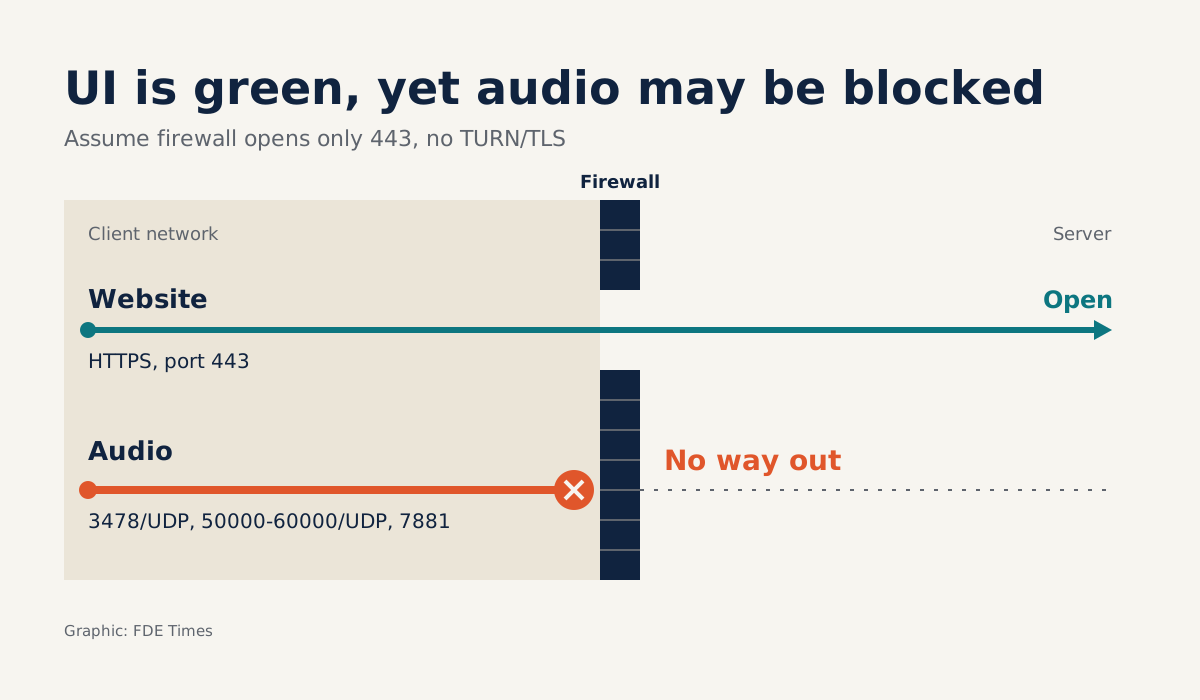
The port list in LiveKit’s self-hosting documentation shows that separation clearly: 443 serves HTTPS and TURN/TLS, while WebRTC also needs 3478/UDP, the 50000-60000/UDP range and 7881 for the TCP route.
Imagine a firewall that lets only 443 through, on a system where you have not yet enabled TURN/TLS. The interface stays green because HTTPS has no trouble, while the voice packets have no way out.
Three characters: ICE, STUN and TURN
MDN describes ICE as a framework that helps a browser connect to a peer: getting through firewalls, obtaining an address when the device has no public IP, and relaying data when necessary. Think of ICE as the pathfinder. It gathers every address that might be usable, known as candidates, then tries which pairs work.
There are three main types of candidate. host carries the machine’s real address. srflx is the address the NAT assigns as a packet passes through it to the server, and STUN is the protocol that lets you discover your public address and your router’s restrictions. relay is an address obtained from a TURN server, used to relay media between the two peers.
Having a public address is still not enough. Faced with symmetric NAT, TURN gets through by relaying all data via the server. The price is added cost, which is why both MDN and RFC 8656 advise using TURN only when no other route can be found.
On corporate networks, suspect blocked UDP first and consider NAT afterwards. The test below answers that question in a few minutes.
Reading the customer’s network from a few log lines
Back to the go-live morning. Open DevTools on a real machine inside the customer’s network, then test each route separately. Replace the server name and credentials with those of your own system.
function probe(url, creds = {}) {
  const pc = new RTCPeerConnection({ iceServers: [{ urls: url, ...creds }] });
  pc.createDataChannel('probe'); // needed to trigger candidate gathering
  pc.onicecandidate = (e) => {
    if (e.candidate) console.log(url, e.candidate.type);
  };
  pc.createOffer().then((offer) => pc.setLocalDescription(offer));
}

const creds = { username: 'TEMP_USER', credential: 'TEMP_PASS' };
probe('stun:media.example.com:3478');
probe('turn:media.example.com:3478?transport=udp', creds);
probe('turns:media.example.com:443?transport=tcp', creds);
Suppose the output looks like this:
stun:media.example.com:3478                  host
turn:media.example.com:3478?transport=udp    host
turns:media.example.com:443?transport=tcp    host
turns:media.example.com:443?transport=tcp    relay
Read it line by line. host always appears, so it tells you nothing yet. The STUN route returns no srflx and TURN over UDP returns no relay: both UDP routes are silent. Only TURN/TLS on port 443 answers, so the reasonable conclusion is that outbound UDP is blocked while 443 remains open.
If the 443 line also shows only host, review the TURN configuration on your side first, then call the customer’s IT team with the logs.
But a candidate is only an address that could be used to receive data, not a route that has been proven to work. RFC 8445 says the purpose of ICE is to find out which address pairs work, and each check is a STUN transaction on one specific pair.
So make a real call, then search the client and server logs for any successful ICE pair. If there is none, the audio still has no route and the problem still belongs to the network: call the customer’s IT team with the logs, and ask whoever runs the media server on your side to look at it too.
The last layer lies outside the network. If a pair has succeeded and you still hear nothing, do not call IT yet. Say a sentence into the microphone and check the agent’s logs: did it register what you said, and did it generate a reply?
If the agent received nothing, suspect the outbound direction: the microphone, browser permissions. If the agent replied and the speaker is still silent, suspect the return direction: the browser blocking autoplay, or the audio playback stage in the agent’s pipeline.
What exactly should you ask IT to open?
“Please open the firewall” gives the IT team nothing to approve. A specific list of ports does. LiveKit’s deployment documentation is a good example to learn from; if you use another system, look up that vendor’s ports.
| Route | Ports according to LiveKit | What to do with IT |
|---|---|---|
| UDP | 3478/UDP, 50000-60000/UDP | Always ask for these: this is the route with the best quality |
| WebRTC over TCP | 7881 | Ask for this too, but not as a replacement for UDP |
| TURN/TLS | 443 | Confirm that user machines can reach it outbound, as a fallback when UDP is not feasible |
LiveKit uses TURN/TLS on TCP 443 when UDP is not feasible, but still recommends opening the UDP ports for the best audio and video quality.
If your side has deployed TURN/TLS and the probe on 443 returns relay, tell IT exactly that: there is a fallback through 443 today, and UDP is what you are requesting to make conversation smoother. If you have not deployed it, an open port 443 will not save the call, and the first job is on your side.
What to do from the start with the next customer
Do not wait for go-live day. In the first week, ask for a machine configured like an end user’s, plug it into the network they actually use, not the guest Wi-Fi, then run the probe and save the results in the project documentation.
Next, make a real call and record whether ICE had a successful pair and whether the agent heard and replied. Send IT the port table with the logs as evidence. Once they have acted, test again with iceTransportPolicy: 'relay' in the RTCPeerConnection configuration to be sure the fallback really works and does not merely exist on paper.
The mistakes that cost you a whole morning
One familiar trap is configuring only STUN and testing from home. According to web.dev, most WebRTC calls connect with STUN alone, so a home network can easily turn everything green. WebRTC.org’s guidance, for its part, says plainly that direct sockets between clients are often not feasible, and that the common solution is TURN.
The next trap is having TURN but running it only over UDP. When a firewall blocks UDP, that TURN server is blocked with it, which is why TURN/TLS on TCP 443 is needed. Conversely, forcing every call through a relay to be safe means taking on extra cost on networks that never needed it, which RFC 8656 advises against.
Nor should you stop at candidates. Seeing srflx or relay and concluding that the network is fine is not enough, because only the checks on individual pairs can answer that question. And do not blame the network before reading the agent’s logs, only to send the customer’s IT team hunting for a fault that may not be theirs.
How to present this skill on a CV
This skill deserves a place on your CV, as long as you are specific. When reading voice AI job descriptions, watch for the terms WebRTC, TURN and NAT traversal. When describing a project, do not write “experienced in WebRTC”: explain what the network was blocking, which logs proved it and which ports you asked to have opened.
Exercise: block UDP on your own machine
Set up a small WebRTC application, or use a vendor’s demo, then add a firewall rule on your own machine that blocks outbound UDP, leaving DNS open. Make a call without TURN/TLS, record the candidate types from the probe and whether the call has sound, then enable TURN/TLS on 443 and call again.
After an evening of this, a silent call is no longer a mystery, because you have caused one with your own hands. Next time the whole meeting room turns to look at you, you will know which log to open first.
Was this article useful?
Thanks for the feedback!
8 sources
- Introduction to WebRTC protocols - Web APIs | MDN
- RFC 8445: Interactive Connectivity Establishment (ICE)
- RFC 8656: Traversal Using Relays around NAT (TURN)
- RTCIceCandidate: type property | MDN
- WebRTC infrastructure (web.dev)
- Configuring firewalls | LiveKit docs
- Virtual machines | LiveKit docs
- TURN server | WebRTC