The temperature knob is disappearing, but tuning is not
Max tokens, stop sequences and penalties still decide whether output is usable, and each client task, from extraction to support bots, needs its own settings.
In brief
- Before tuning, check what the model still lets you change: Claude models released after Opus 4.6 do not accept temperature, and Google recommends keeping defaults for Gemini 3.x.
- Tune only one control in each pair: temperature or top-p, frequency or presence penalty.
- max_tokens is a ceiling, not a target. Count real tokens, then read stop_reason to learn why output stopped.
Anthropic’s Messages API documentation states that models released after Claude Opus 4.6 no longer allow temperature to be set. Google’s prompting guide for Gemini “strongly recommends” keeping sampling parameters at their default values for the Gemini 3.x family. The most familiar LLM control is gradually being locked.
Even with sampling locked, parameter tuning has not gone away. It has moved to other controls. Max tokens, stop sequences and penalties still decide whether output is usable in a client’s system, and they have to be tuned separately for each type of task.
Anyone who wants to work as an FDE needs to master this. Clients do not pay you to run a demo on default settings. They need a support bot that does not repeat the customer’s name three times in one sentence, and an extraction pipeline that does not cut off halfway through a JSON object.
What will you build?
You will build a per-task config file covering four kinds of work: structured data extraction, a customer support chatbot, creative writing and summarisation.
Alongside it comes a short piece of code that checks why output stopped. To follow along you need API access to at least one provider, basic Python and, most importantly, 10 to 20 real client inputs to test with.
The code below has been simplified for illustration. Parameter names and value ranges differ between providers, so check against the documentation for the model you are using.
Step 1: what does this model still let you tune?
Before turning any control, draw up a small table of the parameters your model still accepts. The reason was given above: newer Claude models have dropped temperature, and Google recommends keeping defaults for Gemini 3.x. A config carried over from an old project may be rejected by the API, or may quietly make output worse.
The table should also have columns for penalties and top_k, so you record whether your API accepts them instead of guessing.
Check: for every parameter you plan to use, you can answer “does this model accept it, and does the provider recommend keeping the default?” A common mistake is copying a config from a blog post written for a different model.
Step 2: choose temperature or top-p, not both
DAIR.AI’s Prompt Engineering Guide advises adjusting temperature or top-p, but not both. If you turn both at once and output gets worse, you cannot tell which one caused it. Top-p is also worth understanding correctly: according to Vellum, it is a cumulative probability, not a percentage of tokens.
Imagine the next token has three candidates with probabilities of 0.6, 0.3 and 0.1. With top-p at 0.9, the model chooses only among the first two, because 0.6 plus 0.3 already reaches 0.9. If you misread it as keeping 90% of tokens, you would get all three. Vellum also notes that a very low top-p produces constrained, simple output.
Top-k is easier to picture. It is an integer that limits how many of the highest-probability tokens are considered. A top-k of 1 means greedy selection, so the result is deterministic.
The Gemini documentation also says temperature 0 is deterministic: the highest-probability response is always chosen. For extraction, that is exactly the property you need. Conversely, DAIR.AI suggests raising temperature for poetry and other creative tasks.
Step 3: set max tokens from measurements, not gut feel
Anthropic’s documentation is clear that max_tokens is only the maximum number of tokens to generate. The model may stop earlier. In other words, the number is a ceiling to cap cost and runaway output, not the length you are asking for.
For a quick estimate, the Gemini documentation says a token is roughly four characters. Suppose the client wants a summary of about 2,000 characters, or around 500 tokens. That is only a starting point: the four-character rule is an estimate, so you still need to count on the client’s real text.
Anthropic offers a free token-counting API, but it has per-minute request limits based on usage tier, and its results are only estimates. The documentation also warns that the new tokenizer produces about 30% more tokens.
If 500 tokens was measured on an older model, the same text may come to about 650 tokens after switching models. So count again every time you change model.
Check: take 10 real outputs, count their tokens, then set max tokens a safe margin above the longest one. A common mistake is setting max tokens close to the average, so the longest outputs get cut off.
Step 4: add a stop sequence and read why output stopped
A stop sequence is a string that makes the model stop when it generates it. DAIR.AI notes that, together with length limits, it helps control cost and format. With Anthropic’s API, when a stop sequence is matched, the response returns stop_reason as "stop_sequence", and the stop_sequence field contains the exact string that matched.
A simplified request for an extraction task, where the prompt asks the model to finish with ###:
{
  "model": "<your-model>",
  "max_tokens": 600,
  "stop_sequences": ["###"],
  "messages": [{"role": "user", "content": "Extract the following invoice as JSON, ending with ###: ..."}]
}
The important part is the code that reads the response:
# Simplified: response is a dict parsed from the API
if response["stop_reason"] == "stop_sequence":
    parse_json(response)          # the model finished in the right place
else:
    log_for_review(response)      # stopped for another reason: may be truncated
Check: run it with a deliberately very long input and confirm it lands in the log_for_review branch. A common mistake is choosing a stop sequence that can appear in the content itself, such as a newline, so output is cut off after the first line.
Step 5: choose frequency or presence penalty
The two penalties differ in how they are calculated. DAIR.AI explains that frequency penalty grows with the number of times a token has appeared, while presence penalty is a fixed penalty: a token that has appeared twice or ten times is penalised the same. According to Vellum, presence penalty penalises a word right after its first use. The advice is the same as in step 2: tune only one of the two.
Vellum points to a situation very familiar on client sites: a support chatbot that keeps repeating certain names or phrases. This is where presence penalty fits.
Vellum gives the range of presence penalty as -2 to 2, but says it is usually best kept between -1 and 1. To make a bot repeat itself less, the cautious approach is to start with a small positive value, say 0.1 to 0.5, and raise it gradually if the bot still repeats.
For frequency penalty, Vellum suggests that values from 0.1 to 1 are reasonable if you only want to reduce repetition slightly. If the table from step 1 shows your API has no penalty parameters, skip this step.
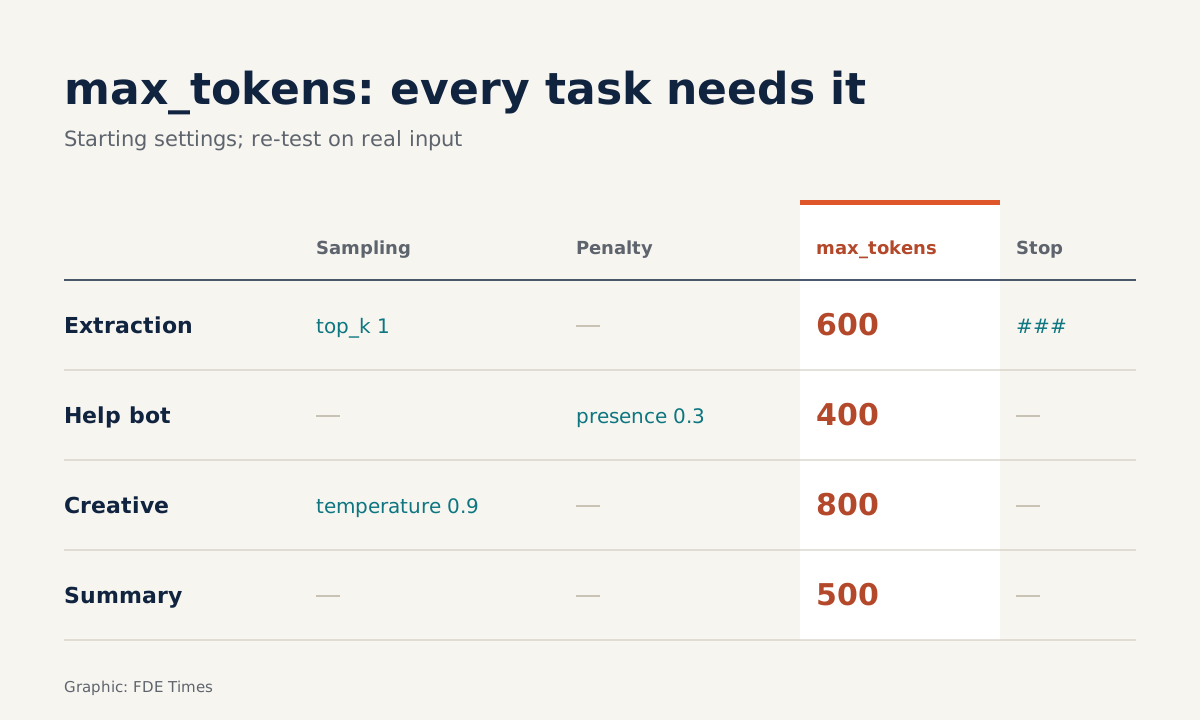
Step 6: combine everything into a per-task config file
# Illustrative config; parameter names vary by provider
PROFILES = {
  "extraction": {"top_k": 1, "max_tokens": 600, "stop": ["###"]},
  "support_bot": {"presence_penalty": 0.3, "max_tokens": 400},
  "creative": {"temperature": 0.9, "max_tokens": 800},  # keep temperature only if the model allows it
  "summary": {"max_tokens": 500},  # replace with the figure measured from 10 real outputs
}| Task | Main control | Why |
|---|---|---|
| JSON extraction | top-k 1 or temperature 0, stop sequence | Needs deterministic output and certainty that it finished |
| Support bot | small positive presence penalty, e.g. 0.1 to 0.5 (if the API has it) | Avoids repeating names and phrases |
| Creative writing | temperature or top-p, not both | Needs variety while staying debuggable |
| Summarisation | max tokens from measurements | Controls cost and length |
The numbers in the file are starting points for testing, not answers. If the model is one for which the provider recommends keeping defaults, remove the sampling controls from the config and keep only max tokens and stop sequences. Likewise, remove top_k or penalties if the API does not support them.
Where does this skill show up in client work?
Imagine a client complains that the bot “talks like a machine”, that summary reports are unusually long, or that a downstream system is throwing JSON parse errors. A good FDE does not guess. They open the logs, look at stop_reason, count tokens, then change exactly one control at a time.
When reading FDE job descriptions, look for phrases such as “inference cost optimisation” or “output stability”. On your CV, do not write “proficient in prompt engineering”. Write specifically that you reduced the rate of truncated output with stop sequences and stop_reason logging, with before-and-after figures from a real project of your own.
Sampling controls may be locked further with each model generation. Max tokens, stop sequences and the habit of measuring before tuning will remain useful on every project.
Was this article useful?
Thanks for the feedback!
8 sources
- LLM Settings (Temperature, Top-K, Top-P) - Prompt Engineering Guide, DAIR.AI
- Top K - LLM Parameter Guide - Vellum
- Top P - LLM Parameter Guide - Vellum
- Frequency Penalty - LLM Parameter Guide - Vellum
- Presence Penalty - LLM Parameter Guide - Vellum
- Prompt design strategies - Gemini API, Google AI for Developers · 2026-09-17
- Messages API reference - Claude Docs (Anthropic)
- Token counting - Claude Docs (Anthropic)