Give an agent 80 tools and it picks the wrong one more often
Keep a few core tools loaded, group the rest under consistent prefixes and let the agent search for them when a task calls for it.
In brief
- Once an agent has more than 30–50 tools, its ability to choose the right one declines. Tool definitions can consume tens of thousands of tokens before the user types a word.
- Keep the 3–5 most-used tools always loaded, group the rest under prefixes such as github_ and slack_, and defer loading them.
- defer_loading only decides what enters the context: you still have to send every definition in every request.
You have just connected a client’s agent to six MCP servers: GitHub, Slack, Jira, the CRM, the warehouse system and the billing system. The demo works. But when you count again, the agent has 80 tools, and pilot users have started complaining that when they ask “which tickets are open”, the agent creates a new ticket instead.
Editing the system prompt is unlikely to fix this at the root, because the problem probably lies in how many tools the agent has to look at at once. Anthropic’s documentation on tool search states plainly that Claude’s ability to select the right tool degrades once the number of tools exceeds roughly 30–50. At 80 tools, you are well inside the danger zone.
The skill needed here is designing how the agent sees its tools: which are always visible, which are grouped, and which load only when needed. An FDE who does this well cuts cost and raises accuracy at the same time, instead of patching the system prompt one sentence at a time.
Where do eighty tools cost you?
The first cost is tokens. Anthropic gives the example of a setup with five MCP servers and 58 tools, in which the tool definitions alone took up about 55K tokens before the conversation began. The company also says it has seen cases where tool definitions consumed 134K tokens before optimisation.
Do the arithmetic: 55K divided by 58 comes to about 950 tokens per tool on average. If your client’s tools are of similar length, 80 tools would take up around 76K tokens. That is only a rough estimate, but it is enough to show that a large share of the context is gone before the user types their first sentence.
The second cost is greater: accuracy. According to Anthropic, the two most common failures with large tool sets are choosing the wrong tool and passing the wrong parameters. When jira_search_issues and jira_create_issue sit beside 78 other tools, the line between them blurs, and that is exactly the bug your pilot users are hitting.
Group first, defer second
The core idea is simple. The agent does not need to see every tool at once; it only needs to find the right tool at the right moment. Anthropic’s advice is to keep the three to five most-used tools always loaded and defer the rest.
But deferring only works if the agent can find the tools again, so grouping has to come first. Claude’s documentation recommends naming tools with consistent prefixes by service or resource, such as github_ or slack_, so that one search matches the whole group. It also suggests listing the tool groups in the system prompt.
OpenAI takes a similar approach: its tool search loads tools dynamically and recommends grouping tools by namespace or by MCP server. It also gives a concrete figure, advising that each namespace hold fewer than 10 functions to save tokens and help the model perform better.
A worked example: an operations agent for a logistics company
Go back to those 80 tools. Step one is to sit with real users and ask what they do most each day. Suppose the answer is looking up orders, checking shipment status, finding tickets and posting in the on-shift Slack channel. Those four tools are the core that stays loaded.
That leaves 76 tools. If each group must have fewer than 10 tools, meaning at most 9, simple division shows you need at least 9 groups, because 8 groups can hold only 72 tools.
In practice, you might split them into github_, slack_, jira_, crm_ and billing_, then break the large warehouse system into warehouse_inventory_, warehouse_inbound_, warehouse_outbound_ and warehouse_returns_. Any group still over 9 tools gets split again by resource.
A deferred tool looks like this. Note the prefixed name and a description that says clearly when to use it:
{
  "name": "warehouse_inbound_list_delayed_receipts",
  "description": "List inbound warehouse receipts that are behind schedule, filtered by warehouse and date range. Use when the user asks about late-arriving goods.",
  "input_schema": {
    "type": "object",
    "properties": {
      "warehouse_id": { "type": "string" },
      "from_date": { "type": "string", "format": "date" }
    },
    "required": ["warehouse_id"]
  },
  "defer_loading": true
}
In the system prompt, add a short passage listing the groups, for example: “Tools are grouped by prefix: warehouse_inbound_ for inbound goods, billing_ for invoices…”. When a user asks about late-arriving goods, the agent knows to search for warehouse_inbound, and the whole group comes back in one search.
How does the agent find tools?
Claude offers two server-side search variants: regex and BM25. Practical advice for getting started: if your tool names already follow strict prefixes, as in the example above, try regex first, because a pattern such as warehouse_inbound_.* will match the whole group.
If users tend to ask in natural language, try BM25 as well and let your eval set decide which variant picks the right tool more often.
If the client has many tools that mean the same thing under different names, you can write your own search logic, for instance with embeddings or semantic search, and return tool_reference blocks from a custom tool. Save this option for when regex and BM25 have failed on your eval set; do not start with it.
When you go to production, do not forget the prompt cache. OpenAI loads newly found tools at the end of the context window so that the prompt cache stays intact between requests. The lesson applies everywhere: keep the start of the context, the system prompt and core tools, stable, and do not reorder it between calls.
Common mistakes
The most common mistake is assuming that defer_loading makes requests lighter. Claude’s documentation is clear that you must still send the full definition of every tool in the tools array on every request, including deferred tools. The flag only decides what goes into the context window, because the API needs all the definitions to search and expand them.
The second mistake is using tool search for every agent. The documentation says tool search suits cases with 10 or more tools, or definitions longer than 10k tokens. With fewer than 10 tools, or when every request uses every tool, ordinary tool calling works better. A small client’s six-tool agent does not need an extra search layer.
The third mistake is deferring the core tools too, forcing the agent to search even for things it does ten times an hour. The fourth is arbitrary naming such as getData2 or helper_sync, which breaks any name-based search.
Prove it with numbers
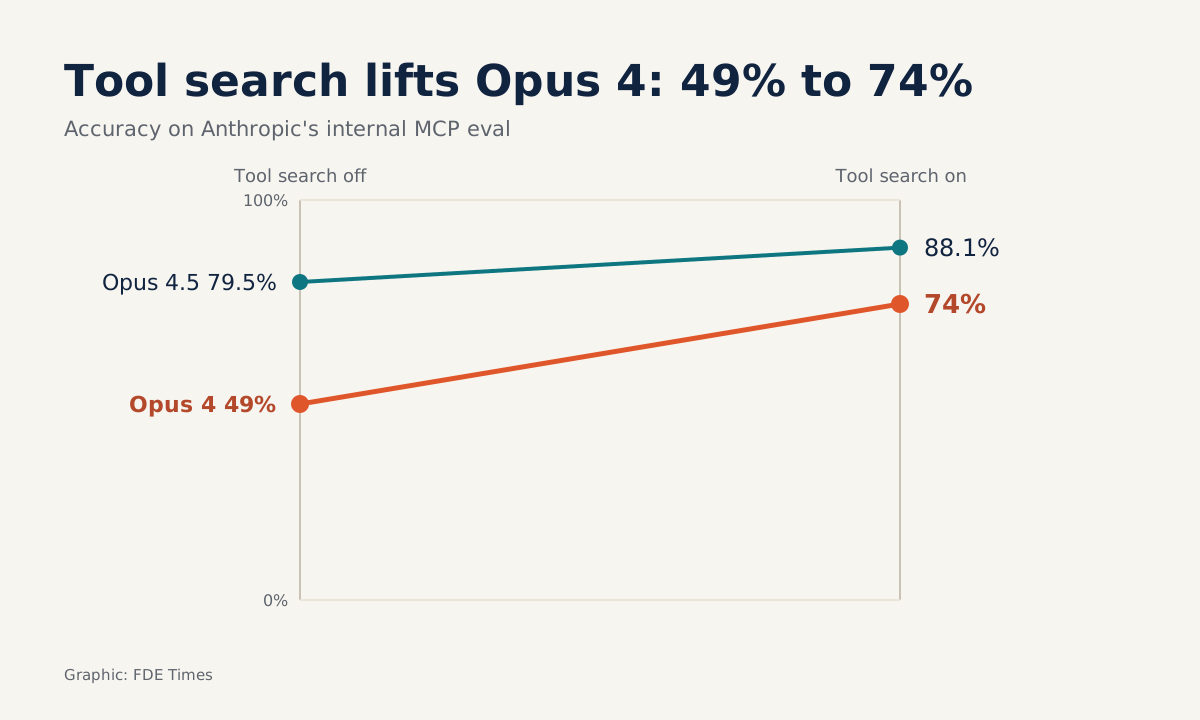
Do not tell the client the agent is “smarter”. Measure it. On Anthropic’s internal MCP evals, enabling the Tool Search Tool raised Opus 4 from 49% to 74% and Opus 4.5 from 79.5% to 88.1%. Anthropic also says tool search cuts token usage by 85% while keeping access to the full tool library.
Your numbers will differ, because your client’s data and tools differ. Build a set of real requests, record the correct tool and correct parameters for each, then score separately the two failure types Anthropic names: wrong tool and wrong parameters. Run the same set before and after the restructuring.
The result also makes a strong line on a CV. For example: “Restructured 80 tools into 4 core tools and 9 prefixed groups with tool search, cutting definition tokens from X to Y and raising correct tool selection from A to B on an N-request eval set”.
That line shows you measure outcomes, not just describe what you did.
Practise on your own agent
Exercise: take an agent you already have, or build one connected to two or three public MCP servers. Print out the full tool list, underline the 3–5 tools you believe are core, then sort the rest into prefixed groups of at most 9 tools each.
Next, write 20 requests the way real users would type them, and record the correct tool and parameters for each. Run the set against the old configuration, then against the new one with defer_loading, and count wrong-tool and wrong-parameter errors separately. If one group keeps being matched wrongly, that is a sign its name or description needs rewriting.
The next time a client wants to connect a seventh system, the first question should not be whether it can be done. Ask which group the new tools belong to and how the agent will find them.
Was this article useful?
Thanks for the feedback!