Integration-test a customer's API with Vitest and MSW without calling the real system
When the customer's staging is down or there is no sandbox yet, you can still test 200, 401, 404 and 500 on your laptop, using a mock server that intercepts requests at the network level.

In brief
- MSW intercepts requests at the network level and works with standard Fetch API Request/Response objects, so the client code needs no changes.
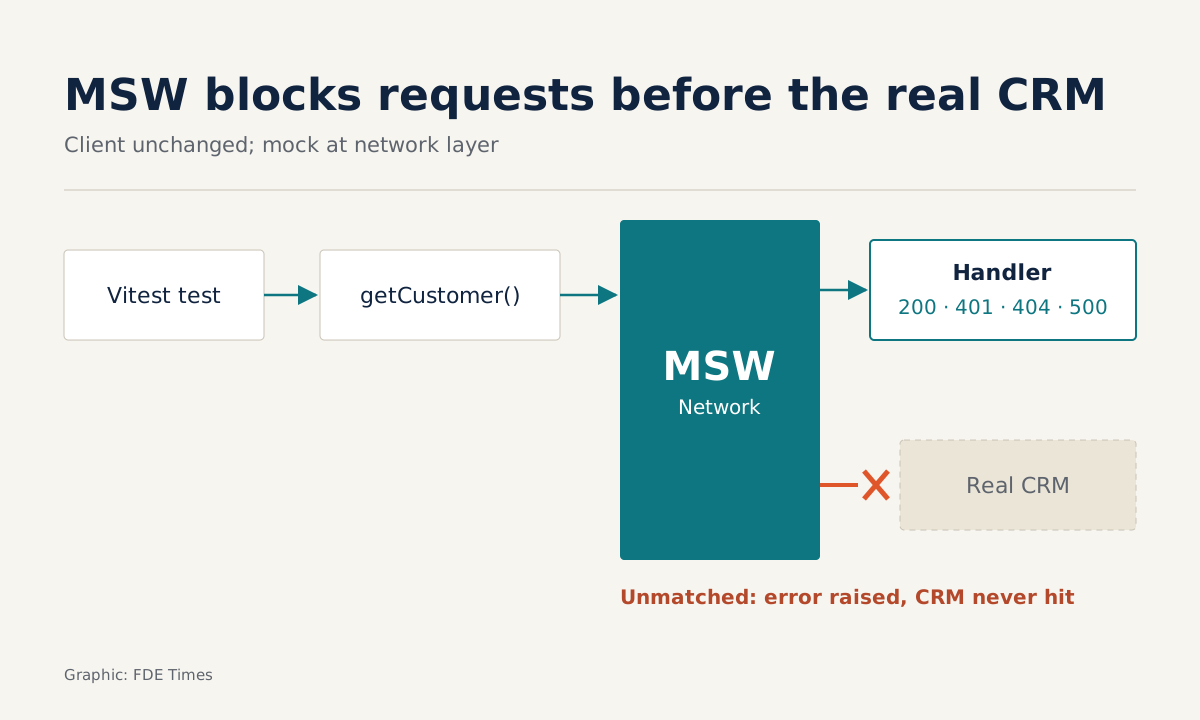
- Turn on onUnhandledRequest: 'error' so that any request without a handler fails the test, which stops you from accidentally calling the customer's real system.
- Put the happy path in the default handlers, use server.use() in individual tests to force errors, and call resetHandlers() after each test.
Picture this: it is Friday afternoon, you are racing to finish an integration with a customer’s CRM, and their staging environment goes down. The only person with permission to restart it is on holiday. If your test suite has to call the real system, you are working without tests for the rest of the week.
Every Forward Deployed Engineer runs into this sooner or later, because your code depends on APIs you do not control. This guide offers another way: test the real client with Vitest and let MSW play the part of the customer’s API.
The reason for choosing MSW is simple: Vitest’s own documentation recommends Mock Service Worker for mocking network requests. MSW can intercept HTTP, GraphQL, SSE and WebSocket traffic, and its Node integration is not tied to Vitest, so what you learn here carries over to other projects.
What you will build, and what you need
You will end up with a function getCustomer(id, token) that calls a hypothetical CRM API at crm.example.com, plus four tests: success, missing token, customer not found and server error. None of the tests touches the real network.
You need Node.js, a TypeScript project and two dev dependencies, vitest and msw. The command below is the shortest version; if your project requires specific versions, check each library’s documentation.
npm install -D vitest mswStep 1: write the client as it will really run
What you need to test is the code that will run at the customer’s site, so write it first and leave no hooks for mocking.
// src/crm.ts
export async function getCustomer(id: string, token: string) {
  const res = await fetch(`https://crm.example.com/api/customers/${id}`, {
    headers: { authorization: `Bearer ${token}` },
  })
  if (res.status === 404) return null
  if (!res.ok) throw new Error(`CRM error ${res.status}`)
  return res.json()
}
Check: this file imports nothing from MSW. The client has no idea it is under test. MSW’s position is that API mocking belongs in a separate layer, and when the mock lives at the network level, application code stays as it is.
Step 2: a handler for the happy path
In MSW, a request handler intercepts a request and returns a response. You write it with the http.* helpers, and the resolver receives properties such as request, params and cookies.
// src/mocks/handlers.ts
import { http } from 'msw'

export const handlers = [
  http.get('https://crm.example.com/api/customers/:id', ({ request, params }) => {
    if (!request.headers.get('authorization')) {
      return new Response(null, { status: 401 })
    }
    return Response.json({ id: params.id, name: 'Company A', tier: 'gold' })
  }),
]
The handler returns a standard Fetch API Response, so the client receives exactly the kind of object it gets in production. The authorization header check is a simplified simulation: the handler behaves like a real server and rejects requests without a token.
Kent C. Dodds recommends the same approach: build a mock server that handles requests the way a real server would, rather than mocking the fetch function.
Step 3: the server, the setup file and strict mode
In Node, import setupServer from msw/node and pass it the handlers.
// src/mocks/server.ts
import { setupServer } from 'msw/node'
import { handlers } from './handlers'

export const server = setupServer(...handlers)
Next comes the lifecycle: start the server before the tests run, reset handlers between tests and close the server when everything is done. server.listen() is a synchronous API, so there is no need to await it.
// vitest.setup.ts
import { beforeAll, afterEach, afterAll } from 'vitest'
import { server } from './src/mocks/server'

beforeAll(() => server.listen({ onUnhandledRequest: 'error' }))
afterEach(() => server.resetHandlers())
afterAll(() => server.close())
// vitest.config.ts (simplified)
import { defineConfig } from 'vitest/config'
export default defineConfig({ test: { setupFiles: ['./vitest.setup.ts'] } })The most important line is onUnhandledRequest: 'error', exactly the configuration given in the Vitest documentation. When a request hits an endpoint with no handler, MSW raises an error instead of letting the request quietly reach the customer’s real system. For an FDE, this is the guardrail that stops anyone writing junk data into a customer’s production just by running npm test.
Step 4: override each error case
server.use() prepends handlers to the list at runtime. You use it to replace the happy-path response in a specific test. An override lasts until it is reset, which is why resetHandlers() sits in afterEach.
// src/crm.test.ts
import { describe, it, expect } from 'vitest'
import { http } from 'msw'
import { server } from './mocks/server'
import { getCustomer } from './crm'

const url = 'https://crm.example.com/api/customers/:id'

describe('getCustomer', () => {
  it('returns the customer when a token is present', async () => {
    const c = await getCustomer('42', 'tok')
    expect(c.name).toBe('Company A')
  })

  it('throws when the token is missing', async () => {
    await expect(getCustomer('42', '')).rejects.toThrow('401')
  })

  it('returns null when the customer is not found', async () => {
    server.use(http.get(url, () => new Response(null, { status: 404 })))
    expect(await getCustomer('999', 'tok')).toBeNull()
  })

  it('throws when the CRM returns 500', async () => {
    server.use(http.get(url, () => new Response(null, { status: 500 })))
    await expect(getCustomer('42', 'tok')).rejects.toThrow('500')
  })
})
Check: run npx vitest run and you will see three tests pass and one fail: “throws when the token is missing”. The reason is that with an empty token, the client still sends an authorization header with the value Bearer, so the handler treats it as having a token, returns 200, and the function does not throw.
A failing test here is good news. The bug is real and lives in the client from Step 1; without this test it would have shipped to the customer’s environment. The fix is to send the header only when there actually is a token:
// src/crm.ts (fixed)
export async function getCustomer(id: string, token: string) {
  const headers: Record<string, string> = {}
  if (token) headers.authorization = `Bearer ${token}`

  const res = await fetch(`https://crm.example.com/api/customers/${id}`, { headers })
  if (res.status === 404) return null
  if (!res.ok) throw new Error(`CRM error ${res.status}`)
  return res.json()
}
Run npx vitest run again: this time all four tests should pass. A request without a token no longer carries the header, the handler returns 401, and the client throws CRM error 401, just as the test expects.
Step 5: break it on purpose to make sure the suite catches errors
Change customers to customer in the client’s URL and run the tests again. Every test should fail, because the request matches no handler and onUnhandledRequest: 'error' raises an error.
Kent C. Dodds explains why this step matters: when you mock at the network level, calling fetch the wrong way means the handler is never invoked and the test fails, as it should. A hand-written fetch mock returns its canned data whatever URL you call, so that typo slips through.
Common mistakes
The first is forgetting resetHandlers(). The previous test’s 500 handler stays in place and makes the next test fail unpredictably, depending on run order. If a test passes on its own but fails when the whole suite runs, suspect this first.
The second is relaxing onUnhandledRequest to a softer level “to cut the noise”. The price is a request going straight to the customer’s real API without anyone noticing. The third is cramming too much logic into the default handler: keep it as a clean happy path and put special cases in server.use() within individual tests.
How this skill shows up at the customer’s site
Picture the first week of an engagement: the customer gives you the API documentation and a few sample responses but has not yet granted access to staging. On day one, you can turn those sample responses into handlers and write a client with tests for 401, 404 and 500, before making a single real call.
Once you have access, reconciliation comes down to comparing real responses with your handlers. Wherever they differ is where you need to go back to the customer, and you ask with a concrete test rather than a hunch.
If you are aiming for an FDE role, let your portfolio repo show that you can integrate with systems you do not control: a client that calls a public API, with an MSW test suite that has onUnhandledRequest: 'error' turned on and one test per error code. On your CV, say that you integration-tested without a sandbox, rather than just listing “Vitest” under skills.
The next time a customer’s staging goes down on a Friday afternoon, your tests will keep running as usual.
Was this article useful?
Thanks for the feedback!