A model that works on your laptop may not load on the client's server
scikit-learn offers no supported way to load models across versions, so pin the environment, save with skops and ship a FastAPI container.
In brief
- scikit-learn does not support loading a model trained with a different version, so the serving environment must pin the same packages and versions used for training.
- Never load a pickle file from an untrusted source. skops.io only loads types that have been trusted.
- Containerise FastAPI with an exec-form CMD. On Kubernetes, run one Uvicorn process per container and let the cluster handle replication.
The scikit-learn documentation contains a sentence every FDE should know by heart: there is no supported way to load a model trained with a different version of scikit-learn. Your model runs perfectly on your laptop, but the customer’s server has a different version installed. At that point nothing guarantees the model will load, or that it will behave correctly if it does.
That is the gap between a data scientist and a Forward Deployed Engineer. The first hands over a model file. The second hands over a service that runs on the customer’s infrastructure, with a pinned environment, a safe artifact and a startup process the customer’s operations team can understand.
This guide walks that whole path with a deliberately small example: an iris flower classifier in scikit-learn, wrapped in FastAPI and packaged as a container. The example is simple so you can concentrate on the genuinely hard part, which is getting the model off your laptop.
What will you build, and what do you need?
The end result is a Docker image exposing a POST /predict endpoint that accepts four numeric features and returns a predicted label. You need Python, Docker, and the packages scikit-learn, skops, fastapi and uvicorn. If you want to redo the exercise with PyTorch, note that the latest stable release requires Python 3.10 or later, so pick Python 3.10 or above from the start and both routes can share the same base.
Do everything inside a clean virtualenv created for this project alone. The reason will become clear in step 3.
python -m venv .venv
source .venv/bin/activate
pip install scikit-learn skops fastapi uvicorn
A sensible layout: train.py at the root, app/main.py for the API, model/ for artifacts, plus requirements.txt and Dockerfile.
Step 1: train a pipeline, not a set of loose notebook cells
IBM describes training as choosing a model, collecting and preparing data, selecting hyperparameters, computing the loss, optimising parameters and finishing with evaluation. In scikit-learn, the neatest approach is to bundle data preparation and the model into a single pipeline, so the API never has to recreate the scaling step on its own.
# train.py — simplified example
from sklearn.datasets import load_iris
from sklearn.model_selection import train_test_split
from sklearn.pipeline import make_pipeline
from sklearn.preprocessing import StandardScaler
from sklearn.linear_model import LogisticRegression
import skops.io as sio

X, y = load_iris(return_X_y=True)
X_train, X_test, y_train, y_test = train_test_split(
    X, y, test_size=0.2, random_state=42)

model = make_pipeline(StandardScaler(), LogisticRegression(max_iter=1000))
model.fit(X_train, y_train)
print("accuracy:", model.score(X_test, y_test))

sio.dump(model, "model/model.skops")
Check: run python train.py, see the accuracy line printed and model/model.skops appear. Saving the model without the scaler is the classic mistake: the API will receive raw data and make wrong predictions without raising any error.
Step 2: why not pickle?
The scikit-learn documentation is blunt: never load a pickle file from an untrusted source, just as you would never run code from an untrusted source. On a customer site this is very practical advice. An artifact may pass through shared drives, buckets or several people’s email before it reaches the server.
skops.io avoids pickle and only loads files whose types and function references are trusted, either by default or as specified by the user. Before loading, list the types that are not yet trusted, read every line yourself, and only once you have reviewed them write that list to a file that travels with the model:
# review_types.py — simplified example
from pathlib import Path
import skops.io as sio

unknown = sio.get_untrusted_types(file="model/model.skops")
print(unknown)  # read every line carefully before trusting it

# only run the line below after you have reviewed the list above
Path("model/trusted_types.txt").write_text("\n".join(unknown))
The snippet above is simplified for illustration; check the function signatures against the skops version you have installed. The essential point is that the trusted list must be something you have reviewed by eye, not something passed straight through to get the job done. trusted_types.txt becomes part of the artifact: anyone reviewing the model can see what you chose to trust.
Step 3: pin the environment before writing the API
The scikit-learn documentation requires the serving environment to have the same packages and the same versions as the training environment. So record versions immediately after training, while you still know for certain what produced the model:
python -c "import sklearn; print(sklearn.__version__)"
pip freeze > requirements.txt
Run pip freeze inside the clean virtualenv you created at the start, not the machine’s shared Python environment. Otherwise requirements.txt will drag in every library you ever installed for other projects, bloating the image and making it hard for the customer’s team to tell what the model actually needs.
Check: open requirements.txt and find a scikit-learn== line with a specific version. The list should contain only the packages installed above and their dependencies. If you see scikit-learn with no number, or a >=, you are leaving the door open to exactly the failure described at the top of this article.
Step 4: wrap the model in FastAPI
The API should do only three things: load the model once at startup, validate input, and call predict. The trusted list is read from the file reviewed in step 2. If you leave it empty while the model file contains types not trusted by default, loading will fail as soon as the service starts.
# app/main.py — simplified example
from pathlib import Path
from fastapi import FastAPI
from pydantic import BaseModel
import skops.io as sio

# types reviewed in step 2
TRUSTED = Path("model/trusted_types.txt").read_text().split()
model = sio.load("model/model.skops", trusted=TRUSTED)

app = FastAPI()

class Features(BaseModel):
    values: list[float]

@app.post("/predict")
def predict(f: Features):
    pred = model.predict([f.values])
    return {"prediction": int(pred[0])}
Try it with uvicorn app.main:app --port 8000, then call:
curl -X POST localhost:8000/predict \
  -H "Content-Type: application/json" \
  -d '{"values": [5.1, 3.5, 1.4, 0.2]}'
Check: you get back JSON with a prediction field. Try sending three numbers instead of four to see how the API reacts. On a customer site, malformed data is an everyday occurrence, and you should decide in advance what the error message looks like.
Step 5: containerise so the customer can reproduce it
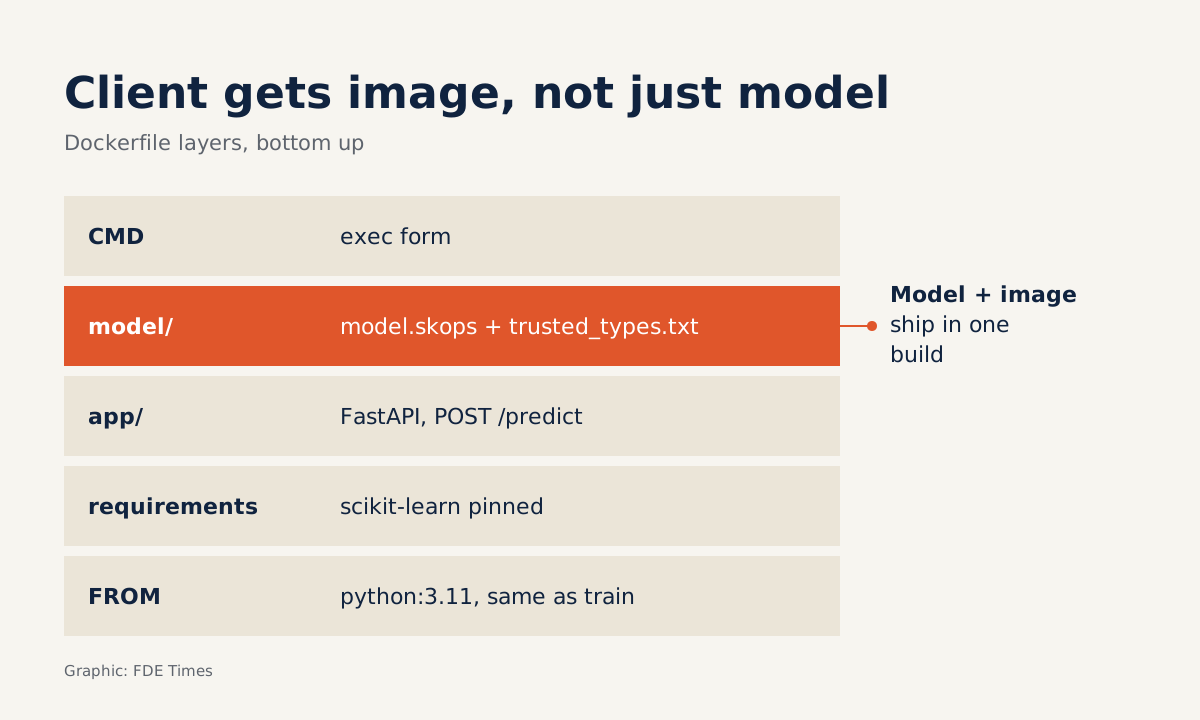
FastAPI recommends containers for security, reproducibility and simplicity. Two details from its documentation are worth getting right from the start: copy requirements.txt first to take advantage of layer caching, and always use the exec form of CMD so FastAPI shuts down gracefully and lifespan events are triggered.
FROM python:3.11
WORKDIR /code
COPY ./requirements.txt /code/requirements.txt
RUN pip install --no-cache-dir -r /code/requirements.txt
COPY ./app /code/app
COPY ./model /code/model
CMD ["uvicorn", "app.main:app", "--host", "0.0.0.0", "--port", "80"]
The Python image on the first line should match the version you trained with. The model/ directory carries both model.skops and trusted_types.txt. Build and run:
docker build -t iris-api .
docker run -p 8000:80 iris-api
Check: repeat the curl command from step 4; the result must be identical. If it differs, the environment inside the container has drifted from the training environment.
The mistakes that cost you a day on site
One easy mistake is writing CMD in shell form, such as CMD uvicorn app.main:app. The FastAPI documentation stresses that you should always use the exec form so the application shuts down gracefully and lifespan events fire. Drop the exec form and you lose that guarantee at exactly the moment Kubernetes or the operations team stops the container.
The next is cramming several Uvicorn workers into one container running on Kubernetes. The FastAPI documentation advises one Uvicorn process per container when the cluster already handles replication: let the cluster scale the number of pods rather than scaling inside the container.
The last is retraining on your laptop after upgrading a library, then sending the customer only the new model file. The model and the image must always travel as a pair, from the same build.
How does this skill show up with customers?
At the first technical session, the question to ask is not “which model” but “where will the service run”. If the customer runs Docker on a few virtual machines, the image from step 5 is almost enough. If they already have Kubernetes, prepare a single-process container and ask the platform team how they scale.
If the customer already runs Kubernetes, KServe is worth considering: it is a distributed inference platform for both predictive and generative models, and an incubating CNCF project. For PyTorch models, the PyTorch homepage presents TorchScript for moving from eager mode to graph mode and TorchServe for shortening the path to production.
Whatever platform you choose, the principles of pinning versions and treating artifacts as code stay the same.
When reading FDE job descriptions, look for phrases such as “deploy into customer environments”, “on-prem” or “Kubernetes”. They signal that the role needs exactly the chain of skills in this guide. On your CV, do not write “knows machine learning”; write that you packaged a model as an API in a container, pinned the environment and replaced pickle with a safer format, with a link to a repo that includes the Dockerfile.
An accurate model wins you the demo. An image that starts first time on the customer’s server is what gets you invited back.
Was this article useful?
Thanks for the feedback!