One OpenAPI file and a staging URL can catch 500s before go-live
Schemathesis generates requests from a client's schema to find server errors, but it sends real traffic, so point it at staging and never at production.
In brief
- Schemathesis generates tests from an OpenAPI schema, so there is no need to write tests for each endpoint.
- The not_a_server_error check catches every 5xx code and is on by default; only max_response_time has to be enabled separately.
- The tool sends real requests that can create, modify and delete data, so run it only on dev or staging.
A client sends you an openapi.json file with a note saying go-live is next week. You can trust that every endpoint copes with unexpected input. Or you can let a tool generate requests from that very file and see whether the server returns a 500.
The second approach is called property-based testing, and Schemathesis does it without making you write a test for each endpoint. The project’s documentation puts it plainly: point the tool at a schema and run it, and it will catch server errors, schema violations and validation gaps that hand-written tests tend to miss.
The skill sits close to an FDE’s daily work. You often integrate with APIs you did not write, the documentation is incomplete, and the first 500 a real user hits will be counted as your fault. This guide runs from installation to a report you can send to the client.
What you will build, and what you need
The end result is a single command that runs on a laptop and in CI. It reads the client’s OpenAPI file, sends requests to the staging environment with a token, returns a clear exit code and exports a report.
You need four things. First, Python 3.11 or later, which PyPI lists as a requirement for Schemathesis; the tool is built on Hypothesis, a property-based testing library for Python. Then uv, to run the tool without installing it into the project; the client’s OpenAPI file; and, most important, a base URL that is not production.
That last condition is not a formality. The Schemathesis README warns directly that the tool sends real requests that can create, modify and delete data. Before running anything, get the client to give you a dev or staging environment in writing.
Step 1: a first run with the client’s file
The README gives the most basic invocation, pointing straight at the schema’s URL:
uvx schemathesis run https://your-api.com/openapi.jsonIn practice, though, clients usually send a file rather than a URL. When the schema is a local file, the CLI documentation makes --url mandatory to specify the base URL of the API under test:
uvx schemathesis run ./openapi.json \
  --url https://staging.customer.example
After this step, confirm that the command actually sent requests to staging. If you forget --url, Schemathesis cannot run and returns exit code 2, the code reserved for configuration errors. That is not yet a bug in the API.
Step 2: attach a token to get past authentication
The first run often returns a wall of 401s. The reason is simple: most client APIs sit behind authentication, and requests without a token never reach the real logic. The --header option adds a header to every request and can be repeated:
uvx schemathesis run ./openapi.json \
  --url https://staging.customer.example \
  --header "Authorization: Bearer $STAGING_TOKEN" \
  --header "X-Tenant-Id: test-tenant"
The second header here is a hypothetical example; replace it with whatever headers the client’s API actually requires. Keep the token in an environment variable rather than pasting it into the command, where it would end up in shell history or CI logs.
Check: the share of 401/403 responses should drop sharply. If many remain, check whether the token has permission for every endpoint before concluding the API is broken.
Step 3: read 500s like an engineer, not a scorekeeper
The check that matters most is not_a_server_error, which catches every 5xx code, including 500. You do not need to enable it: according to the documentation, every check is on by default except max_response_time.
Picture a typical result. The POST /orders endpoint returns a 500 when the quantity field is negative, while the schema sets no lower bound. That is two problems, not one: the server lacks validation, and the schema misdescribes the real contract.
So for each failure, record three things: a request that reproduces it, the affected endpoint, and whether the fix belongs in the code or the schema. The client will value that list far more than a headline figure of “37 bugs”.
Step 4: narrow the phases to iterate faster
The --phases option lets you choose which of four phases to run: examples, coverage, fuzzing and stateful. By default the tool runs all of them, which is the right choice for both the first scan and the final one before go-live.
When you are fixing a specific bug and only want a quick re-check, limiting --phases to one or two is enough. But do not drop stateful from the full run: PyPI notes that stateful testing infers links between operations from the schema.
Consider a flow that creates an order and then reads that same order back: testing each endpoint in isolation never walks that chain, whereas the stateful phase is designed to connect steps like these.
Step 5: turn the run into a CI gate
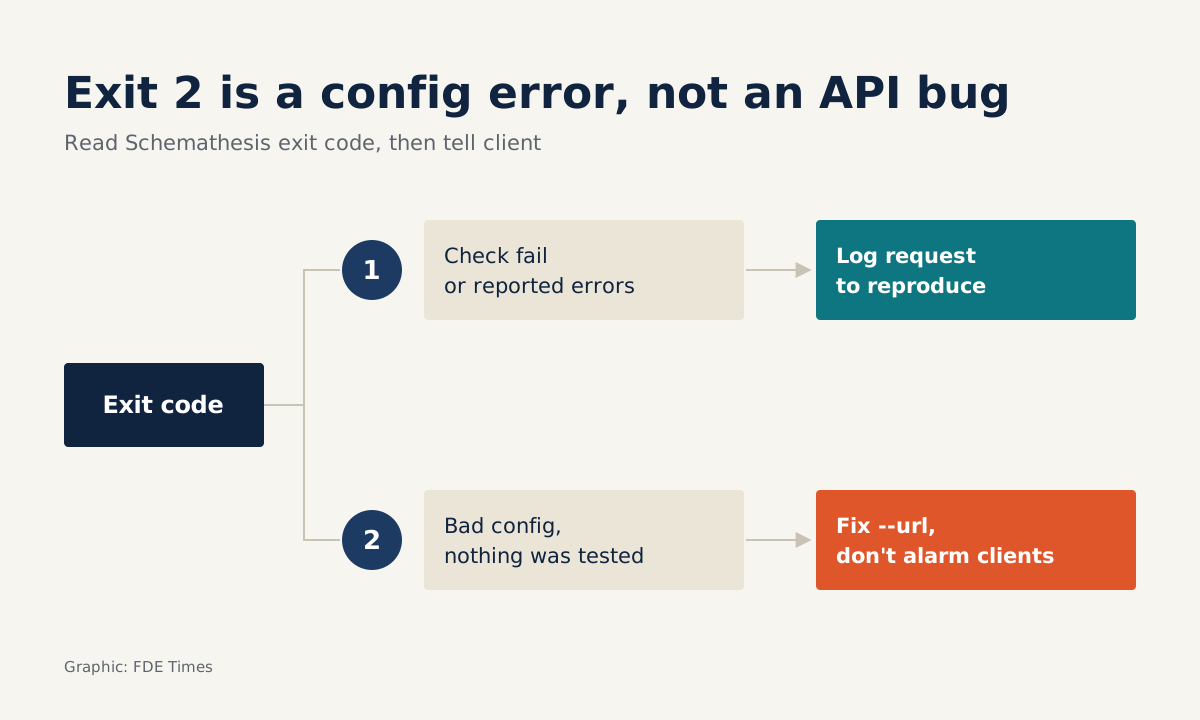
Exit codes are what let Schemathesis plug into a pipeline. Code 1 means at least one check failed or an error was reported. Code 2 means Schemathesis itself could not run because of a configuration error.
The project’s CI/CD guide recommends failing the job whenever the exit code is non-zero. It also flags a trap: a run that tests nothing also returns exit 2. That way an empty schema file or a wrong filter will not quietly turn the build green.
To have something to send the client, the tool can export reports in several formats at once, listed with commas: junit, vcr, har, json, html. A practical tip: choose the format by recipient. Machine-readable formats are for the CI pipeline; the HTML version is the easiest to attach when you email the client before go-live.
Mistakes that cost you the client’s trust
The most expensive mistake is running against production. A single fuzzing run can create a flood of junk records or delete real data, and no number of 500s found will make up for that.
The next is believing you have tested latency. max_response_time is the only check not enabled by default, so if the client has a response-time SLA, you must switch it on yourself. Finally, there is reading exit 2 as “the API is broken” and alarming the client, when in fact you simply forgot --url or misconfigured something.
How this skill shows up in FDE work
On a client site, the value lies in timing. Running Schemathesis in the first week of an integration gives you a map of which endpoints are fragile before you build logic on top of them. Running it again before go-live gives the client evidence that the API contract holds.
For your career, when reading FDE job postings, look for phrases such as “integrate with customer APIs” or “production readiness”: that is where this skill is used. On a CV, do not just write “API testing”. Write in terms of outcomes, for example: introduced schema-based testing into CI, found and reproduced 5xx errors before go-live, with a report for the client’s team.
The next time a client sends an OpenAPI file along with a go-live date, you do not have to guess whether the API can handle unexpected input. You can run one command, produce a report and point to exactly where it breaks.
Was this article useful?
Thanks for the feedback!