The ignored boolean that keeps Node.js alive on a multi-GB file
Learn the stop signal by hand once, then let stream.pipeline() handle backpressure in real code, with memory that stays flat however large the client's export grows.
In brief
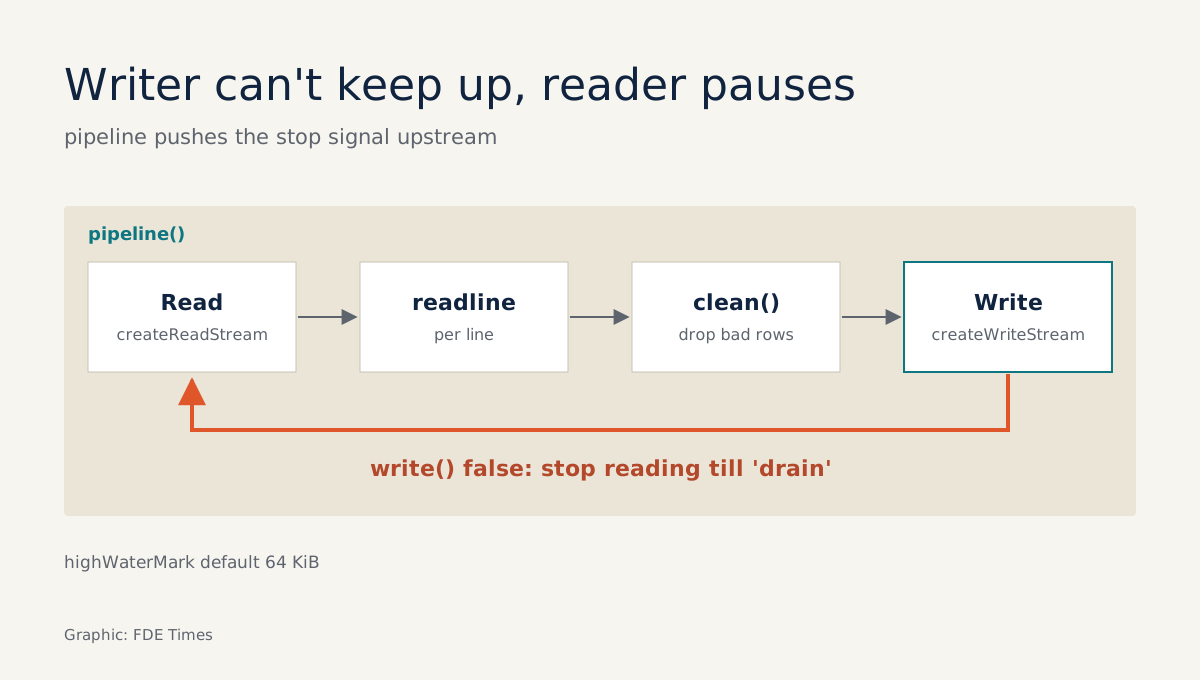
- Reading a file is usually faster than writing one, so data piles up in a buffer. When write() returns false, stop writing
- pipeline handles backpressure for you and closes every stream on error, which a chain of .pipe() calls does not
- Read line by line with readline and crlfDelay: Infinity, and do not await anything between creating the interface and starting the loop
The write() method of a Node.js Writable stream returns a boolean, and that value is easy to ignore. With a file of a few tens of MB, ignoring it does no harm. But when a client sends an order export weighing several GB, that value decides whether your process gets through the file or dies halfway with an out-of-memory error.
The Node.js documentation calls the problem backpressure: when the receiving side is slower than the source, data builds up like a blockage. Writing to disk is usually much slower than reading from it, so compressing or cleaning a file and writing it back out is the textbook case. If the reading side does not know when to stop, the difference sits in RAM.
For an FDE this is not a theoretical exercise. Picture day one at a client: you are handed a dump file, a CSV exported from an ERP or NDJSON exported from a logging system. This guide builds, step by step, a tool to clean such a file, one that runs on your laptop straight away.
What you will build, and what you need
Suppose the client sends orders.ndjson, one order per line. Some lines are broken JSON, some are empty, and the file was exported from a Windows machine. The goal is to write orders.clean.ndjson along with a list of the bad line numbers to send back to the client.
You need a modern version of Node.js, a code editor, and the csv-parse library for the CSV part at the end. The code uses ES modules and has been trimmed for readability. Before taking it to production, check the options against the official documentation.
Step 1: read line by line, not the whole file
The NDJSON specification says each line is a standalone JSON text that must not contain newline characters. The natural unit of work is therefore the line, in the spirit of JSON Lines: structured data, processed one record at a time. readline is the built-in tool for that.
import { createReadStream } from 'node:fs';
import { createInterface } from 'node:readline';

const rl = createInterface({
  input: createReadStream('orders.ndjson'),
  crlfDelay: Infinity,
});

let n = 0;
for await (const line of rl) {
  n++;
}
console.log('Line count:', n);
The crlfDelay: Infinity option is what the readline documentation recommends when a file contains \r\n, as files exported from Windows do. To check: count the lines with another tool you trust and compare the result with n.
The readline documentation warns plainly about one trap: if any asynchronous operation sits between creating the interface and starting the for await, you can lose lines. Do not slip an await db.connect() in between. Connect first, create the interface afterwards.
Step 2: see the stop signal for yourself
Before reaching for the automatic tooling, write it by hand once to understand the mechanism. When the buffer exceeds highWaterMark, write() returns false. According to the Node.js documentation, that is when the backpressure system kicks in: the reading side pauses until the writing side is ready again, signalled by the 'drain' event.
import { createWriteStream } from 'node:fs';

const out = createWriteStream('orders.clean.ndjson');

async function writeLine(text) {
  if (!out.write(text)) {
    await new Promise((resolve) => out.once('drain', resolve));
  }
}
The for await loop in step 1 waits for each iteration to finish, so when you await writeLine(...) inside the loop, the reading side pauses on its own to wait for the writing side. Drop the await and the program still runs, but with a large file the data not yet written piles up in memory.
Because the reading side is willing to wait, RAM only has to hold the data waiting to be written, not the whole file. Whether the file is 1 GB or 10 GB, that waiting portion stays just as small.
Step 3: let pipeline carry the hard part
Writing drain handling by hand helps you understand the mechanism, but in real code use pipeline. The Node.js guide shows that when streams are connected with pipe or pipeline, backpressure is taken care of, and its pipeline example contains not a single line of drain code. When something goes wrong, pipeline also passes the error back to you and closes every stream in the chain.
That is the big difference from .pipe(): according to the Node.js documentation, if the Readable emits an error midway, the destination Writable is not closed automatically, and you have to clean up yourself to avoid leaking memory. Platformatic’s engineering blog also stresses that pipeline manages errors across the chain itself. The whole cleaning tool, in condensed form:
import { pipeline } from 'node:stream/promises';
import { createReadStream, createWriteStream } from 'node:fs';
import { createInterface } from 'node:readline';

const badLines = [];

async function* lines() {
  const rl = createInterface({
    input: createReadStream('orders.ndjson'),
    crlfDelay: Infinity,
  });
  for await (const line of rl) yield line; // no await in between
}

async function* clean(source) {
  let n = 0;
  for await (const line of source) {
    n++;
    if (line.trim() === '') continue; // our decision: skip empty lines
    try {
      yield JSON.stringify(JSON.parse(line)) + '\n';
    } catch {
      badLines.push(n);
    }
  }
}

await pipeline(lines, clean, createWriteStream('orders.clean.ndjson'));
console.log('Bad lines:', badLines.length, badLines.slice(0, 20));
To check this step: create a file with a few deliberately broken lines, run it again, and see whether badLines contains exactly those line numbers.
Note that badLines will grow if the file is broken on a large scale. A production version should write the bad lines to a separate file through the pipeline itself, rather than holding them in an array.
Step 4: do not trust the promise, measure it
The claim that “memory does not grow with the file” is only credible once you have seen it yourself. First, generate a fake NDJSON file of a few GB, for example by calling the writeLine function from step 2 in a loop a few tens of millions of times, planting some broken lines. Then write the version many people write first:
import { readFile } from 'node:fs/promises';

const text = await readFile('orders.ndjson', 'utf8'); // loads the whole file into RAM
let bad = 0;
for (const line of text.split('\n')) {
  try { if (line.trim()) JSON.parse(line); } catch { bad++; }
}
console.log('Bad lines:', bad);
console.log('RSS (MB):', Math.round(process.memoryUsage().rss / 1e6));
For the pipeline version from step 3, print memory every second while it runs:
const timer = setInterval(() => {
  console.log('RSS (MB):', Math.round(process.memoryUsage().rss / 1e6));
}, 1000);
await pipeline(lines, clean, createWriteStream('orders.clean.ndjson'));
clearInterval(timer);
Run both on a file of around 100 MB, then on one of several GB, and record the numbers. The readFile version has to hold both the file’s contents and the array of lines in RAM, so its memory use must rise with file size, and with a large enough file it may not run to the end.
The pipeline version holds only what is waiting to be written. What you want to see is RSS hovering around one level even when the file is many times larger. If the number keeps creeping up, look for where your code is still holding on to data; the first suspect is the badLines array.
Step 5: CSV goes through the same pipeline
According to the csv-parse documentation, the parser is built on Node.js’s native Readable Stream API. So it plugs straight into the middle of a pipeline, and every stream in the chain is cleaned up on error.
import { parse } from 'csv-parse';

await pipeline(
  createReadStream('customers.csv'),
  parse(), // each record is an array; see the csv-parse docs for the header option
  async function* (rows) {
    for await (const row of rows) yield JSON.stringify(row) + '\n';
  },
  createWriteStream('customers.ndjson'),
);
Do not split CSV with split(',') through readline. A single field containing a comma or a newline inside quotes is enough to shift every column after it, and that kind of bug may only surface on line several million.
Step 6: a preview tool, and the break trap
When you have just received an unfamiliar file, check which columns it has before doing anything else. Every Node.js Readable stream is an async iterable, so a for await loop printing the first five rows answers that question at once:
const file = createReadStream('customers.csv');
let i = 0;
for await (const row of file.pipe(parse())) {
  console.log(row);
  if (++i === 5) break;
}
file.destroy(); // close the read stream yourself to be safe
When you leave a for await loop with break, return or throw, Node.js by default destroys the stream being iterated, which here is the stream created by parse(). To keep that stream alive, iterate over readable.iterator({ destroyOnReturn: false }) instead.
The file’s read stream, however, is not the thing being iterated. To be sure a 4 GB file is not read any further, close it yourself with file.destroy(), as in the last line. This small example uses .pipe() for brevity; a real job should still go through pipeline so that every stream is closed on error.
At the client, what gets remembered is the bad-line count
Picture this: just minutes after receiving the file, you reply “there are 312 broken lines, here are the line numbers”, run on your own laptop, without asking for an extra server.
The figure of 312 is only an example. But an error report with line numbers tells the client’s data team exactly where to fix things, so it can cut the back-and-forth considerably.
That scene is what is worth taking into a job application. A small repo that recreates it, with a fake multi-GB file seeded with broken lines, the readFile version running alongside the pipeline version, and the memory table measured in step 4, tells the day-one-at-a-client story for you.
On your CV, write the outcome of that story: “processed multi-GB export files with stable memory, reporting errors line by line” is far more specific than “proficient in Node.js”. When a job posting mentions bringing client data into a system, that is the moment to point to the repo.
Once memory no longer tracks file size, a “slightly heavy” file is just a matter of running a few minutes longer. The question worth asking the client then is where their data is broken.
Was this article useful?
Thanks for the feedback!