ROW_NUMBER and rn = 1: how FDEs deduplicate customer data without losing columns
One customer can appear three times in a CRM table, and the record you keep decides whether the first number you report is right.

In brief
- A window function computes over a group of rows without collapsing them, so you keep the full record.
- The standard pattern: PARTITION BY the key, ORDER BY updated_at DESC NULLS LAST plus a tie-breaker column, then filter rn = 1.
- Snowflake and DuckDB have QUALIFY. PostgreSQL forbids window functions in WHERE, so there you need an extra CTE or subquery.
On your second day at a customer site, you receive a CRM export and a question that sounds simple: how many active customers are there?
You count a number, and the head of sales shakes their head because it is higher than reality. The reason is a familiar one: the same person appears several times, thanks to two imports, one phone-number correction and one migration from a legacy system.
For an FDE, this is not a minor chore. Everything you build afterwards, from dashboards and pipelines to an agent that looks up customers, rests on this table. Get deduplication wrong and every downstream number is wrong too, and people usually find out during the demo, not while you are writing the query.
The skill fits into a single SQL pattern: number the records within each customer group, then keep only row 1. Below is that pattern on a concrete example, along with the traps that make it return different results between two runs, or between two engines.
Why isn’t GROUP BY enough?
Many engineers reach first for GROUP BY email with MAX(updated_at). That gives you the latest update time, but not the phone number, address or status sitting on that same row.
To get those columns back, you have to join back to the source table. If two rows share the same timestamp, both match the join and that customer is duplicated again.
Window functions solve exactly this. As the PostgreSQL documentation explains, a window function does not collapse rows into a single output row the way an ordinary aggregate does. Each row keeps its separate identity in the result, so you can compute a rank within the group while still holding the full record to choose from.
The pattern has three parts. PARTITION BY splits rows into groups that share the same key value, such as the same email. ROW_NUMBER() numbers the rows in each group consecutively and, as MotherDuck’s glossary notes, unlike RANK() or DENSE_RANK() it never produces ties.
The ORDER BY inside OVER decides which row gets number 1. On SQL Server, Microsoft’s documentation states that this clause is required for ROW_NUMBER.
A dirty table, numbered row by row
Picture a customers_raw table after you have lowercased emails and stripped whitespace. The customer An has four records: two were created in the same second because the import job ran twice, and row 104 came over from the legacy system without an updated_at.
The rn column is the result of ROW_NUMBER() OVER (PARTITION BY email ORDER BY updated_at DESC, id DESC), run verbatim on PostgreSQL and on DuckDB. The rnk column uses RANK() with the same ordering minus id, run on DuckDB.
| id | customer | phone | updated_at | rn (PostgreSQL) | rn (DuckDB) | rnk (DuckDB) |
|---|---|---|---|---|---|---|
| 104 | An | 0912 000 099 | NULL | 1 | 4 | 4 |
| 103 | An | 0912 000 222 | 2026-05-10 14:30 | 2 | 1 | 1 |
| 102 | An | 0912 000 222 | 2026-05-10 14:30 | 3 | 2 | 1 |
| 101 | An | 0912 000 111 | 2026-03-01 09:00 | 4 | 3 | 3 |
| 201 | Binh | 0987 000 333 | 2026-04-02 08:00 | 1 | 1 | 1 |
On DuckDB, filtering rn = 1 returns exactly two rows: An’s 103 and Binh’s 201. Filtering rnk = 1 returns three, because An still has two copies.
Microsoft’s documentation spells out the difference: ROW_NUMBER numbers rows sequentially, 1, 2, 3, 4, 5, while RANK gives tied rows the same number, as in 1, 2, 2, 4, 5.
If you want exactly one row per group, you need ROW_NUMBER.
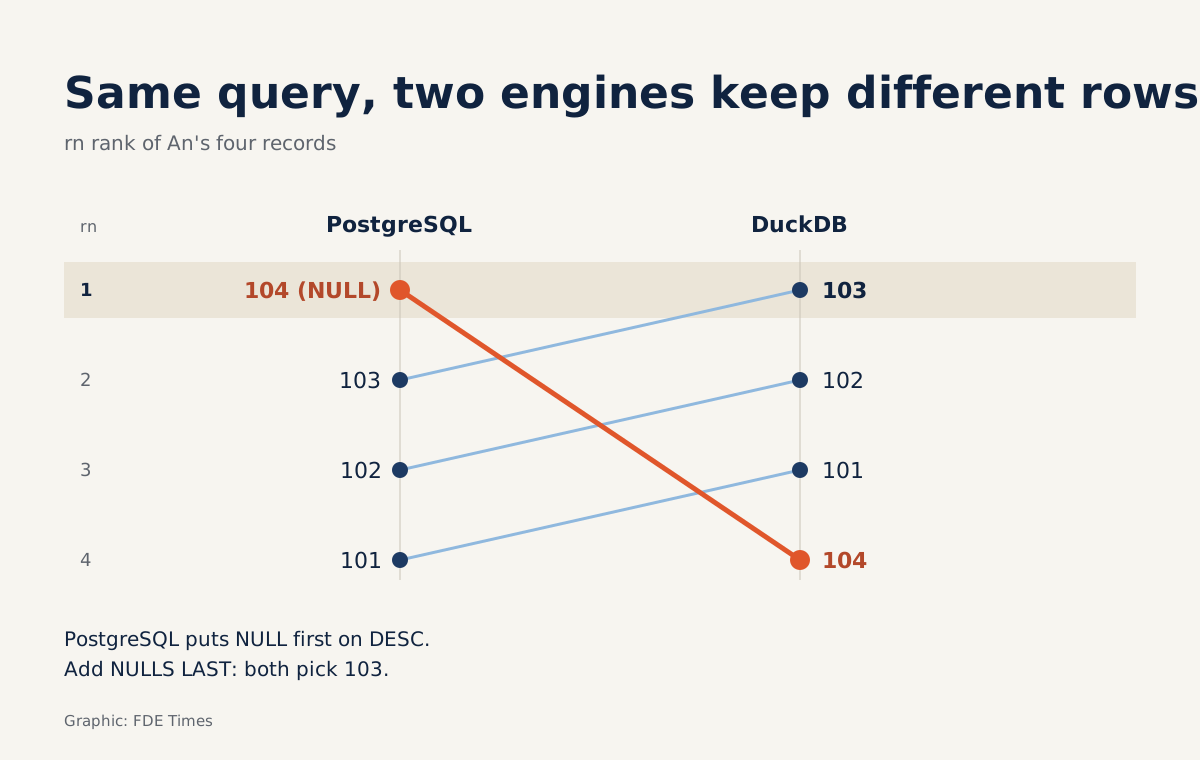
The PostgreSQL column is another story: row 104, the one with no timestamp, gets number 1. Same query, two engines, two different versions of An. The final section explains why.
PostgreSQL allows window functions only in the SELECT list and ORDER BY, and forbids them in WHERE, so you cannot write WHERE ROW_NUMBER() ... = 1. The documentation recommends a sub-select when you need to filter after the window is computed.
On PostgreSQL, the readable approach is to wrap the numbering in a CTE and filter outside it. The NULLS LAST below is there to block exactly the trap in row 104:
WITH ranked AS (
  SELECT
    c.*,
    ROW_NUMBER() OVER (
      PARTITION BY lower(trim(email))
      ORDER BY updated_at DESC NULLS LAST, id DESC
    ) AS rn
  FROM customers_raw c
)
SELECT *
FROM ranked
WHERE rn = 1;
On Snowflake, the QUALIFY clause does this more neatly. Snowflake’s documentation explains that QUALIFY does with window functions what HAVING does with aggregate functions, and its official example uses exactly ROW_NUMBER() to return only the first row of each partition. DuckDB also supports QUALIFY for filtering window-function results.
SELECT *
FROM customers_raw
QUALIFY ROW_NUMBER() OVER (
  PARTITION BY lower(trim(email))
  ORDER BY updated_at DESC, id DESC
) = 1;
What is the id at the end of ORDER BY for?
This detail separates people who have been bitten by dirty data from those who have not. With only ORDER BY updated_at DESC, rows 102 and 103 tie. The PostgreSQL documentation is blunt: tied rows are numbered in an unspecified order, and its own example adds an employee-number column to ORDER BY to break the tie.
Microsoft’s documentation carries a similar warning: there is no guarantee that rows returned by ROW_NUMBER() will be ordered the same way on each execution unless the ORDER BY values within each partition are unique.
In the example above, rows 102 and 103 share the same phone number, so you do not yet see the consequences. But suppose the two tied rows differed in their status column. Today the report says the customer is active; tomorrow it says they have cancelled, though nobody touched the data. A bug like that is almost impossible to debug in front of a customer.
The fix is to always add a unique tie-breaker column at the end of ORDER BY, usually the primary key or the source system’s incrementing id. id DESC means that on a tie, the most recently created record wins. If the customer has a better column, such as an event sequence number or an ingestion timestamp, use that.
Three questions to answer before writing PARTITION BY
The first question is not about SQL at all: what counts as “the same customer”? An email, a tax ID, or an ID from the ERP system? The answer becomes the expression in PARTITION BY, and you should normalise it right there with lower, trim, or by stripping stray characters from phone numbers.
The second question is “which copy is correct”. The latest by updated_at is a sensible default, but some customers want to keep the record entered by the sales team rather than the one created by a web form. In that case ORDER BY can start with a CASE expression that prioritises the source, then the timestamp, then the tie-breaker.
The third question is how you know the result can be trusted. Count the distinct keys in the source table and compare that with the number of rows after filtering: the two must match. Then take a few of the groups with the most records, print them in full, and show the customer’s data owner which row you kept.
The traps that make you keep the wrong row
The hardest trap to spot sits in row 104. According to the PostgreSQL documentation, NULLs sort as if larger than any other value, so with DESC they come first. The oldest record, with no timestamp, quietly wins rn = 1.
DuckDB does the opposite: its documentation states that NULLs stay at the end even in DESC sorts, unlike PostgreSQL, so the same query picks row 103. A DuckDB notebook on your laptop and a PostgreSQL pipeline at the customer’s site can therefore give two different answers, as the two rn columns in the table show.
The defence is not to rely on defaults. Write ORDER BY updated_at DESC NULLS LAST, id DESC explicitly on engines that support that syntax. If the same query has to run on an engine without NULLS LAST, put the NULL ordering into the data itself: ORDER BY CASE WHEN updated_at IS NULL THEN 1 ELSE 0 END, updated_at DESC, id DESC.
The CASE expression assigns 0 to rows with a timestamp and 1 to empty ones, then sorts ascending, so empty rows always come last whatever the engine’s default. With the table above, both engines pick 103.
Another trap is partitioning on an unnormalised column, which turns “[email protected] “ and “[email protected]” into two customers. Next comes using RANK or DENSE_RANK on the assumption that they are equivalent, then being surprised when the “deduplicated” table still has duplicates in exactly the groups with tied timestamps.
On your CV and in interviews, instead of writing “proficient in SQL”, describe specifically how you built a deterministic deduplication step for a customer table from multiple sources, with a tie-breaker, NULL handling and a before-and-after key count reconciliation.
The next time someone asks “how many customers do we have”, the number you give should be one that comes out identical when rerun tomorrow, on a laptop or on the customer’s server.
Was this article useful?
Thanks for the feedback!