Caching a slow client system can trade slowness for wrong data
Three Redis strategies in the order you will need them: cache-aside by default, write-through for freshness, refresh-ahead for hot keys.
In brief
- Cache-aside is a good default, but every miss costs three round trips and the data can go stale.
- Write-through keeps the cache fresh, at the cost of slower writes and a cache that may hold data nobody reads.
- Refresh-ahead and stampede protection matter most for hot keys that sit in front of a slow system.
In the cache-aside pattern, every cache miss costs three round trips: ask the cache, ask the data source, then write the result back to the cache. With a fast database, those three trips do almost no harm. Put them in front of an old ERP system that takes several seconds per query, and users feel them immediately.
Forward Deployed Engineers know this situation well. You arrive at a client site, the core system is slow, nobody will let you change it, and next week’s demo has to run smoothly. AWS notes that the best thing about caching is how little it intrudes when you deploy it, which is exactly why a cache is often the first tool you reach for.
Pick the wrong caching strategy, though, and you have simply traded “slow” for “wrong”. This guide covers three strategies on Redis in the order you are likely to use them in practice: cache-aside first, write-through when you need fresh data, and refresh-ahead for hot keys.
What will you build, and what do you need?
You will build a caching layer in Python that sits in front of functions simulating “the client’s slow system”, such as an API that fetches customer details and price lists from an ERP. You need a local Redis instance, Python 3 and the redis-py library. The code here is trimmed down to teach the ideas; it lacks the error handling and connection pooling a production version would need.
Step 1: cache-aside, the default strategy
In cache-aside, the application is responsible for reading from and writing to the data source; the cache never touches storage itself. Redis’s documentation suggests storing each entity under a key of the form cache:{entity}:{id}, with a TTL to limit how long stale data can be served.
The first snippet also defines the three slow-system simulators used in later steps, so you can run the whole guide from a single file.
import json, time
import redis

r = redis.Redis(decode_responses=True)
TTL_SECONDS = 300

# --- Simulate the client's slow system (each call takes 2 seconds) ---
def slow_erp_get_customer(customer_id):
    time.sleep(2)
    return {"id": customer_id, "name": "Cong ty A"}

def slow_erp_update_customer(customer_id, fields):
    time.sleep(2)
    return {"id": customer_id, "name": "Cong ty A", **fields}  # record after the update

def slow_erp_get_price(sku):
    time.sleep(2)
    return {"sku": sku, "price": 100000}

# --- Cache-aside ---
def get_customer(customer_id):
    key = f"cache:customer:{customer_id}"
    cached = r.get(key)
    if cached is not None:
        return json.loads(cached)          # hit
    data = slow_erp_get_customer(customer_id)  # miss
    r.set(key, json.dumps(data), ex=TTL_SECONDS)
    return data
Check: call get_customer(42) twice and time it. The first call takes about 2 seconds; the second is almost instant. Open redis-cli and run GET cache:customer:42 to see the record sitting in Redis.
The ex=TTL_SECONDS option corresponds to Redis’s SET ... EX. AWS recommends always setting an appropriate TTL on keys, and the reason becomes clear in the next step.
Step 2: where does stale data come from?
Prisma calls cache-aside a good general-purpose strategy, but it has a window in which the cache and the database disagree. Data in the cache goes stale if the record is updated in the database. The fix Redis describes has two layers: a per-key TTL, so every entry has a limit on how stale it can get, and a DEL on write to invalidate it actively.
def update_customer(customer_id, fields):
    slow_erp_update_customer(customer_id, fields)
    r.delete(f"cache:customer:{customer_id}")  # the next read will miss and fetch the new version
Check: call update_customer(42, {"name": "Cong ty B"}), then run GET cache:customer:42 in redis-cli. The result should be empty.
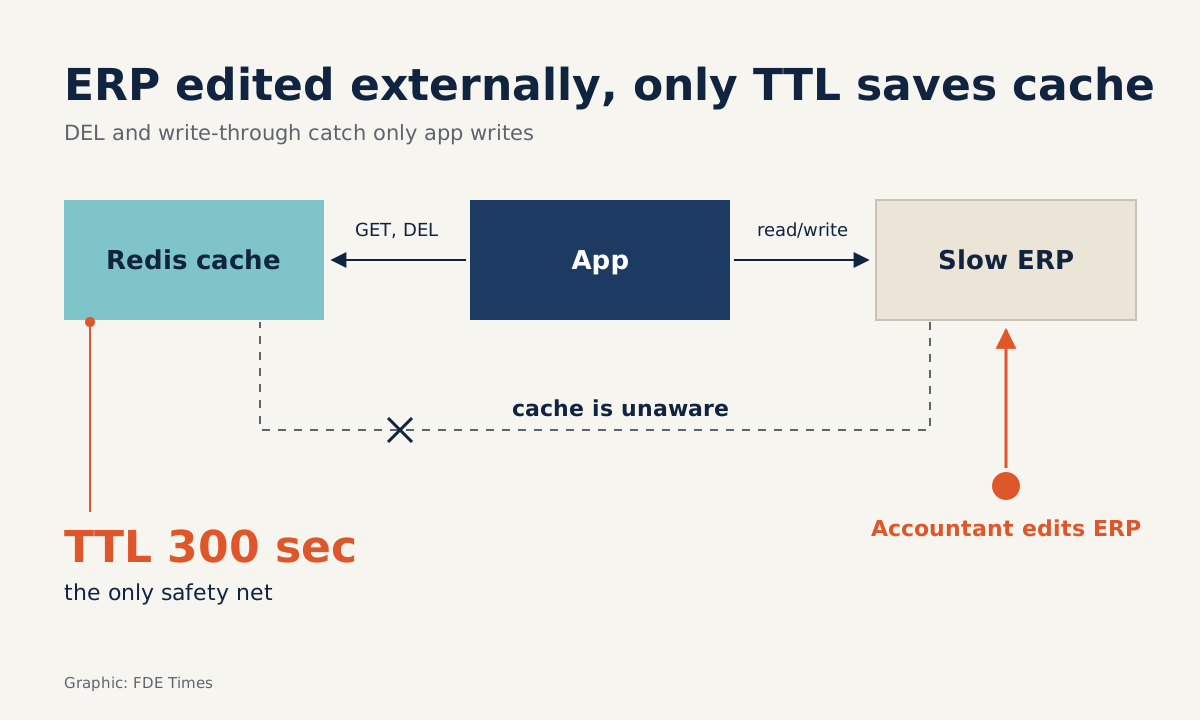
The easily missed detail is that DEL only protects you from writes that go through your code. Imagine the client’s accountant changing the company name directly in the ERP screen.
The application never finds out, and the TTL is the only safety net left. So the TTL is not a number you set for the sake of it; it answers the question “how long, at most, will the client accept seeing stale data?”
Step 3: write-through when fresh data is mandatory
If the business cannot tolerate a stale-data window, for example the status of an order that has just been approved, write-through is a better fit. Every write updates the cache, so the cache always holds the data just written and never goes stale.
# Simplified version: the application writes to both places.
# In the classic pattern, the cache layer itself handles writing to storage.
def update_customer_write_through(customer_id, fields):
    data = slow_erp_update_customer(customer_id, fields)  # returns the new record
    r.set(f"cache:customer:{customer_id}", json.dumps(data), ex=TTL_SECONDS)
    return data
Check: after the update, GET cache:customer:42 should return the new value rather than the empty result from step 2.
The cost comes in two parts. Writes are slower, because they must go through both places. And most of the data written may never be read, bloating the cache’s memory; system-design-primer suggests limiting the damage with a TTL.
Remember, too, that write-through still cannot save you from writes made outside the application, as in the accountant example above.
Step 4: refresh-ahead and the storm on hot keys
Go back to those three round trips. For a hot key, such as a price list that every page reads, the dangerous moment is when it expires.
Redis describes the cache stampede: when a popular key expires under heavy load, dozens of processes query the database for the same record at once. Against a client’s slow system, that storm can bring it down entirely.
Refresh-ahead deals with this by refreshing a recently accessed entry before it expires. The simplified version below stores a “soft expiry” timestamp inside the value, earlier than the real TTL. When a request reaches that point, it still gets the current copy immediately, while the call to the slow system is pushed to a background thread.
import threading

REFRESH_BEFORE = 60  # refresh 60 seconds before the real TTL runs out

def _load_price(key, sku):
    data = slow_erp_get_price(sku)
    entry = {"data": data,
             "soft_expire": time.time() + TTL_SECONDS - REFRESH_BEFORE}
    r.set(key, json.dumps(entry), ex=TTL_SECONDS)
    return data

def get_price_refresh_ahead(sku):
    key = f"cache:price:{sku}"
    cached = r.get(key)
    if cached is None:
        return _load_price(key, sku)  # real miss: still has to wait
    entry = json.loads(cached)
    if time.time() >= entry["soft_expire"]:
        # past the soft expiry: refresh in the background, the current request does not wait
        threading.Thread(target=_load_price, args=(key, sku), daemon=True).start()
    return entry["data"]
Check: set TTL_SECONDS and REFRESH_BEFORE to small values for testing, call the function repeatedly and log every time the slow function is called. You will see the refresh happen before the key actually disappears from Redis, and requests after the first miss do not wait 2 seconds.
To be clear, this is only a sketch. In the classic pattern, the cache itself is configured to refresh automatically; here the application does the job with a thread. If you drop the thread and call _load_price inside the request, all you have is a synchronous “soft TTL”: a request that hits the soft expiry still stands waiting for the slow system.
This version still has one gap to close before production. Every request that hits the soft expiry starts its own thread, so many requests or processes hitting it at the same moment will all call the client’s system together. The stampede has only been moved earlier, not eliminated.
Redis suggests using a Lua script to run a mutex lock or probabilistic early refresh in a single atomic step, without any external locking mechanism; that is the next upgrade to read about in Redis’s cache-aside documentation.
What are the most common mistakes?
The most common mistake is skipping the TTL because there is already a DEL on write, then having data edited from outside leave the cache wrong indefinitely.
The second is turning on refresh-ahead for every key. system-design-primer warns that guessing wrong about which items will be needed next can reduce performance, because you spend effort calling the slow system for data nobody wants.
The third is testing with only one user, so the stampede never shows up until demo day.
How does this skill show up at a client site?
On site, the code is only half the job. The other half is asking the right questions: which kinds of data are edited outside the application, how many seconds of staleness each can tolerate, and which keys are read most often.
The answers decide the strategy: for example, customer profiles use cache-aside with a TTL of a few minutes, order status uses write-through, and the price list uses refresh-ahead with stampede protection.
When reading FDE job descriptions, look for phrases such as “integrate with legacy systems” or “performance under real customer load”; that is where this skill gets tested. On your CV, do not just write “used Redis”. Say which strategy you chose and why, which business requirement set the TTL, and how you dealt with stale data.
The client’s slow system will still be slow after you leave. What you leave behind is a caching layer where anyone reading the code understands why each key lives for exactly as many seconds as it does.
Was this article useful?
Thanks for the feedback!