Hands-on: queue long-running AI jobs in RabbitMQ and return HTTP 202 straight away
A document-analysis request that takes several minutes should not hold the customer's HTTP connection open. It should not disappear if a worker crashes halfway through, either.

In brief
- Declare the queue as durable and the messages as persistent. Otherwise RabbitMQ forgets all of them after a crash or restart.
- The worker should ack only after it has finished the job. Set prefetch_count=1 so long jobs do not all pile up on one machine.
- The API that accepts a job returns 202 straight away, with a Location to poll. An Idempotency-Key makes sure retries do not create duplicate jobs.
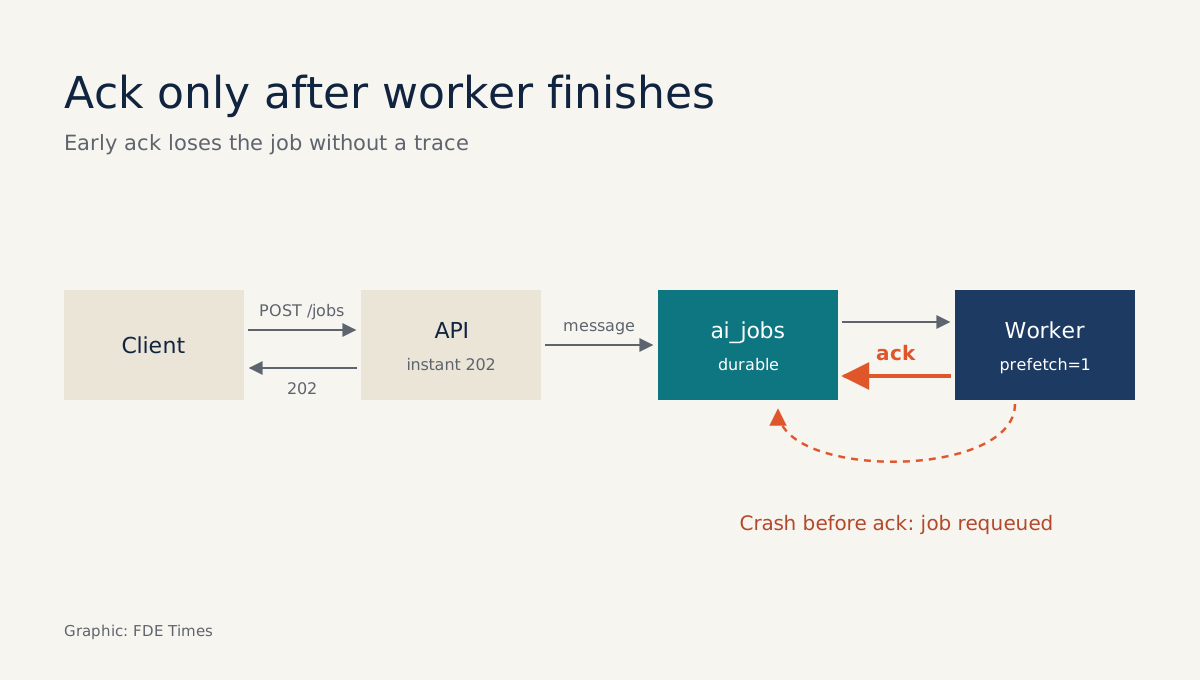
RabbitMQ has a default that catches people out. When the broker quits or crashes, it forgets its queues and messages unless you tell it not to. For an AI job that runs for five minutes, that default means a customer clicks “Analyse”, waits, and never gets anything back.
Most LLM demos call the model inside the HTTP request and keep the connection open until the result arrives. That works on a laptop. In a customer’s environment it runs into load-balancer timeouts, client retries that create duplicate jobs, and worker restarts that lose work.
This guide builds a small pipeline in the order that makes sense on site: a durable queue first, then a safe worker, then the asynchronous API. It takes about an evening, and you end up with something to show in an interview.
What are you building?
AWS defines a message queue as a form of asynchronous communication between services, used to separate heavy processing tasks from the rest of an application. Calling a model is exactly that kind of heavy task.
The flow has four parts. The client sends POST /jobs and gets HTTP 202 back straight away. The API packages the task as a message and pushes it to the ai_jobs queue. A worker takes the message, calls the model and updates the status, while the client polls GET /jobs/{id} to see the result.
You need Python 3, the pika library (the client used in RabbitMQ’s official tutorials) and RabbitMQ running on localhost, installed by following the official instructions. The code below is cut down to show the ideas. It has no connection configuration and no reconnect handling, and it keeps job status in memory.
Step 1: A queue that survives a restart
RabbitMQ’s Work Queues tutorial describes this exact problem. Instead of running a resource-heavy task immediately and waiting for it, you package it as a message and send it to a queue. If a message is to survive a crash, both the queue and the message must be marked as durable.
import json, pika

conn = pika.BlockingConnection(pika.ConnectionParameters('localhost'))
ch = conn.channel()
ch.queue_declare(queue='ai_jobs', durable=True)

def enqueue(job: dict):
    ch.basic_publish(
        exchange='',
        routing_key='ai_jobs',
        body=json.dumps(job),
        properties=pika.BasicProperties(
            delivery_mode=pika.DeliveryMode.Persistent),
    )
Check: send a few jobs, restart RabbitMQ and see whether the messages are still in the queue. If the queue is empty, you have left out durable=True or delivery_mode in one of the two places.
Step 2: The worker acks only when the job is done
This is the part that protects long jobs. If a worker dies before it acks, RabbitMQ assumes the message was not fully processed and puts it back on the queue. For that to happen you must ack manually, and the ack goes on the last line, not the first.
ch.basic_qos(prefetch_count=1)

def handle(ch, method, props, body):
    job = json.loads(body)
    set_status(job['id'], 'Running')
    result = run_model(job)          # calls the LLM; may take several minutes
    set_status(job['id'], 'Succeeded', result=result)
    ch.basic_ack(delivery_tag=method.delivery_tag)

ch.basic_consume(queue='ai_jobs', on_message_callback=handle)
ch.start_consuming()
This handler does not catch exceptions yet. If run_model raises an error, the job is never marked Failed. The dead-letter queue section at the end of this guide adds that part.
The line basic_qos(prefetch_count=1) tells RabbitMQ not to give a worker more than one message at a time. Picture two workers and a run of alternating jobs: summarising a contract takes 10 minutes, classifying an email takes 10 seconds.
If jobs are handed out in strict turns without prefetch, every 10-minute job can end up on the same worker while the other sits idle. With prefetch set to 1, whichever worker is free first takes the next job, so the queue balances the load according to how long each task actually takes.
Check: make run_model sleep for 60 seconds, kill the worker at the 30-second mark and start it again. The job should run again from the beginning. The consequence is that run_model must be safe to run more than once, because a job can be processed twice.
Step 3: The API returns 202 and does not make the client wait
The Async Request-Reply pattern in the Azure Architecture Center covers the client-facing side. The API returns HTTP 202 (Accepted) at once to confirm it has received the request. The response includes a Location header pointing to the URL the client polls for status, and a Retry-After header suggesting how long to wait before the next poll.
Every client retries when the network is unreliable. That is why Microsoft recommends an Idempotency-Key: if the backend receives a key it has already seen, it returns the existing status resource rather than pushing a second work item onto the queue. The sketch below is not tied to any framework, and it rejects any request that lacks a key:
JOBS, KEYS = {}, {}   # simplified: use a database in production

def post_jobs(request):
    key = request.headers.get('Idempotency-Key')
    if not key:
        return 400, {'error': 'Idempotency-Key is required'}
    if key in KEYS:
        return accepted(KEYS[key])
    job_id = new_id()
    JOBS[job_id] = {'status': 'Pending', 'createdAt': now(),
                    'lastUpdatedAt': now()}
    KEYS[key] = job_id
    enqueue({'id': job_id, 'input': request.json,
             'correlationId': job_id})
    return accepted(job_id)

def accepted(job_id):
    return 202, {'Location': f'/jobs/{job_id}', 'Retry-After': '10'}
Check: send two POSTs with the same key. The queue should grow by exactly one message, and both responses should point to the same Location. Then send a POST without the header: you should get a 400, and the queue should not change.
Step 4: A status endpoint that tells the client exactly where the job is
GET /jobs/{id} returns the fields the Async Request-Reply pattern suggests: status (Pending, Running, Succeeded, Failed or Canceled), createdAt, lastUpdatedAt, percentComplete and error. In the demo, this just means reading JOBS[job_id].
Polling is not the only option. Nordic APIs and Postman both describe cases where the server notifies the client through a callback, such as a webhook. A sensible combination is a webhook for the customer’s systems and a status endpoint for anyone who needs to check by hand.
Where does a message go when something fails?
Azure lists data loss as one of the challenges of asynchronous architecture. The remedy is to store events in transit durably and dequeue them only once the next component has acked. Steps 1 and 2 already do that. The remaining question is what happens when a job genuinely fails.
Azure suggests moving failed events to a dead-letter queue (DLQ) for an administrator to inspect. The cut-down version below replaces the handler from Step 2 and uses only APIs already shown. It wraps run_model in a try. On error, it records Failed with an error, publishes the message to a durable ai_jobs_dlq queue, and only then acks the original message.
ch.queue_declare(queue='ai_jobs_dlq', durable=True)

def handle(ch, method, props, body):
    job = json.loads(body)
    set_status(job['id'], 'Running')
    try:
        result = run_model(job)
        set_status(job['id'], 'Succeeded', result=result)
    except Exception as e:           # simplified: catches every kind of error
        set_status(job['id'], 'Failed', error=str(e))
        ch.basic_publish(
            exchange='',
            routing_key='ai_jobs_dlq',
            body=body,
            properties=pika.BasicProperties(
                delivery_mode=pika.DeliveryMode.Persistent),
        )
    ch.basic_ack(delivery_tag=method.delivery_tag)
This is a simplified version: every error, including a brief network glitch, goes straight to the DLQ. Check: make run_model raise an error for one specific input, then confirm that GET /jobs/{id} returns Failed, that ai_jobs_dlq has one more message, and that ai_jobs no longer holds the job.
The last piece is the correlation ID. Azure recommends attaching one to every event so that every consumer and logging system can link related operations into a single trace. The demo reuses job_id, so print it on every log line in the API and the worker. Then grep for one ID and you will see that job’s full path through the system.
The four most common mistakes
The most common mistake is acking as soon as the message arrives because it looks tidier. If the worker dies halfway through, the job is lost without a trace, because RabbitMQ thinks the work is done.
The second is declaring the queue durable but forgetting to mark messages as persistent, or the other way round. You need both to survive a restart.
The third is skipping the Idempotency-Key on the assumption that clients will not retry. With AI jobs, every duplicate means another paid model call, and it may produce a second result that contradicts the first.
The fourth is declaring a percentComplete field that the worker never updates. The client sees a 10-minute job sitting at 0% for nine minutes and decides the system has hung. If the task can be split into steps, such as one page of a document at a time, update percentComplete and lastUpdatedAt after each step.
On site and on your CV
If a customer complains that “the AI keeps hanging”, a sensible approach is to build this framework before tuning the model. Start by asking how long the longest job takes, who is retrying, and where a running job goes if the worker restarts at 2am.
When reading job descriptions, look out for phrases such as “asynchronous processing”, “message queue”, “idempotency” or “observability”. They are a signal to ask more questions in the interview, not firm evidence of what the job involves. On your CV, do not just write “used RabbitMQ”.
Write that you designed a 202 API with an Idempotency-Key, a worker with manual ack and prefetch, a DLQ and correlation IDs, and that you tested it by killing the worker mid-job.
Models will change many times over. What you built here (a durable queue, acks at the right moment, and an API that always tells the client what stage a job has reached) will still apply on every project that follows.
Was this article useful?
Thanks for the feedback!
6 sources
- What is a Message Queue? (AWS)
- RabbitMQ tutorial - Work Queues | RabbitMQ
- Asynchronous Request-Reply Pattern - Azure Architecture Center | Microsoft Learn · 2026-03-30
- Event-Driven Architecture Style - Azure Architecture Center | Microsoft Learn · 2026-03-06
- The Differences Between Synchronous and Asynchronous APIs · 2024-01-25
- Understanding asynchronous APIs · 2022-08-26