RAG for operations engineers: answers for the right machine and the right SOP revision
A night-shift technician needs only one manual excerpt stripped of its model name, one superseded SOP or one error code the embeddings miss before they stop trusting the assistant.

In brief
- A RAG pipeline that splits by token count and then embeds strips chunks of context, cuts tables in half and tends to miss error codes. Equipment manuals and technicians' questions are full of exactly those tables and codes.
- Chunk by document structure, attach context, run hybrid BM25 plus vector search, filter separately for each document type, and cite sources in every answer.
- Start with a fixed workflow. Move to an agent only when questions genuinely require the model to choose its own tools.
At two in the morning, a technician types the alarm code flashing on a compressor’s display into the assistant your team has just deployed. The answer is fluent and the steps are clear, but they come from the manual for a different model and from an SOP that has been superseded.
The scenario is hypothetical, but any RAG pipeline thrown together on technical documentation is prone to exactly this kind of failure.
The demo usually holds up on ten well-chosen questions. Once it goes live on site, it meets manuals dense with tables, SOPs with multiple revisions and thousands of hastily written work orders.
The hard part is not choosing a model. It is designing retrieval for three very different kinds of document. The sections below go through it step by step, following a single alarm code from chunking to answer.
Why does conventional RAG break on equipment manuals?
Take a passage such as “Fully release pressure before removing the safety valve”. Separated from its source document, it no longer says which machine or which model it applies to.
Fixed-size chunking does even more damage. An analysis published by VentureBeat gives the example of a specification table split so that the “voltage limit” header sits in one chunk while the “240V” value falls into another. According to the author, that kind of chunking is fine for prose but wrecks the logic of a technical manual.
The third problem lies in how operators ask questions. They type alarm codes, part numbers and asset IDs. Anthropic notes that BM25 is particularly effective for queries containing unique identifiers or technical terms.
Microsoft’s Azure AI Search documentation likewise says that product codes, specialised jargon, dates and people’s names are better found with keyword search, because it matches exactly.
Three document types, three treatments
| Source | Chunk by | Required metadata | Main risk |
|---|---|---|---|
| Equipment manual | Chapter and section, tables kept whole | model, chapter, page | Chunk loses its model name, tables get cut |
| SOP | Each procedure or each major step | revision, status, effective date | Returns a superseded version |
| Closed work order | One chunk per work order | asset_id, error code, close date | Hasty notes, no standardisation |
The versioning risk is not theoretical. The authors of VersionRAG on arXiv measured existing approaches at only 58-64% accuracy on version-dependent questions. The cause they identify is that retrievers fetch semantically similar content without checking whether it is still in force.
Maintenance software vendors such as OxMaint describe filtering search results by manufacturer, model, site and the maintenance history of the specific asset being asked about. This is a product pitch with no independent measurement, but it describes fairly closely the “right machine” requirement that operations teams need.
Following code E-217 through five steps
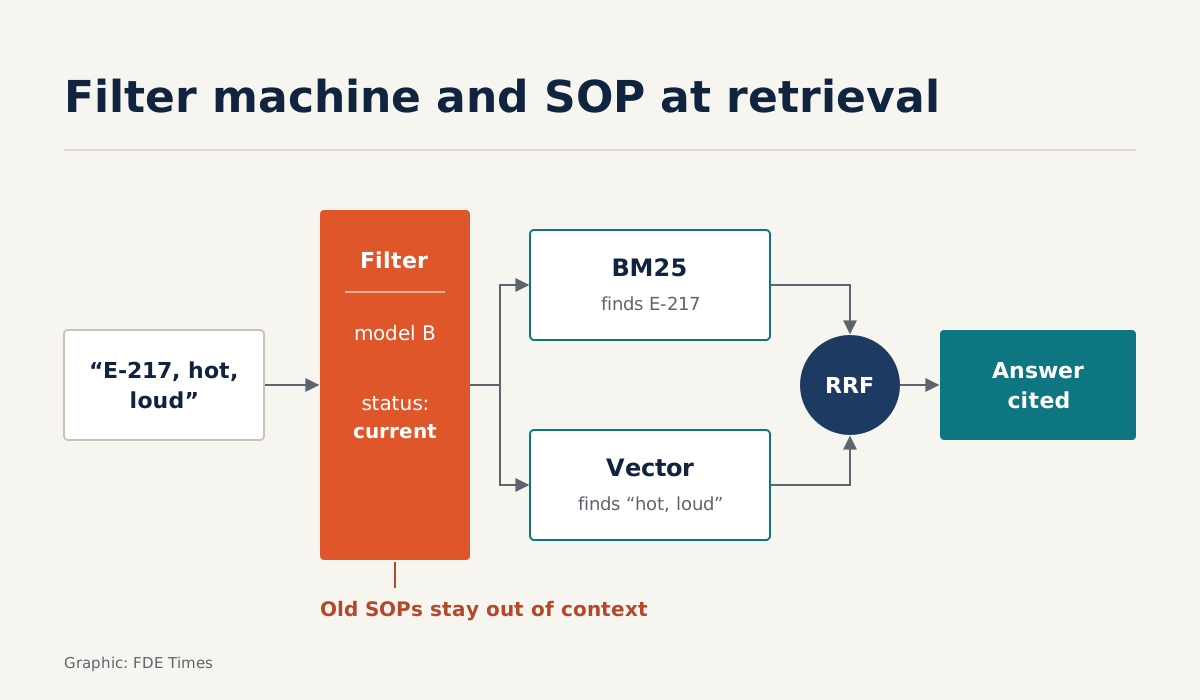
Picture a plant with two compressor lines, model A and model B. Both use the alarm code “E-217”, but it means different things on each. A technician standing in front of a model B machine asks: “E-217, machine is hot and loud, what do I do?”
Step one is to chunk by document structure: by chapter, section and paragraph rather than by token count. Each section of the “Alarm handling” chapter in the model B manual becomes one chunk, and the error code table stays intact so that column headers are never separated from their values.
Step two is to attach context before encoding. The cheapest way is to prepend a header line built from existing metadata:
def contextualize(chunk, doc):
    header = (f"[{doc.doc_type} | model {doc.model} | "
              f"{doc.section_path} | rev {doc.revision}]")
    return header + "\n" + chunk.text  # feed into both the embedding and BM25
This header line is only a cheap substitute, not the contextual embeddings technique Anthropic used when measuring the results cited later. It helps a chunk keep its model name, but do not expect it to deliver that same figure on its own.
Step three is hybrid search. Microsoft describes the approach: run a full-text query and a vector query in parallel, then merge the two lists with Reciprocal Rank Fusion (RRF). Anthropic’s pipeline similarly combines and deduplicates BM25 and embedding results.
def rrf(ranked_lists, k=60):
    # k: smoothing constant; 60 is a common default
    scores = {}
    for ranked in ranked_lists:
        for rank, doc_id in enumerate(ranked, start=1):
            scores[doc_id] = scores.get(doc_id, 0) + 1 / (k + rank)
    return sorted(scores, key=scores.get, reverse=True)

def doc_filter(asset):
    # one condition per document type, joined with OR
    return {"$or": [
        {"doc_type": "manual", "model": asset.model},
        {"doc_type": "sop", "status": "current"},
        {"doc_type": "work_order", "asset_id": asset.asset_id},
    ]}

def retrieve(query, asset, top_n, k=60):
    f = doc_filter(asset)
    lexical = bm25.search(query, filter=f, top=top_n)
    semantic = vectors.search(embed(query), filter=f, top=top_n)
    return rrf([lexical, semantic], k)
The filter is written separately for each document type because their metadata differs. Apply one blanket condition such as “model B and current status” to everything, and closed work orders, which have no status field, are filtered out entirely, even though they are the source closest to the machine that has actually failed.
RRF suits this problem because it ignores raw scores and uses only ranks, so there is no need to normalise BM25 scores and cosine scores onto the same scale. Each chunk receives 1/(k + rank) in each list, and the values are summed.
Work it through with k = 60. Suppose the E-217 work order on this very machine ranks 2nd in both lists: 1/62 + 1/62 ≈ 0.0323. The E-217 table in the model B manual ranks 1st in BM25 and 4th in vector search: 1/61 + 1/64 ≈ 0.0320.
A generic passage about “machine overheating” that ranks 1st in vector search but does not appear in BM25 gets only 1/61 ≈ 0.0164. The lesson: a chunk that both BM25 and vector search rank highly will climb above a chunk that only one side puts first.
Step four is the status: current condition reserved for SOPs. OxMaint describes the requirement that the index always return the current SOP version and automatically exclude superseded procedures. Put this condition in the retrieval layer rather than reminding the model in the prompt, and old revisions never reach the context.
Step five is to answer with sources. A good answer combines the procedure from the current SOP, the relevant passage from the model B manual and the most recent work orders with E-217 on the same asset, each with a link so the technician can check it.
Measure before trusting any number
According to Anthropic, combining contextual embeddings with contextual BM25 reduced the top-20 chunk retrieval failure rate by 49%. That result was on their data, with their technique, not on your customer’s manuals with a header line stitched together from metadata.
So the first job on site is to collect real questions from shift logs and tickets. Record the correct document and section for each one, then count how many questions have no correct answer in the top 20.
That count is your baseline. Every change to chunking, BM25, the value of k or the filters must be re-evaluated against this same question set.
Workflow first, agent later
Only once retrieval is right does the architecture question arise. Anthropic defines workflows as systems in which models and tools are orchestrated through predefined code paths, as distinct from agents. Its advice is to find the simplest solution possible and add complexity only when it is genuinely needed.
For operations teams, most questions take the same form: “this machine is showing that code, what next?” The five-step pipeline above is enough for that.
Move to an agent only when a question forces the model to decide for itself which system to call first, for instance checking the CMMS to see which part was just replaced before going back to the manual. Even then, the retrieval layer you built is not thrown away: it becomes a tool the agent calls, with the right-machine and right-SOP filters already in place.
Five traps when building an operations assistant
The first trap is keeping the demo’s token-based chunking and tweaking the prompt when answers go wrong, when the real culprit is a table cut in half. The next is relying on vector search alone, so queries containing error codes or part numbers miss and nobody understands why.
Loading every SOP revision into a single index without a status field is just as dangerous, because old versions can still slip into the context. Answers without sources leave operators no way to tell a correct answer from a fabricated one.
The last trap is building a multi-tool agent from day one, when a fixed workflow could have handled most of the questions.
Which CV line shows you can do this work?
“Built a RAG chatbot for an operations team” tells a hiring manager nothing. Name the specific skills: structure-aware chunking, hybrid search fused with RRF, filtering SOPs by revision.
Then add the result: top-20 misses cut from X to Y on a question set drawn from shift logs. X and Y must be numbers you measured yourself. If the job description mentions technical documentation, CMMS or evaluation, put this line at the top of your experience section.
Operations teams do not need an assistant that knows everything. They need one that knows exactly which machine it is talking about, under which SOP revision, and can point to its source every time.
Was this article useful?
Thanks for the feedback!
7 sources
- Introducing Contextual Retrieval · 2024-09-19
- Hybrid Search Overview - Azure AI Search | Microsoft Learn · 2026-08-31
- Most RAG systems don't understand sophisticated documents — they shred them · 2026-01-31
- Retrieval-Augmented Generation (RAG) for Maintenance Knowledge Management · 2026-05-31
- Building effective agents · 2024-12-19
- VersionRAG: Version-Aware Retrieval-Augmented Generation for Evolving Documents · 2025-10-09
- Hybrid Search: Keywords and Vectors Cover Each Other's Blind Spots