PrivateLink or site-to-site VPN: choosing a private network path into customer infrastructure
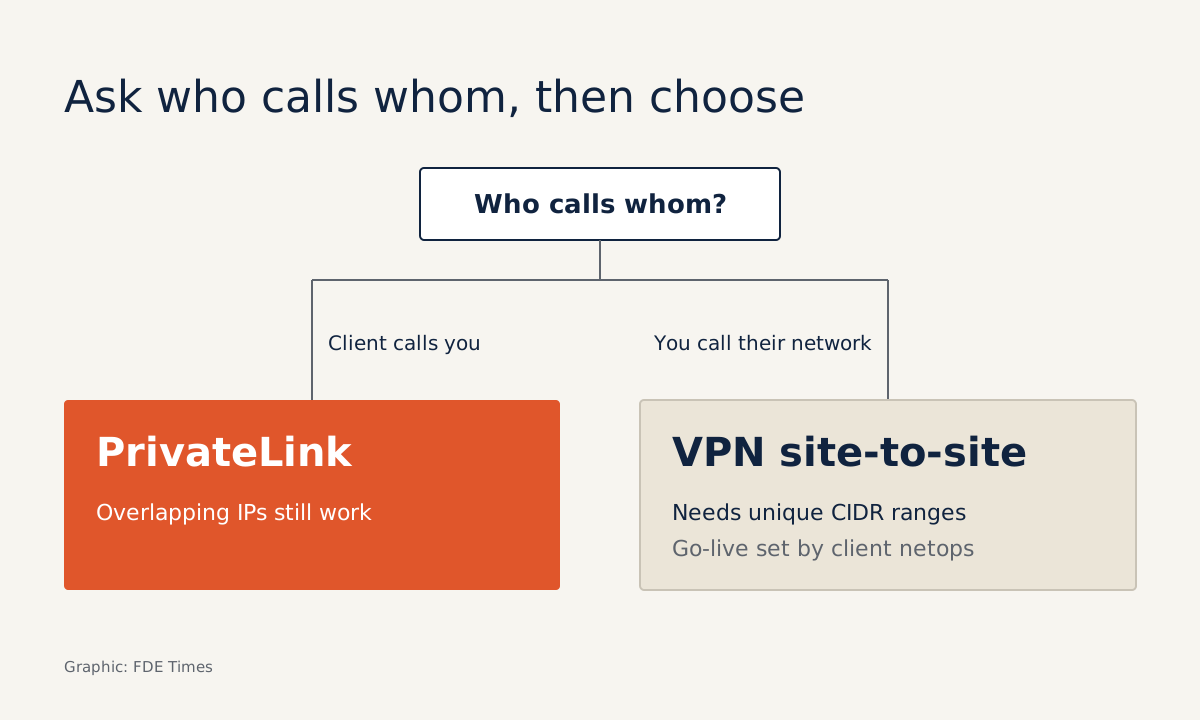
The first question for the customer's network team is who needs to call whom. Encryption can wait.

In brief
- Three questions decide it: who needs to call whom, where the data lives, and whether the two sides' IP ranges overlap.
- PrivateLink fits when the customer calls your service, even if both sides use the same IP range. A VPN fits when two networks must be joined and the customer has a network team to configure the device.
- The most common mistakes are assuming PrivateLink works in both directions and forgetting that, by default, nobody is allowed to connect to the endpoint service.
At the second kickoff meeting, the customer’s head of security is blunt: their systems have no public IP addresses and never will. Your service runs in your company’s VPC; the data sits in the customer’s network. Only now do you discover that both sides use 10.0.0.0/16.
The connection type you choose at this point shapes everything that follows: who has to configure what, which team has to find time in its calendar, and whether anyone has to touch the network addressing plan. Most of the choice comes down to two options: PrivateLink (Private Link on Azure) and site-to-site VPN.
Both keep traffic off the public internet, but they solve different problems. An FDE should know which one to propose before the customer’s network team starts asking.
Expose a service, or join two networks?
The easiest way to remember it: PrivateLink brings a service into the consumer’s network, while a VPN joins two networks together.
According to AWS documentation, PrivateLink lets a VPC reach a service as if it were inside that VPC, with no internet gateway, NAT, public IP, Direct Connect or Site-to-Site VPN.
The consumer initiates the connection and the provider accepts or rejects it. Traffic between the VPC endpoint and the endpoint service stays on the AWS network and never reaches the public internet.
A site-to-site VPN is a different animal. It is an IPsec connection, and each connection has two encrypted tunnels that can be used in parallel for higher availability. Because the two networks are joined, AWS recommends non-overlapping CIDR ranges when connecting several VPCs to a shared on-premises network.
A worked case: two VPCs on 10.0.0.0/16
Picture this: you are the FDE at a company that sells a model inference API. The customer’s application runs on AWS and needs to call your API.
Both VPCs are 10.0.0.0/16. For site-to-site VPN on AWS and VNet peering on Azure, the providers either recommend or require non-overlapping address ranges. So one side usually has to re-address its network, and that easily swells into a project of its own, well outside the scope of your deployment.
PrivateLink sidesteps the problem. AWS states plainly that it is a suitable solution when VPCs have overlapping IP ranges, and the AWS networking blog says you can expose endpoints between overlapping VPCs without changing the underlying addressing plan.
The reason is that the interface endpoint sits in the customer’s own subnet and takes an IP from the customer’s range, so no routes collide.
In practice, the order of work is as follows. On your side, as the provider, you put a load balancer in front of the service and create an endpoint service from that load balancer.
By default the endpoint service is open to nobody, so you must grant permission to the customer’s exact AWS principal, usually their AWS account. The customer creates an interface endpoint in their subnet, and then you accept the connection request.
The last step belongs to the customer, and it is the one security teams like best. Because the endpoint lives in their subnet, they control access with their own security group. For example, they might allow only their application servers to call port 443 on the endpoint. They do not have to open anything to the outside, nor trust a broad network route into your VPC.
When you need to call into the customer’s network
Now reverse the direction. Your agent has to read a database in the customer’s on-premises data centre. PrivateLink’s “consumer opens the connection” model does not automatically give you the reverse path. Having an endpoint does not mean the two networks can reach each other.
There are still a few options. AWS says a provider can run its service on on-premises servers, and resource endpoints allow access to resources in on-premises environments too, so PrivateLink is still worth considering when the customer’s infrastructure is not on AWS.
But when the real problem is “two networks need to talk to each other”, a site-to-site VPN is usually the more natural answer. Be clear about its costs from the outset.
The first cost is people. The customer must configure their own VPN device (the customer gateway device), and by default it is that device which must generate traffic and initiate IKE negotiation to bring up the tunnel. Your go-live date therefore depends on the customer’s network team’s calendar.
Do not confuse “initiate” here with PrivateLink’s “open the connection”. IKE is only the step that brings up the tunnel.
Next comes addressing. The overlapping 10.0.0.0/16 case above becomes a real problem, because AWS recommends non-overlapping ranges.
Finally there is bandwidth. A standard tunnel delivers 1.25 Gbps. Large-bandwidth tunnels of up to 5 Gbps are only available through Transit Gateway or Cloud WAN. If your agent needs to sync large volumes of data every night, work out this number in advance.
On Azure, the logic holds
If the customer is on Azure, the vocabulary changes but the reasoning does not. Microsoft says that with Azure Private Link, traffic between the virtual network and the service travels over the Microsoft backbone, and the service need not be exposed to the public internet. A provider can create a Private Link service to offer to customers.
One detail is worth raising with the security team: a private endpoint maps to a specific instance of a resource rather than to the whole service, which reduces the risk of data exfiltration.
On-premises networks can still connect over ExpressRoute or a VPN tunnel. Microsoft also presents Private Link as an alternative to VNet peering, which requires non-overlapping address space. It is the same overlapping-IP problem as on AWS.
Try it: five questions for the discovery meeting
Before writing the first line of Terraform, get five answers. One: who needs to call whom: does the customer call you, or do you call the customer? Two: where does the data live: AWS, Azure or on-premises? Three: what is the CIDR range of each network, and do they overlap?
Four: what is the peak data volume per hour, and does it exceed 1.25 Gbps per tunnel? Five: who on the customer side owns the network devices, and how long do they need to schedule the configuration? If the answer to question one is “the customer calls you” and to question three is “they overlap”, you will almost certainly be proposing PrivateLink.
Mistakes that stall a deployment
The most common mistake is treating PrivateLink as a two-way pipe. It is designed for the consumer to call the provider. If your agent needs to initiate calls in the other direction, design that path separately.
Almost as common is forgetting that an endpoint service is open to nobody by default. The customer creates the endpoint, reports an error, and both sides lose an afternoon before realising nobody has granted permission to their principal.
With VPNs, some teams set up only one tunnel when every connection comes with two, and are then surprised when that tunnel drops. Others commit to a go-live date without confirming that the customer’s network team is ready to initiate IKE.
Where this skill fits in your profile
When reading FDE job descriptions, look for phrases such as “customer VPC”, “private networking” or “on-prem deployment”. If they appear, the role very likely needs someone who can do exactly this work.
On your CV, instead of writing “knows AWS networking”, write one sentence with a constraint and an outcome, for example: delivered a service into a customer VPC with an overlapping IP range using PrivateLink, with no network re-addressing.
In interviews, do not stop at definitions. Walk through, in order, what you asked, what you chose and why you did not choose the alternative. Customers rarely remember which protocol you used. They remember that their security team did not have to open a single extra port to the internet.
Was this article useful?
Thanks for the feedback!
8 sources
- What is AWS PrivateLink?
- AWS PrivateLink concepts
- AWS PrivateLink - Amazon VPC Connectivity Options
- What is AWS Site-to-Site VPN?
- How AWS Site-to-Site VPN works
- What is Azure Private Link? | Microsoft Learn · 2026-07-08
- Announcing Azure Private Link · 2019-09-17
- Connecting Networks with Overlapping IP Ranges · 2022-06-16