Batch API: processing 300,000 customer documents at half price without missing the deadline
The cheaper API call is the easy part. The hard part is knowing which work can wait, splitting the batches cleanly and keeping the results after 29 days.

In brief
- Anthropic, OpenAI and Google Gemini all offer 50% off for batch work. With Anthropic and OpenAI, the price is accepting a wait of up to 24 hours, although most Anthropic batches finish in under an hour.
- 24 hours is a ceiling, not a promise: a batch that has not finished expires. The customer's deadline therefore needs room for a second run.
- Anthropic batch results can be downloaded for only 29 days, so the pipeline must save them to the customer's own store straight away.
On Monday, a customer sends you a link to a bucket holding 300,000 old contracts. They want every contract labelled by clause type and risk before Friday’s board meeting. Last week’s demo ran smoothly, because each call sent the model a single document.
Making 300,000 calls that way will hit rate limits, compete for quota with the chat feature the customer’s users rely on every day, and cost twice what it needs to. This kind of work is why providers built Batch APIs. A good FDE needs to know when to use one and, just as important, when not to.
Trading time for half the price
Anthropic’s Message Batches API is built for asynchronous bulk processing. Every token in a batch, input and output alike, is billed at 50% of the standard API price. According to the company’s documentation, most batches finish in under an hour.
The discount is not unique to Anthropic. Simon Willison notes that OpenAI and Google Gemini also offer 50% off for batch work. OpenAI’s Batch API completes within 24 hours, and 24 hours is the only completion window it accepts. What you give up in exchange for half price is the right to an immediate result.
So the deciding question is not technical but a product question: is anyone waiting for the result? Anthropic lists the work suited to batching as running evals, content moderation, data analysis and bulk content generation. What they have in common is that no user is staring at a chat box.
Run as a batch
- Labelling a backlog of documents
- Rerunning the eval suite after each prompt change
- Moderating content users have already posted
- Summarising reports, done before the next morning
Must run in real time
- Chatbots and assistants answering users
- Agents that must decide within a live workflow
- Transaction checks that must block instantly
- Any screen where someone clicks a button and waits
A Quora product manager once summed up the experience: sending off a batch and downloading the results within 24 hours is very convenient. “Convenient” holds only when the customer’s process already runs on a scale of days, not seconds.
24 hours is a ceiling, so do not turn it into a promise to the customer
This is where many engineers go wrong. At launch on October 8th 2024, Anthropic described each batch as being processed in under 24 hours. The current documentation is more explicit: a batch that has not finished processing within 24 hours expires, and when demand is high, more batches may expire.
If you promise a customer “results within 24 hours”, you are promising something the provider does not promise you. The rule to follow is that the customer’s deadline must leave room for at least two windows: one main run and one rerun for whatever expired or failed.
A Friday deadline with data ready on Monday is comfortable. If the data only arrives on Thursday evening, run the urgent part in real time.
Worked example: splitting 300,000 contracts
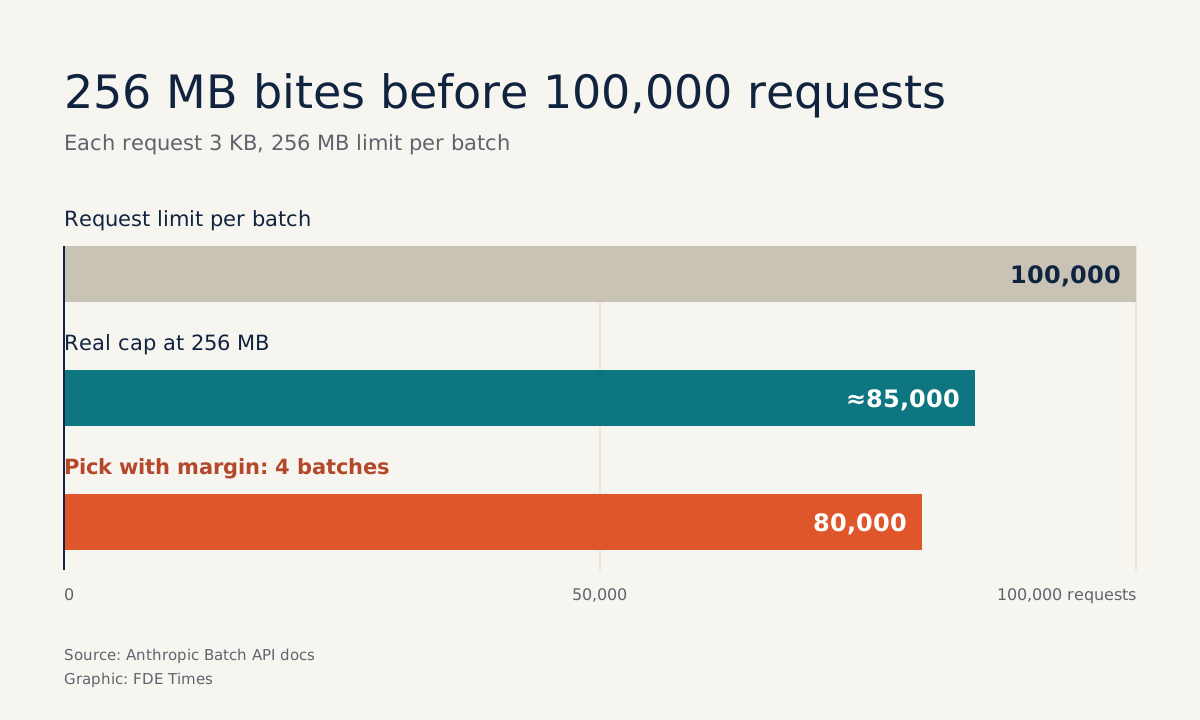
Anthropic’s limit is 100,000 requests or 256 MB per batch, whichever is reached first. A quick reading suggests 300,000 documents need only 3 batches. But contracts tend to be long, and the size limit will stop you before the request limit does.
Suppose each request, contract text plus prompt, averages 3 KB. Then 100,000 requests come to about 300 MB, over the 256 MB limit. Dividing 256 MB by 3 KB gives roughly 85,000 requests.
Leaving a safety margin for unusually long contracts, you set 80,000 requests per batch and end up with 4 batches. If the customer uses OpenAI, the limits are 50,000 requests and a 200 MB input file, so the numbers must be worked out again from scratch.
The second thing to design is custom_id. It is the only thread linking a result back to the right document, so use the primary key from the customer’s system rather than a loop counter. The code below sketches the flow with Anthropic’s Python SDK:
import anthropic

client = anthropic.Anthropic()

# System prompt shared by every contract, so cache it for 1 hour
SYSTEM = [{
    "type": "text",
    "text": LABELING_GUIDE,  # long, shared labelling taxonomy
    "cache_control": {"type": "ephemeral", "ttl": "1h"},
}]

def to_request(doc):
    return {
        "custom_id": doc.contract_id,  # the customer's primary key
        "params": {
            "model": MODEL,
            "max_tokens": 1024,
            "system": SYSTEM,
            "messages": [{"role": "user", "content": doc.text}],
        },
    }

batch = client.messages.batches.create(
    requests=[to_request(d) for d in chunk]  # chunk of at most 80,000 documents
)

# Once processing_status == "ended":
for entry in client.messages.batches.results(batch.id):
    if entry.result.type == "succeeded":
        save_to_customer_store(entry.custom_id, entry.result.message)
    else:  # "errored" or "expired"
        queue_for_retry(entry.custom_id, entry.result.type)
The cache_control line is not decoration. A batch can run for longer than 5 minutes, so Anthropic recommends a 1-hour cache duration so that shared context, such as a long labelling guide, gets more cache hits.
On October 15th 2024, Willison calculated that combining prompt caching with batching could cut Claude 3.5 Sonnet token costs by almost 95%. The real saving depends on how much of each request is shared prompt, but the direction is clear.
Results do not stay there for ever
Anthropic batch results can be downloaded for only 29 days after creation. After that you can still see the batch but can no longer retrieve the results. On a project where the customer may come back three months later asking “how was this contract labelled?”, that is a gap.
So the save_to_customer_store step must run as soon as the batch ends and write to a store the customer owns, along with the prompt version and model used.
If the customer has a real-time feature running alongside, OpenAI has one further advantage worth mentioning: batch rate limits are separate from per-model rate limits, so a large job does not eat into the quota for live traffic.
The rollout process and common mistakes
The sequence to follow with a large corpus is: confirm no one needs results in real time, measure the average request size, run a small trial batch of about 1,000 documents, split the rest by both limits, then build the retry loop for failed and expired requests before submitting the large batches.
The trial batch gives you real figures on timing and error rates, so you can report to the customer with numbers rather than guesses.
The most common mistake is treating 24 hours as an SLA. Next comes splitting batches by request count only, then discovering the size limit has been exceeded at submission. The third is harder to spot: using a custom_id that cannot be mapped back to the customer’s system, so 300,000 results come back with no way of telling which row belongs to which contract.
The remaining two are operational. One is leaving results on the provider’s platform and forgetting to download them before day 29. The other is not handling the errored and expired cases, so the customer’s report quietly misses a few per cent of the data without anyone noticing.
How to put it on your CV
When reading an FDE job description, look for mentions of processing large volumes of documents, running evals regularly or controlling model costs. If they are there, batch experience is worth bringing to the interview.
On a CV, a line such as “moved a labelling pipeline for N documents from real-time to batch, halving the cost, with a retry mechanism and results stored in the customer’s own store” shows a recruiter that you understand cost, reliability and data ownership.
Customers rarely ask you about Batch APIs. They ask why this month’s bill is so high, or why the chatbot was slow on the very day the big job ran. The FDE who spots early that half the workload never needed an immediate answer is usually the one who can answer both questions.
Was this article useful?
Thanks for the feedback!