RLS is on, yet the AI assistant can still read HR's documents
The usual cause is the role the application connects as, and the fix is a few lines of SQL in the right places.
In brief
- With RLS enabled but no policy, Postgres blocks every row, but owners, superusers and BYPASSRLS roles still get around it.
- Set the department as a transaction-local variable before running the retrieval query, then use USING for reads and WITH CHECK for writes.
- Permissive policies combine with OR, so add a restrictive policy as a hard barrier, plus an index that leads with department_id.
You have run ENABLE ROW LEVEL SECURITY, written your policies carefully and tested them in psql. Yet the AI assistant still answers a salesperson’s question with an excerpt from an internal HR document.
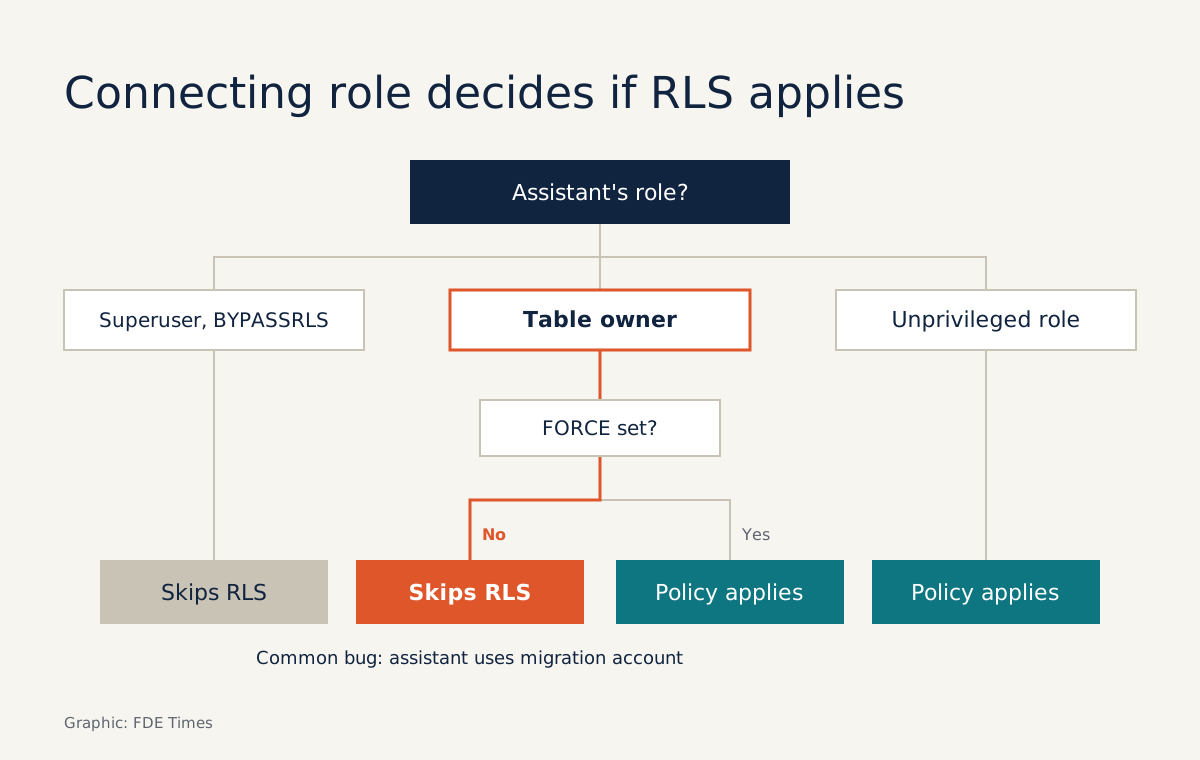
The policy is not broken. The application is connecting as the table’s owner role, and the Postgres documentation is clear that owners normally bypass row security.
FDEs run into this often when they bring a RAG assistant into a company: one shared document store, several departments, and a requirement that people “only see their own data”. Filtering in the prompt, or with a WHERE clause in application code, depends on nobody ever forgetting. RLS pushes the rule down into the database, where every query has to pass through it.
This guide works step by step on a local Postgres: a documents table, an assistant_app role, and a department set per transaction. You need Postgres, psql and permission to create roles. The final section covers pgvector for anyone doing vector retrieval.
Steps 1–2: build the table, then watch it “lock up”
The example below is stripped down: no embeddings, and primary keys entered by hand to avoid granting sequence privileges. The CHECK constraint rejects rows with an empty department, so no document can sit outside every boundary.
CREATE TABLE documents (
  id bigint PRIMARY KEY,
  department_id text NOT NULL CHECK (department_id <> ''),
  title text,
  content text
);

INSERT INTO documents VALUES
  (1, 'hr',      'Salary policy 2026',  '...'),
  (2, 'sales',   'Reseller price list', '...'),
  (3, 'finance', 'Q4 budget forecast',  '...');

CREATE ROLE assistant_app LOGIN PASSWORD 'change-this-password';
GRANT SELECT, INSERT, UPDATE ON documents TO assistant_app;
Now enable RLS and force the owner to obey it too:
ALTER TABLE documents ENABLE ROW LEVEL SECURITY;
ALTER TABLE documents FORCE ROW LEVEL SECURITY;
Check: log in as assistant_app and run SELECT count(*) FROM documents;. The result must be 0. According to the Postgres documentation, a table with RLS enabled but no policies uses a default-deny policy: no rows are visible or modifiable. The default is to block, and that is what you want.
The FORCE line is not decoration. Superusers and roles with the BYPASSRLS attribute always bypass RLS, and owners bypass it unless the table is set to FORCE ROW LEVEL SECURITY.
Render’s guide to multi-tenant RAG on pgvector treats FORCE as mandatory. Supabase warns of the same kind of risk: its secret key goes through the service_role role, which has bypassrls.
An AI assistant must never hold a key like that.
Step 3: one policy, two doors
Supabase offers an easy mental model: each policy is like a WHERE clause attached to every query. Your “WHERE” compares department_id with a session variable:
CREATE POLICY dept_isolation ON documents
  FOR ALL
  TO assistant_app
  USING (department_id = (SELECT current_setting('app.department_id', true)))
  WITH CHECK (department_id = (SELECT current_setting('app.department_id', true)));
Three parts of this statement deserve a close reading.
USING and WITH CHECK guard different things. USING decides which existing rows can be seen or modified, while WITH CHECK validates the new row produced by an INSERT or UPDATE. Without WITH CHECK, an agent with write access could read a document from its own department and then change its department_id to push it into another.
TO assistant_app scopes the policy. Leave it out and the policy applies to PUBLIC by default, meaning every role, and it becomes hard to tell which rule affects whom.
(SELECT ...) wraps current_setting. According to Supabase, this makes the planner evaluate the value once (an initPlan) rather than once per row. The trick only holds when the result does not depend on the row’s data, and the department variable meets that condition.
Check: log in as assistant_app, open a transaction without setting a department, and run SELECT count(*) FROM documents;. You need to see 0. If not, stop and review the policy before going further, because “forgot to set the department” is a bug that will certainly happen in real code.
Step 4: set the department per transaction
Render recommends setting the tenant ID as a transaction-local variable before running the retrieval query. In this example, the tenant is the department:
BEGIN;
SET LOCAL app.department_id = 'hr';
SELECT id, department_id, title FROM documents;
COMMIT;
Check: only the row with id = 1 appears. Next, try writing across into another department:
BEGIN;
SET LOCAL app.department_id = 'hr';
UPDATE documents SET department_id = 'sales' WHERE id = 1;
ROLLBACK;
Postgres must reject the UPDATE because the new row violates WITH CHECK. An UPDATE ... WHERE id = 2, by contrast, runs but changes no rows, because USING hides the sales department’s row.
The word LOCAL is what matters. Real applications use a connection pool, and a variable set at session level can linger into the next request from a different user. A transaction-local variable expires when the transaction ends.
In code, do not concatenate the department value into the SQL string. The value must come from the authenticated login session, never from anything the LLM generates.
Why can adding a policy widen access?
Suppose that three months later a colleague adds a policy letting every department read documents whose title starts with “Notice”. All permissive policies that apply to the same query are combined with OR. A single loosely written policy, such as a USING (true) added for debugging and never removed, is enough to throw the table wide open.
Restrictive policies work the other way: every one of them must pass before a row can be accessed. Use one as a hard barrier for the department boundary:
CREATE POLICY dept_guardrail ON documents
  AS RESTRICTIVE
  FOR ALL
  TO assistant_app
  USING (department_id = (SELECT current_setting('app.department_id', true)));
Check: temporarily create a permissive USING (true) policy for assistant_app, then rerun the query from Step 4. You should still see only the HR row. Drop the temporary policy afterwards.
Step 5: keep policies from slowing retrieval
The Postgres documentation notes that policies relying only on values in the row being examined are the simplest and fastest case, and recommends designing that way. The policy above is exactly that: it compares one column with a transaction constant, with no join or subquery into another table.
What remains is indexing. Supabase points out that a column only counts as indexed when it is the leading column of a btree index:
CREATE INDEX documents_dept_idx ON documents (department_id);An existing index on (created_at, department_id) does nothing for this policy. If you need a composite index, put department_id first.
With pgvector: missing results and no error
Picture a store of 1,000 passages, of which HR owns only 50. A vector query fetching LIMIT 10 through an HNSW index finds the nearest neighbours across the whole store first, and only then does RLS filter them. The result may shrink to two rows, the LLM answers poorly, and no error is logged.
Render describes exactly this: filtering combined with HNSW can return fewer rows than LIMIT. The parameter to look for is pgvector’s hnsw.iterative_scan, which decides whether the index keeps scanning until LIMIT is filled.
Check the documentation for the exact pgvector version you have installed to see which values it accepts, then enable it in the same transaction as the retrieval query.
Whichever value you choose, turn it into a measurement. Wrap your actual retrieval query in count(*) and run it as assistant_app with the smallest department. The snippet below is simplified: the ORDER BY is where you paste the vector distance expression your application uses.
BEGIN;
SET LOCAL app.department_id = 'hr';
SELECT count(*) FROM (
  SELECT id FROM documents
  ORDER BY /* your vector distance expression */
  LIMIT 10
) AS hits;
COMMIT;
Check: with HR’s 50 passages, the result must be 10. If you get 2 or 3, retrieval is silently starved of context. Add this count to your automated tests, compare it against the smaller of LIMIT and the department’s actual number of passages, and rerun it whenever the index configuration changes.
Common mistakes, and how they look at a client
The most common mistake is the one this article opened with: the assistant’s connection string reuses the migration account, which owns the table, or an admin key used “to save time”. The second is harder to spot.
The Postgres documentation warns that referential integrity checks, such as foreign keys, bypass RLS and can create “covert channels” that leak information; for example, a constraint-violation error can tell a user that an ID exists in another department.
At a client, this skill shows up in the very first security meeting. The security team will ask: “How do you prove the assistant can’t read another department’s data?”
A convincing answer is a clearly named role, policies that live in migrations, and a CI test suite that tries to read and write across the boundary and must fail. Ask for a least-privilege Postgres account in the first week, before someone sends you the owner’s password.
If you want to move into FDE work, put this exercise in your portfolio as a small repo: schema, policies, isolation tests and a README paragraph explaining why FORCE and AS RESTRICTIVE are there.
When a job ad mentions “enterprise data”, “permissions” or “multi-tenant RAG”, put a concrete line on your CV such as “designed per-department data isolation with Postgres RLS for a RAG assistant, tested in CI”.
A line like that carries more weight than a list of frameworks.
AI assistants will increasingly be given write access, tool calls and the ability to run their own queries. What holds the boundary then is not a “do not disclose data” line in the system prompt, but SQL that refuses at the database layer.
Was this article useful?
Thanks for the feedback!