Without Kubernetes, Docker Compose can still roll back a bad deploy
A health check, the --wait flag and one else branch in deploy.sh bring back the old image when the new one fails to turn healthy in time.
In brief
- --wait blocks the command until the service is healthy, and --wait-timeout makes a broken release fail the command instead of hanging.
- A health check returning 0 means healthy and 1 means unhealthy; code 2 is reserved, so do not use it.
- For zero downtime you need a reverse proxy, and you must drop container_name and ports from the service.
Plenty of customers do not run Kubernetes. They have a single VM, a compose.yaml file and an operator who only knows how to type docker compose up. When a new release breaks at 6pm, what saves you is not a platform but a deploy command that knows how to say “no” and go back to the old version on its own.
This guide builds exactly that. You will end up with an app service that has a health check, a migration job that runs first, and a deploy.sh script that takes two versions: the new one and the old one. If the new release is not healthy within the time limit, the script brings the old one back up by itself.
You need Docker with the Compose plugin, a small web application with a /health endpoint, and two different image tags for it, such as v1 and v2. Every command below runs on a laptop before you take it to a customer’s machine.
The health check must speak Docker’s language
Docker reads the exit code of the check command: 0 means the container is healthy and ready, 1 means it is unhealthy, and 2 is reserved. By default --retries is 3, so a container is only marked unhealthy after three consecutive failures.
Step 1. Add this to the application’s Dockerfile:
# Assumes the image has curl and the app listens on port 8080
HEALTHCHECK --retries=3 CMD curl -f http://localhost:8080/health || exit 1
The || exit 1 is not decoration. Many tools return arbitrary error codes on failure; forcing it to 1 ensures you never accidentally return 2, which Docker does not treat as a valid status.
Check: build the image, run the container, then look at the STATUS column in docker ps. Next, switch off the /health endpoint and wait: the container should turn unhealthy after three failed checks.
One point that is often missed: the /health endpoint should check what the application actually needs, such as its database connection. A /health that always returns 200 lets a broken release slip through the gate without anyone noticing.
Start-up order is part of the deploy
Compose can hold a service back until the health check of the service it depends on passes, using depends_on with condition: service_healthy. For a one-off job such as a migration, the service_completed_successfully condition requires that job to finish successfully before the next service may start.
Step 2. A trimmed-down compose.yaml:
services:
  db:
    image: postgres:16
    healthcheck:
      test: ["CMD", "pg_isready"]   # simplified, adjust for your DB
  migrate:
    image: myapp:${APP_VERSION}
    command: ["./migrate"]
    depends_on:
      db:
        condition: service_healthy
  app:
    image: myapp:${APP_VERSION}
    depends_on:
      migrate:
        condition: service_completed_successfully
The ${APP_VERSION} part is a simplifying assumption: the image tag is passed in through an environment variable. The ./migrate command is also illustrative; replace it with your real migration command.
Check: run APP_VERSION=v1 docker compose up and watch the logs. migrate should only run after db is healthy, and app should only start after migrate exits successfully. If you make migrate exit with an error, app will not be started.
The deploy gate lives in two flags
The --wait flag makes docker compose up block until services are running or healthy, and it implies detached mode, so you do not need to add -d. The --wait-timeout flag sets the maximum number of seconds to wait, so a broken release makes the command fail rather than hang forever.
Together, these two flags turn a start-up command into a yes-or-no question the shell understands through the exit code. Add --no-deps to update only app without touching linked services such as db.
Step 3. Create deploy.sh:
#!/usr/bin/env bash
set -u
NEW="$1"   # e.g. v2
OLD="$2"   # e.g. v1

if APP_VERSION="$NEW" docker compose up --wait --wait-timeout 90 --no-deps app; then
  echo "Deployed $NEW"
else
  echo "$NEW unhealthy, rolling back to $OLD"
  APP_VERSION="$OLD" docker compose up --wait --wait-timeout 90 --no-deps app
fi
Rollback is now literally one command: ./deploy.sh v2 v1. There is nothing to remember at midnight; you only need to know which tag was running well.
Check: build a v2-broken tag whose /health always fails, then run ./deploy.sh v2-broken v1. The first command should fail within 90 seconds, the rollback line should print, and docker ps should show app running the v1 image again in a healthy state.
Do not pick 90 seconds at random
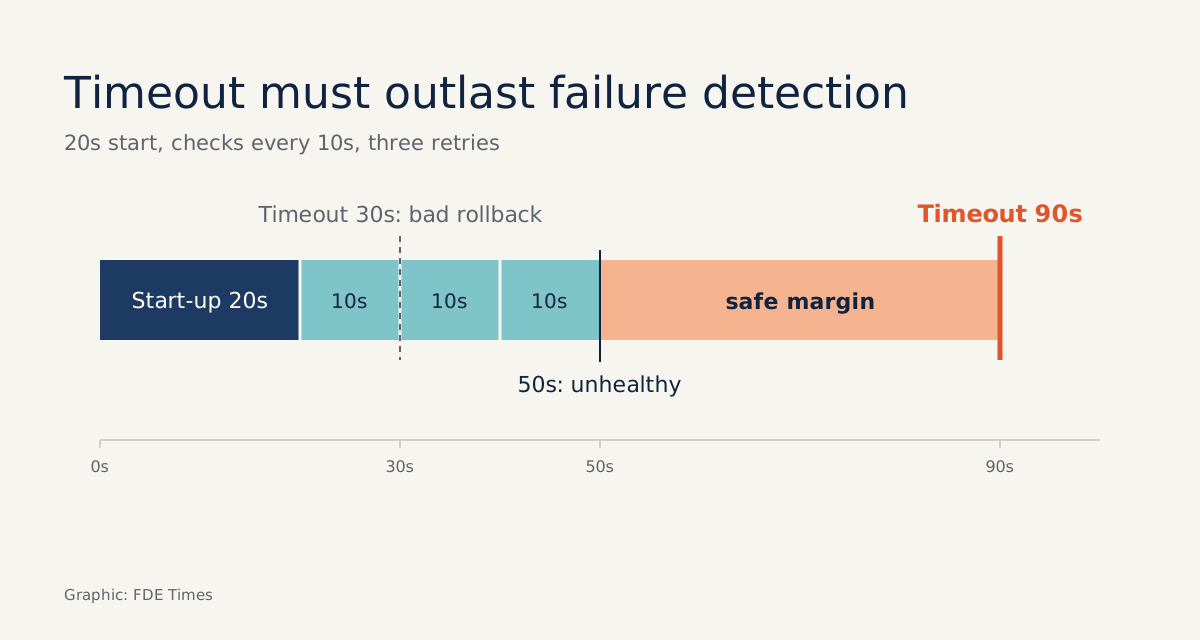
Do the arithmetic. Suppose the application takes about 20 seconds to start and checks run 10 seconds apart. With the default three retries, a broken release needs roughly 20 + 3 × 10 = 50 seconds to be marked unhealthy.
Set --wait-timeout 30 and even a good release that starts slowly may be judged a failure and rolled back for nothing. Set it to 600 and, after every failed deploy, the customer waits ten minutes before the old version returns. Measure the real start-up time on the customer’s machine, then set the timeout above that total with a safety margin.
There is one more trap in --no-deps: because it leaves linked services alone, migrate will not run in this script. Run migrations as a separate step before the deploy, and write them to be backward compatible, because rolling back the image does not roll back the schema. v1 must be able to run on a database that v2 has migrated.
Zero downtime needs two versions running at once
The script above only answers whether the new release is healthy; it does not promise that the old release keeps serving while the new one starts.
The Compose deploy specification distinguishes two update orders: stop-first stops the old version first, while start-first brings the new version up first so the two overlap for a while.
If users are to see no gap at all, you need the second: two containers alive during the handover.
The --scale flag overrides the scale setting in the Compose file, letting several instances of a service run side by side. The community tool docker-rollout, a Docker CLI plugin, automates exactly that idea: it doubles the number of instances, waits for the new ones to come up, then removes the old ones.
But it comes with constraints: the service must not declare container_name or ports in the Compose file, and you need a reverse proxy to split traffic between the old and new containers.
The constraint has a reason: two containers cannot hold the same fixed port on the host, nor share the same name. So the proxy holds the public port, while the containers behind it are created or removed without users ever knowing.
The Compose specification also has declarative rollback
The Compose deploy specification describes this behaviour declaratively. The rollback_config block defines how a service is rolled back when an update fails. Inside update_config, failure_action takes one of three values, continue, rollback or pause, while order chooses between stop-first and start-first as described above.
services:
  app:
    deploy:
      update_config:
        failure_action: rollback
        order: start-first
This is a trimmed configuration. Before relying on it, check whether the tool running the Compose file on the customer’s machine actually honours these deploy blocks. If you are unsure, the deploy.sh script above is the more transparent option, because you can see every step it takes.
Taking the process to the customer’s machine
The typical FDE situation is an on-prem server or a VM in the customer’s cloud, where the IT team will not allow another orchestrator to be installed. You hand over a repo with a compose.yaml, a deploy.sh and a README that states clearly which tag is running, how to deploy and the rollback command. The customer’s operator must be able to do it without calling you.
The first thing to do at a customer is ask what the application’s /health checks, then measure the real start-up time on their machine. Those two facts decide whether a broken release is stopped or slips through the gate.
If you are applying for FDE roles, do not write “knows Docker” on your CV. Write a more specific line, such as: built a Compose deploy process with health checks, timeouts and automatic rollback for environments without Kubernetes. Add a small repo with a v2-broken scenario so a recruiter can run it and watch the rollback work.
Customers rarely remember the deploys that went smoothly. They remember the time a broken release hit production and, three minutes later, the system had put the old version back by itself.
Was this article useful?
Thanks for the feedback!