Without a shared definition of P1, every bug becomes a crisis
A four-level table agreed before go-live tells you which faults justify a call at midnight and which can wait until morning.
In brief
- There is no common standard for P1, P2 and P3, so the client and your team will read them differently unless they are written down
- Each level needs both a measurable impact criterion (for example, more than 25% of users) and a committed response speed
- When unsure, classify higher, change the level once things are clear, and treat reclassification as normal
Eleven at night, and the phone buzzes. The client’s head of operations has sent a message: “P1, the export report button is misaligned.” You open the laptop, confirm that the button is indeed a few pixels off, and realise this is the third time this week you have been woken for a fault nobody needed fixed before morning.
The client is not trying to make life hard. They use the word P1 as they understand it; you understand it the way your own team does. Rootly, an incident management platform, says plainly that there is no common standard for P1/P2/P3 or SEV0/SEV1/SEV2 labels.
For an FDE the problem is worse than for an internal SRE team, because you sit between two organisations. OneUptime writes that without clear definitions, every incident turns into an argument.
The way to avoid this is to sit down with the client before go-live, write out four levels from P1 to P4, and have both sides sign.
One label, two questions
When a client says “P1”, they are answering two questions at once: how bad is this, and how fast must it be handled. Rootly separates the two. Severity measures an incident’s impact; priority decides how quickly to act. People tend to merge the concepts, and the midnight argument usually starts there.
Severity should be measured with something countable. PagerDuty advises each organisation to define its own scale, typically based on the percentage of users or accounts affected. OneUptime gives a sample threshold for high impact: more than 25% of users affected, or a revenue-generating function degraded.
How many levels? In incident.io’s experience, 3-5 is about right, because fewer cannot distinguish between different incidents. Four levels, P1-P4, sit comfortably in that range and are enough to separate “wake someone now” from “put it in the next sprint”.
A table for a specific client
Imagine you are deploying an agent that reads claims files for an insurance company, used daily by 400 claims adjusters. For this client, the 25% threshold means more than 100 people. The table you bring to the meeting might look like the one below, with each row stating both impact and response speed.
| Level | Impact | Response | Example at the insurer |
|---|---|---|---|
| P1 | The agent stops running, or more than 100 of the 400 adjusters cannot process claims | Start immediately, 24/7, drop planned work, notify leadership on both sides | Every claim returns an error after a model update |
| P2 | A smaller group is blocked on a core function | Respond within the business day, after any P1 work | 30 people cannot upload one type of scanned form |
| P3 | Quality drops but there is a workaround | Add to the regular work schedule; no out-of-hours calls unless things get worse | The agent misclassifies a few rare claims, and reviewers can correct them by hand |
| P4 | A minor or cosmetic fault that does not stop anyone using the product | Open a ticket; page no one | The export report button is a few pixels off |
Notice how the table keeps the two questions apart while using a single label: the Impact column answers the severity question, the Response column answers the priority question. Putting them on the same row means both sides have agreed in advance that impact of this size goes with response of that speed, so nobody has to renegotiate at midnight.
Nor is the Response column invented: it matches how Rootly defines P1, P2 and P3, OneUptime’s rule of no out-of-hours calls for low levels, and PagerDuty’s practice of pushing cosmetic faults to a ticket.
Notifying leadership at P1 corresponds to PagerDuty’s SEV-1, the level of incident that requires public notification and direct communication with executives.
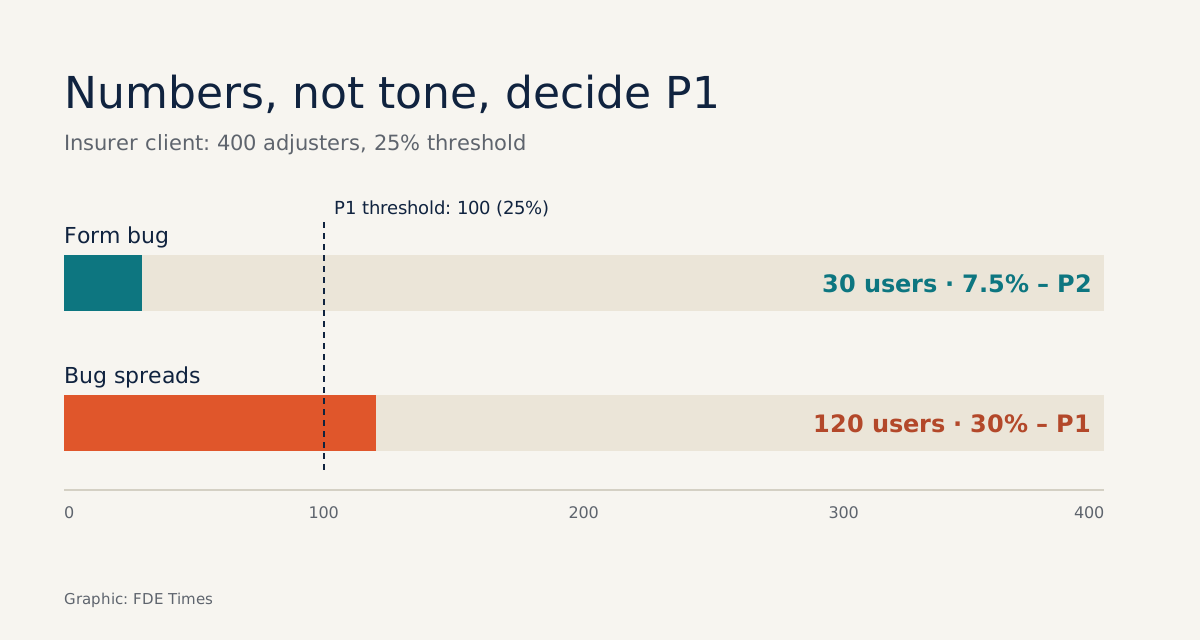
Now apply the numbers. The form fault blocking 30 people, or 7.5% of 400, is still below the 25% threshold. So it is P2, even if those 30 people are having a bad day.
If the same fault spreads to 120 people, or 30%, it crosses the threshold and becomes P1. The level is decided by the number, not by the tone of the message. And the misaligned button at eleven at night is P4: a ticket, and nobody gets woken up.
The pre-go-live meeting
A draft table is only worth something when the client sets the thresholds themselves. Do not ask “what do you want P1 to be?”, because that invites the answer “everything is important”. Ask about people and about hours:
You: “If the agent stops running at 3am on a Sunday, who do you want called? Do you want to be called yourself?”
Client: “Of course, the whole claims department would be at a standstill.”
You: “And if only one type of form is failing and about 30 people are blocked, does anyone need to be woken in the night, or can it wait until Monday morning?”
Client: “Monday morning is fine, as long as someone deals with it that day.”
After those two answers, the client has drawn the line between P1 and P2 themselves. All you need to do is record it as a number.
The sequence runs like this. Before the meeting, count the real users and identify which functions are tied to revenue, then fill in the draft table with examples taken from the client’s own system. In the meeting, use the script above to adjust the thresholds.
Before signing, add two rules at the bottom of the table. The first comes from PagerDuty: if unsure which level an incident is, treat it as the higher one, then review at the postmortem. The second comes from Rootly: the initial classification is only provisional, and changing the level shows the process is working.
Why do so many tables end up as waste paper?
The most common mistake is having labels without criteria. A row that reads “P1: critical” helps nobody at midnight, because “critical” is exactly what the two sides are arguing about. Each level needs a number or a specific function that the on-call engineer can check within minutes.
The second mistake is reluctance to downgrade. An incident opened as P1 that turns out after 20 minutes to affect ten people should be lowered to P2, with the reason recorded so both sides can see it. If nobody dares to downgrade, the client learns that tagging something P1 makes someone come running, and the table stops working within a few weeks.
The third mistake is writing the table and filing it away. It has to match the alerting configuration and the on-call rota. If a P3 still triggers a page at 2am, the table is just a promise on paper. Finally, resist adding P5 and P6 because each side wants an exception: with too many levels, the on-call engineer spends time choosing a label instead of fixing the problem.
Turn the table into career evidence
When an FDE job posting mentions “on-call”, “incident response” or “SLA”, it is a good prompt for a question in the interview: who defines incident levels with the client, and where is that definition written down? The answer gives a fairly clear picture of what your on-call nights will look like.
On a CV, a specific line carries more weight than an adjective: “Built a P1-P4 table with the client based on the share of users affected, wired directly into the paging configuration.” If you have before-and-after figures on out-of-hours pages, include them.
In interviews, describe a time you downgraded an incident and how you explained it to the client.
The four-row table does not make the system fail less often. It only ensures that the next time the phone buzzes at midnight, it is for something genuinely worth waking up for.
Was this article useful?
Thanks for the feedback!