A green pipeline is no proof the client's install actually runs
Three pytest tests and one exit code tell you whether to roll back, provided exit code 5 never slips through the gate.
In brief
- Smoke tests check only a few critical paths, such as startup, database connectivity and authentication, and finish in under 2 minutes.
- Declare a command-line option in conftest.py so the same suite runs against any client environment.
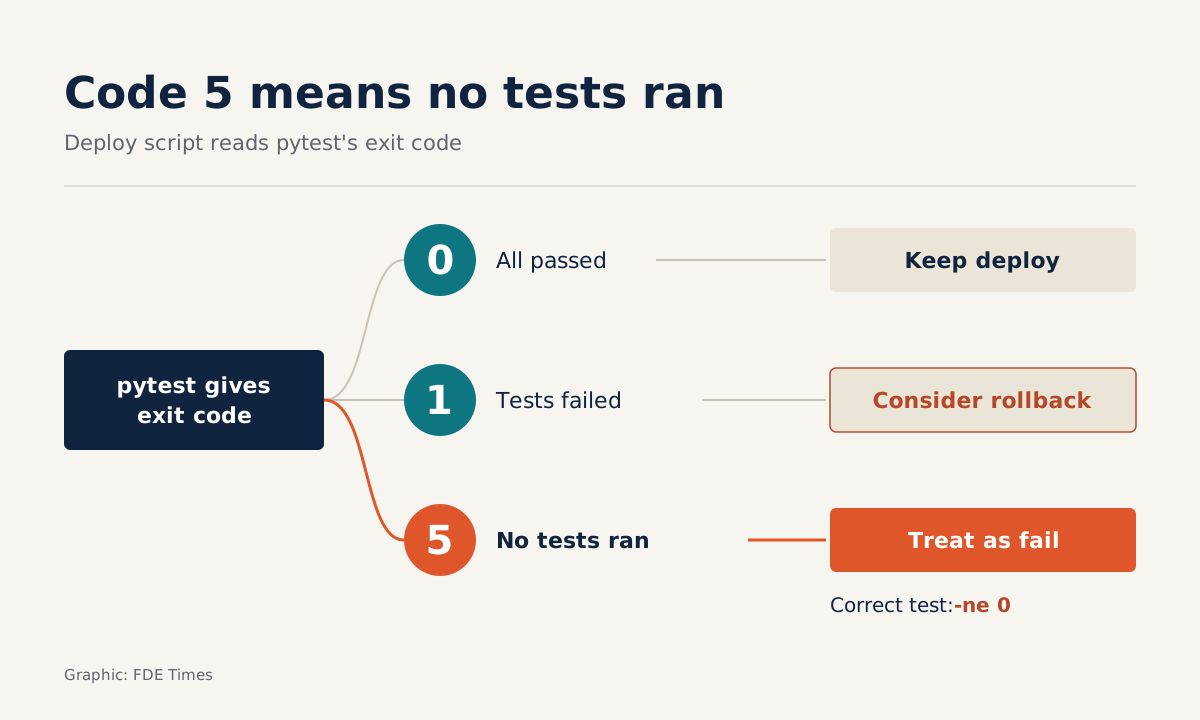
- The deploy script must treat every non-zero exit code as a failure, including code 5 (no tests collected).
In ArgoCD you can attach smoke tests to a PostSync hook so they run as soon as a deployment completes. One detail is often missed: when the tests fail, the sync is marked as failed, but the new resources stay in the cluster. The tool only tells you. The decision to roll back is still yours.
For a forward deployed engineer this is everyday work. You install the product into a client’s infrastructure, with their own network, their own database and their own sign-in system, and the pipeline goes green. The Google SRE Workbook is explicit that some release failures only show up once real traffic starts flowing into a service. The client’s environment is exactly where those failures appear.
This guide shows how to write a smoke test suite in pytest. The suite runs against any client environment with a single command-line option, and returns an exit code that your deploy script uses to decide whether to keep the release or roll back.
What you will build, and what you need
Take a hypothetical example: you have just deployed a document search service into a client’s infrastructure. The service has three endpoints, also hypothetical for illustration: /health reports that the process has started, /ready returns 200 only when it can reach the database, and /api/search requires a token. In real work, substitute the endpoints your product exposes.
You need Python 3, pytest, the URL of the environment to check and a test token stored in an environment variable. The code below uses the standard library’s urllib so there is nothing extra to install. It is a cut-down version, enough to learn the approach, not a finished production build.
smoke/
  pytest.ini
  conftest.py
  test_smoke.py
Step 1: check only what brings the whole system down
A smoke test is a quick check of whether core functions work. It gives you an early signal that the foundations of the deploy are running. Keep the scope to critical paths such as startup, database connectivity and authentication. Edge cases and individual small features do not belong here.
The time budget should be under 2 minutes for the whole suite. In the example above there are three tests, each request with a 5-second timeout. The worst case is all four requests hanging until the timeout, roughly 20 seconds, still well inside the limit. If the suite starts growing to several minutes, that is a sign you are putting regression tests in the wrong place.
Step 2: register the marker and let pytest catch typos
pytest recommends registering custom markers, such as smoke, in the configuration file:
# pytest.ini
[pytest]
markers =
    smoke: quick checks of critical paths after a deploy
Check: run pytest --markers and look for the smoke line in the list. When running the suite, always add --strict-markers. With this flag, any unregistered marker you apply with a @pytest.mark... decorator raises an error. A mistyped @pytest.mark.smok is stopped immediately, instead of silently ensuring that test is never selected.
Step 3: one suite for every client environment
Do not hardcode the URL. The pytest documentation shows how to add a command-line option through pytest_addoption in conftest.py, then pass its value into tests through a fixture:
# conftest.py
import pytest

def pytest_addoption(parser):
    parser.addoption("--target-url", action="store", default=None,
                     help="Base URL of the environment to check")

@pytest.fixture
def target_url(request):
    url = request.config.getoption("--target-url")
    if not url:
        pytest.fail("Missing --target-url")
    return url.rstrip("/")
Check: run pytest --help and look for --target-url among the custom options.
Step 4: write three tests for three critical paths
# test_smoke.py
import os
import urllib.error
import urllib.request

import pytest

TIMEOUT = 5  # seconds

def get_status(url, token=None):
    req = urllib.request.Request(url)
    if token:
        req.add_header("Authorization", f"Bearer {token}")  # assumed auth scheme
    try:
        with urllib.request.urlopen(req, timeout=TIMEOUT) as resp:
            return resp.status
    except urllib.error.HTTPError as err:
        return err.code

@pytest.mark.smoke
def test_service_started(target_url):
    assert get_status(f"{target_url}/health") == 200

@pytest.mark.smoke
def test_database_reachable(target_url):
    assert get_status(f"{target_url}/ready") == 200

@pytest.mark.smoke
def test_auth_rejects_then_accepts(target_url):
    assert get_status(f"{target_url}/api/search?q=test") == 401
    token = os.environ["SMOKE_TOKEN"]
    assert get_status(f"{target_url}/api/search?q=test", token) == 200
The third test checks both directions. Getting through without a token is a security hole, not a success. A test that only checks “with a token, you get 200” will still pass even if the authentication layer has been switched off entirely.
Step 5: use the exit code to keep or roll back
pytest’s exit code is what the deploy script needs to read. Code 0 means every test passed. Code 1 means tests were collected and run but some failed. Code 5 means no tests were collected, and that is the trap.
pytest -m smoke --strict-markers --target-url "$TARGET_URL" -q
rc=$?
if [ "$rc" -ne 0 ]; then
  echo "Smoke tests failed (exit $rc), consider rolling back"
  exit 1
fi
Imagine you mistype -m smoek on the command line. --strict-markers only catches typos in decorators, not in the -m expression, so pytest selects no tests and returns code 5. If your script only checks rc -eq 1, the deploy passes the gate without a single test having run. That is why the correct condition is -ne 0.
Three ways smoke tests deceive you
The exit code 5 trap above is the first. The second is letting the suite grow until it takes ten minutes: people then start skipping it when they are in a hurry, which is exactly when it is needed most.
The value of a smoke test lies in its speed: when a test fails you know at once that something is broken, and you can roll back before users notice.
The third is believing the system will handle it for you. As the ArgoCD example at the start shows, a failed PostSync hook does not remove the new resources. Write the rollback procedure in advance, or at least give a named person the authority to decide, before you press deploy.
What this skill looks like on a client site
Google SRE defines canarying as a partial, time-limited deployment of a change, together with an evaluation of that change. A smoke test is a simpler version of that evaluation step, and often the only feasible one in your first week on a client site, before you have split traffic or dashboards.
In that first week, the first thing to do is ask the client for a dedicated test account for smoke tests, so that SMOKE_TOKEN does not have to borrow a real person’s token.
The suite is also a communication tool. When the client asks “is it installed yet?”, you answer with three green lines and an exit code rather than “it should be fine”.
In interviews or on your CV, be specific: which paths the smoke tests check, at which stage of the pipeline they run, and what failures they have caught. A description like that shows you can verify that a product is actually running, not merely that it has been deployed.
A green pipeline tells you the code has been delivered. Whether the product actually runs on the client’s infrastructure is a question only those three pytest tests can answer.
Was this article useful?
Thanks for the feedback!