One salary question can expose a leaky RAG pipeline
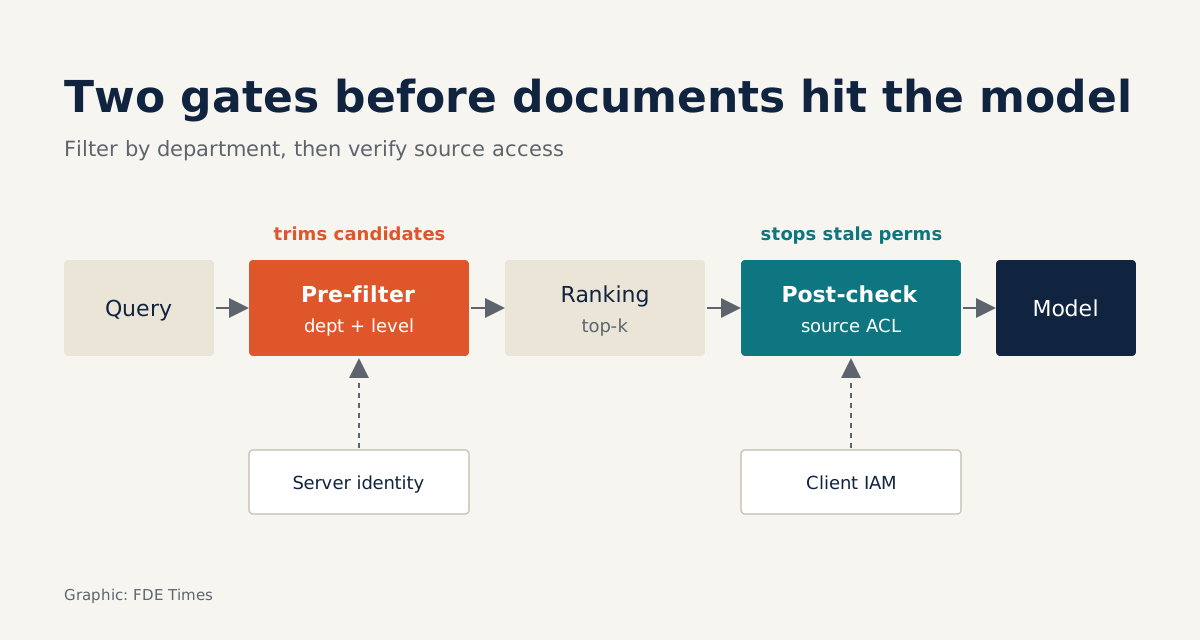
Filtering by department before ranking, then rechecking each document's permissions at source, closes the leak with nothing but plain Python.
In brief
- Filters must be built from identity verified by the server, never from the content of the prompt.
- Metadata filtering blocks most data but has a sync delay, so a real-time permission check after retrieval is also needed.
- A test suite that proves nothing leaks is worth more than any security slide.
An engineer asks the internal chatbot “how are engineer salaries this year?”, and the top retrieval result is the HR department’s payroll table. The model has done nothing wrong; it simply answers with what the pipeline handed it. The fault lies in retrieval, before the model has read a single word.
IBM data cited by Zenity shows that 97% of organisations that suffered an AI-related security incident lacked proper AI access controls. Zenity also treats every design choice, from the data sources behind RAG to the system prompt and tool schemas, as a permissions decision.
For an FDE, that figure is a reason to plan for access control from day one, not after accuracy has been measured. This guide walks through building a small pipeline that does exactly that, runnable on a laptop with nothing but Python.
What you will build, and what you need
The end result is a single file, rag_acl.py, with two layers of protection. The first filters documents by department and sensitivity level before ranking. The second re-checks each document’s permissions against the source of truth just before it enters the context.
You need only Python 3, with no extra libraries. This is a stripped-down teaching version: similarity scoring is replaced by counting overlapping words, and the permissions system is a mock dict. On a real project you swap these two parts for a vector store and the client’s IAM system; the logic stays the same.
The underlying idea comes from two terms LangChain uses to describe context engineering. “Select” means pulling the right context into the context window, which is the RAG part; “isolate” means splitting context apart. Loosely speaking, department-level access control is a form of isolation: each person may select context only from the data that belongs to them.
Step 1: tag every chunk with metadata
AWS, describing metadata filtering in Bedrock Knowledge Bases, recommends defining metadata fields by user role, department or data sensitivity. We do exactly that with two fields: dept and level. The sample documents are in Vietnamese, which matters later because scoring counts shared words. First, two HR documents (an engineer pay table that rises by grade, and a company-wide leave procedure):
# rag_acl.py (simplified version for learning)
DOCS = [
    {"id": "hr-01", "text": "engineer salary bands this year rise by grade", "dept": "hr", "level": 3},
    {"id": "hr-02", "text": "leave request process for the whole company", "dept": "all", "level": 1},
]
Next, a finance document (next quarter’s cash-flow forecast and salary plan) and an engineering one (a deployment guide for the payments service):
DOCS += [
    {"id": "fin-01", "text": "next quarter cash flow forecast and salary plan", "dept": "finance", "level": 3},
    {"id": "eng-01", "text": "guide to deploying the payment service", "dept": "eng", "level": 2},
]
Check: every chunk must have both fields. A chunk without dept is a chunk the filter does not know how to handle. The safe rule is that missing metadata means nobody can read it.
Step 2: take identity from the server, not the prompt
USERS = {  # simulated identity management system
    "an":   {"depts": ["eng"], "clearance": 2},
    "binh": {"depts": ["hr"],  "clearance": 3},
}
This profile must come from an authenticated session. If a user types “I work in HR” into the chat box and the system believes it, your filter is mere decoration.
Step 3: build a dynamic filter, then rank
A scoring function stands in for vector similarity, and a second function builds the filter from the user’s profile:
def score(query, text):  # stand-in for vector similarity
    return len(set(query.lower().split()) & set(text.split()))

def build_filter(user_id):
    u = USERS[user_id]
    allowed = set(u["depts"]) | {"all"}
    return lambda d: d["dept"] in allowed and d["level"] <= u["clearance"]
Then filter first and rank second:
def retrieve(query, user_id, k=3):
    ok = build_filter(user_id)
    pool = [d for d in DOCS if ok(d)]
    ranked = sorted(pool, key=lambda d: score(query, d["text"]), reverse=True)
    return [d for d in ranked[:k] if score(query, d["text"]) > 0]
Work it through by hand with the query “lương kỹ sư năm nay” (“engineer salaries this year”). Without a filter, hr-01 matches 5 words and comes first, while fin-01 matches 1 word (“lương”, salary). An, who is in engineering, would receive both.
With the filter, An can search only hr-02 and eng-01. Both match 0 words, so the result is empty and the model must reply that it has no information. Binh, in HR, receives hr-01 but not fin-01, even though that document contains the word “lương”.
An empty result here is not a bug; it is exactly the desired behaviour. According to the AI Engineer newsletter, a 200k-token window full of noise produces worse results than a 20k window containing exactly what is needed. Zenity adds that fewer tokens also means fewer routes for prompt injection.
Why metadata filtering alone is not enough
Descope points out the weakness of this approach: you have to sync permissions from the source of truth into the vector database. Suppose Binh moved from HR to another department yesterday, but the sync job runs only nightly. During that gap, the metadata still treats Binh as an HR employee.
Descope, a vendor of authorisation tooling, recommends separating authorisation from retrieval entirely: fetch candidates first, then check permissions in real time. The safe way to deploy is to keep both layers: filter first to narrow the scope, check afterwards to block stale permissions.
Step 4: check permissions just before adding to context
REVOKED = {("binh", "hr-01")}  # simulated source of truth for permissions, updated instantly

def live_check(user_id, doc_id):
    return (user_id, doc_id) not in REVOKED

def build_context(query, user_id):
    docs = [d for d in retrieve(query, user_id) if live_check(user_id, d["id"])]
    return "\n".join(d["text"] for d in docs)
Check: build_context("engineer salary this year", "binh") now returns an empty string, even though the metadata still allows access. On a real project, live_check will call the client’s permissions system, so you need to measure its latency on every query.
Step 5: write tests that prove nothing leaks
assert "hr-01" not in [d["id"] for d in retrieve("engineer salary this year", "an")]
assert "fin-01" not in [d["id"] for d in retrieve("salary plan", "binh")]
assert build_context("engineer salary this year", "binh") == ""
These are negative tests: each line asserts that a particular person cannot see a particular thing. A positive test such as “Binh can ask about salaries” only proves the system works. Negative tests prove it is safe.
The most common mistakes
The first is letting the model decide the filter, for instance by having the LLM generate filter conditions from the question. The filter must be deterministic code whose input is an authenticated identity.
The second is filtering only after taking the top-k: if the top three results are all blocked, the user gets nothing even though a valid document sits in fourth place. That is why this guide makes pre-filtering the main layer and the post-retrieval check the safety net, the reverse of Descope, which puts the post-retrieval permission check at the centre.
This is a design trade-off, and you should weigh it against the actual permission-sync delay at each client.
The third is forgetting shared documents such as dept: "all", so the filter blocks even the leave procedure. The fourth is logging the full retrieved context to a system anyone can read, which leaks the data by another route.
How this skill shows up at clients
AWS frames the goal of metadata filtering as preventing sensitive or restricted information from being surfaced inadvertently. At a client, that turns into concrete questions: where do the source permissions live, how often do they sync, and who owns the sensitivity labels?
On day one at a client, the first job is to map permissions: which data sources exist, which system stores the permissions, and what the sync delay is. Choosing a vector store can wait. The principle of least privilege that Zenity cites, granting only the access a task needs, must be applied from the way you tag metadata.
If you are a developer aiming for an FDE role, look for job descriptions that mention “access control”, “RBAC” or “enterprise RAG”. On your CV, instead of writing “built a RAG chatbot”, state that you designed department-level filtering, with real-time permission checks and a negative test suite proving nothing leaks.
Users will never praise a chatbot for not leaking the payroll. But a single leak is enough for a client to shut down the whole project.
Was this article useful?
Thanks for the feedback!
5 sources
- Context Engineering · 2025-07-02
- 4 context engineering strategies every AI engineer needs to know · 2025-11-27
- Context Engineering Is Security Engineering. RSA 2026 Made the Case. · 2026-04-02
- Access control for vector stores using metadata filtering with Amazon Bedrock Knowledge Bases · 2024-07-02
- Adding Performant ReBAC to RAG Pipelines at Scale · 2025-11-04