pass@k and pass^k: why an agent that succeeds once is not enough to report to a client
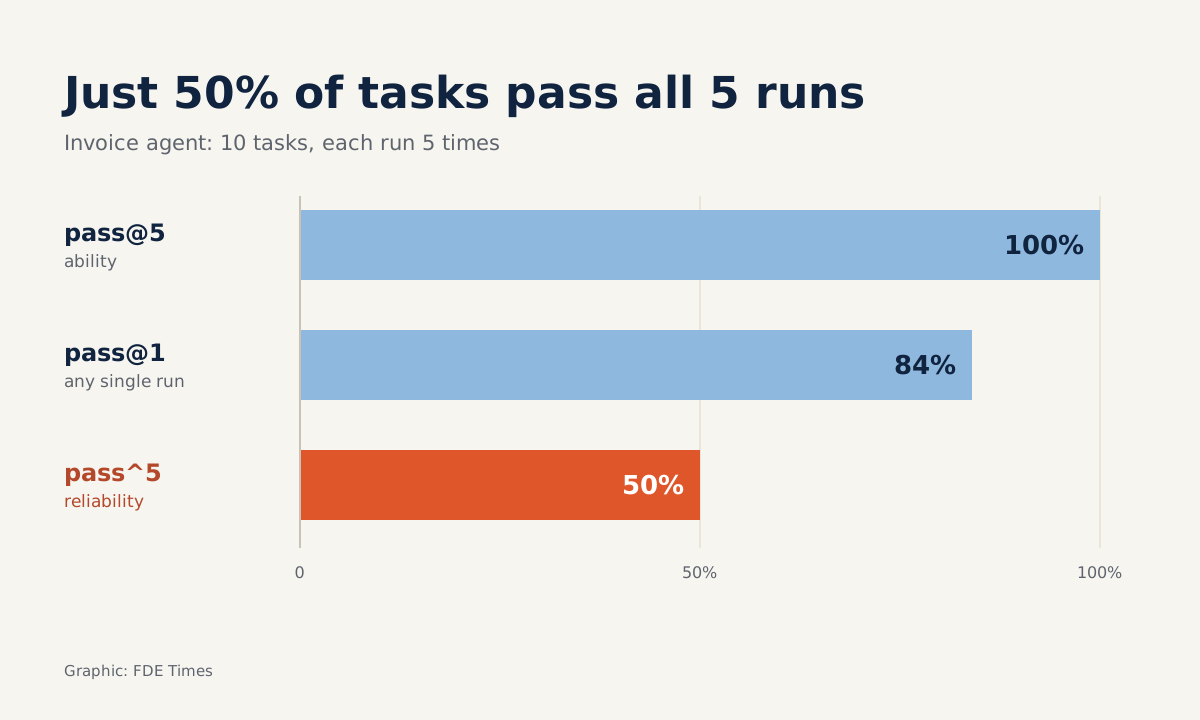
The same set of tasks can score 100%, 84% or 50%, depending on whether you are measuring capability or reliability. The client needs to know which number you are showing them.

In brief
- pass@k asks whether the agent can do the task at least once; pass^k asks whether it gets it right every time.
- As k rises, pass@k goes up and pass^k goes down, so reporting only pass@k hides how unstable an agent is.
- An agent that runs unattended, with no human review, must be reported on pass^k, and its runs must be genuinely independent of each other.
On Friday, the invoice-processing agent ran flawlessly through the client’s ten sample tasks in the demo. On Monday, the same ten tasks were run again and three failed. Nobody had changed a line of code.
The client’s project lead asks a perfectly reasonable question: so what percentage of the time is the agent right? You could answer with three different numbers, each of them technically “correct”. Pick the wrong one and you promise the client a level of reliability the system does not have.
This is a skill every FDE who puts an agent into production needs: knowing whether you are measuring capability or reliability, and saying so clearly before the number goes on a slide.
Two questions that sound alike but are not
Anthropic defines pass@k as the probability that an agent produces at least one correct solution in k attempts. The question it answers is: can the agent do this job, given a few chances?
pass^k asks something else. According to Anthropic, it is the probability that all k attempts succeed. Phil Schmid at Google DeepMind puts it more strictly: the agent must succeed on all k independent attempts. The question now is: does the agent get it right every time?
The metric is not new. pass^k was proposed in the τ-bench paper by Yao, Shinn, Razavi and Narasimhan of Sierra and Princeton, posted to arXiv on 17 June 2024, to measure agent reliability across multiple trials. Sierra describes it as a measure of whether an agent can complete the same task many times, not just once.
The two metrics move in opposite directions as k rises. Anthropic explains that pass^k falls because demanding consistency across many runs is a harder bar, while pass@k rises.
Picture an agent that is right 80% of the time on each run, with runs independent of one another. At k = 1, both numbers are 80%. At k = 3, pass@3 = 1 − 0.2³ = 99.2%, while pass^3 = 0.8³ = 51.2%.
By k = 5, pass@5 is close to 100% (99.968%) while pass^5 has dropped to 0.8⁵ ≈ 32.8%: the same agent looks almost perfect on one measure and is right fewer than a third of the time on the other.
A worked example with five runs
Back to the invoice agent. Suppose you take ten real tasks from the client and run each one five times, each in a clean session. You record how many of the five runs were correct for each task:
results = {  # task_id: number of correct runs out of 5
    "T01": 5, "T02": 5, "T03": 5, "T04": 4, "T05": 4,
    "T06": 3, "T07": 5, "T08": 2, "T09": 5, "T10": 4,
}
n = k = 5

# pass@1: average success rate across all runs
pass_1 = sum(results.values()) / (len(results) * n)
# pass@5: tasks with at least one correct run
pass_at_k = sum(c > 0 for c in results.values()) / len(results)
# pass^5: tasks correct on all 5 runs
pass_pow_k = sum(c == n for c in results.values()) / len(results)

print(pass_1, pass_at_k, pass_pow_k)  # 0.84 1.0 0.5
Each number answers its own question:
| Metric | The question it answers | Result |
|---|---|---|
| pass@5 | Which tasks can the agent do at least once? | 100% |
| pass@1 | What share of any single run is correct? | 84% |
| pass^5 | Which tasks does the agent get right every time? | 50% |
If the slide says “100% of tasks succeeded”, you are not lying. But the client will take it to mean the agent can handle every invoice, when in fact half the invoice types sometimes fail. Task T08 was right only two times out of five, and that is the line the client needs to see.
The τ-bench results suggest this is not a rare case. Sierra reported that every model tested lost significant performance as k increased, meaning they lacked consistency.
Which number goes on the slide?
Anthropic advises choosing the metric according to the nature of the product: pass@k for tools where a single success is enough, pass^k for agents that need to be consistent. A code-suggestion tool for developers, where users generate a few options and pick one themselves, suits pass@k. An agent that answers customer complaints automatically does not.
The guidance on agentpatterns.ai is blunter: for an automated pipeline, pass^k is the number to watch. pass@k only means something when a human reviews the output, and both numbers should be reported.
Phil Schmid warns that pass@k can make performance look better than it is. For agents, he argues, the goal should be to measure consistency, not the best result. At a client site, the safe approach is to put both numbers side by side and label each clearly: “capability” and “reliability”.
How to do it at a client site
Start by asking the client whether anyone reviews the agent’s output before it moves on. The answer decides the headline metric. If a human reviews it, pass@k is the main number, with pass^k alongside. If nobody does, the reverse.
Next, build the task set from the client’s real data, including the hard cases they often complain about. Choose k to match the real risk: a flow that runs thousands of times a day needs a larger k than one that runs a few times a week. Run each task k times and record the number of correct runs per task, not just the overall figure.
Finally, report by task. Tasks with low pass^k are your to-do list: fix the prompt, add a validation step, or put a human reviewer at exactly that point. The client sees where the risk lies, rather than an average.
The skill also counts in interviews. On your CV, instead of writing “built an agent with 90% accuracy”, write that you measured pass^k on how many tasks, with what k, and how you raised it. If the job description mentions evals, have an explanation of pass^k ready, using an example from your own project.
Mistakes that skew the numbers without anyone noticing
The most dangerous mistake is attempts that are not independent. Both metrics assume they are. According to agentpatterns.ai, if the harness shares context, seed or cache, the samples become correlated and the number no longer reflects what the metric defines. An agent that is “right all five times” may simply be reading back an old result from the cache.
The second mistake is reporting only pass@k for an agent that runs unattended, like the “100%” slide above. The third is running each task once and calling it pass@1, when a single run tells you nothing about variance.
And finally, folding everything into one average, which loses exactly the tasks, like T08, that the client needs to know about.
Next time a client asks “what percentage of the time is the agent right?”, the best answer starts with a question back: right once, or right every time?
Was this article useful?
Thanks for the feedback!
5 sources
- Demystifying evals for AI agents · 2026-01-09
- τ-bench: A Benchmark for Tool-Agent-User Interaction in Real-World Domains · 2024-06-17
- τ-Bench: Benchmarking AI agents for the real-world · 2024-06-20
- Pass@k vs Pass^k: Understanding Agent Reliability · 2025-03-24
- pass@k and pass^k: Capability and Consistency Metrics · 2026-06-12