A script isn't handed over until the client installs it in one line
Five steps with Typer and uv turn a loose script into a packaged CLI, with help and auto-completion that take no extra code.
In brief
- Typer uses standard Python type hints to build a CLI with help and auto-completion for Bash, Zsh, Fish and PowerShell built in.
- The command is declared in [project.scripts] and points to the app object. The [build-system] table must always be present.
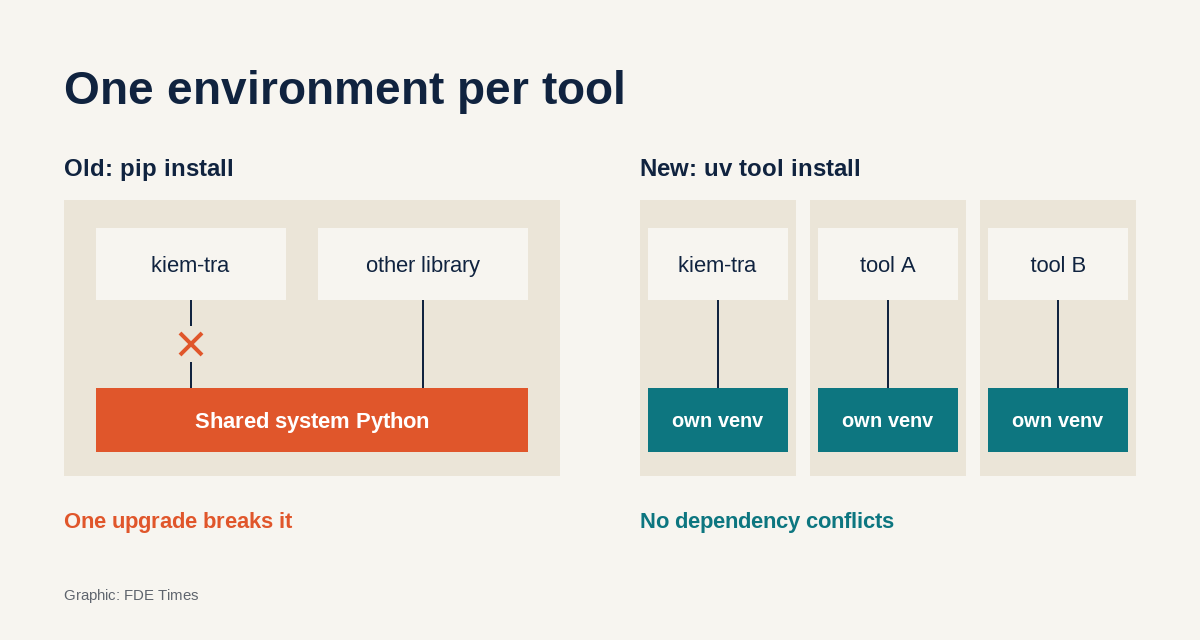
- pipx and uv tool install put each tool in its own environment, while uvx runs a tool in a temporary one, so the client team avoids dependency conflicts.
Three weeks into a client engagement, you have a script, check_csv.py, that checks data files before they are loaded into the pipeline.
The client’s operations team asks how to run it, and you reply with a long set of instructions: which Python version to install, what to pip install, where to put the file.
Two days later they report an error, because their machine has a different version of one of the libraries.
The code was fine. The handover was what failed. What an FDE should leave behind is a tool the client can run on their own after the engineer has left, and for anything run from the command line, that means a properly packaged CLI. The five steps below turn a loose script into a check-data command the client team installs with a single line.
What you will build, and what you need
The end product is a Python package called check-data. It has one command that takes a path to a CSV file and a --max-rows option, prints the result to the screen and returns an error code when the file fails. You need Python and uv on your machine. The validation logic in the example has been left out; replace it with your own.
The main tool is Typer, a library that describes itself as a way to build great CLIs that are easy to code, based on Python type hints.
Because Typer relies on standard Python type hints, you declare parameters just as you would when writing an ordinary function. Help and auto-completion for Bash, Zsh, Fish and PowerShell come built in.
The client team gets all of that without you writing a single extra line.
Steps 1–2: create the package and write the command
Typer’s packaging tutorial uses uv to scaffold the package:
uv init --package check-data
cd check-data
This creates pyproject.toml, a file src/check_data/__init__.py with a main() function that prints a greeting, and a default entry check-data = "check_data:main" under [project.scripts]. That entry is replaced in step 3.
Check: open pyproject.toml and look for the [build-system] table. The Python Packaging User Guide says this table should always be present, whichever build backend you use.
Next, run uv add typer to add Typer to the dependencies, then create src/check_data/main.py. The version below is minimal: the command skeleton is complete, and only the validation logic is left for you to fill in.
from pathlib import Path
import typer

app = typer.Typer()

@app.command()
def check(path: Path, max_rows: int = 1000):
    """Check a CSV file before loading it into the pipeline."""
    ok = True  # replace with the real validation logic
    if not ok:
        raise typer.Exit(code=1)
    typer.echo(f"{path}: passed")
The Path and int type hints tell Typer the type of each parameter. Which parameters are required follows ordinary Python function rules: path has no default, so it must be supplied, while max_rows has = 1000, so it can be omitted. Run --help to see how Typer presents the two.
Step 3: declare the command, where most mistakes happen
According to the Python Packaging User Guide, a package that installs a command must declare it in the [project.scripts] table. Typer’s example looks like rick-portal-gun = "rick_portal_gun.main:app". For your package, edit the default line that uv init created rather than adding a second line with the same command name:
[project.scripts]
check-data = "check_data.main:app"
The left side is the command name users will type, written with hyphens. The right side is the import path, written with underscores, and it must point to the app object, not to the check function.
The reason lies in how entry points work. The Packaging Guide explains that running the command is equivalent to importing the referenced object, calling it, and passing its return value to sys.exit.
That call passes no arguments. So if you point directly at check, the command will most likely fail at once for lack of arguments, instead of going through Typer to parse the command line.
The mechanism also shows something else: a CLI’s exit code is a contract between you and the client’s systems. Their cron jobs, CI or orchestration scripts will read that number to decide whether to carry on.
Check: temporarily change ok = True to ok = False to simulate a bad file, then run it through uv run (which installs the package into the project environment before running):
uv run check-data --help
uv run check-data broken_data.csv
echo $?   # expect 1, not 0
Steps 4–5: build a wheel and ship it so the client has nothing to worry about
uv buildThis produces two files in dist/: an sdist .tar.gz and a wheel .whl. The wheel is what you send to the client or push to their internal package index. At this point the question is no longer technical: how are the client team’s machines set up?
That matters, because the failure at the start of this piece came from installing into the shared system Python.
The uv documentation explains that uv tool install puts each tool in its own environment, so the dependencies of tools, scripts and projects do not conflict. pipx does something similar for end-user Python applications: each gets its own virtualenv, and its command is put on the PATH.
uvx, by contrast, runs a tool in a temporary, isolated environment, so users need not install anything first. For the wheel just built, the two invocations are:
uv tool install ./dist/check_data-0.1.0-py3-none-any.whl
uvx --from ./dist/check_data-0.1.0-py3-none-any.whl check-data data.csv
Permanent install (pipx, uv tool install)
- The operations team uses the command daily
- The command sits on the PATH, callable from cron or scripts
- Needs an upgrade process when you ship a new version
Temporary run (uvx)
- An analyst only runs it occasionally
- Leaves nothing behind on the machine
- Suits demos or letting the client try it out
On the client side, settle on one rule: whoever uses the command every day installs it permanently, and whoever only tries it uses uvx. Spell out both in the README, one command line each. Do not make them read instructions for installing Python.
The mistakes that kill a tool after you leave
The first is giving the command a generic name such as check or run, which then clashes with something already on the client’s machine. Choose a name tied to the business task, such as check-orders.
The next is code that always exits with 0, even after spotting bad data. Whoever is at the screen sees the warning, but the client’s pipeline goes on loading the bad file.
The third is letting the client install the wheel straight into the system Python, exactly as in the opening scenario. Your tool then shares libraries with everything else on the machine, and a single upgrade can break it. The README should list only pipx, uv tool install or uvx commands, never a bare pip install.
The last is testing only on your own machine, where every dependency is already present. Before sending, install the wheel on a clean machine or container using exactly the command in your README.
How this skill shows up in FDE work
On client sites, the gap between “the demo works” and “the client can run it themselves” often comes down to small things like this. A CLI with a clear --help, auto-completion and correct exit codes sharply cuts the “how do I run this” messages after you leave. The client can also put it into cron or CI without calling you.
When reading FDE job descriptions, look for requirements about internal tooling or handing work over for client teams to run themselves: that is where this skill is used.
On a CV, do not write “knows Python packaging”. Write that you packaged a data-validation tool as a CLI so the client’s operations team could run it daily, and say who used it.
The first script to package is the one you have had to explain how to run most often this week.
Was this article useful?
Thanks for the feedback!