A few hours of widget code gets 50 traces judged in an afternoon
Client experts know which answers are wrong but lack a quick way to say so; anywidget syncs their notes to Python with no server or database.
In brief
- An eval guide on The Pragmatic Engineer describes a team that spent a few hours vibe-coding its own simple data viewer. A notebook is enough to do the same.
- The note field is free text, with no prepared list of failure categories. For each trace, record only the first failure and describe the behavior without guessing the cause.
- The minimum is 100 diverse traces, or two afternoons. Stop when the last 20 traces produce no new failure category.
A guide to LLM evals on The Pragmatic Engineer tells the story of a small decision: a product team spent a few hours vibe-coding its own data viewer, a very simple one. For a tool that lets people read traces and write comments quickly, a few hours is a bargain.
On client sites, this is usually where error analysis gets stuck. Domain experts know which answers are wrong, but they have nowhere convenient to read traces and write down what they see. They understand the business, and you understand the system.
This guide shows how to build that place: a notebook widget that lets the client’s expert review 50 traces in one afternoon. By the end of the session you have a file of labels and a table of failure counts by category, enough to decide what to fix first next week.
What you will build, and what you need
The widget has three parts: a pane that shows the trace, a free-text box and two buttons, Pass and Fail. Each click appends the label to the reviewer’s JSONL file and brings up the next trace. You build it with anywidget.
The reason for anywidget is how it shares state: fields declared with traitlets and sync=True stay in sync between Python and JavaScript. Whatever the expert types in the browser lands directly in Python, and you never have to stand up a server or a database.
You need a notebook environment with Python, the anywidget, traitlets and pandas packages, and a traces_50.jsonl file in which each line is a trace with an id field. The code below has been trimmed for readability, so check it against anywidget’s Getting Started page before taking it to a client.
Step 1: pick 50 traces that cover a wide range
The Pragmatic Engineer guide recommends reviewing at least 100 diverse traces and writing open notes on any unexpected behavior. Langfuse’s cookbook also targets about 100. At 50 traces an afternoon, this is the first pass, and you will need a second session to reach that mark.
Diversity has to be deliberate: pull traces across question types and tools, short and long, including cases where users complained.
Check: open the file and do a quick count to see whether any one group makes up more than half. If one does, swap some out.
Step 2: write the widget with anywidget
The browser-side interface lives in the _esm attribute. This module exports a render function, the entry point that draws the widget and updates it when the data changes. On the Python side, you declare four fields that the interface reads and writes.
import anywidget, traitlets

class TraceLabeler(anywidget.AnyWidget):
    _esm = """
    function render({ model, el }) {
      const view = document.createElement("pre");
      const note = document.createElement("textarea");
      note.placeholder = "What did the system get wrong FIRST? Describe what it did; don't guess the cause.";
      note.rows = 4; note.style.width = "100%";
      const btn = (label, v) => {
        const b = document.createElement("button");
        b.textContent = label;
        b.onclick = () => {
          model.set("note", note.value);
          model.set("verdict", v);
          model.set("submitted", model.get("submitted") + 1);
          model.save_changes();
        };
        return b;
      };
      const draw = () => { view.textContent = model.get("trace"); note.value = ""; };
      model.on("change:trace", draw);
      draw();
      el.append(view, note, btn("Pass", "pass"), btn("Fail", "fail"));
    }
    export default { render };
    """
    trace = traitlets.Unicode("").tag(sync=True)
    note = traitlets.Unicode("").tag(sync=True)
    verdict = traitlets.Unicode("").tag(sync=True)
    submitted = traitlets.Int(0).tag(sync=True)
Check: set w = TraceLabeler(trace="hello") and display w in a cell. You should see the text, the text box and both buttons.
Step 3: why the note field must be free text
This is where engineers most often go wrong, because a dropdown looks tidier. Langfuse’s cookbook warns that inventing failure categories before reading traces leads to confirmation bias. Given a ready-made list, the expert will pick the closest item instead of saying what they actually see.
This stage is called open coding. Hamel Husain describes it as reading traces and writing open-ended notes about any problem. Langfuse defines it the same way: free-text comments with no predefined categories, plus one instruction, which is to describe the behavior and not diagnose it.
The other rule is already in the placeholder: record only the first failure. The Pragmatic Engineer guide calls marking only the first upstream failure the most effective approach. The reason is easy to see: if the agent misreads the question at the outset, every later step goes wrong with it, and logging all of them only inflates the counts.
Step 4: show the trace cleanly, save the label, move on
Don’t dump raw JSON on the screen, because the client’s expert has no need to read tool_call_id. The render function below shows only the user’s question, the tool calls and the final answer. The field names are assumptions, so adjust them to match how the client’s system exports traces.
Each reviewer runs the notebook with their own name in the REVIEWER variable and writes to their own file. This keeps two people from overwriting each other, and every label line already carries the reviewer’s name for the adjudication step at the end.
import json
from pathlib import Path

REVIEWER = "expert_a"   # each reviewer sets their own name
traces = [json.loads(l) for l in Path("traces_50.jsonl").read_text().splitlines()]
out = Path(f"labels_{REVIEWER}.jsonl")
w = TraceLabeler()
i = 0

def render(t):
    lines = [f"USER: {t.get('input', '')}", ""]
    for s in t.get("steps", []):
        if s.get("type") == "tool":
            lines.append(f"→ {s.get('name')}({s.get('args')})")
    lines += ["", f"ANSWER: {t.get('output', '')}"]
    return "\n".join(lines)

def show(k):
    w.trace = f"[{k+1}/{len(traces)}]\n" + render(traces[k])

def on_submit(change):
    global i
    rec = {"trace_id": traces[i]["id"], "reviewer": REVIEWER,
           "verdict": w.verdict, "note": w.note}
    with out.open("a") as f:
        f.write(json.dumps(rec, ensure_ascii=False) + "\n")
    i += 1
    if i < len(traces):
        show(i)

w.observe(on_submit, names="submitted")
show(0)
w
Appending one line at a time means that if the kernel dies at trace 31, the first 30 labels survive. You only need to reset i to the number of lines already in that reviewer’s file.
Check: click twice, then open labels_expert_a.jsonl to confirm it has two lines with the right trace_id and reviewer. Review the first few traces yourself to see whether the display gives enough to make a judgment.
Step 5: group the notes into categories, then count
After the session, you and the expert reread the notes and group them into a small number of named categories. This is axial coding, and Hamel Husain closes the step with one concrete task: count the failures in each category.
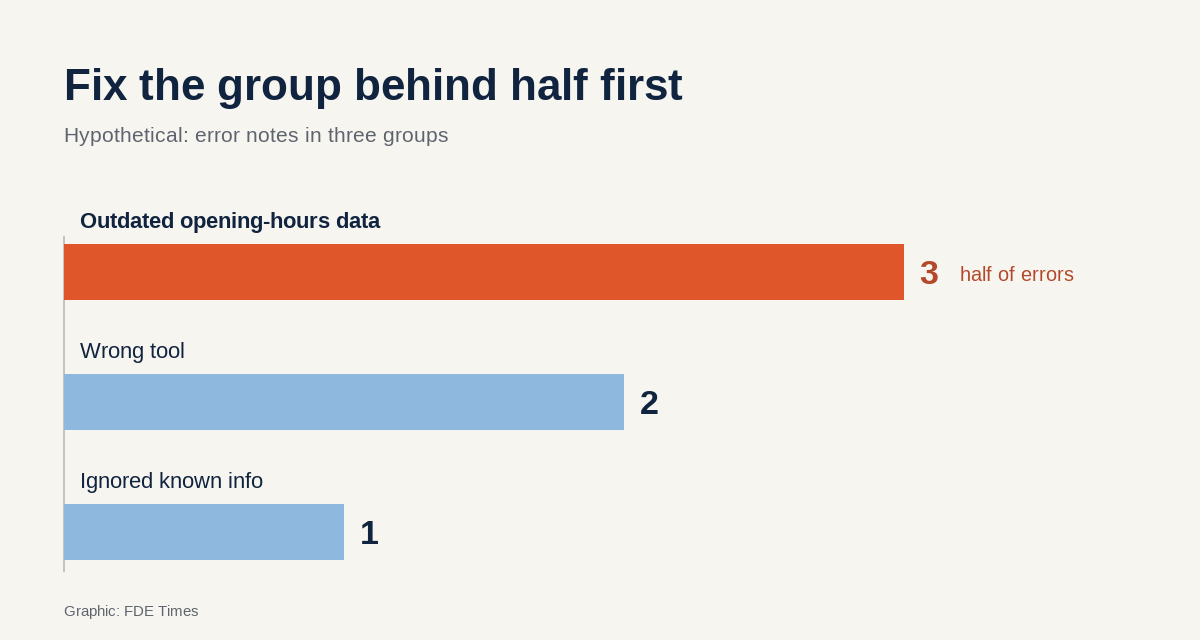
Take a hypothetical customer-service assistant for a retail chain. Read the six failure notes below and they fall into three clusters on their own; the category names come only after the clusters are visible.
| Expert’s free-text note | Category assigned after reading |
|---|---|
| Gave last year’s opening hours | Outdated opening-hours data |
| Gave holiday hours as if it were a normal day | Outdated opening-hours data |
| Said the downtown branch opens until 10pm; that has changed | Outdated opening-hours data |
| Asked about returns but called the order-lookup tool | Wrong tool chosen |
| Called the store-finder tool instead of the policy tool | Wrong tool chosen |
| Asked for the order number again though the user gave it in the first message | Ignored information already provided |
None of the notes says “because of the prompt” or “because of retrieval.” Because they describe behavior, two different readers arrive at the same clusters. Once you have the categories, attach them to the label file and count.
import pandas as pd
df = pd.read_json("labels_expert_a.jsonl", lines=True)
# assign a category by hand to each failed trace, after reading all the notes
categories = {
    "t07": "Outdated opening-hours data",
    "t12": "Wrong tool chosen",
    "t19": "Ignored information already provided",
    # ...
}
df["category"] = df.trace_id.map(categories)
df[df.verdict == "fail"]["category"].value_counts()
In this example the counts come out at 3, 2 and 1. The prioritization meeting then comes down to one sentence: fix the opening-hours data source first, because it accounts for half the failures.
On how many traces are enough, Langfuse offers a stopping rule that is easy to check: stop when the last 20 traces produce no new failure category. If you reach that by the end of the second session, the review has reached saturation.
Common mistakes
The most common mistake is adding a failure-category dropdown in the first session “to save time,” which skips exactly what Step 3 warns against. A category list should appear only after you have grouped the free-text notes.
The second is letting notes turn into diagnoses such as “the prompt lacks context.” A sentence like “gave last year’s opening hours” describes behavior, and that is the kind of sentence that can be grouped. The third is having several people review without a way to settle disagreements.
On a client site, who settles reviewer disagreements?
Label Studio’s guide to labeling agent traces suggests one approach: send traces with conflicting verdicts to a separate queue for a reviewer. Since each reviewer already has their own file and a reviewer column, you only need to combine the files and filter for the trace_id values whose verdicts differ.
from pathlib import Path
import pandas as pd
all_df = pd.concat(pd.read_json(p, lines=True) for p in Path(".").glob("labels_*.jsonl"))
disagreement = all_df.groupby("trace_id").verdict.nunique()
to_adjudicate = disagreement[disagreement > 1].index.tolist()
The to_adjudicate list is the agenda for the adjudication session. The FDE’s job here is to make reviewing fast and painless for the experts, and to keep your prepared list from steering their thinking. The verdict on what is right or wrong still belongs to the people who understand the business.
Keep this notebook; it makes a good thing to bring to interviews.
By the second afternoon, the numbers in the count table will persuade the client more than any slide about model quality.
Was this article useful?
Thanks for the feedback!
6 sources
- Q: Why is 'error analysis' so important in AI evals, and how is it performed? · 2025-06-27
- Error Analysis for LLM Applications - Step by step guide (Langfuse)
- A pragmatic guide to LLM evals for devs · 2025-12-02
- Getting Started | anywidget
- How to build a labeling tool for agent trace tree annotation · 2026-05-27
- Axial Coding: From Notes to Failure Modes (Grokking LLM Evals)