Measure your RAG retriever before the client finds the failures
A small golden set, hit rate and MRR in plain Python, then LlamaIndex's RetrieverEvaluator, show whether wrong answers come from retrieval or from generation.
In brief
- Evaluate the retriever separately from generation, or you will not know whether a failure lies in search or in the LLM.
- Hit rate is a yes/no check per query, MRR rewards putting the right result first, and both ignore relevant passages further down the list.
- Start the golden set with a few dozen queries, grow it to 50-200, label it by passage ID and include enough hard queries.
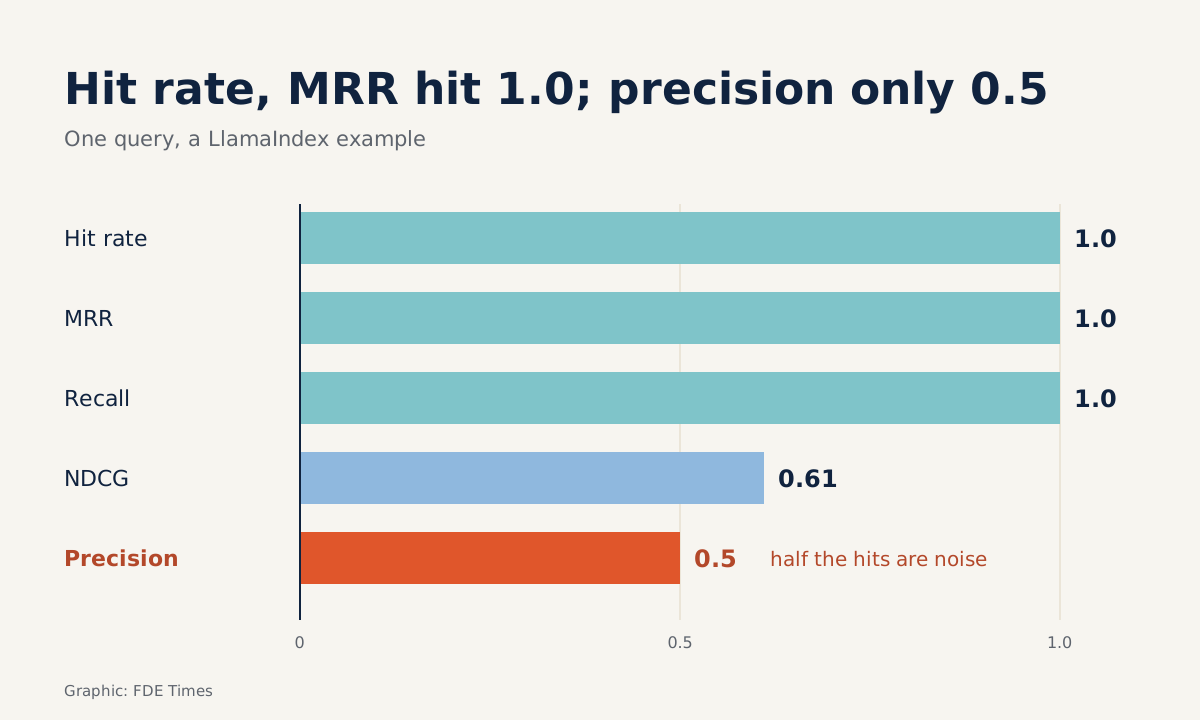
One line of output in LlamaIndex’s example documentation can startle a reader: for the same query, hit rate and MRR both reach 1.0 while precision is only 0.5. There is no contradiction. Each metric answers a different question.
This matters to FDEs because RAG at a client site tends to fail in a familiar way: the answer is wrong, and nobody knows whether the fault lies in finding the documents or in the LLM writing the answer. Pinecone titled its guide to RAG evaluation “don’t let your customers tell you first”.
Getting there means measuring the retriever on its own, with numbers a non-technical audience can follow.
This guide does that on a laptop: build a small golden set, compute hit rate and MRR in plain Python to understand what they measure, then run the same measurement with LlamaIndex’s RetrieverEvaluator.
What do you need?
You need a working RAG system, even a prototype, and a retriever that takes a query and returns a ranked list of passages with IDs. You also need Python, plus LlamaIndex for step 3.
All the code below is trimmed down to illustrate the approach, so check function names against the documentation for the version you have installed before using it for real.
LlamaIndex separates retrieval evaluation from answer generation: RetrieverEvaluator scores the quality of any Retriever module defined in the library. Keep that mindset. Get the search layer measured and solid first, and only then touch the prompt.
Step 1: the golden set decides how far the numbers can be trusted
A golden set is a list of queries, each paired with the passages you know for certain are relevant. Kunal Ganglani, in his handbook on evaluating retrieval in production, advises starting with a few dozen queries and growing to 50-200.
He also recommends labeling by passage ID rather than by text content, so the labels survive a change in chunking.
golden = [
    {"query": "What is the maximum refund limit?",
     "relevant_ids": {"policy_v3#12"}, "group": "easy"},
    {"query": "How are fees calculated when a business customer changes plans mid-cycle?",
     "relevant_ids": {"billing#4", "billing#7"}, "group": "hard"},
    # ... add more, up to a few dozen queries
]
Check after this step: open the file and count how many queries are easy FAQs and how many are hard, such as those that need two passages combined or that use different wording from the documents. Ganglani warns that if most of the golden set is easy FAQs, the numbers will look better than the system really performs.
If labeling by hand takes too much effort, the LlamaIndex documentation suggests using an LLM to generate synthetic data, meaning pairs of questions and contexts. This gives a quick starting point. Generated data does not guarantee a balance of easy and hard queries, though, so read it through, count by group and write extra hard queries yourself where they are missing.
Step 2: compute the numbers yourself to see what they measure
Hit rate@k is a yes-or-no check for each query: is at least one relevant passage in the top k? MRR, as Weaviate defines it, measures how well the system puts relevant results at the top. Each query scores 1 divided by the rank of the first relevant passage.
def hit_rate_and_mrr(golden, retrieve, k=5):
    hits, rr_sum = 0, 0.0
    for item in golden:
        ids = retrieve(item["query"], k)  # list of passage IDs, ranked
        for rank, pid in enumerate(ids, start=1):
            if pid in item["relevant_ids"]:
                hits += 1
                rr_sum += 1 / rank
                break  # count only the first relevant passage
    n = len(golden)
    return hits / n, rr_sum / n
Work through an example with four queries. The first relevant passage sits at rank 1, rank 3, nowhere in the top k, and rank 2. Hit rate is 3/4 = 0.75. MRR is (1 + 1/3 + 0 + 1/2) / 4, roughly 0.458.
Check after this step: compute the example by hand, then feed exactly those four cases into the function and see whether the results match. If they do not, the usual culprit is rank counted from 0 instead of 1.
Because both numbers stop at the first relevant passage, add a simple recall@k function: for each query, divide the number of relevant passages found in the top k by the total number of relevant passages, then average. The group parameter lets you score each group of queries separately.
def recall_at_k(golden, retrieve, k=5, group=None):
    items = [i for i in golden if group is None or i["group"] == group]
    total = 0.0
    for item in items:
        found = set(retrieve(item["query"], k)) & item["relevant_ids"]
        total += len(found) / len(item["relevant_ids"])
    return total / len(items)
For the mid-cycle plan change query, if the top k contains only billing#4, that query’s recall is 0.5, even though its MRR may still be 1.0.
Step 3: run the same measurement with LlamaIndex
Once the mechanics are clear, the library can do the rest. According to the LlamaIndex documentation, the evaluator is built from metric names and a retriever, then run asynchronously over the whole dataset. The code below is a sketch; check the import paths in your version.
from llama_index.core.evaluation import RetrieverEvaluator

retriever = index.as_retriever(similarity_top_k=5)
retriever_evaluator = RetrieverEvaluator.from_metric_names(
    ["hit_rate", "mrr"], retriever=retriever
)
eval_results = await retriever_evaluator.aevaluate_dataset(qa_dataset)
Besides hit rate and MRR, the evaluator supports precision, recall, AP and NDCG, all selected by name. Check after this step: run it on a golden-set query whose answer you already know from step 2. Both methods must give the same result. If they differ, check that your IDs match the node IDs the index generates.
What can two good numbers still hide?
Back to the output line at the top: hit rate 1.0, MRR 1.0, recall 1.0, but precision only 0.5 and NDCG around 0.61. The relevant passage was already in first place. Yet half of the returned list is noise, and that noise is what goes into the LLM’s context.
Hit rate@k
- Asks: is there at least one relevant passage in the top k?
- Each query is scored only yes or no
- Can look good even when coverage is poor
MRR
- Asks: at what rank is the first relevant passage?
- Each query scores 1/rank, then the scores are averaged
- Ignores every relevant passage after the first
Ganglani and Weaviate both point to one limit of MRR: it considers only the first relevant passage. For the mid-cycle plan change query in step 1, which needs both billing#4 and billing#7, the system can reach maximum MRR and still miss half the information.
So when the golden set has many queries that need several passages, report recall@k as well, using the function from step 2.
Common mistakes
The first mistake is labeling by text content. Change the chunk size once and the whole golden set loses its value, leaving no way to compare before and after. The second is reporting only one value of k.
Hit rate at k=10 is almost always higher than at k=3, so the number means something only when k is stated next to it.
The third is harder to spot: a golden set made entirely of easy queries. Everything looks fine in the demo, then in the first week real users ask questions the test set never contained. The fix is to break results down by query group, so the hard group always has its own score.
How does this skill show up at a client site?
At a client site, the complaint you hear most is “the bot gives wrong answers”. Take an FDE who brings a 60-query golden set to a meeting with the operations team and says, with hypothetical figures: “In the FAQ group, hit rate@5 is 0.92.
In the group of queries that need two passages combined, hit rate@5 is still 0.80 but recall@5 is only 0.45, so the bot usually finds only half the information it needs.”
The next sentence is what the client actually needs: “So this week the team will fix chunking for the billing documents and re-measure on these same 60 queries, without changing the model yet.” Instead of arguing over whether the bot “seems” good or bad, both sides agree on what to do and how to check the result.
Developers moving into FDE roles should write their CVs the same way. Rather than “built a RAG chatbot”, state how many queries your golden set had, how many groups you split it into, and how a metric for the hard group changed after you switched chunking strategy.
When reading job descriptions, watch for phrases such as “evaluation”, “retrieval quality” or “offline eval”, which signal that the employer needs exactly this skill.
A first golden set usually has only a few dozen queries and plenty of rough edges. But it gives you a fixed benchmark to re-measure after every change to the system, and that lets you catch failures before the client calls to report them.
Was this article useful?
Thanks for the feedback!
5 sources
- Retrieval Evaluation (LlamaIndex docs)
- Retrieval Evaluation (LlamaIndex docs, markdown)
- RAG Evaluation Metrics for Retrieval Quality: My Production Playbook · 2026-09-14
- Evaluation Metrics for Search and Recommendation Systems (Weaviate) · 2024-05-28
- RAG Evaluation: Don't let customers tell you first (Pinecone)