One retry at 2am can double your AI assistant's data
Airflow's own rule is that a task must give the same result however often it runs, and this four-task ELT pipeline is built to honour it.
In brief
- Every task must produce the same result when rerun, because Airflow may retry tasks that fail.
- Pull data for exactly one day and overwrite exactly that day's partition. Never append.
- Keep DAG files light, push data to remote storage and set the schedule with the schedule parameter.
Airflow’s best-practices documentation contains a sentence worth printing out and taping next to your screen: Airflow may retry a task when it fails, so a task must produce the same result however many times it runs. It sounds obvious, but it shapes how the whole pipeline below is designed.
Picture this: a customer has an AI assistant that answers questions from support staff, drawing on tickets and product documentation.
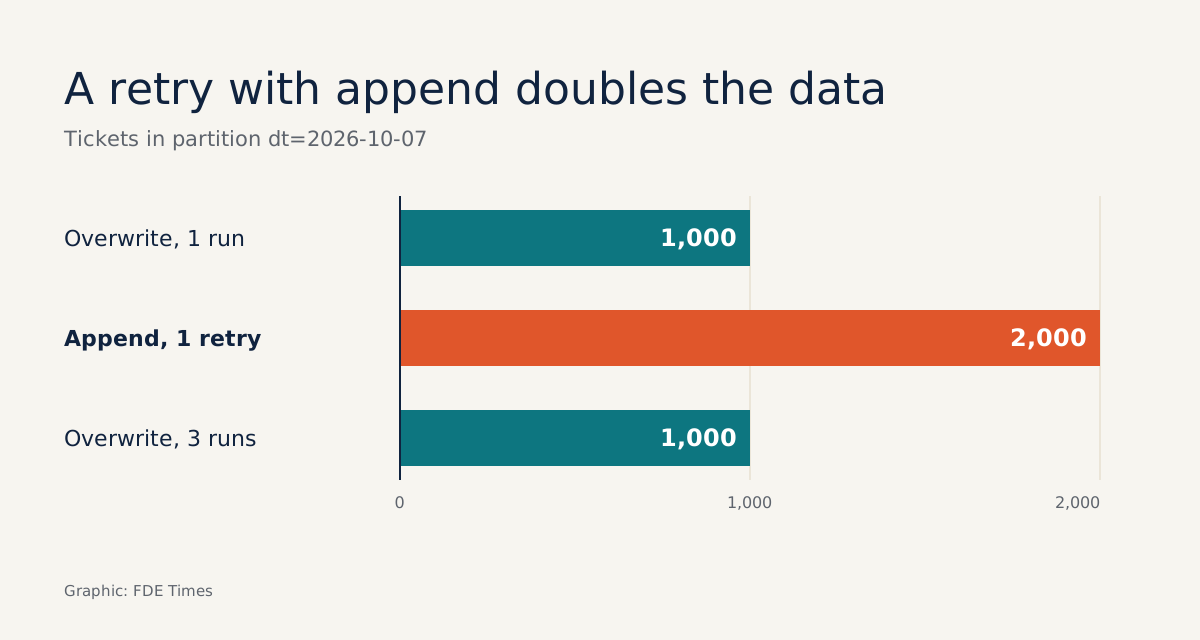
The data needs refreshing every night. Suppose the load task is retried at 2am and turns 1,000 tickets into 2,000. The next morning the assistant cites duplicates, miscounts, and users lose trust in it.
This guide walks through building that pipeline so that it is safe to rerun any number of times. An AI assistant can only answer from the data it has been given, so if you want to work as a Forward Deployed Engineer (FDE), this is a skill worth practising before you go on site with a customer.
What will you build?
Airflow is a platform for building and running workflows. Each workflow is represented as a DAG (Directed Acyclic Graph) made up of Tasks. The DAG defines the dependencies between tasks, which in turn determine the order in which they run.
The DAG in this guide has four tasks in sequence. extract pulls tickets for exactly one day, load pushes the raw data to remote storage, transform normalises it, and refresh_index refreshes the knowledge source the assistant reads. Loading raw data first and transforming it afterwards is ELT: raw data lands in central storage first and is normalised later.
To follow along you need a working local Airflow environment, basic Python and somewhere S3-style to store data remotely. The code below is a simplified version meant to illustrate the design. Import paths, operator names and parameters other than schedule vary between versions, so check them against the documentation for the Airflow version you have installed.
Step 1: Why must the DAG file be light?
Airflow’s scheduler both triggers workflows on schedule and hands tasks to the executor, and to do that it has to read (parse) your DAG files. The Airflow documentation is explicit: the top level of a DAG file must not access a database, do heavy computation or make network calls.
# WRONG: the query runs every time the scheduler parses the file, not when the task runs
rows = source_db.query("SELECT * FROM tickets")

# RIGHT: all I/O lives inside the function and only runs when the task executes
def extract(run_date: str):
    ...
Check: open the DAG file and read it top to bottom. Apart from imports, constant declarations and function definitions, no line should touch a database or an API.
Step 2: Pull data for one day only
Astronomer’s documentation recommends breaking pipelines into incremental extracts and loads wherever possible. That way, when something fails, you only have to reprocess the affected data. For a nightly sync, the natural unit is one day.
# sync_utils.py: plain Python logic, testable without Airflow
def extract_window(run_date: str) -> tuple[str, str]:
    return f"{run_date} 00:00:00", f"{run_date} 23:59:59"

def raw_path(run_date: str) -> str:
    # the "acme-raw" bucket is just an example
    return f"s3://acme-raw/tickets/dt={run_date}/part.jsonl"
The key point is that the data window is calculated from the run’s date, not from “now”. If you rerun the job for 7 October today, it still pulls exactly the tickets from 7 October, with nothing from 8 October mixed in.
Check: call extract_window("2026-10-07") twice at two different times. The results must be identical.
Step 3: Overwrite, don’t append
Go back to the 1,000 tickets that became 2,000. If load appends to a shared table, every retry adds another copy. If load overwrites exactly the dt=2026-10-07 partition, that partition holds 1,000 rows whether the task runs once or three times.
def load(run_date: str, rows: list[dict]):
    # storage is a hypothetical client for remote storage (S3 or equivalent)
    storage.put(raw_path(run_date), rows, overwrite=True)
Data has to go to remote storage rather than sit on local disk, because in Airflow each task may run on a different machine. A file that extract writes to /tmp on machine A will not exist when transform runs on machine B. The Airflow documentation advises against storing files or config on the local filesystem, and recommends putting large data somewhere like S3.
Check: write a test that calls load twice with the same run_date, then count the rows. If the count has doubled, the task is not yet idempotent.
Step 4: Transform and refresh the assistant’s source
transform reads from raw_path(run_date), cleans the data (dropping empty fields, normalising formats) and writes the result to a “clean” partition, also split by date. refresh_index then updates the knowledge source the AI assistant queries on the same principle: it replaces that day’s data rather than inserting duplicates.
According to Astronomer, idempotent DAGs and tasks shorten recovery time after incidents and prevent data loss. On a customer site the benefit is concrete. When the data source team reports that they have just fixed a problem with 5 October, you rerun that one day, instead of wiping everything and resyncing from scratch.
Step 5: Schedule the run for 2am
The schedule is set with the DAG’s schedule parameter, which can be a cron expression, a timedelta or a preset. Each time the schedule comes round, Airflow creates a corresponding Dag Run and stores it in the backend database.
# nightly_sync.py: simplified skeleton, check imports against your version
with DAG(
    dag_id="nightly_assistant_sync",
    schedule="0 2 * * *",   # cron: 2am every day
    start_date=datetime(2026, 10, 1),
) as dag:
    extract_task >> load_task >> transform_task >> refresh_index_task
The functions from steps 2 and 3 should take run_date from the current Dag Run, not from the system clock. How a task reads the Dag Run’s date differs between Airflow versions, so look it up in the documentation for your installed version.
All of the idempotency rests on this choice: rerunning a Dag Run processes exactly that Dag Run’s date.
Check: after the first night, open the Airflow UI and confirm there is a new Dag Run with all four tasks successful. Then manually trigger a rerun of that same Dag Run and confirm the row count has not changed.
Three mistakes you will meet on customer sites
The most common is using “the current time” to calculate the data window, as in WHERE updated_at > now() - 1 day. It works when the job runs on time, but if it is retried at 9am the window has shifted, and you will lose or duplicate data without any error being raised.
The second is putting heavy logic at the top level, usually because someone wants to “fetch the list of tables from the database and generate tasks dynamically”. The third is writing intermediate files to local disk: fine on a laptop, broken as soon as it reaches the customer’s multi-worker environment.
From laptop to customer site
The pipeline in this guide is a small slice of data engineering, which IBM defines as designing and building systems for collecting, storing and analysing data at scale.
When an FDE job description mentions “data pipeline”, “Airflow” or “integrate with customer systems”, what it is really asking is whether you can deliver that slice on a customer’s real systems.
So on your CV, don’t just write “used Airflow”. Say that you designed an incremental, date-partitioned pipeline that can rerun any single day without duplicating data. That sentence shows you understand what customers actually worry about: one bad night, and the next morning users see the assistant giving wrong answers.
On your first day with a customer, don’t rush to ask “which model are we using?”. Ask first: “If tonight’s job fails, how do we rerun it tomorrow morning?”
Was this article useful?
Thanks for the feedback!