Git bisect for LLM agents: find the change that made a client's agent worse in a few eval rounds
When a client says "the agent has got noticeably worse lately", guessing won't help. A binary search over the change history, judged by a noise-tolerant eval, will.

In brief
- Git bisect uses binary search to find the first bad commit: 64 changes need only about 6 rounds of checks
- With LLMs, the good/bad verdict must come from an eval run several times and averaged, because temperature 0 is still not deterministic
- If the prompt history turns up no culprit, the model has probably changed: bisect over the product of prompt versions and model versions
On Monday the client messages you: their internal support agent “keeps going off-topic lately”. Over the past two weeks your team has merged about 60 changes: system prompt edits, new tools, a different way of chunking documents for retrieval, a model version upgrade. Everyone has a theory, and nobody can prove theirs.
Every FDE who looks after a client’s agent will get a message like that sooner or later, and the person who guesses fastest is not necessarily the one who finds the bug.
The people who handle it well follow a mechanical process for narrowing things down. Follow the steps and you get the answer; intuition does not come into it. The technique has been in Git for a long time.
What you need on top is a way to adapt it to LLM behaviour, which is not deterministic.
Binary search is cheaper than you think
According to Git’s official documentation, git bisect runs a binary search over the commit history to find the first commit that introduced a bug. You need only two markers: one commit you know is good and one you know is bad. Git checks out the commit in the middle, you judge whether it is good or bad, and the search range halves.
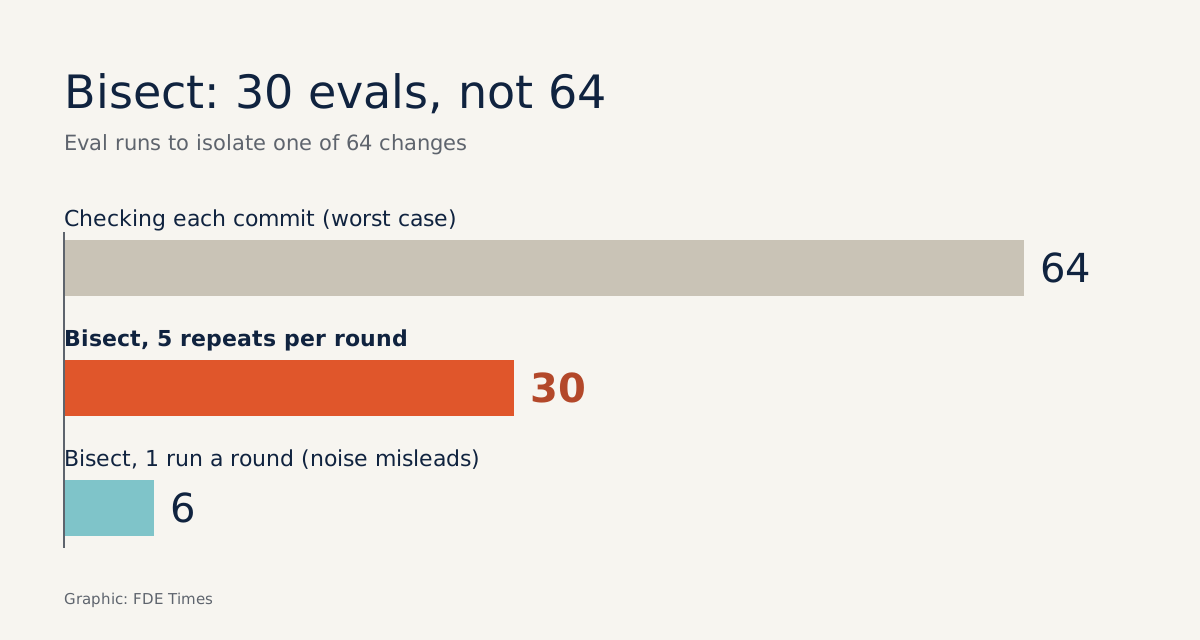
Take 64 changes. After each round you have 32 left, then 16, 8, 4, 2, 1, so roughly 6 rounds get you there. Checking commits one by one would take 64 runs in the worst case. For an agent, every eval run costs API money and time, so the gap between 6 and 64 matters.
The Git documentation also lets you automate the whole process with git bisect run: given a script that can judge whether the current source is good or bad, Git runs every round by itself. For an agent, that script is your eval.
LLMs break two of bisect’s assumptions
The authors of the “Time Travel” paper on arXiv point out that traditional bisect assumes the test is deterministic and the failure state is binary. LLM behaviour often violates both. A unit test either passes or fails; an agent eval produces a score, and that score fluctuates.
A post on prompt bisecting on Tian Pan’s blog makes a point many engineers still forget: temperature 0 is not actually deterministic. The same commit run twice can score 0.84 and 0.79. If your threshold sits between those two numbers, bisect takes the wrong turn in the very first round, and every round after that searches the wrong half.
The remedy Tian Pan proposes is to run each bisect step several times and average the results, so a single outlier run cannot decide the verdict on its own. The cost is that the number of evals multiplies by the number of repetitions: 6 rounds of 5 runs each is 30 evals. That is still far cheaper than a week of guessing.
A worked example from start to finish
Suppose release v1.4 from two weeks ago averaged 0.91 on a 40-case eval set, while today’s HEAD manages only 0.72. A sensible threshold sits between the two, say 0.82, far enough from both that noise will not flip the result. The verdict script might look like this:
# eval_gate.py — keep OUTSIDE the repo being bisected, e.g. ~/tools/eval_gate.py
import json, statistics, subprocess, sys

RUNS = 5           # number of repeated runs per commit
THRESHOLD = 0.82   # between the good score (0.91) and the bad score (0.72)

def run_once():
    out = subprocess.run(
        ["python", "-m", "evals.run", "--cases", "/frozen/cases.jsonl", "--json"],
        capture_output=True, text=True, timeout=900,
    )
    if out.returncode != 0:
        raise RuntimeError(out.stderr)
    return json.loads(out.stdout)["score"]

try:
    scores = [run_once() for _ in range(RUNS)]
except Exception:
    sys.exit(125)   # the eval cannot run on this commit: skip it, don't mark it bad

mean = statistics.mean(scores)
print(f"mean={mean:.3f} scores={scores}")
sys.exit(0 if mean >= THRESHOLD else 1)
Then run:
git bisect start
git bisect bad HEAD
git bisect good v1.4
git bisect run python ~/tools/eval_gate.py
git bisect reset
The exit codes in the script follow Git’s convention exactly. Code 0 means good, codes 1 to 127 except 125 mean bad, 125 means the commit cannot be tested and Git will skip it, and any other code aborts the whole bisect session.
Returning 125 when the eval crashes matters more than it looks. A commit with a syntax error in a config file does not mean the agent answers badly, and marking it bad would skew the entire search.
Two small details in the script decide the outcome. The eval cases must be frozen at a fixed path outside the repo, and the script must live outside the repo too, because each time Git checks out an old commit, every file in the tree, test set included, reverts to its old version.
You would then be measuring with a ruler that keeps changing length.
Bisect can only find what is already in the history
Suppose bisect finishes and names commit a3f9c1 as the culprit, but that commit changed five sections of the system prompt at once. You are only halfway there.
The next step uses the same arithmetic as git bisect with a different unit. According to Tian Pan, the unit of change for a prompt should be a hunk: one contiguous edit within one section of the prompt. So split that commit into hunks, apply them one by one to the good version, and keep bisecting at that level.
The harder case is when bisect finds nothing: every commit scores the same, yet today’s score is still lower than last week’s. The culprit may then not be in your repo at all, because the model service itself changes over time.
Research by Chen, Zaharia and Zou shows that the behaviour of the “same” LLM service can change substantially over a short period.
GPT-4’s accuracy on a prime-number task fell from 84.0% in March to 51.1% in June 2023, and the share of opinion-survey questions the model was willing to answer fell from 97.6% to 22.1%.
For an FDE, a slide of that size would drag eval scores down without a single line of the repo changing. Only with a baseline score tied to a pinned model version can you see that the drop came from the provider rather than from your team’s commits.
If the provider changes the model, the prompt history will give you no clues. Tian Pan suggests running over the product of prompt versions and model versions. A practical first step is to hold the prompt at the good version and switch to the current model, then do the reverse: you will know which axis the fault lies on before bisecting further.
So from your first day at a client, write the model name with a specific version into a committed config file, never an alias such as “latest”. The same goes for data.
Chunking configuration, index versions and document snapshots should be referenced by version identifiers in the repo, so that data changes also become commits you can bisect.
Mistakes that make bisect lie
The most common mistake is skipping too freely. The Git documentation warns that if you skip a commit adjacent to the culprit, Git cannot say exactly which commit is the first bad one. So return 125 only when the eval genuinely cannot run; a commit with a puzzling score is not a reason to skip.
Another trap is setting the threshold too close to one of the two markers, so that noise decides the outcome. Run both the good and the bad marker five times before you start. If their ranges overlap, the eval set is too small or too noisy to bisect with, and you need to fix it first.
Picture it: the good marker scores 0.89 to 0.93 and the bad marker 0.70 to 0.74, so a threshold of 0.82 sits neatly in the gap between them. But if the good marker ranges from 0.78 to 0.90, the 0.82 threshold falls inside the noise and every bisect round is close to a coin toss.
Finally, remember that bisect assumes the regression is monotonic. If one commit lowers the score and a later one accidentally raises it again, bisect will show you only one of the two transitions, not the whole story.
Turning the skill into evidence on your CV
For a client, the report “the third hunk of commit a3f9c1 dropped the score from 0.91 to 0.72, and here is the fix” is far more convincing than “it’s probably the prompt”. The same holds for hiring managers.
A CV line such as “narrowed an agent regression down to a single prompt change using automated bisect with a repeated eval” shows you understand Git, evals and LLM non-determinism. In interviews, walk through one such case, with the number of bisect rounds and the scores before and after the fix.
Every agent will get worse at some point. An FDE with a good/bad verdict script and a version-pinned history will answer “why” in about six eval rounds. Without those two things, all that is left is guessing.
Was this article useful?
Thanks for the feedback!