A 60-minute drill for the FDE technical screen: SQL, JSON and data checks in Python
You can look up syntax. The real trap is bad data that never throws an error, and these six exercises build the habit of catching it.

In brief
- The Databricks FDE screen lasts 45–60 minutes, runs over video and consists of many short questions, so you need to write familiar patterns fast.
- COUNT(column) skips NULLs while COUNT(*) counts every row. Every SQL data-quality check starts from this difference.
- json.loads raises no error on duplicate keys or NaN. A successful parse does not mean the data is correct.
At Databricks, the technical screen for forward deployed engineer roles lasts only 45 to 60 minutes. That time is split across many short questions, and the whole session runs remotely over video. At that pace, there is almost no time to look up syntax.
Aced’s interview guide gives a sample SQL question for this round: write a query that returns users with more than one transaction. It is easy. But precisely because it is easy, it gives you room to ask about NULLs, duplicate records and the format of the input data, rather than typing the answer and stopping.
This article is a 60-minute drill in six steps. You will write four SQL patterns and a short Python script that reads dirty JSON. Along the way, you will hit two errors that Python’s json module never reports.
What do you need before starting the clock?
You need Python 3 and a database that supports window functions, such as PostgreSQL. Create a sample table called transactions with the columns user_id, txn_id, email, amount and created_at, then insert about twenty rows. Deliberately add a few rows with duplicate txn_id values and a few with a NULL email.
The data is made up, but it must be dirty on purpose. A table that is too clean teaches nothing for this screen, and looks nothing like the data you will meet on the job.
Steps 1–2: count correctly, then count quickly
Step 1 (10 minutes). Solve the Databricks sample question:
SELECT user_id, COUNT(*) AS n_txn
FROM transactions
GROUP BY user_id
HAVING COUNT(*) > 1;
Check: count by hand whether the result matches the number of users you deliberately gave multiple transactions. Then ask yourself: if the same txn_id is recorded twice, is that user wrongly counted as having “more than one transaction”? Yes. Step 3 deals with that.
Step 2 (10 minutes). Measure the NULL rate. The SQLite documentation is explicit: COUNT(X) counts only the rows where X is not NULL, while COUNT(*) counts every row in the group. Subtract the first from the second and you have the number of rows with missing data.
SELECT COUNT(*)                AS total_rows,
       COUNT(email)            AS has_email,
       COUNT(*) - COUNT(email) AS missing_email
FROM transactions;
Imagine the table has 1,000 rows and 940 of them have an email. That leaves 60 rows without one, or 6%. Do not stop at that number. Go on to say whether that 6% would break any calculation in later steps.
Steps 3–4: when do you need a window function?
Step 3 (10 minutes). Deduplicate. According to the PostgreSQL documentation, ROW_NUMBER numbers the rows within each partition, starting at 1. Partition by the business key, sort by time in descending order, then keep row 1, the most recent record.
WITH ranked AS (
  SELECT *,
         ROW_NUMBER() OVER (
           PARTITION BY txn_id
           ORDER BY created_at DESC
         ) AS rn
  FROM transactions
)
SELECT * FROM ranked WHERE rn = 1;
Check: the number of rows returned must equal COUNT(DISTINCT txn_id) on the original table. Then rerun Step 1 on this CTE and put the two results side by side. The interviewer will see you verifying your own answer.
Step 4 (10 minutes). Top-N per group. The point to grasp is how ties are handled. RANK leaves a gap after a group of tied rows. DENSE_RANK does not, because it counts by tie group.
WITH ranked AS (
  SELECT user_id, txn_id, amount,
         RANK() OVER (
           PARTITION BY user_id ORDER BY amount DESC
         ) AS rnk,
         DENSE_RANK() OVER (
           PARTITION BY user_id ORDER BY amount DESC
         ) AS drnk
  FROM transactions
)
SELECT * FROM ranked WHERE rnk <= 2;
For a user with three transactions, the two columns give the following:
| amount | RANK | DENSE_RANK |
|---|---|---|
| 100 | 1 | 1 |
| 100 | 1 | 1 |
| 90 | 3 | 2 |
Suppose the question is “return each user’s top two transactions by amount”. Filtering on rnk <= 2 returns the two rows of 100. Switch to drnk <= 2 and all three rows come back. Neither is absolutely right, so the good answer is to ask the interviewer how they want ties handled.
Step 5: dirty JSON must not crash the loop
According to the Python documentation, json.loads takes a str, bytes or bytearray containing a JSON document and returns a Python object. If the data is not valid JSON, it raises JSONDecodeError, a subclass of ValueError. So whenever you read data from outside, wrap it in try/except.
import json

lines = [
    '{"user_id": 1, "amount": 20.5}',
    '{"user_id": 2, "amount": NaN}',
    '{"user_id": 3, "user_id": 4, "amount": 5}',
    '{"user_id": 5, "amount": ',
]

good, bad = [], []
for i, line in enumerate(lines):
    try:
        good.append(json.loads(line))
    except json.JSONDecodeError as e:
        bad.append((i, str(e)))

print(len(good), len(bad))
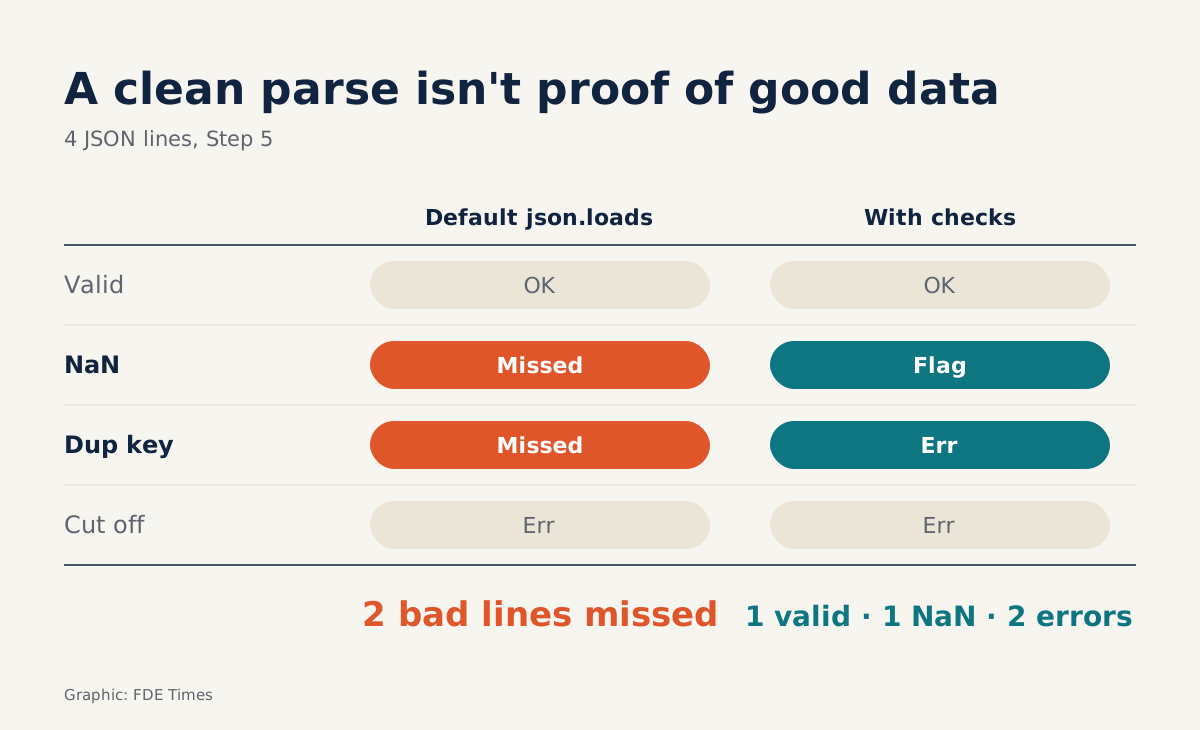
Check: you will see 3 “good” lines and 1 bad line, the truncated one at the end. Keep the line number and error message; do not just pass. The customer will want to know exactly which lines are broken.
Step 6: why is “3 good lines” the wrong number?
Print good and look. The second line has an amount of nan. The reason: according to the Python documentation, the json module accepts Infinity, -Infinity and NaN as valid JSON numbers by default, even though the JSON standard does not allow them. The third line has a user_id of 4, because when the module meets a duplicate key it raises no error and simply keeps the last name–value pair.
Catching NaN needs no extra library, because NaN is the only value that is not equal to itself:
for rec in good:
    amt = rec.get("amount")
    if isinstance(amt, float) and amt != amt:
        print("NaN:", rec)
Duplicate keys are harder to catch, because once the data is a dict the old value is gone. The version below is simplified, but good enough for practice:
def no_dup_keys(pairs):
    keys = [k for k, _ in pairs]
    if len(keys) != len(set(keys)):
        raise ValueError(f"duplicate keys: {keys}")
    return dict(pairs)

json.loads(line, object_pairs_hook=no_dup_keys)
If you add this hook to the loop in Step 5, change except json.JSONDecodeError to except ValueError. Because JSONDecodeError is a subclass of ValueError, that single except block catches both the truncated line and the line with duplicate keys. Run it again and you will see 2 good lines and 2 bad ones, while the NaN line is caught separately by the check above.
Where people slip even when they know how
One common mistake is using COUNT(email) when you mean to count rows, or the reverse, and reporting a wrong number without realising it. Another is deduplicating with DISTINCT across all columns: two records with the same txn_id usually differ in created_at, so DISTINCT does not merge them. A third is swallowing JSONDecodeError with an empty except block.
One risk lies outside the code: silence. The interview runs over video, so the interviewer only knows what you are thinking when you say it. State your assumptions before you type.
At the customer, this is first-week work
These six steps are not only for interviews. When a customer sends their first export file, do three things before building any pipeline or agent: run the NULL rates, count duplicate records by business key, and do a trial read of the JSON file to get the list of bad lines.
With those three numbers in hand, your first meeting with the customer’s data team will be about real data rather than guesswork.
On your CV, do not write “proficient in SQL”. Write a specific line, such as “detected and removed duplicate records by transaction ID before data entered reporting”, with real numbers from your own project.
You can look up ROW_NUMBER syntax in a minute. The habit of doubting the data before the customer starts doubting you has to be practised, and these 60 minutes are for practising it.
Was this article useful?
Thanks for the feedback!