Audit logs for agents: record both the user and the agent acting for them
When an agent does something wrong on a customer's system, a log that records only the user's name cannot answer the first question everyone asks: who did this?

In brief
- OWASP requires every log entry to answer when, where, who and what. With agents, "who" has two parts: the user and the agent acting on their behalf.
- Delegation under RFC 8693 keeps the agent's own identity; impersonation erases the boundary. Token passthrough in MCP also makes logs record the wrong identity.
- Tool inputs and outputs from the model are untrusted text. Sanitise them before logging, record content only when explicitly enabled, and add tamper detection.
Picture this: a customer’s support agent has just closed 40 tickets that should have stayed open. The ticketing system’s log names the support team lead as the person who did it.
In reality he typed a single request. The agent chose the tool, filled in the parameters and ran it. When the customer asks who is responsible, you have no evidence to give them.
The fault lies with the log, not the model. The Model Context Protocol security documentation describes exactly this: when a token is passed straight through (passthrough), downstream logs may record the request as coming from a different source with a different identity.
This guide builds an audit log that answers three questions: who triggered the action, which agent acted on their behalf, and which tool was called with which parameters.
To follow along you need only Python 3 and a test Claude Code project to attach the hook to. The code below is simplified for learning. Before using it in production, check the hook configuration syntax against the Claude Code documentation.
The right schema starts with four questions
The OWASP Logging Cheat Sheet sets the baseline: every entry must answer when, where, who and what, and carry enough information for later monitoring and analysis. With agents, “who” is much harder, because at least two identities always take part in a single action.
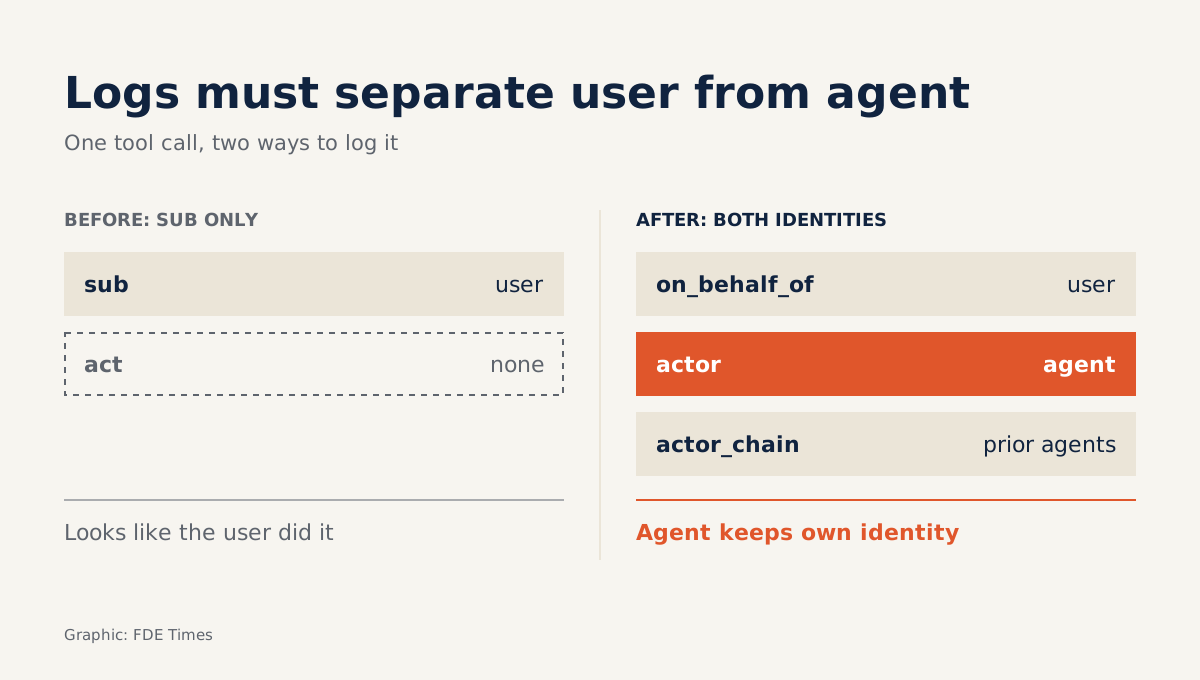
RFC 8693 (OAuth 2.0 Token Exchange) draws a clear line between two mechanisms. With impersonation, the acting party receives all of the original subject’s rights and the log can no longer tell the two apart. With delegation, the agent keeps its own identity. Your schema therefore needs two separate fields: on_behalf_of for the user and actor for the agent.
| Question | Field in the entry | Source |
|---|---|---|
| When | when (UTC, ISO 8601) |
Server clock |
| Where | host, session_id |
Host machine, hook JSON payload |
| Who | on_behalf_of, actor, actor_chain |
sub and act claims in the token |
| What | tool_name, tool_use_id, parameters |
Hook JSON payload |
How to check: give this table to a colleague and ask whether they could answer “which agent closed the 40 tickets” from these fields alone. If not, the schema is still incomplete.
Step 1: capture every tool call with a hook
Claude Code hooks run on every tool call and receive a JSON payload containing session_id, tool_name, tool_input and tool_use_id. Those four fields are enough to know which tool was called, with which parameters and in which session. The hooks documentation includes a PreToolUse example that appends to a log file and uses a matcher to filter MCP tools; the code below is based on that pattern.
#!/usr/bin/env python3
# audit_hook.py - simplified version for learning
import json, sys, os, hashlib, datetime

LOG = os.path.expanduser("~/agent-audit.jsonl")
event = json.load(sys.stdin)  # JSON payload received by the hook

tool_input = event.get("tool_input") or {}
record = {
    "when": datetime.datetime.now(datetime.timezone.utc).isoformat(),
    "where": {"host": os.uname().nodename,
              "session_id": event.get("session_id")},
    "what": {"tool_name": event.get("tool_name"),
             "tool_use_id": event.get("tool_use_id"),
             "input_keys": sorted(tool_input.keys())},
}
Register this script as a PreToolUse hook. If you only want to track MCP tools, add a matcher as in the documentation’s example. How to check: have the agent call any tool, then open the log file. You should see a tool_use_id matching the call that just ran.
Step 2: separate the user from the agent
The hook tells you what happened, but the answer to “who” lives in the token. RFC 8693 defines the act claim in a JWT to express delegation: sub remains the user, while act says who is acting. When one agent calls another, the act claims nest into a chain.
def who_from_claims(claims: dict) -> dict:
    chain, act = [], claims.get("act")
    while act:                      # outermost act = current actor
        chain.append(act.get("sub"))
        act = act.get("act")        # nested act = previous actor
    return {"on_behalf_of": claims.get("sub"),
            "actor": chain[0] if chain else None,
            "actor_chain": chain}
One detail is easy to miss. RFC 8693 says the earlier actors in a nested act chain are informational only: the token enforces nothing about them. If you want to trace that chain later, the log itself has to store it. That is what the actor_chain field is for.
This function must run on the server receiving the request, because that is where the token is. MCP recommends that servers accept only tokens issued to them, because token passthrough makes incident investigation and auditing harder.
If you let the user’s token pass through several layers, actor will always be empty and you are back in the 40-ticket scenario. How to check: decode a real token your agent uses to call an API and see who sub is before drawing any conclusion.
If sub is the user but there is no act claim, the token expresses no delegation: the agent is impersonating the user or passing their token straight through, and downstream logs cannot separate the two. If sub is the agent itself, meaning the agent is using its own token, a missing act is normal because nobody is being acted for.
In that second case actor is recorded correctly, but the token says nothing about the user who triggered the action. on_behalf_of must then be taken from the user’s session and recorded separately; otherwise the entry holds only half the answer to “who”.
Step 3: treat every parameter as untrusted text
Tool parameters are generated by the model, and the model may have been steered by prompt injection. OWASP requires all event data to be sanitised before it is logged, to prevent log injection.
Imagine a parameter containing a newline followed by a fake JSON line: write that string as-is and an attacker has just created their own entry in your log.
The simple defence is to always write with json.dumps. It escapes newlines, so each entry is guaranteed to sit on exactly one line. The second problem is personal data. The OpenTelemetry GenAI conventions warn that message content is likely to contain PII, so content should be recorded only when explicitly enabled.
if os.environ.get("AUDIT_LOG_CONTENT") == "1":   # opt-in
    record["what"]["input"] = {k: str(v)[:500] for k, v in tool_input.items()}
By default, the log keeps only the parameter key names. That is still enough to know the agent called a delete tool with a ticket_id key, without storing customers’ email addresses. The 500-character limit is illustrative; choose one that fits your needs.
Step 4: make the log hard to alter quietly
An audit log that someone can edit is no longer evidence. OWASP advises building in a way to detect when entries are modified or deleted, and copying logs to read-only storage as soon as possible. A simple approach is a hash chain: each line holds the hash of the line before it.
def last_hash():
    try:
        with open(LOG, "rb") as f:
            return json.loads(f.readlines()[-1])["hash"]
    except (FileNotFoundError, IndexError):
        return "0" * 64

record["prev"] = last_hash()
body = json.dumps(record, sort_keys=True, ensure_ascii=False)
record["hash"] = hashlib.sha256(body.encode()).hexdigest()
with open(LOG, "a", encoding="utf-8") as f:
    f.write(json.dumps(record, ensure_ascii=False) + "\n")
This simplified version does not lock the file when several hooks write at once, and it only detects tampering; it does not prevent it. Prevention comes from shipping the log to read-only storage. To verify, you need a script that walks the file from the start and recomputes each hash exactly as the hook did.
#!/usr/bin/env python3
# verify_chain.py - recompute the hash chain from the first line
import json, hashlib, os, sys

LOG = os.path.expanduser("~/agent-audit.jsonl")
prev = "0" * 64
with open(LOG, encoding="utf-8") as f:
    for n, line in enumerate(f, 1):
        rec = json.loads(line)
        h = rec.pop("hash")
        body = json.dumps(rec, sort_keys=True, ensure_ascii=False)
        if rec.get("prev") != prev or hashlib.sha256(body.encode()).hexdigest() != h:
            sys.exit(f"Chain broken at line {n}")
        prev = h
print("Chain intact")
How to check: run python3 verify_chain.py while the log is untouched and you should see “Chain intact”. Then edit one character on line five by hand and run it again: the script should report the chain broken at exactly line 5. If you delete a line entirely, the prev field of the next line will not match and the script stops there too.
Step 5: also log when permissions are widened
Dangerous actions often come with a request for more permissions. MCP recommends logging scope elevation events, including the scopes requested and the scopes actually granted, together with a correlation ID. The same documentation warns that overly broad bundled scopes make the audit trail noisy and obscure the user’s intent.
Use a single correlation ID for the permission grant and the tool calls that follow it. During an investigation you can then read the whole story: what the user asked for, what permissions the agent requested, how far they were granted, and what the agent used them for.
Common mistakes
The most common mistake is recording sub without act, so every agent action looks as if the user did it. The second is turning on full prompt logging “to make debugging easier”, which turns the log into an uncontrolled store of PII.
The third is keeping the log on the same machine as the agent, where the agent has file write access, so the agent itself can edit its own log.
If you want to plug into an existing observability stack, the OpenTelemetry GenAI conventions define an invoke_agent operation and an agent identifier attribute. Using the same field names as these conventions lets the customer’s operations team read your logs without you having to explain them.
Where does this skill come up in practice?
Imagine the customer’s security team asks how you would trace an agent’s actions after an incident.
If you can open the four-question schema, explain the act chain and run the tamper-detection script right there in the meeting, the conversation moves into detail instead of stopping at a promise.
An FDE who only says “we have logs” has not answered anything.
When reading FDE job descriptions, look for phrases such as “enterprise security review”, “compliance” or “agent governance”. On your CV, don’t write “did logging”. Write that you designed an audit trail separating users from agents under RFC 8693, with integrity verifiable through a hash chain, and bring the log file to show the recruiter when they ask more.
The more work agents are given, the more often the question “who did this?” gets asked. The most convincing answer is a log file that was already sitting in read-only storage before the incident.
Was this article useful?
Thanks for the feedback!