No client data yet? Build Friday's demo with Vietnamese fake data
A seeded Python script turns the week spent waiting for database access into hundreds of realistic customers and orders that come out identical on every run.
In brief
- Faker generates locale-specific fake data. vi_VN includes a Vietnamese address provider along with company, job and automotive providers.
- The same seed, the same methods and the same Faker version give the same output. Across patch releases this is not guaranteed, so pin the version.
- Fake data is only a stopgap. A sample FDE job description describes working inside the client's systems and on their data, and warns about demos that run on a permissive sandbox production does not have.
Picture your first week on site with a client. The contract is signed and the kickoff meeting is done, but database access is still waiting on approval from the security team. Meanwhile, the client’s project lead wants to see a working demo this Friday.
This situation is common: you have documentation describing the schema but not a single row of data. If you wait, you lose a week. If you build the demo on a few hand-typed rows of “Nguyen Van A”, the client will see at once that it is a toy.
This guide covers a third option: using Python and Faker to generate a few hundred customers with Vietnamese-style names, addresses and companies, producing exactly the same dataset every time you run it. All you need is Python 3, pip and a terminal.
What will you build?
The end result is a script, sinh_du_lieu.py, that writes two files: khach_hang.csv (customers) and don_hang.csv (orders). The assumed scenario is a retail chain that wants a dashboard of revenue by customer. The example is simplified for teaching; the client’s real schema will certainly have more columns.
According to the official documentation, Faker is a Python package for generating fake data. The project README lists use cases such as bootstrapping a database, stress testing and anonymising production data. A demo built while waiting for real data falls into the first category.
Step 1: install and record the version
Create a dedicated virtualenv for the demo, then install Faker:
pip install Faker
pip show Faker
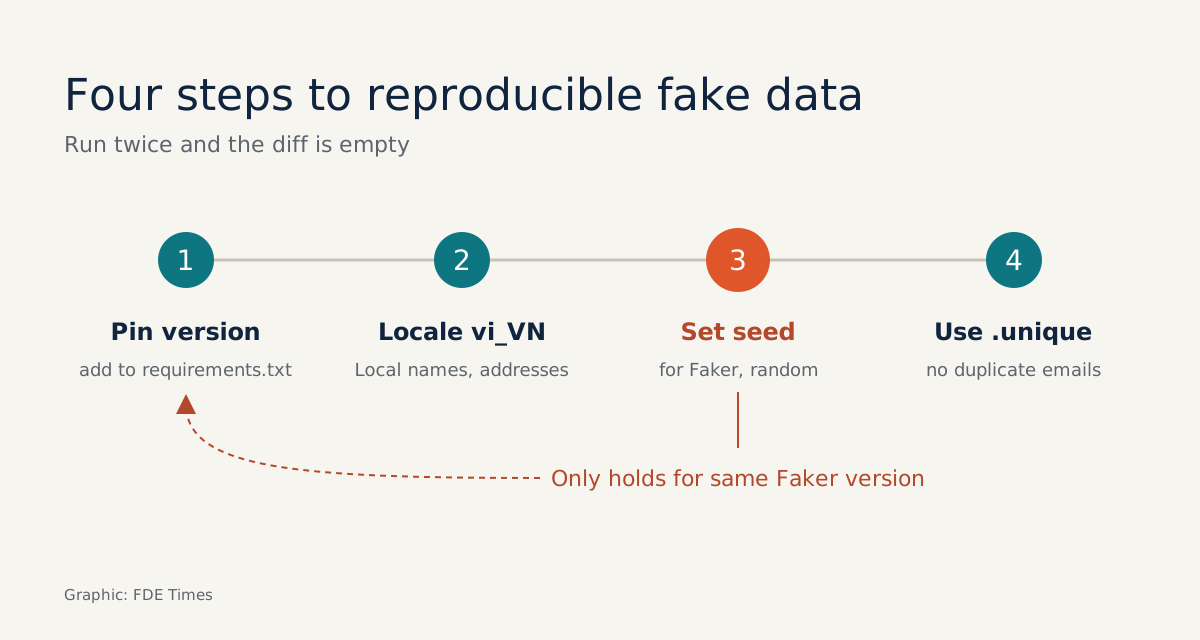
Check: pip show should print a Version: line. Copy that version number into requirements.txt in the form Faker==<the version you see>. The reason becomes clear in step 3, and this is the step newcomers most often skip.
Step 2: the data has to look Vietnamese
You can pass a locale to Faker to get region-specific data. For a Vietnamese client, use vi_VN. The documentation page for this locale includes a provider for Vietnamese addresses, along with company, job and automotive providers.
from faker import Faker

fake = Faker("vi_VN")
print(fake.name())
print(fake.address())
print(fake.company())
print(fake.job())
Check: the names and addresses printed should be in Vietnamese with diacritics. If you see American-style names, you may have forgotten to pass the locale, or you are initialising a different fake variable somewhere else in the code.
This sounds minor, but it shapes how the audience reacts. A sales manager who sees familiar customer names and addresses on a dashboard will talk about the numbers. One who sees “John Smith, Springfield” will talk about how odd the demo looks.
Step 3: seed it so Friday’s demo matches Thursday’s
You do a trial run on Thursday evening, see that the top customer has nice revenue figures, and send the client a screenshot in advance. On Friday morning you run it again and the top customer is someone else. For a demo, that is a serious failure.
Faker has a seed() method that seeds the shared random number generator. According to the README, the same seed, the same methods and the same Faker version produce the same results. The README also states plainly that results are not guaranteed to match across patch releases, which is why step 1 makes you pin the version.
import random
from faker import Faker

Faker.seed(2026)
random.seed(2026)
fake = Faker("vi_VN")
random.seed is also set here because the order amounts below use Python’s random module. The Python documentation says that reusing a seed value reproduces the same sequence across runs, as long as multiple threads are not running at the same time.
Check: run the script twice and compare the output files with diff. If no lines differ, you are done.
Step 4: keep emails and IDs from colliding
Random data occasionally produces duplicates. In a name column, that does not matter. In a key column, such as a login email or an order ID, duplicates break joins and can bring the demo down in front of the client.
The documentation for the Faker class says that calling a provider through the .unique attribute guarantees the returned values are not repeated. When you need to regenerate from scratch, clear that memory with fake.unique.clear().
emails = [fake.unique.email() for _ in range(300)]
fake.unique.clear()
Check: len(set(emails)) == len(emails) should return True.
Step 5: the complete script
Put the steps together. The version below is simplified: customer IDs are sequential, amounts are random integers, and there is no seasonal distribution yet.
import csv
import random
from faker import Faker

Faker.seed(2026)
random.seed(2026)
fake = Faker("vi_VN")

khach = []
for i in range(1, 301):
    khach.append({
        "ma_kh": f"KH{i:04d}",
        "ho_ten": fake.name(),
        "email": fake.unique.email(),
        "dia_chi": fake.address(),
        "cong_ty": fake.company(),
    })

with open("khach_hang.csv", "w", newline="", encoding="utf-8") as f:
    w = csv.DictWriter(f, fieldnames=khach[0].keys())
    w.writeheader()
    w.writerows(khach)

with open("don_hang.csv", "w", newline="", encoding="utf-8") as f:
    w = csv.writer(f)
    w.writerow(["ma_don", "ma_kh", "so_tien"])
    for j in range(1, 2001):
        kh = random.choice(khach)["ma_kh"]
        w.writerow([f"DH{j:05d}", kh, random.randint(50, 5000) * 1000])
Check: open both files in the dashboard tool you plan to demo and join on ma_kh (customer ID). Every order should match a customer.
One variant is worth knowing. If part of your customer base is foreign, the Faker documentation lets you pass an OrderedDict of locales with weights to mix them in proportion, for example OrderedDict([("vi_VN", 0.8), ("en_US", 0.2)]). The ratio here is only an example; use the figure the client gives you.
Three mistakes that make a fake-data demo backfire
The first mistake is not pinning the version. A colleague rebuilds the environment, pulls a newer patch release, and “the same seed” no longer produces the same data. The second is using the random module to generate tokens, passwords or anything security-related. The Python documentation states clearly that this module is not meant for security purposes.
The third is harder to spot: naming columns however you like. If the client’s schema documentation says CUST_ID, call it exactly CUST_ID. That way, on the day you get access, you only have to change the data source rather than rework both the pipeline and the dashboard.
Exercise: dirty your own data
Data you generate yourself is suspiciously clean. To build the habit of thinking about real data, insert the snippet below just before writing khach_hang.csv. This is a simplified simulation: the 5% rate is an assumed figure, and CUST_ID follows the schema example above.
for kh in khach:
    kh["CUST_ID"] = kh.pop("ma_kh")
    if random.random() < 0.05:
        kh["email"] = ""
Remember to change ma_kh to CUST_ID in the order-generation section so the join still works. Because random is seeded, the rows with blanked emails will be the same on every run.
Check: reopen the dashboard. If any chart breaks or miscounts when emails are empty, you have just found something to fix before you meet the real data.
When does fake data stop being useful?
A sample 2026 FDE job description says the hire will work with one to three clients, inside their systems and on their data. It also names a failure mode: a demo that runs on a permissive sandbox, when production has no such sandbox.
So treat the fake dataset as something you will throw away. It lets the client see the shape of the product and lets you test join and aggregation logic.
But it tells you nothing about how dirty the real data is, how many null values there are, or where access gets blocked. In the demo, say clearly that the data is synthetic, then use that same meeting to ask for read access to a small sample of real data.
When reading a job description, if the role is described as working inside the client’s systems and on their data, prepare a story about how you coped during the period before you had access, because the interviewer is quite likely to ask.
On your CV, do not write a vague “knows Faker”. Write that you built a demo on reproducible synthetic data, kept to the client’s schema, and then moved to real data within however many days it took.
The person valued most on a client site is not the one with the prettiest fake dataset. It is the one who gets to delete it soonest.
Was this article useful?
Thanks for the feedback!