Embedding an AI widget on a client's site: iframe or Web Component, and how to read the CSP
The widget works on staging. On the client's production site it shows up as an empty box. The cause is nearly always the boundary between the two pages, and rarely your code.

In brief
- When an iframe is blocked, check two places: frame-src (or default-src) on the client's page and frame-ancestors on the widget's page. frame-ancestors only works when sent as an HTTP header.
- An iframe isolates the widget from the client's page. A Web Component with Shadow DOM isolates only styles and IDs, and its code still runs under the client's CSP.
- Use a fresh nonce on every request instead of unsafe-inline, send postMessage to a specific targetOrigin, and always check the origin of incoming messages.
Picture this. The staging demo runs smoothly, the client approves, and the go-live date is fixed. On the morning you deploy to the client’s real customer portal, the AI assistant’s slot is an empty white box, and the console shows one red line: “Refused to frame”.
None of your code has changed. The page around it has. The client’s production site has a strict Content Security Policy. Staging had none.
An engineer who can read the boundary between the two pages fixes this in a morning. One who can’t spends a week trading emails with the client’s security team.
This guide shows how to read that boundary. It covers how to choose between an iframe and a Web Component, what the client has to open for each, and how to let the two pages talk without opening a new hole.
An iframe has two gatekeepers
Chrome for Developers’ documentation on CSP starts from a plain fact: by default, the browser runs any code a page asks for. So a page must declare an allowlist of the sources it trusts. With an iframe, there are two allowlists, one on each side.
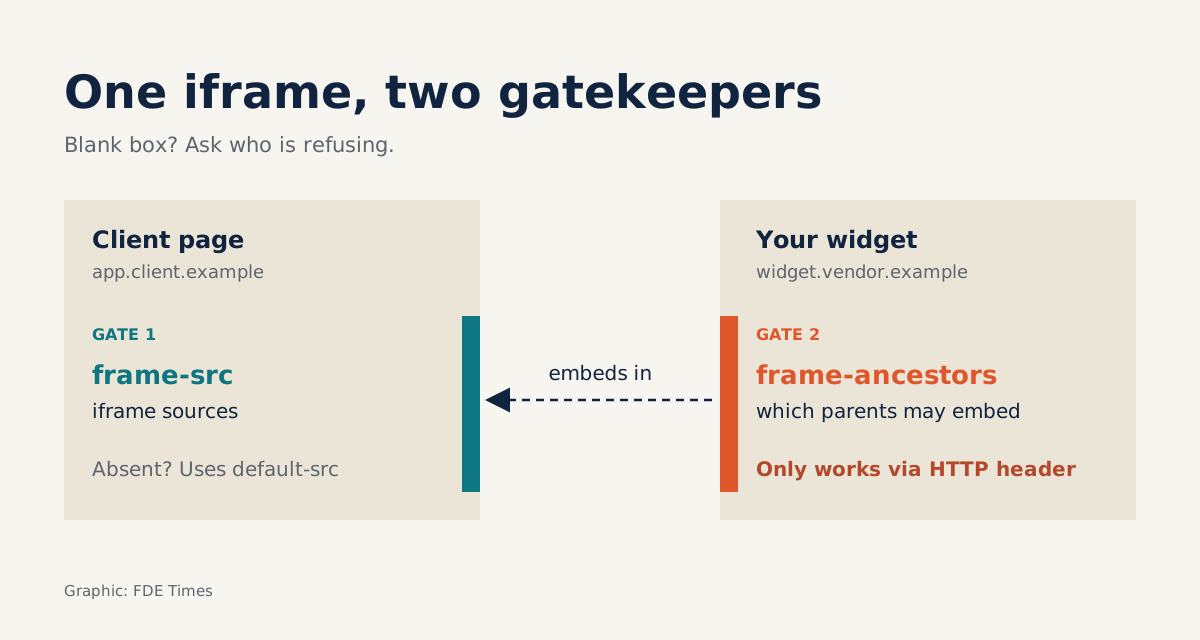
On the client’s page, frame-src sets where that page may load iframes from. On your widget’s page, frame-ancestors sets which parent pages may embed it. MDN is explicit that these two directives point in opposite directions. When you see a blank box, the first question is: which side is refusing?
Two traps often lead to the wrong diagnosis. The first: if the client’s CSP has no frame-src, the browser falls back to child-src, then to default-src. A harmless-looking default-src 'self' is enough to block your iframe, even while the client insists they “don’t block any frames”.
The second trap is on your side. frame-ancestors has no effect when declared in a <meta> tag. It must be sent as an HTTP header. If the widget sits on a static host and the policy lives in the HTML, you have in effect declared nothing. Configure it at the CDN or the server.
Iframe or Web Component: choose the boundary first, the technology second
Web Components are three technologies: custom elements, Shadow DOM and HTML templates. According to MDN, their purpose is encapsulation, so that names and styles clash less with the host page. Shadow DOM keeps the widget’s styles and IDs separate from the rest of the page. The client’s CSS won’t break your buttons, and your CSS won’t break their page.
Here is the common misunderstanding. This is isolation of the interface, not security isolation. A custom element runs inside the client’s document.
The consequence follows directly. Because it lives in the client’s page, the widget’s scripts and API calls must pass the page’s CSP like every other script there. An iframe on its own origin loads the widget as a separate document, and the two sides communicate through postMessage, a channel where you control both ends.
That gives a simple rule for choosing. If the widget needs to blend into the interface and read page state, and the client accepts running your code in their page, a Web Component makes sense. If the widget holds tokens, conversation history or end-user data that you don’t want any other script on the page to touch, choose an iframe.
Example: a voice assistant in a customer portal
Suppose you are adding a voice-enabled AI assistant to https://app.customer.example. The widget lives at https://widget.vendor.example and the API at https://api.vendor.example. You choose an iframe because the widget holds the conversation session. First, declare your side with a header:
Content-Security-Policy: frame-ancestors https://app.customer.exampleOn the client’s side, suppose the current header contains only default-src 'self'. Under the fallback rule, the iframe will be blocked. Ask the client to add exactly one directive rather than loosening default-src:
Content-Security-Policy: default-src 'self';
  script-src 'self' 'nonce-{fresh-value-per-request}' 'strict-dynamic';
  frame-src https://widget.vendor.example
The snippet that loads the widget is an inline script, so it needs a nonce. Infobip, in its documentation for the Live Chat widget, recommends a nonce and discourages unsafe-inline unless the client’s directive already contains it. Chrome for Developers adds that the nonce must be generated fresh for every request and must not be guessable. A nonce hard-coded into a template protects nothing.
Why strict-dynamic? Atlassian explains in its widget documentation that the widget’s loader script is updated often, so a hash-based CSP is a poor fit, and it recommends strict-dynamic.
Atlassian also asks clients to open frame-src to the widget host, exactly as in the example above.
Now the voice part. The iframe tag needs an allow attribute:
<iframe src="https://widget.vendor.example/chat?tenant=customer"
        allow="microphone"
        sandbox="allow-scripts allow-same-origin allow-forms"></iframe>
MDN notes that allow can only narrow the policy already set by the page’s Permissions-Policy header. It does not replace that header. If the client sends Permissions-Policy: microphone=(), your microphone button will stay silent whatever the iframe tag says. Ask about this during discovery, not on go-live day.
Read the sandbox attribute carefully. MDN warns strongly against combining allow-scripts and allow-same-origin when the embedded content shares an origin with the parent page, because the embedded page can then remove its own sandbox.
The configuration above is acceptable only because the widget is on a separate origin. If the client one day proposes proxying the widget to app.customer.example/assistant to “keep things tidy”, that is the moment to drop one of the two flags.
postMessage is a back door if you forget to check the origin
The client’s page often needs to pass context into the widget, such as which order the user is viewing. The widget needs to report out, for instance that the conversation has been handed to a human agent. The standard channel for this is postMessage, and MDN sets two rules for it.
When sending, always specify a concrete targetOrigin, never "*", because the target window may have navigated elsewhere and the data could land with a stranger. When receiving, check origin, and preferably source too. MDN says plainly that skipping this step opens the way to cross-site scripting attacks.
const WIDGET = 'https://widget.vendor.example';
const frame = document.querySelector('iframe');

frame.contentWindow.postMessage({ type: 'context', orderId: 'A123' }, WIDGET);

window.addEventListener('message', (e) => {
  if (e.origin !== WIDGET) return;
  if (e.source !== frame.contentWindow) return;
  if (e.data?.type === 'handoff') openAgentPanel(e.data.ticketId);
});
The widget does the same in the other direction. Its list of valid origins should come from each tenant’s configuration rather than being hard-coded.
The mistakes that delay go-live by a week
The most common mistake is fixing the wrong side: asking the client to loosen their CSP when the block is your own frame-ancestors, or the reverse. The second is asking for too much. The client will refuse default-src * or unsafe-inline, and they will be right to.
The third is assuming that an iframe only needs frame-src. Infobip states that for its Live Chat widget, which loads through an iframe, clients must still open script-src, connect-src, frame-src and style-src together.
The reason is that even when the widget sits in an iframe, the code that loads it on the client’s page still has to pass the client’s CSP. So hand over the complete list at the start, rather than having them open one directive after each failure.
What should you bring to the meeting with the security team?
That list should become a written document: “CSP requirements for embedding the widget”, listing each directive, each domain and the reason it is needed. With it, the meeting goes line by line instead of circling through questions.
The document is also the best evidence for your CV. Instead of “frontend integration”, write that you designed the embedding configuration and CSP requirements that took a widget to production on a system with a strict security policy.
Security teams trust people who understand their policy more than people who just ask them to open things up.
Was this article useful?
Thanks for the feedback!
8 sources
- Content-Security-Policy: frame-ancestors directive - HTTP | MDN · 2026-08-27
- Content-Security-Policy: frame-src directive - HTTP | MDN
- <iframe> HTML inline frame element - HTML | MDN
- Web Components - Web APIs | MDN
- Window: postMessage() method - Web APIs | MDN
- Content Security Policy (CSP)
- About the widget security policy | Customer Service Management | Atlassian Support
- Content Security Policy | Privacy & Security | Chrome for Developers