TypeScript for Python FDEs: enough types, async and npm to fix a client's Node code in a week
Most of what you need is already in your head from Python. The rest comes down to three new habits and one command to run before every merge.

In brief
- Working JavaScript is also valid TypeScript, so type checking can be switched on gradually rather than by rewriting.
- An async function always returns a Promise: use its result without `await` and you are holding a Promise, not data, so let tsc check every place that result is read.
- Node can run .ts files itself, but it only strips the types and checks nothing, so `tsc` still has to sit in an `npm run` script before every merge.
Picture this: on Monday morning you are given access to a client’s backend repo. You have written Python for five years; this repo is Node, written in TypeScript. An endpoint that sends notification emails sometimes sends nothing, and the log holds a single line: undefined.
As an FDE, you cannot say “our team doesn’t do Node”. The client needs the bug fixed this week, on their stack. The good news is that many of the concepts you will meet have a Python counterpart. What is genuinely new comes down to three things: shape-based types, Promises and npm.
You already know more than you think
The official TypeScript documentation is explicit: JavaScript code that runs is also TypeScript code. For an FDE that has practical value, because you can add types to a client’s code one file at a time instead of asking permission to rewrite a whole module.
The syntax is familiar too. Type annotations go after the variable name, as with Python type hints: function getUser(id: string). TypeScript infers types in many cases, so you annotate less than you might expect. And any works like Python’s Any: it switches checking off. The documentation advises against it, because a value of type any is not checked at all.
| In Python | In TypeScript/Node |
|---|---|
x: str | None |
x: string | null |
Any |
any (avoid) |
coroutine, await |
Promise, await |
| asyncio event loop | Node’s event loop |
| requirements and dev-requirements | dependencies and devDependencies |
| lock file | package-lock.json |
Types are judged by shape, not class name
This is the biggest shift in thinking. Python compares types by class name by default. TypeScript uses structural typing: two objects with the same shape count as the same type, whoever declared them.
So in a client’s repo you will see fewer class declarations and more type User = { id: string; email: string | null }. Any object with both fields is accepted as a User, including JSON just parsed from an API.
Union types come with one rule worth remembering: TypeScript only allows an operation if it is valid for every member of the union. With string | null, you cannot call .toLowerCase() until you have checked null out of the way.
With strictNullChecks on, any value that might be null or undefined has to be checked before you use a property or method on it, just as you must check for None before using an Optional value in Python. The strict flag in tsconfig bundles these tighter checks together, and you should turn it on.
A Promise is Node’s awaitable
According to MDN, a Promise is the object an asynchronous function returns, representing the current state of the operation. If you have written asyncio, the model is familiar: Node runs JavaScript on a single thread by default, and the event loop lets it do non-blocking I/O.
The trap lies in one short sentence in the documentation: an async function always returns a Promise. Call it and forget await, and you get not the data but a promise of data. When reading someone else’s code, a missing await is very hard to spot by eye.
The bug in the client’s repo, fixed step by step
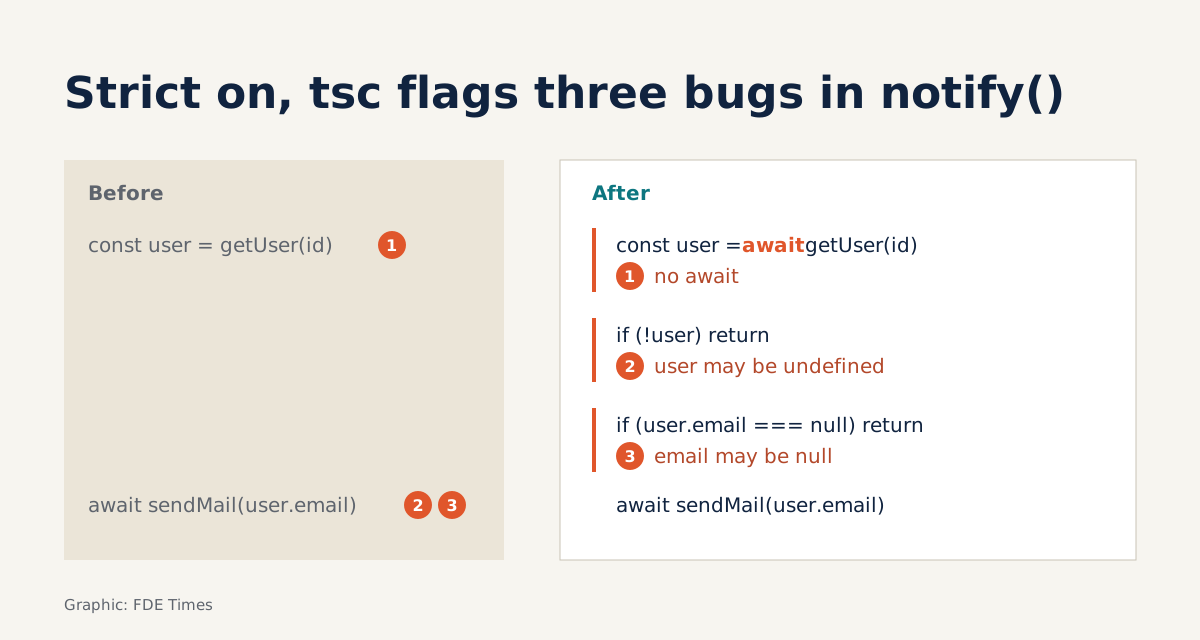
Back to the email endpoint. Suppose the code looks like this:
type User = { id: string; email: string | null };

async function getUser(id: string): Promise<User | undefined> {
  const row = await db.findById(id);
  return row ?? undefined;
}

export async function notify(id: string) {
  const user = getUser(id);      // missing await
  await sendMail(user.email);    // user is a Promise, not a User
}
Here tsc rejects the line user.email even without strict, because a Promise has no email property. This is the easy case: the async function’s result is used on the very next line, so there is a wrongly typed operation for the compiler to catch.
The other two cases are harder. If someone casts user to any to silence the error, tsc stops checking anything. And if a call such as sendMail(...) loses its await and its result is not used further, then as far as types go nothing is wrong, so do not count on tsc to find it; you have to review those calls yourself.
Add the await, and this is where strict earns its keep. With strictNullChecks on, tsc reports a second error: user has type User | undefined, so you may not read .email yet. Fix that, and a third appears: email may be null. The final fix narrows the type in both places:
export async function notify(id: string) {
  const user = await getUser(id);
  if (!user) {
    logger.warn({ id }, "user not found");
    return;
  }
  if (user.email === null) {
    logger.warn({ id }, "user has no email");
    return;
  }
  await sendMail(user.email);    // here email is definitely a string
}
Note how you arrived at the fix. You did not have to guess. Every error tsc reported is a real case in the client’s data that the old code ignored, and every early return is a log line that helps the client’s team understand why an email was not sent.
npm is the map of the repo
Before reading a line of code, open package.json. The scripts field maps each command name to the actual command to run, so npm run build or npm run test is the standard way in to building and testing the repo. You need not guess which tools the client uses: it is all written down there.
Next, look at the two groups of dependencies. The npm documentation says test harnesses, transpilers and development-only tools should not go in dependencies.
They belong in devDependencies, much as you separate runtime requirements from dev-requirements. package-lock.json pins the exact dependency tree and is designed to be committed to the repo.
If your fix changes that file, include it in the same PR.
There is one new trap. Recent versions of Node can run .ts files directly by replacing TypeScript syntax with whitespace, and they do no type checking at all.
Features that need syntax transformation, such as enum, simply raise an error. So “Node runs it” proves nothing about the types. The missing await above still runs on Node without a warning; it only surfaces when tsc is invoked.
What stays after you leave
The order of work for the week is in the diagram at the top. The step worth stressing is the last one: check that tsc sits in a script that CI runs before merging, and if it does not, propose adding it. Your fix helps the client this week; tsc in CI keeps blocking the same class of bug after you have moved on to another client.
Mistakes Python developers often make
The most common is using any to make the compiler stop complaining. That only erases the information you need. Next comes forgetting await and then hunting for the bug in the database layer. Then there is the habit of treating Node running a .ts file as proof that the code is correct.
On npm, do not install build tools into dependencies, and do not leave package-lock.json out of a commit. Both make the client’s production environment differ from your machine without anyone noticing.
On the career side, when reading FDE job ads, look at the description of the client stack: if Node or TypeScript appears, it is a skill worth preparing evidence for in advance. On your CV, do not just write “TypeScript”. Write one specific line: you turned on strict in an existing codebase, the number of type errors you fixed, and adding tsc to CI.
A recruiter reading that line will understand you can work on the client’s stack, not only your own.
This week’s exercise: in the repo you are working on, remove await from an async call whose result is read on the next line, then run tsc; then repeat with a call whose result is discarded. The first time tsc complains, the second time it stays silent, and that silence is exactly where you will have to check by hand at your next client.
Was this article useful?
Thanks for the feedback!