Build an order-lookup voice agent on ElevenLabs with one webhook tool
The voice and the prompt are not what usually breaks a voice agent. If your API returns JSON in a different shape when an order is not found, the agent may read the caller the status of someone else's order.

In brief
- A voice agent is only useful when it can fetch real data, and a webhook tool is how you connect the agent to your API.
- The order ID goes in the URL as an LLM Prompt parameter; the API key goes in a header and is stored as a secret.
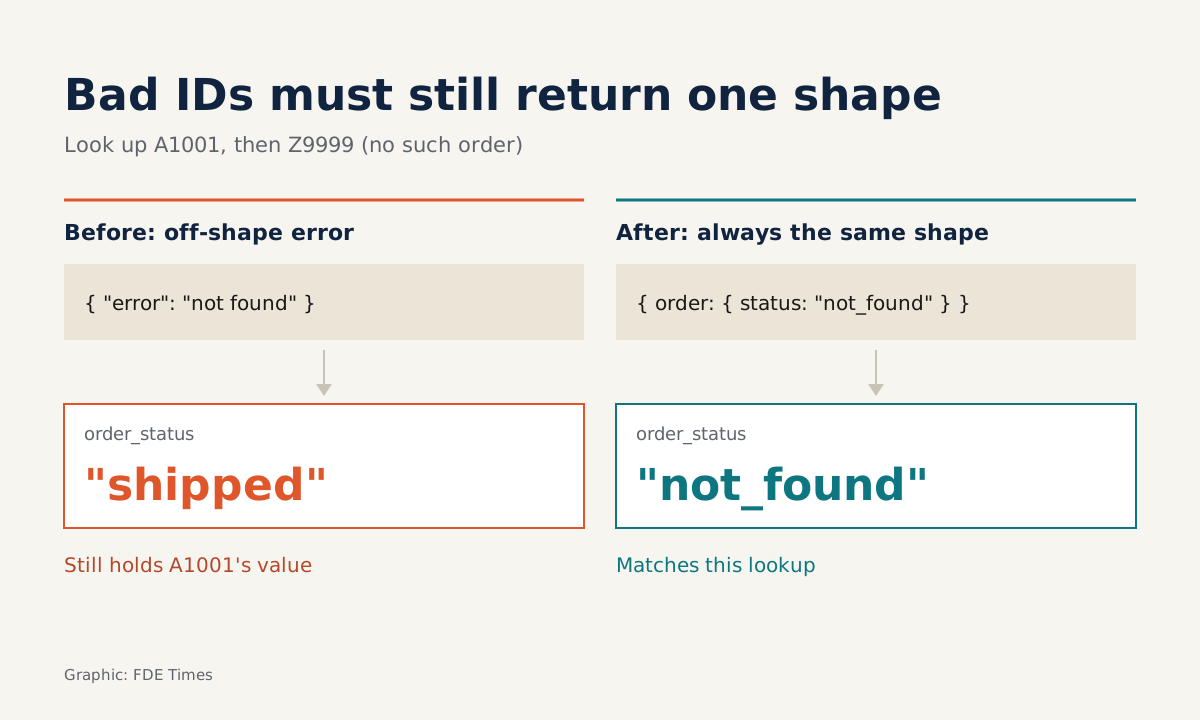
- The endpoint must always return JSON in the same shape, because a dynamic variable is not updated when its path does not exist in the response.
A voice agent that sounds good but cannot look up an order is just an answering machine with a pleasant voice. A customer calls to ask “where is my order?”, and the answer lives in the company’s systems, not in the language model.
This guide builds exactly that piece. You will end up with an agent on the ElevenLabs agents platform, a mock order API written in JavaScript running on a Cloudflare Worker, and a webhook tool joining the two. It takes about an evening. You need an ElevenLabs account, a Cloudflare account, Node.js and curl.
If you work as an FDE or are aiming for the role, picture the real version of this exercise: the order data sits behind an existing customer API, and your job is to wrap it so the agent can call it safely, then prove the flow works end to end.
What is the agent doing while you talk?
According to ElevenLabs’ documentation, the platform orchestrates four components: automatic speech recognition (ASR), an LLM of your choice, a low-latency text-to-speech (TTS) model, and a separate turn-taking model that manages the rhythm of the conversation. In this guide you decide three things: the voice, the LLM, and the tools the LLM is allowed to call.
ElevenLabs offers several kinds of tool: client, webhook, code, MCP and system. A webhook tool calls your external API. A code tool runs JavaScript in a sandbox on ElevenLabs’ infrastructure, so you do not have to host an endpoint yourself.
This guide uses a webhook because it is closer to a real deployment: at a customer, the order data and access keys live in their systems, and a webhook leaves them where they are.
Step 1: create a blank agent and give it a voice
In the dashboard, create a new assistant, name it and choose the Blank template. Then fill in three things: the system prompt, the first message and the voice. The system prompt sets how the agent behaves. The first message is what the agent says as soon as the call starts.
A starting system prompt might look like this. It is only an illustration; adjust it to suit your case:
You are a customer service agent for an online store.
When a customer asks about an order, ask for the order ID (format A1001),
read the ID back for the customer to confirm, and only then look it up.
Answer only from the lookup result. Never guess the status.
The platform has more than 10,000 voices in more than 70 languages, so choose a voice for the caller’s language rather than accepting the default. Test it with the Test AI agent button and talk to it directly. At this point the agent cannot look anything up, and if it invents an order status, that is why you need the last line of the prompt.
Step 2: write a mock order API
Create a Worker with Cloudflare’s C3 CLI. The command below is the common invocation; check Cloudflare’s documentation for the latest version:
npm create cloudflare@latest order-mockReplace the contents of the Worker file with the following code. It is a stripped-down version with the data hard-coded:
const ORDERS = {
  A1001: { status: "shipped", eta: "in 2 days" },
  A1002: { status: "processing", eta: null },
};

export default {
  async fetch(request, env) {
    if (request.headers.get("x-api-key") !== env.ORDER_API_KEY) {
      return Response.json({ error: "unauthorized" }, { status: 401 });
    }
    const m = new URL(request.url).pathname.match(/^\/orders\/([^/]+)$/);
    if (!m) return Response.json({ error: "bad_path" }, { status: 404 });

    const id = decodeURIComponent(m[1]).replace(/\s|-/g, "").toUpperCase();
    const found = ORDERS[id];
    return Response.json({
      order: {
        id,
        status: found ? found.status : "not_found",
        eta: found ? found.eta : null,
      },
    });
  },
};
Two points in this code deserve attention. All asynchronous work in a Worker must run inside the handler, not in global scope, so when you replace the ORDERS object with a fetch call to a real system, put that call inside fetch(request, env).
The other point: an order that does not exist still returns exactly the shape { order: { id, status, eta } }, with status: "not_found". The reason becomes clear in step 5.
ORDER_API_KEY is an environment variable. Set it as a Worker secret following Cloudflare’s instructions; do not write it into the code.
Step 3: deploy and test before touching the agent
Deploy with Wrangler to a *.workers.dev subdomain. That is exactly what ElevenLabs needs: a public HTTPS URL.
npx wrangler deploy
curl -H "x-api-key: $KEY" https://order-mock.<your-name>.workers.dev/orders/A1001
curl -H "x-api-key: $KEY" https://order-mock.<your-name>.workers.dev/orders/Z9999
curl https://order-mock.<your-name>.workers.dev/orders/A1001
The first command must return shipped, the second not_found, and the third a 401. Do not move on until you get all three. Testing the backend on its own first saves you from guessing whether a fault lies in the prompt, the tool or the API.
Step 4: attach the webhook tool
In the agent’s Tools section, add a webhook tool with method GET and a URL containing a variable in curly braces:
https://order-mock.<your-name>.workers.dev/orders/{order_id}Declare order_id as a path parameter with value type LLM Prompt. With this type the model extracts the value from the conversation itself, so the parameter description must be explicit, for example “order ID made of one letter and four digits, such as A1001”.
Add an x-api-key header and store it as a secret, as ElevenLabs recommends for API keys. Skip the body content type, since that setting applies only to POST, PUT and PATCH. A GET lookup needs only path or query parameters.
Step 5: keep the order status in dynamic variables
If the tool returns a valid JSON object, it can create or update dynamic variables. You declare paths in dot notation: map order.status to the variable order_status and order.eta to order_eta. From then on, the rest of the conversation can use these two variables without calling the API again.
This is why step 2 forces the Worker to always return the same shape. If a field or path is missing from the response, the variable is not updated. Imagine the Worker returned { "error": "not found" } for a wrong ID: order_status would keep the value from the previous lookup, and the agent might tell the customer that a non-existent order “has shipped”.
Mistakes almost everyone makes
The most common mistake is a misheard order ID. A customer says “A one zero zero one”, and ASR may transcribe it as “A 1001” or “a-1001”. The replace line in the Worker handles spaces and hyphens, and the “read the ID back for the customer to confirm” instruction in the prompt handles the rest. You need both layers; relying on only one will let errors through.
The next is letting the agent interpret technical status codes on its own. processing sounds mechanical when read aloud, so add a table to the prompt that turns each status into a natural sentence. And do not put the API key in the URL or in the code: it will leak into logs, whereas a header combined with a secret avoids the problem.
A final check: press Test AI agent, ask about A1001, then Z9999, then look up A1001 again and follow up with “so when will it arrive?”. The last question tests whether the agent uses order_eta, and the Z9999 lookup in the middle shows that order_status has switched to not_found rather than keeping the old value.
At a customer, where is the hard part?
The mock Worker in this guide becomes the buffer layer between the agent and the customer’s order management system. In that layer you normalise order IDs, hide fields the agent does not need to see, and return a fixed shape even if the system behind it changes.
The first question to put to the customer’s engineering team is: what does the order lookup API return for a wrong ID, and how do we issue a separate key for the agent?
If you are aiming for an FDE role in applied AI, put this project on GitHub along with notes on the failure cases above.
In an interview, explaining why the endpoint always returns the same shape is far more convincing than a demo that talks smoothly.
A worthwhile next step is to replace the ORDERS object with a call to a real database, then measure how much the tool’s latency lengthens the silences in the call.
Was this article useful?
Thanks for the feedback!