Why an EDI parser can feed a logistics agent a false timeline
Before wiring a TMS to an agent, learn the five X12 transactions that matter and why segment G62 changes meaning between them.
In brief
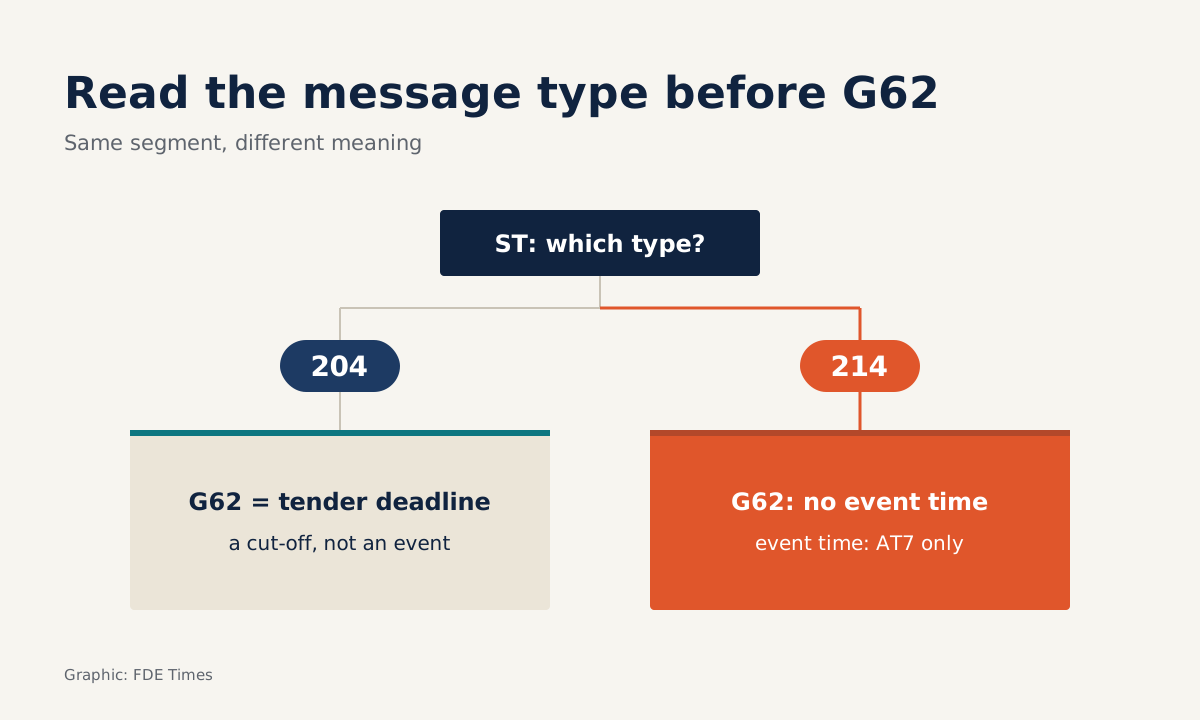
- In a 214, the status time lives in AT7. G62 must not be used to report it, while a G62 in the 204 header is the deadline to respond.
- A 997 only says the message passed technical checks. Whether a tender was accepted or rejected is in the 990.
- Never generate a 997 in reply to a 997. Your tests must include a rejected tender that goes back to dispatch.
Picture your first week at a logistics company. The client wants an agent that can answer “where is this shipment, and is it late?”
The IT team opens a folder full of text files for you. Every line begins with two or three capital letters, with fields separated by symbols. Their TMS has no REST API at all, only EDI X12.
In a situation like this, the model is not the hard part. The hard part is reading the messages correctly, because the same segment means different things depending on the transaction that contains it. If the parser reads it wrongly, the agent still answers with great confidence. It just answers wrongly.
This article walks through the five transaction types you will meet most often, one specific trap in the parser, and the test cases the client will judge you by.
Which messages does a shipment generate?
For full-truckload road freight, everything starts with a 204. This is the message a shipper or another involved party uses to tender a load to a full-truckload carrier. Inside it, B2 carries the basic shipment data, S5 each stop, N1 the parties involved and L11 the reference numbers.
The carrier replies with a 990: accept or decline the load. Once the truck is moving, it sends 214s to report shipment status to the shipper, the consignee and agents. The opening B10 segment carries identifiers such as the shipment reference number. AT7 is the core: it holds the status code, the reason, the time of the status and the appointment.
Ocean freight uses the 315 to report shipment events. There you read N9 for references, Q2 for the vessel and sailing dates, R4 for ports and SG for status.
The 997 is the functional acknowledgement, sent back in response to a transaction or a group of transactions: the receiver confirms it has received them, and whether they were accepted, accepted with errors or rejected.
| Transaction | Who sends it, and why | Segments to read first | What the AI system uses it for |
|---|---|---|---|
| 204 | Shipper tenders a load to a carrier | B2, S5, N1, L11, G62 (response deadline) | The plan: stops, parties, deadline to reply |
| 990 | Carrier accepts or declines | Matched to the right version of the 204 | Whether the load has a truck or must be reassigned |
| 214 | Carrier reports road shipment status | B10, AT7 | The event timeline for predicting delays |
| 315 | Reports ocean shipment events | N9, Q2, R4, SG | Vessel, port, shipment status |
| 997 | Receiver acknowledges technically | AK5, AK9 | Health of the connection, not business data |
The G62 trap: a segment that changes meaning by transaction
TrueCommerce’s 214 guide contains a short rule: G62 must not be used to report the date and time of the shipment status. That time lives in AT7. In a 204, however, a G62 in the header carries the deadline to respond to the tender.
Suppose an engineer in a hurry writes a single “find the date and time” function for every transaction by scanning for G62. On a 204, that function picks up the response deadline and records it as a shipment event.
On a 214, it skips AT7, which is where the real time is. Your agent will then say “the shipment is 6 hours late” on the strength of timestamps that are not events at all.
So the parser must route by transaction type first, and only then read segments. The Python sketch below deliberately does not hard-code the position of each field. Field positions come from each partner’s implementation guide, not from guesswork.
def parse_segments(raw, seg_term="~", elem_sep="*"):
    # set the delimiters from the partner's documentation, never assume defaults
    return [s.strip().split(elem_sep) for s in raw.split(seg_term) if s.strip()]

def first(segs, tag):
    return next((s for s in segs if s[0] == tag), None)

# tx_type: read from the first element after the ST segment name, e.g. first(segs, "ST")[1] == "214"
# field_map: a lookup table you build from the implementation guide; pick(seg, name) returns the element at the recorded position
def to_records(tx_type, segs, field_map):
    if tx_type == "214":
        return {
            "shipment_ref": field_map.pick(first(segs, "B10"), "shipment_ref"),
            # event times come ONLY from AT7, never from G62
            "events": [field_map.pick(s, "status") for s in segs if s[0] == "AT7"],
        }
    if tx_type == "204":
        return {
            "stops": [s for s in segs if s[0] == "S5"],
            # G62 in the 204 header = deadline to respond to the tender
            "respond_by": field_map.pick(first(segs, "G62"), "datetime"),
        }
    if tx_type == "997":
        return {"ack": True}  # record only, never reply to it
    raise ValueError(f"unsupported transaction type {tx_type}")
This approach forces you to answer “what is this message?” before “what is this field?”. When the client adds 315s for its ocean business, you only add one branch that reads N9, Q2, R4 and SG, without touching the 214 logic.
A 997 says “received”, not “agreed”
The second mistake usually arrives later, once the system has been running for a few weeks. In a 997, AK5 reports the result for each transaction set, with errors if there are any, while AK9 reports the result for the whole functional group and the number of transaction sets. When everything shows as accepted, it is easy to assume every shipment is fine.
In fact a 997 or 999 only tells you the message passed technical checks. A 204 can get back an accepting 997 and then a declining 990. The business outcome has to be tracked separately, through the 990 or through reconciliation reports.
One more point: a 990 is tied to a specific version of the 204. If the client amends a tender twice, the system has to match the acceptance to the right tender. A declined tender must go back to dispatch for reassignment, not sit quietly in a “sent” state.
The other direction needs a hard rule too. The X12 standard says a 997 must not itself be acknowledged, to avoid an endless loop of acknowledgements of acknowledgements. If your AI pipeline generates messages, write a test proving it never answers a 997 with a 997.
Four steps when connecting a client’s EDI
The first step on site is to ask for each partner’s implementation guide, not for database access. Build a lookup table: transaction type, segment, field, business meaning. Take that table to a session with a dispatcher, because they know which status codes are actually used.
Second, build a parser that routes by transaction type, as above, and store the raw message alongside the normalised record. When the agent gives a wrong answer, you need to trace it back to the exact AT7 or SG line that produced it.
Third, keep two separate status tables: one for 997s (is the connection healthy?) and one for 204/990/214 (how is the shipment doing?). The AI system reads only the second. The first is for operational alerts.
The last step is the test suite. Stacksync’s 990 testing guide requires testing a declined tender and confirming it goes back to dispatch for reassignment. This is the test to write first: if it fails, a declined load will sit idle with nobody assigning another truck.
The mistakes that cost client trust
The common mistakes are all familiar: taking event times from G62 in a 214, treating an accepting 997 as an accepted tender, matching a 990 to an old 204, forgetting the decline case, and letting the pipeline answer a 997 with a 997. None of them needs AI knowledge to fix. All of them need careful reading of the documentation and tests written early.
On the career side, when you read FDE or solutions engineer job ads in logistics, look for the words “EDI”, “X12” and “TMS”. When you see them, ask directly in the interview how much of the role’s time goes on integration.
On your CV, do not just write “EDI experience”. Be specific: you connected 204/990/214 flows, reconciled 997s separately from business outcomes, and built a test suite for declined tenders.
A delay-prediction agent is only as good as the timeline it is fed. With a logistics client, that starts with taking event times from AT7, not from G62.
Was this article useful?
Thanks for the feedback!
7 sources
- Product: X12 EDI (TrueCommerce: X12 214 Transportation Carrier Shipment Status Message)
- EDI 214 Transportation Carrier Shipment Status Message (Stedi X12 004010)
- EDI 204 Motor Carrier Load Tender (Stedi X12 004050)
- EDI 990 Response to a Load Tender (Stedi X12 004050)
- Stacksync: XPO Logistics Freight Inc, EDI 990
- EDI 997 Functional Acknowledgment (Stedi X12 004010)
- EDI 315 Status Details (Ocean) (Stedi X12 003060)