Hands-on: designing tool results so an agent doesn't drown in 10,000 rows
A single unpaginated API call can overflow an agent's context window many times over, and stopping it is the tool author's job, not the model's.

In brief
- MCP's built-in pagination does not apply to tools/call, so capping result size is the tool author's job.
- Combine filtering, capped pagination, truncation and a concise mode. In Anthropic's example, concise uses only about ⅓ of the tokens.
- Truncation messages with concrete guidance steer the agent towards tool calls that use fewer tokens.
Runpod measured one unpaginated tool call on a real account. The data it returned was about 15 times the size of Claude Code’s context window. An agent cannot read a result larger than its context in full, however strong the model.
Picture your first week on a customer site. They hand you an orders endpoint that returned 20 rows in the demo. On real data it returns 10,000 rows, each with a raw payload attached. The agent you built yesterday ran smoothly; today it cannot run at all.
In its guide to writing tools for agents, Anthropic stresses that optimising the amount of context a tool returns matters as much as its quality.
Nor should you count on the protocol. According to an analysis by Wati, MCP’s built-in pagination does not apply to tools/call, which is where most of the data flows.
So capping result size is your job.
What you will build, and what you need
You will write a search_orders tool that wraps a mock orders API with 10,000 rows. The finished version has filters, a capped limit, an opaque cursor, a concise/detailed switch, a token budget per call and a truncation message with guidance. A second tool fetches the large payload when the agent genuinely needs it.
All you need is Python 3, with no external libraries. The code is simplified and not tied to any MCP framework; wire these functions into whichever SDK or framework you use. All the data is fake.
import json, random, base64

STATUSES = ["paid", "pending", "refunded", "failed"]
ORDERS = [
    {
        "order_uuid": f"7f3a-{i:05d}-c91e",
        "customer_name": f"Customer {i % 800}",
        "status": random.choice(STATUSES),
        "amount": round(random.uniform(5, 500), 2),
        "region": random.choice(["north", "south", "central"]),
        "raw_payload": "x" * 400,
    }
    for i in range(10_000)
]
Step 1: measure before you fix
Don’t fix anything until you have a number. Write the naive version first, a tool that returns everything the API hands back, then measure how heavy it is.
def estimate_tokens(obj) -> int:
    # rough estimate: assume ~4 characters per token; swap in your model's tokenizer
    return len(json.dumps(obj, ensure_ascii=False)) // 4

def list_orders_naive():
    return ORDERS

print(estimate_tokens(list_orders_naive()))
Check: The raw_payload field alone holds 4 million characters, so by the rough estimate above the result will exceed one million tokens. For comparison, Claude Code caps each tool result at 25,000 tokens by default. Use 25,000 as a reference budget per call.
Step 2: filter first, then worry about the rest
Anthropic advises that tools which can return a lot of data should combine pagination, range selection, filtering and truncation. Filtering is the cheapest step, because a row that has been dropped never needs to be paginated or truncated.
def _filter(status=None, region=None, min_amount=None):
    rows = ORDERS
    if status:
        rows = [r for r in rows if r["status"] == status]
    if region:
        rows = [r for r in rows if r["region"] == region]
    if min_amount is not None:
        rows = [r for r in rows if r["amount"] >= min_amount]
    return rows
Check: len(_filter(status="refunded")) should leave about a quarter of the rows. In a real system, push the filters down into query parameters on the customer’s API rather than downloading all 10,000 rows and filtering afterwards.
Step 3: a capped limit and an opaque cursor
Runpod’s rule for every tool that returns a list is short: always paginate, cap the limit and use an opaque cursor, a string the agent simply passes back without being able to read inside it.
With a cap, the agent cannot ask for 5,000 rows at once. With an opaque cursor, the agent has no offset to guess at, and you can change how the backend paginates without breaking the agent.
MAX_LIMIT = 50

def _encode(offset: int) -> str:
    return base64.urlsafe_b64encode(json.dumps({"o": offset}).encode()).decode()

def _decode(cursor) -> int:
    return json.loads(base64.urlsafe_b64decode(cursor))["o"] if cursor else 0
The base64 cursor here is only for illustration: the agent doesn’t need to read it, but anyone who wants to can decode it. In production, sign the cursor or use one issued by the customer’s own API.
Step 4: concise by default, identifiers only when needed
Anthropic recommends that tool results prioritise meaningful context and avoid low-level technical identifiers. A bare uuid tells the agent nothing; a customer name does. A response_format switch lets the agent choose the level of detail. In Anthropic’s example, concise mode used only about ⅓ of the tokens.
def _shape(row, fmt):
    item = {"customer": row["customer_name"],
            "status": row["status"], "amount": row["amount"]}
    if fmt == "detailed":
        item["region"] = row["region"]
        item["order_id"] = row["order_uuid"]
        item["payload_ref"] = f"order-payload:{row['order_uuid']}"
    return item
Detailed mode keeps order_id because the agent needs it to call the next tool. raw_payload is never returned directly; step 6 explains why.
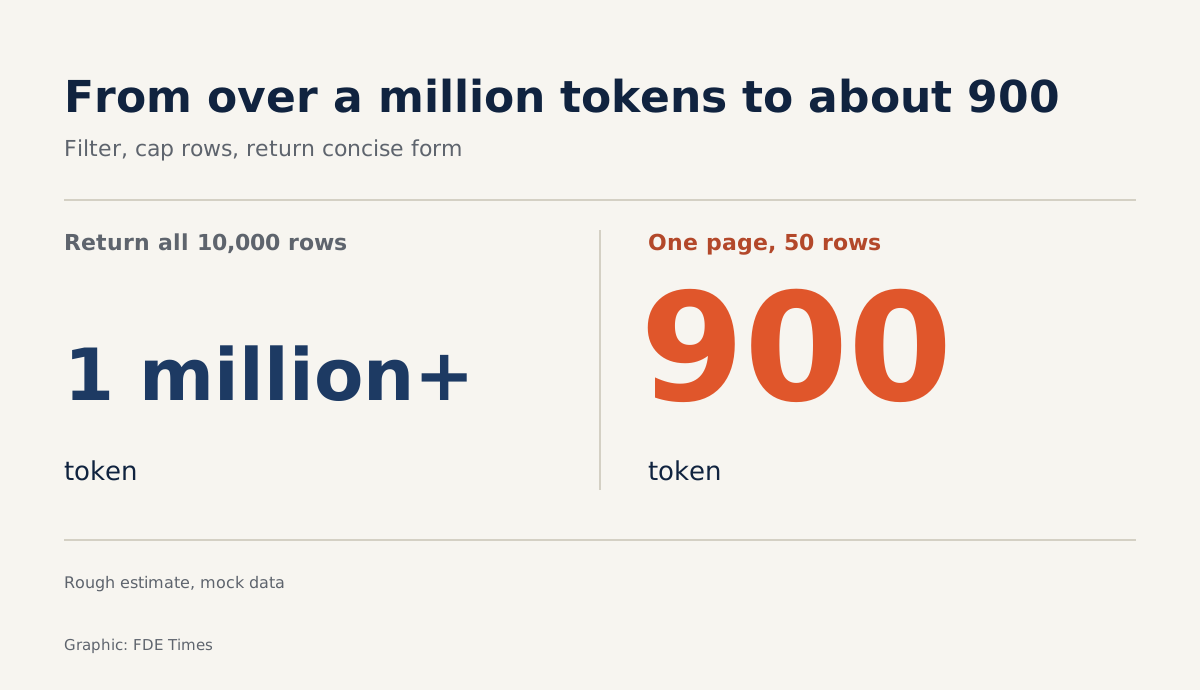
Check: Estimate a 50-row concise page. With this fake data each row is only about 70 characters, so the whole page comes to roughly 900 tokens by the rough count, against more than a million tokens in step 1.
Step 5: a budget and a truncation message with guidance
Now put it all together. Anthropic notes that truncation and error messages can steer an agent towards tool calls that use fewer tokens. So don’t just say “too large”: say exactly which parameters the agent should use next time.
BUDGET = 25_000

def search_orders(status=None, region=None, min_amount=None,
                  limit=20, cursor=None, response_format="concise"):
    rows = _filter(status, region, min_amount)
    start = _decode(cursor)
    limit = max(1, min(limit, MAX_LIMIT))
    items = [_shape(r, response_format) for r in rows[start:start + limit]]
    result = {"total_matches": len(rows), "items": items}
    while estimate_tokens(result) > BUDGET and len(items) > 1:
        items = items[: len(items) // 2]
        result["items"] = items
        hint = "Narrow with status/region/min_amount"
        if response_format == "detailed":
            hint += ", switch to response_format='concise'"
        result["note"] = (f"Truncated to {len(items)} items to fit the budget. "
                          f"{hint}, or page with next_cursor.")
    end = start + len(items)
    result["next_cursor"] = _encode(end) if end < len(rows) else None
    return result
The hint to switch to concise appears only when the agent is using detailed. Telling an agent to do what it is already doing only makes it repeat the same call.
Check: Try three things. Call with limit=5000 and confirm you get back only 50 rows. Call twice in a row with next_cursor and confirm the two pages don’t overlap. Then temporarily set BUDGET = 200 to see the note field appear and next_cursor move back by exactly the number of rows cut.
With the fake data, 50 concise rows are far below the 25,000 mark. The budget is a safety net for the day a customer’s notes field turns out to be unusually long. The limit cap counts rows, the budget counts size, and you need both.
Step 6: return a reference instead of a heavy payload
Runpod advises that for large or binary results, a tool should return a reference the agent can fetch when needed, rather than the whole payload. That is why step 4 returns only payload_ref.
def get_order_payload(payload_ref: str, max_chars: int = 2000):
    uuid = payload_ref.split(":", 1)[1]
    row = next(r for r in ORDERS if r["order_uuid"] == uuid)
    text = row["raw_payload"]
    return {"payload": text[:max_chars], "truncated": len(text) > max_chars}
Check: Call search_orders(response_format="detailed"), take a payload_ref from the result and pass it to get_order_payload. This helper tool has its own cap too, because there is no reason for it to become a back door for 4 million characters.
What if the agent really has to see all 10,000 rows?
Some questions, such as “which region has the highest refund rate”, genuinely require scanning all the data. In that case, let the agent write code that runs outside the model. Anthropic describes using code execution to filter a 10,000-row dataset while the agent sees only five rows: the model receives the aggregated result, not the raw data.
Even when each result is compact, results pile up over a long session. Anthropic regards clearing old tool results from the history as one of the lightest and safest forms of context compaction. A page of orders the agent has finished with does not need to sit in context for another 30 turns.
Common mistakes
The first mistake is assuming the protocol handles pagination, when MCP’s pagination does not cover tools/call. The second is capping the number of rows but not their size, so a single row with a huge text field is enough to break everything.
The third is a “response too large” message that gives the agent no way out, so it repeats the same call or guesses blindly. The fourth is returning only uuids, forcing the agent to spend an extra call just to find out whose uuid it is.
How this skill shows up on customer sites
Runpod’s measurement was taken on a real account, and that is the lesson. During customer discovery, don’t just ask which fields the API returns. Ask how many records the customer’s largest account has, then run step 1 on that account before the demo. Demo accounts are always small; real ones are not.
For your career, this skill is easy to prove with numbers. A CV line such as “cut tokens returned by the order search tool from X to Y; the agent no longer overflows its context on the largest account” is far more persuasive than “experienced with MCP”.
When reading FDE job descriptions, look for mentions of building tools for agents, MCP integration or connecting agents to customer systems. If they are there, put your before-and-after numbers in your CV and bring them to the interview.
An agent that runs well on demo data is only a draft. It becomes a product when the tool standing between the agent and the customer’s API knows how to refuse the 9,995 rows it doesn’t need.
Was this article useful?
Thanks for the feedback!
5 sources
- Writing effective tools for agents — with agents · 2025-09-11
- Effective context engineering for AI agents · 2025-09-29
- Code execution with MCP: Building more efficient agents · 2025-11-04
- Designing MCP tools that don't blow up your agent's context window · 2026-09-02
- How Much Data Can an AI Agent Pull Through MCP? · 2026-09-03