Swapping a client's RAG embedding model without downtime: a six-step rehearsal on a laptop
Vectors from two models cannot be mixed in one index, so a new index has to be built while the client is still searching, with a way back ready.

In brief
- Vectors from two models cannot share an index, so the whole corpus must be re-embedded into a separate one.
- Dual writes keep the new index current, and an insert-only backfill does not overwrite newer versions.
- Measure recall by query group before and during the alias swap, because queries sent with the wrong model raise no errors.
Changing an embedding model looks like editing one line of config. In practice, you are rebuilding the entire index while the client’s users are still typing queries into it.
Zilliz is blunt about the hard part: mix vectors from two models in one ANN index and some of the results retrieved will land squarely in the wrong region. The practical answer is to re-embed into a separate column or collection.
Imagine a client who wants to move to a new model but cannot switch search off while you work. By the end of the rehearsal below, you will have a procedure you can take to that client, along with a rollback command you have actually tried.
What will you build on your laptop?
A small rehearsal on the public BEIR SciFact dataset, which has 300 queries and about 5K documents. Alongside it run two scripts in a continuous loop, one sending queries and one editing and deleting documents, to simulate a system with live users.
Get the download link for scifact.zip from the BEIR wiki, then set up the environment:
unzip scifact.zip
pip install qdrant-client sentence-transformers
docker run -p 6333:6333 qdrant/qdrant
Check: compare the md5 of the downloaded file with the value on the wiki. The original SciFact data is licensed CC BY-NC, which is enough for a rehearsal, but check the licence if you plan any commercial use.
Use all-MiniLM-L6-v2 as the old model and BAAI/bge-small-en-v1.5 as the new one, wrapped in two functions of your own, embed_old and embed_new, that return a list of numbers. These are choices for the rehearsal only, and do not assume either model is better: step 4 answers that question.
Also prepare a golden set: questions paired with their correct documents, split into groups of at least 40 questions each. Start from SciFact’s 300 queries, check the labels in the download package, then set your own rule for splitting them, for example queries containing a number versus all the others.
The reason for the figure of 40 is simple division. In a group of 10 questions, one wrong answer pulls recall down by 10 percentage points; in a group of 40, by only 2.5. This is a working level for a rehearsal, not a statistical standard.
The two riskiest operations, the conditional insert and the alias swap, are written as qdrant-client calls; check them against the documentation for the version you install. Snippets marked “pseudocode” have been shortened, and their function names only express intent.
Step 1: Have the application call a stable name
An alias is a fixed name the application calls, while the collection behind it can change. If the application calls a collection name directly, change and deploy that before touching the model.
from qdrant_client import QdrantClient, models

client = QdrantClient(url="http://localhost:6333")
client.update_collection_aliases(change_aliases_operations=[
    models.CreateAliasOperation(create_alias=models.CreateAlias(
        collection_name="kb_v1", alias_name="kb_search"))
])
Check: the query script, now calling kb_search, still runs and its results are unchanged from before the alias.
Step 2: Create kb_v2 and turn on dual writes
Zilliz advises writing new data to both, keeping old and new side by side, and moving queries to the new index only once it has proved it works well. Qdrant’s guide calls this dual-write mode: every change is written to both the old and the new collection.
This step comes before the backfill because, without dual writes, the new collection would go stale during the backfill itself. Deletes must also run on both collections.
client.create_collection("kb_v2", vectors_config=models.VectorParams(
    size=len(embed_new("x")), distance=models.Distance.COSINE))

# Pseudocode
def save_document(doc):
    write(kb_v1, doc.id, embed_old(doc.text), doc.meta)
    write(kb_v2, doc.id, embed_new(doc.text), doc.meta)

def delete_document(doc_id):
    delete(kb_v1, doc_id)
    delete(kb_v2, doc_id)
Check: edit a document, then read the record back by ID from both collections. The meta must be identical, and each vector must come from the correct model for that collection.
Step 3: The backfill may insert, never overwrite
A backfill walks the corpus in batches, re-embeds each record with the new model and adds it to the new index. The word “upsert” is a trap at this step, so insert only when no record with that ID exists.
Consider one case. At 10:00, the backfill reads version 1 of document A. At 10:01, the client edits A and the dual write puts version 2 into kb_v2. At 10:02, an ordinary upsert writes version 1 over it, and kb_v2 silently reverts to old data.
def insert_if_absent(collection, docs, vectors):
    ids = [d.id for d in docs]  # integer or UUID
    found = {p.id for p in client.retrieve(
        collection, ids=ids, with_payload=False)}
    points = [models.PointStruct(id=d.id, vector=v, payload=d.meta)
              for d, v in zip(docs, vectors) if d.id not in found]
    if points:
        client.upsert(collection, points=points)

# Pseudocode
for batch in scroll_corpus(batch_size=BATCH):
    insert_if_absent("kb_v2", batch, [embed_new(d.text) for d in batch])
This function checks and then writes, so a small gap remains between the two calls. That is enough for a rehearsal; in production, find out whether your Qdrant version supports conditional inserts on the server side.
Insert-only does not save you in the opposite case either. If A is deleted at exactly 10:01, the insert at 10:02 brings A back to life, because that ID is no longer in kb_v2. So after the backfill, reconcile the ID sets of both collections against the original data source.
Check: the ID sets match, and a document edited during the backfill carries the latest version.
Step 4: Measure retrieval, do not admire the answers
Qdrant’s guide warns that a new model is not automatically better on your data, so measure before moving traffic. The metric to watch, according to the tianpan.co blog, is recall@k. Query kb_v2 directly with embed_new while the alias still points to kb_v1, so users are not affected.
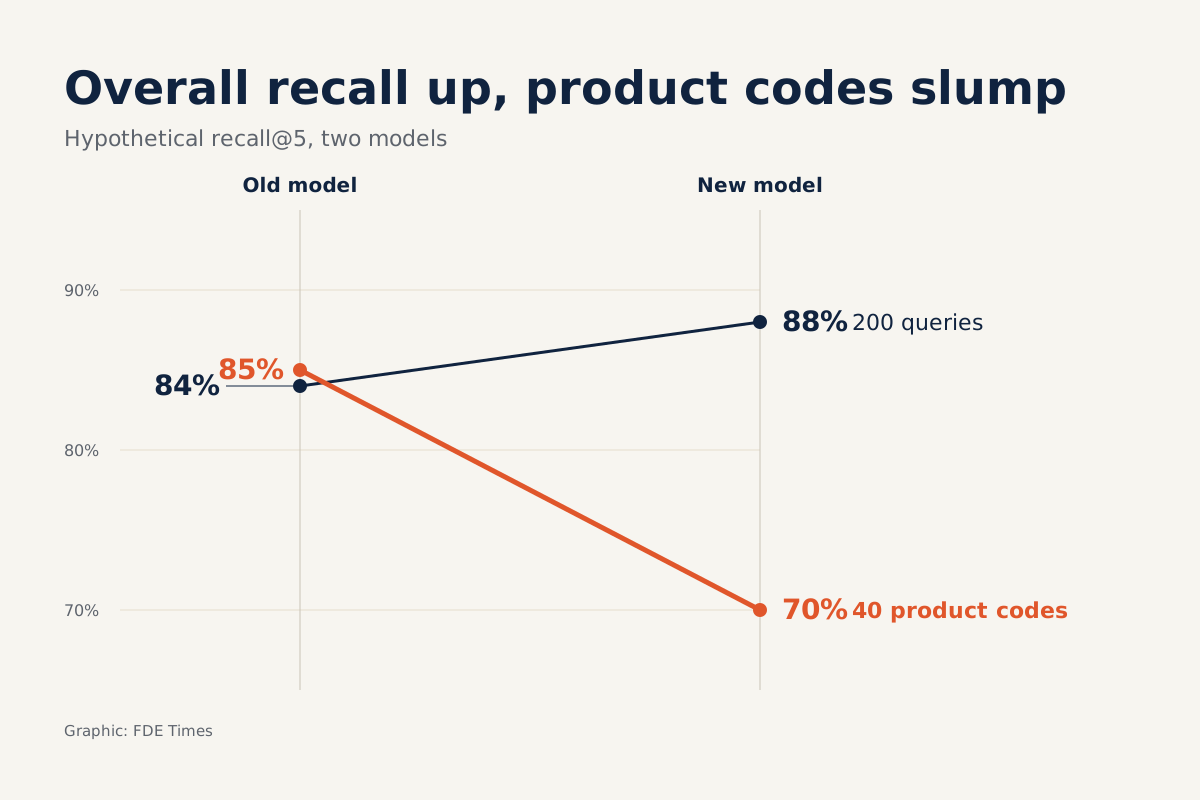
Here is a hypothetical example: a client with 200 questions, each with one correct document. The old model finds the correct document in the top 5 for 168 questions, a recall@5 of 84%. The new model manages 176, or 88%, so at a glance the new model has won.
Now split by group. Among the 40 questions containing product codes, the old model gets 34 right and the new model only 28, a fall from 85% to 70%. The overall gain comes from the other 160 questions, which go from 134 to 148 correct.
If product-code lookups are what the client’s support team uses all day, 88% is a misleading number. Always report by group, and agree in advance with the client what threshold allows the switch.
Check: you have a table of recall@k by group for both models, reproducible with one command.
Step 5: Swap the alias and the query model together
With Qdrant, deleting and recreating the alias in a single request makes the switch atomic. But OneUptime notes that this only changes the target in the database; it does not also deploy the application’s model.
def swap_alias(alias, target):
    client.update_collection_aliases(change_aliases_operations=[
        models.DeleteAliasOperation(
            delete_alias=models.DeleteAlias(alias_name=alias)),
        models.CreateAliasOperation(create_alias=models.CreateAlias(
            collection_name=target, alias_name=alias)),
    ])

swap_alias("kb_search", "kb_v2")
set_query_model("new")  # pseudocode: the application's config flag
In the gap between the last two lines, queries embedded with the old model can reach the new index. Your script will not see an error: the tianpan.co blog observes that cosine scores are still calculated but mean nothing, and Voyage AI’s documentation on MongoDB also warns that retrieval quality degrades when comparing across two different models.
Print len(embed_old("x")) and len(embed_new("x")). If the two numbers are equal, the database has no reason to reject a query from the wrong model, so only recall will reveal the problem.
# Pseudocode: runs throughout the swap, sampling the golden set on each loop
while swapping:
    hits = [g.doc_id in search("kb_search", embed_current(g.q), k=5)
            for g in sample(golden, 20)]
    log(now(), current_model(), sum(hits) / len(hits))
On the laptop, deliberately insert a 30-second wait between the two swap lines to see how recall drops. In production, a drop like that is exactly the signal you need to recognise. When doing it for real, choose a low-traffic period and warn the client in advance.
Check: the query script shows no errors, and recall in the log after the swap returns to kb_v2’s level from step 4. The absence of errors alone proves nothing.
When does the way back disappear?
Swapping the alias is not yet the point of no return. As long as kb_v1 is still receiving dual writes, rollback means only reversing the alias and changing the query model back, and Weaviate’s documentation also treats pointing an alias back at the previous collection as a simple operation.
The hard point comes when dual writes stop. Qdrant notes that rolling back after that moment means losing every later change, because the old collection no longer receives updates. Once kb_v1 is deleted, there is no old index to return to.
Step 6: Rehearse the rollback, then clean up
According to OneUptime, rollback has two parts and should be rehearsed before production. On the laptop, roll back once while both scripts are still running, then switch to kb_v2 again.
# Miss either line and the query model no longer matches the index
swap_alias("kb_search", "kb_v1")
set_query_model("old")  # pseudocode
After the final switch, the tianpan.co blog advises keeping the old index for a fallback period, and dual writes should also run throughout that period. Voyage AI’s documentation likewise advises keeping the old field and index until the migration is complete.
Check: edit a document after the switch, roll back, then find that new version in kb_v1. Recall in the log must return to the old model’s level from step 4.
The costliest mistakes tend to look harmless
The first is treating dual writes as a side job: one side fails silently and the two indexes drift apart without anyone knowing. Put failed writes into a retry queue, and reconcile IDs again before swapping the alias.
The second is rolling back only one of the two, the query model or the alias. The third is judging a model by a few attractive LLM answers in a demo.
At the client’s site, what should you ask before re-embedding?
Ask whether the application calls through an alias, who owns the data write path, and who can label real questions. Dual writes require changes to the write path itself, so if another team owns it, bring them in from the start.
If the client cannot accept even the brief mismatch in step 5, consider having each request read a configuration record containing both the collection and the model as a pair. That record then becomes the single switch, replacing the alias.
Next, settle three things in writing: the recall threshold for each group, how long the old index is kept, and who has the authority to order a rollback. These decisions belong to the client; your job is to raise them before anything goes wrong.
For your career, this makes a very clear line on a CV if you have real numbers: how many documents were migrated, how recall by group changed, whether service was interrupted, whether the rollback was rehearsed.
When a job description mentions RAG, ask the interviewer how their most recent model change went; the answer will tell you whether that team runs production or has stopped at the demo.
If every step goes well, the client’s users will not notice the model has changed. What the client keeps is the recall table and a rollback command that has actually been tested, and with those, the next model change stops being a tense negotiation.
Was this article useful?
Thanks for the feedback!
7 sources
- How do you change your embedding model without re-indexing everything? · 2026-06-26
- Migrate to a New Embedding Model with Zero Downtime in Qdrant
- Retiring an Embedding Model: Re-indexing Millions of Vectors Without Taking Search Down · 2026-07-05
- Zero-downtime collection migration with aliases | Weaviate Documentation
- How to Change a Qdrant Embedding Dimension with a New Collection and Alias Swap · 2026-08-28
- Migrate to a New Embedding Model - Voyage AI by MongoDB - MongoDB Docs
- Datasets available (BEIR wiki)