A three-page design doc can save an FDE weeks of rework on site
Seven steps, applied to a ticket-triage agent for a logistics company, turn discovery notes into a document the client's platform team approves before any code is written.
In brief
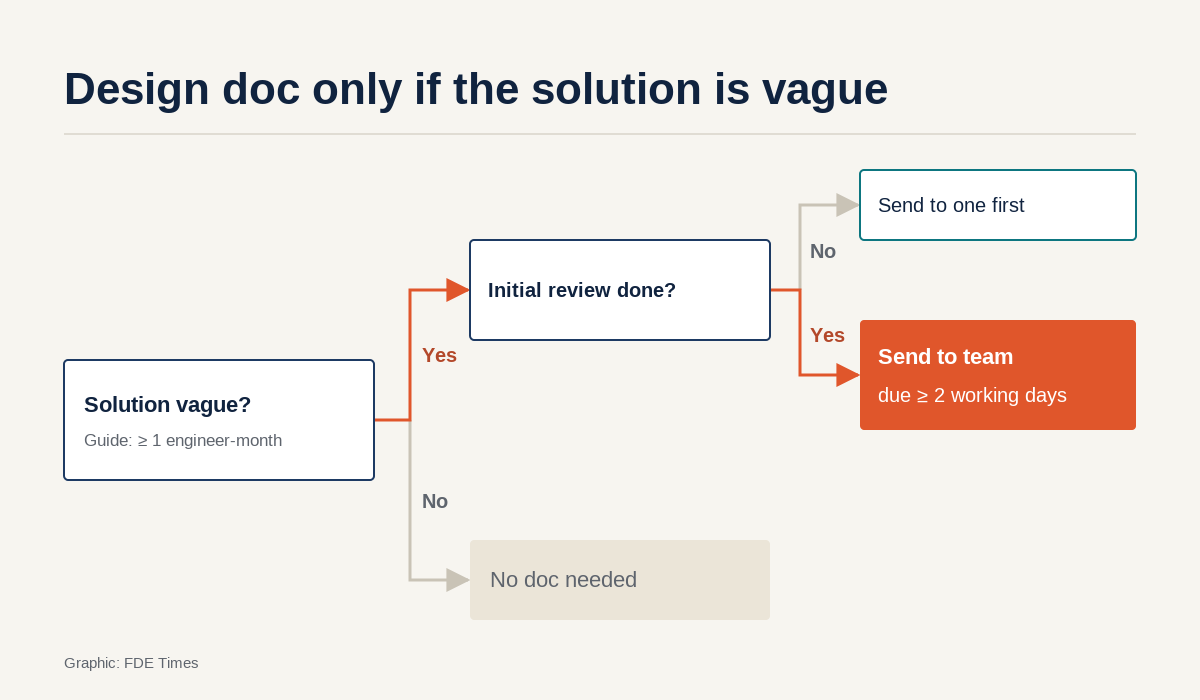
- Write a design doc when the solution is ambiguous. Work lasting one engineer-month or more is only a supporting signal and does not replace the question of ambiguity.
- Non-goals are the strongest scoping tool when working with a client: list the things that sound entirely reasonable but that you will not do.
- Give the draft to one reviewer first, give approvers at least two working days, and answer every comment before resolving it.
At Google, design docs are written before any code and described as “relatively informal” documents. Yet this loosely structured paperwork is where design flaws get caught early, while fixing them is still cheap.
That matters more for a forward deployed engineer than for most. You are coding inside someone else’s system, their engineering team almost certainly has the final say, and one misunderstanding about scope can burn several weeks.
A design doc is also a tool for reaching consensus on a design across an organization. On a client site, it is how you reach agreement with them before writing the first line of code.
The guide below walks through seven steps, applied to a hypothetical case. The result is a two-to-three-page design doc you can send to the client’s tech lead within the week.
What you will write, and what you need
Take an FDE sent to a logistics company to deploy an agent that reads support tickets and assigns category labels. The agent has to integrate with the company’s internal ticketing system, and the client’s platform team will be the approvers.
You need three things: notes from your customer discovery sessions, a rough diagram of the client’s current system, and an editor with margin comments, such as Google Docs. Nothing more elaborate.
Step 1: Ask whether the solution is ambiguous
Google’s approach to design docs turns on one question: is the solution to the design problem ambiguous? If everyone already knows what to do, writing a doc adds little. Angela Zhang adds a reference point: work likely to take one engineer-month or more should have a design doc.
Treat that time threshold as a secondary signal; ambiguity is what decides. In the example, the ambiguous question is whether the agent should write labels straight into the ticket database or go through a queue the platform team controls.
There are two reasonable options, and both affect the client’s system. That is reason enough to write the doc.
Check: you can state the core design question in exactly one sentence. If you cannot, you do not yet understand the problem and should go back to discovery.
Step 2: Borrow an existing template and cut it to fit
The Pragmatic Engineer has compiled public templates from Google, Uber, Stedi and Monzo, with the advice to take whichever parts suit you. Below is a trimmed template for client-site work. It is a simplification, not any company’s official template.
# [Project name] — Design Doc
Author · Client reviewers · Comment deadline · Status

## Current system (1 paragraph)
## Goals
## Non-goals
## Proposed design (diagram + data flow)
## Alternatives considered and trade-offs
## Open questions for the client
The “Comment deadline” line and the “Open questions” section are additions specific to FDE work. The first gives the review a clear time limit. The second turns what you do not yet know into tasks the client has to answer.
Step 3: Non-goals are where you fence in scope
As Google defines them, non-goals are things that could reasonably be goals but are deliberately excluded. “Could reasonably” is the crux. Writing “will not rebuild the ticketing system” is useless, because nobody asked for it.
| Goals | Non-goals |
|---|---|
| The agent assigns category labels to new tickets | The agent replies to customers on its own |
| The platform team can review every label | Relabeling the entire ticket backlog |
| Wrong labels can be corrected by hand | Changing the customer service team’s workflow |
In this case, all three non-goals on the right are things a client manager could well ask for halfway through the project. Writing them down at the start means the negotiation is finished before any argument begins.
Check: show the non-goals list to someone outside the project. If they react with “wait, you’re not doing this?” to at least one line, you have written it well.
Step 4: Write the trade-offs, not just the answer
In accounts of how Google works, a design doc concentrates on high-level strategy and trade-offs. Angela Zhang writes that the main purpose of a design doc is to force you to think the design through and to gather feedback from others, rather than to serve as a record.
In the example, set the two options side by side. Writing straight to the database is fast and has fewer moving parts, but it gives the agent write access to the client’s core data. Going through a queue is slower and adds one more thing to operate, but the platform team keeps control. You recommend one option and state why.
The client’s engineers live with that system every day, so they will likely see risks you have missed. Writing out the trade-offs invites them to point those risks out while a fix is still cheap.
Step 5: One first reviewer, then the whole team
A post on the Refactoring English blog advises against sending a draft to everyone at once. Find one first reviewer instead. On a client site, that person is ideally a colleague on your own team or a client engineer you have already worked with.
The reason is practical. Every first draft has obvious holes. Letting the client’s entire platform team see them wastes your first impression, when one person is enough to catch them.
Step 6: Send it, with a deadline
The author of the Refactoring English post always gives reviewers at least two working days to read a design doc. Put that deadline at the top of the doc and in the message you send. For example: send it on Monday morning, with comments due by end of day Wednesday.
Check: your message states three things: where the doc is, what you need them to decide, and when the deadline is.
Step 7: Answer every comment before closing it
When comments start arriving, reply to each margin note and resolve a thread only when you are sure the point has been dealt with. Do not resolve threads just to make the doc look tidy. Commenters notice, and next time they may not bother.
For decisions that comments cannot settle, record them as a decision with an owner. Stedi treats this kind of decision record as a mechanism that forces the parties to agree on a decision that has to be made. In the example, it is the evidence that the platform team agreed to the queue option.
Why your doc gets ignored
The most common mistake is writing a doc for work with nothing ambiguous about it, so reviewers feel their time was wasted and skip your next doc. The second is leaving out non-goals, or listing non-goals nobody asked for.
The third is sending a rough draft to the whole group without a comment deadline, then waiting indefinitely for replies.
How this skill looks on your résumé
When reading an FDE job description, look for phrases such as “work directly with customer engineering teams” or “drive technical alignment”. That is where this skill gets tested. On your CV, skip “strong communication skills”. Write that you authored a design doc, who approved it and which decision it settled.
If you have no real clients yet, practice at your current company: pick a task whose solution is still ambiguous, write a doc using the seven steps above and send it to another team for review. Another team in the same company also sees your system from the outside, as a client would.
The best design doc is the one the client’s engineers corrected before you wrote a single line of code, whatever praise it did or did not earn.
Was this article useful?
Thanks for the feedback!
4 sources
- Design Docs at Google · 2020-07-06
- How to Get Meaningful Feedback on Your Design Document · 2025-11-03
- How to write a good software design document (Angela Zhang) · 2018-07-13
- Companies Using RFCs or Design Docs and Examples of These · 2022-06-21