Robots can't talk, so Monumental's field engineers must
Debugging a bricklaying robot stalled mid-wall means isolating the fault layer by layer while explaining to the foreman what is going on.
In brief
- At Monumental, the FDRE owns the full technical side of each deployment, including debugging failures that happen on the construction site.
- Robots cannot explain themselves, so site workers ask the engineer standing next to them. Talking to those workers is part of the debugging.
- Fixes are tested on one robot before going out to the whole fleet, in hours or days rather than weeks.
Picture it: seven in the morning, in the middle of a building site. A robot has stopped dead on the fifth course of bricks, and the site foreman is walking towards you. Before your laptop has even finished booting, someone asks: “Is it broken?”
Monumental sends fleets of small, electric, self-driving bricklaying robots to construction sites to build walls. Its job posting for a Forward Deployed Robotics Engineer (FDRE) states plainly that debugging failures on site is part of the job.
The posting is also blunt on another point: robots cannot talk, so whenever people see you standing next to one, they will come over and ask you what is going on.
You may never work with bricks and mortar. But if your job is deploying software into a customer’s real environment, you will face the same two tasks at once: finding the fault under pressure, and helping the people who are waiting understand what is happening. What follows explains how to do both.
Why is debugging on site harder than debugging on your own machine?
In the office, when a system breaks, you usually have full logs, time, and as many reruns as you like. On site, all of that is in short supply: people are standing around waiting, and every rerun is another moment the wall is not going up. Monumental describes the FDRE as the person who owns the technical side of a deployment from start to finish.
Owning it does not mean you cannot ask for help. But when a robot stops in front of you, you are the one leading the search for the fault on the spot.
The business model adds to the pressure. According to ioplus.nl, Monumental does not sell robots; it sells finished walls, and each site is handled by a small team of three robots.
The robots work together to carry bricks and mortar. The customer pays for the wall, so in their eyes a robot standing still means the wall is falling behind schedule.
On top of that, a failure on a building site can sit in the ground, the materials or a sensor, not only in the software. The trap is that Monumental’s engineering team, according to its CEO, leans heavily towards software, at roughly three software engineers for every hardware engineer.
People used to writing code tend to suspect the code first, and that is the fourth mistake on the list at the end of this article. That may be why the posting asks for someone who is very good at debugging and breaking problems down.
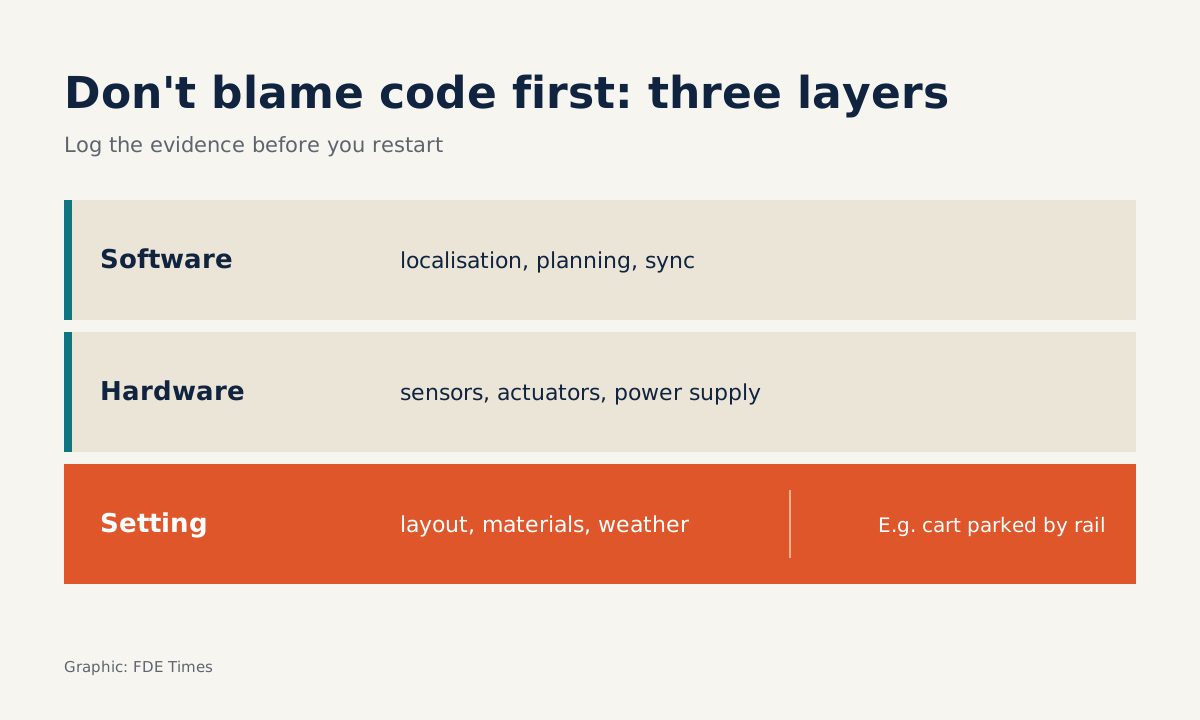
Preserve the clues first, then split the failure into three layers
The core principle is simple: do not jump to the conclusion that the code is at fault, and do not touch the machine until you have kept the clues. The first step is to describe the symptom in terms of what you can see in the physical world.
For the robot stopped on the fifth course, a good symptom record looks like this: “Robot B stopped while placing brick 12 of course 5, north wall; the other two robots are still running; ten minutes earlier a materials trolley was parked next to the rail.”
The second step is to save the evidence. The most common reflex is to hit restart and get the machine going again, and sometimes that really is the workaround you need. But before you press it, photograph the area, save the logs and sensor state, and note the time.
A fault that cannot be reproduced after a restart usually comes back on exactly the day you are not on site. Only once you have kept the clues should you start splitting the failure into three layers.
The environment layer covers the ground, the weather, the materials and anything people have put into the work area. The hardware layer covers sensors, actuators and power. The software layer covers localisation, planning and coordination between robots.
The symptom description above already suggests three hypotheses in three different layers, and each one needs its own test. The fact that the other two robots are still running is an important clue.
If the coordination software had a general fault, the whole fleet would probably be affected. When only one robot stops, look first at what is different around it: the trolley, its own sensors, or where it is standing on the wall.
Talking to the foreman: answer about the wall, not the robot
While you test your hypotheses, the foreman is still standing there. Monumental sees the FDRE as the face and ambassador of the company on site. The foreman does not need to know whether the planner or a sensor is at fault. They need to know three things: will the wall be finished on time, is it safe, and do they need to do anything.
Here is a sample exchange to practise with:
Foreman: Is it broken? Will the north wall be done today?
FDE: One robot has stopped; the other two are still building. I’m checking whether that trolley is parked too close. Could you get someone to move it about two metres away? In fifteen minutes I’ll tell you whether it can restart or whether we need to shift the work to another robot.
That answer talks about the wall first and the robot second. It asks for one specific thing and sets a time to report back that you can keep. It also does not promise “it’ll be fixed right away”, because you do not yet know the cause.
Talking to fellow engineers
- Which layer Robot B failed in, what the logs show
- Hypotheses and the next test
- When the fix will roll out to the fleet
Talking to the foreman
- Is the wall still on schedule
- Is the area safe
- What you need to do, and when I will report back
From one robot to the fleet: a loop measured in hours
Finding the cause is only half the job. As Monumental describes it, a fix is deployed and tested on one robot first, then rolled out to the whole fleet, in iterations measured in hours and days rather than weeks.
So, right there on site, you have to tell two things apart: the workaround that keeps today’s wall going up, and the real fix that will run on every robot.
In this example, the workaround is to move the trolley and carry on. The real fix might be helping the robot detect obstacles better, or adding an area check to the morning routine. Either way, it has to be tested on one robot first.
Working this way, what you learn on one site becomes the default for the next. That is also the goal an FDRE described on the company’s Substack: making sure the technical capabilities are ready ahead of upcoming deployments.
Common beginner mistakes
The first mistake is burying yourself in your laptop and saying nothing. The robot cannot explain itself, so if you stay silent too, the people around you will guess, and they usually guess the worst. The second is promising a time before you have narrowed down where the fault is.
The third is fixing things for this site alone and leaving it there, without feeding the lesson into the shared version for the whole fleet. The fourth is assuming the cause is in the software just because that is the layer you know best.
Do not underestimate the logistics either: the posting warns that you will often have to get up early and drive to the site to arrive on time, and that you need to genuinely enjoy working in that environment.
Putting this skill on your CV
When reading job descriptions, look for phrases such as “debugging failures on-site”, “face of the company” or “decomposing problems”. They signal that the role needs both technical ability and the ability to work with people in the field.
In your CV, do not just write a generic “debugged production systems”. Write it in sequence: the visible symptom, the layer that held the cause, the workaround, and how far the fix was rolled out.
You can practise this skill even if you have never set foot on a site. Next time there is a production incident, write the update for the business side before the technical post-mortem, in exactly three lines:
Impact: where your work is slowed down or stopped.
What we need from you: one specific action, or “nothing yet”.
Next update at: a time you are sure you can keep.
Machines cannot explain themselves, so the person standing next to them has to do it for them.
Was this article useful?
Thanks for the feedback!