Where a customer's bad records go when the pipeline cannot stop
A dead letter queue can hold broken data safely, but only if retries, retention and the people on call are set up correctly.
In brief
- By default Kafka Connect stops on an error. With errors.tolerance=all, the connector drops bad records without logging them. Both are dangerous for customer data.
- A DLQ is only safe when retries leave enough room for transient errors, the DLQ is retained longer than the source queue, and the DLQ topic has a subscription.
- A DLQ is a debugging tool: always record the failure reason in the message, make sure someone reads it, and redrive only after the fault is fixed.
Picture this: at two in the morning a retail customer calls to say the orders table in their data warehouse has not moved since the evening. The cause is a single record with a badly formatted date field. The connector hit it and stopped, and tens of thousands of healthy records behind it are stuck waiting too.
Many engineers’ first reflex is to switch on error skipping so the pipeline keeps running. That is when the second problem appears. A month later the customer’s finance team finds a revenue discrepancy nobody can explain, because there is no longer any trace that the record ever existed.
Working as an FDE on a customer site, you will hit this bind again and again: the pipeline must not stop, and the data must not be lost. A dead letter queue (DLQ) gets you out of it, provided you know where it can fail.
Stop or skip, the customer loses either way
When a message cannot be processed, a system has only three options: stop, skip, or move the message somewhere else. Kafka Connect stops by default. Set errors.tolerance=all and the connector skips bad records instead; a Confluent analysis calls this kind of silent skipping “YOLO”.
“Silent” is meant literally. According to Confluent, once error tolerance is enabled, the connector by default does not log the fact that it is dropping messages. Without a DLQ or logging configured, you lose data with no way of knowing.
The third option is to move the record into a separate queue. AWS documentation for SQS describes a DLQ first and foremost as a debugging tool: messages that cannot be consumed are isolated so you can work out why processing failed. Treat a DLQ as a quarantine ward with a doctor on duty, not as a bin.
An orders pipeline, configured line by line
Back to the retail customer: orders flow through Kafka Connect into the warehouse. For that connector, a sensible configuration looks like this:
errors.tolerance=all
errors.deadletterqueue.topic.name=dlq-orders-sink
errors.deadletterqueue.context.headers.enable=true
errors.log.enable=true
The third line is worth the most. Kafka Connect can write the reason a message was rejected into that message’s own headers. When you open the DLQ the next morning, you know immediately which record failed and why, without rerunning anything to guess.
As noted above, with tolerance enabled the connector does not log dropped messages by default. The last line gives you a trail in the logs alongside the DLQ, so data loss cannot happen silently.
On Confluent Cloud, serde (serialise/deserialise) errors do not stop the connector either: it keeps running and sends the failed records to a DLQ topic.
Now suppose the customer’s orders run on SQS instead. The key number there is maxReceiveCount in the redrive policy: how many times a consumer may receive a message before it is moved to the DLQ.
{
  "deadLetterTargetArn": "arn:aws:sqs:...:orders-dlq",
  "maxReceiveCount": 5
}
AWS advises leaving enough room for retries. Set the value to 1 and a single failure, say a database that flickers for a few seconds, is enough to push a message into the DLQ. The DLQ then fills with perfectly valid orders, and the few genuinely broken records get lost among them.
The retention arithmetic that loses messages
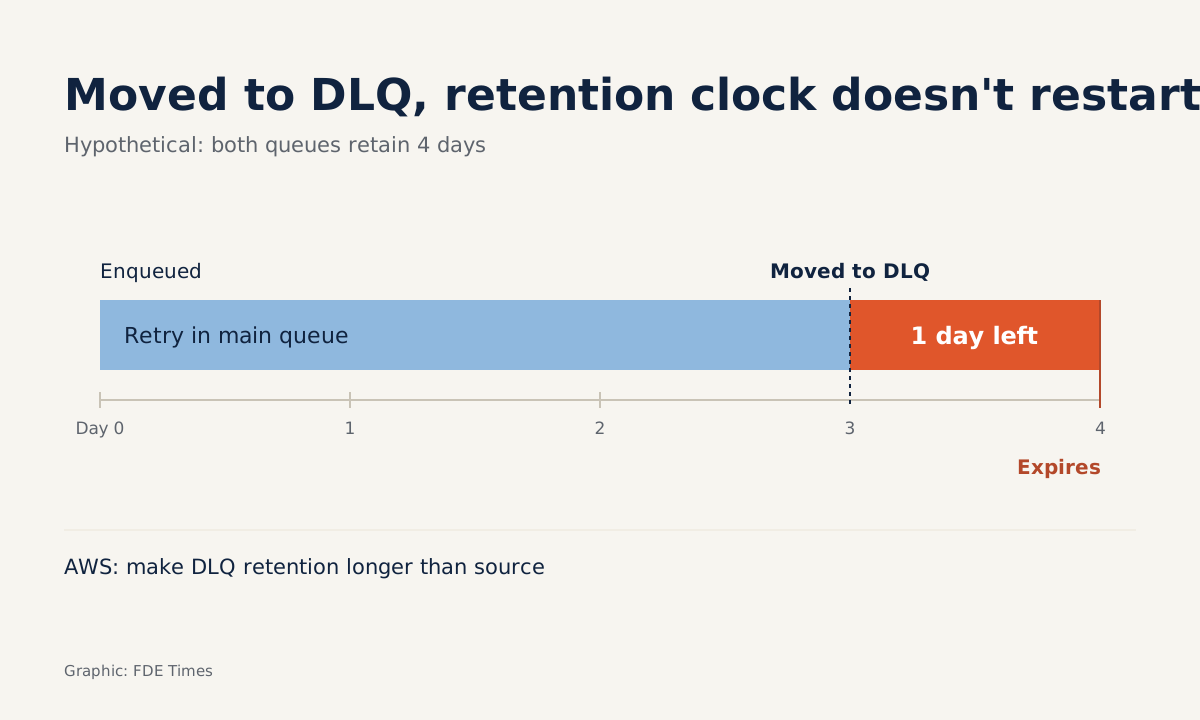
The hardest trap to spot is retention. On SQS standard queues, a message moved to the DLQ keeps the timestamp from when it entered the source queue. That is why AWS recommends always setting the DLQ’s retention longer than the source queue’s.
Take a hypothetical example to make it concrete: both queues keep messages for 4 days. An order enters the queue on day 0 and keeps retrying until day 3, when it is moved to the DLQ.
The clock does not restart, so you have only 1 day left to investigate. If that day falls on a weekend, the message may expire before anyone opens it.
Google Pub/Sub has a different trap. The maximum number of delivery attempts before a message is moved to the dead-letter topic must be an integer between 5 and 100. But if the dead-letter topic has no subscription, messages sent there are lost, which is why Google’s documentation reminds you to add a subscription to that topic.
| Platform | Settings to tune | Where data is easily lost |
|---|---|---|
| SQS | maxReceiveCount, DLQ retention |
DLQ retention equal to or shorter than the source queue’s |
| Kafka Connect | errors.tolerance, DLQ topic, failure-reason headers |
Tolerance enabled with no DLQ or logging |
| Pub/Sub | Maximum delivery attempts, 5 to 100 | Dead-letter topic with no subscription |
In what order to roll it out on a customer site
Start by asking the customer one question: does message order matter to them? AWS warns against attaching a DLQ to a FIFO queue if you do not want to break the exact order of messages or operations. A sequence of account balance updates is very different from a stream of event logs, and the answer shapes the whole design.
Next, choose the retry count based on the kinds of transient faults the customer’s systems tend to have. Set DLQ retention longer than the source queue’s, turn on failure-reason recording, and check that the DLQ has a subscription or consumer. Then set an alert for new messages in the DLQ, and agree with the customer who receives it.
The final step is the runbook. On SQS, once you have investigated, you can send messages back with DLQ redrive. The right order is to read the reason, fix the code or the data, and only then redrive. Do it the other way round and the message simply goes round once more and lands back in the DLQ.
Mistakes that recur across projects
The most common mistake is treating the DLQ as a box-ticking exercise: configured, but with no alert, no owner, and nobody opening it for weeks.
Next comes setting retries too low, so the DLQ fills with transient errors. Then there are the two traps covered above, retention and subscriptions, both of which lose messages without warning.
There is also a communication mistake: not telling the customer the DLQ exists. Put the DLQ record count in your regular report. A customer will trust the system more when they read “12 records with a bad date format, fixed and rerun” than when they stumble on an unexplained revenue gap.
For your career, this is a skill worth spelling out on a CV. Instead of “built data pipelines”, write that you designed DLQ-based error handling, with a redrive runbook, for a production system. In a system design interview, when asked “what happens if a record is corrupt?”, do not just say “retry it”.
Name all three settings: enough retries to absorb transient errors, DLQ retention longer than the source queue’s, and the failure reason written to a header, together with a subscription so someone actually reads the DLQ.
An exercise for this week
Set up a test queue with a DLQ and send it a message with a deliberately wrong schema. Follow it through each retry, read the failure reason in the DLQ, fix the consumer, then redrive and confirm the message reached its destination.
Once you have done one full loop, the next time a customer calls at two in the morning you will be able to show them exactly where each failed record is.
Was this article useful?
Thanks for the feedback!