Writing customer incident updates before you know the cause: four stages, one owner
In the first few minutes, customers do not expect you to know everything. They need to know what is broken, who owns it and when they will hear from you next.

In brief
- Send the first update straight away, without waiting to find the cause.
- Keep communications with one person, and make every change of owner an explicit, spoken handover.
- Promise the time of the next update, not a guess at recovery; when you close the incident, state when the impact began and ended.
A customer’s orders suddenly stop reaching their warehouse system. You have had the logs open for three minutes when a question appears in the shared chat channel: “What’s going on, and when will it be fixed?”
At that moment you do not know the cause, let alone the time of the fix. Engineers tend to react in one of two ways: stay silent until they are certain, or guess a number to reassure the customer. Both are best avoided. Silence leaves the customer with nothing to tell their team, and a guessed number is a promise you have no grounds to keep.
As an FDE, you may also be fixing the fault while being the person the customer messages directly, as in this case. The good news is that writing updates in the middle of a fire does not require fine prose. It requires one owner, four statuses and a few prepared sentences.
Who talks to the customer while the whole team is fixing the fault?
Google’s SRE book draws a clear line between two roles. The incident commander holds the overall state of the incident, while the communications lead speaks to the outside world on the team’s behalf, with a duty to send regular updates to the team and stakeholders rather than simply wait to answer questions.
There is a practical reason for the split. According to PagerDuty, when stakeholders are updated proactively, the core team can concentrate on the response. The customer does not have to ask, and the person reading the logs does not have to stop to reply.
Only two people on your team? One fixes, one writes. If you are alone at the customer’s site, immediately ask a colleague back at the company to take on the writing, or at the very least set an alarm for each send time so that you do not forget.
When the owner changes, do not let the handover happen silently. Google requires a departing commander to say it outright: “You’re now the incident commander, okay?” Customer communications should work the same way: say it aloud, wait for the other person to confirm, then tell the customer the new owner’s name.
Four words that tell customers where the incident stands
The incident.io template uses a status line with four values: Investigating, Identified, Monitoring and Resolved. These four words show customers how far the incident has progressed without requiring them to understand your architecture.
Investigating means you know there is a fault but not yet why. Identified means you have found the point of failure and are fixing it. Monitoring means a fix has been applied and you are watching to see whether it holds. Resolved means the customer is no longer affected.
Every update should use the same six-line skeleton: status, impact, work in progress, action for the customer, time of next update, owner. The structure is adapted from incident.io’s internal update template and, as Statuspal advises, each line should state only facts.
Statuspal is also blunt that there is no need to wait until the problem is identified before reporting it. The first update only has to confirm that the fault has been seen, which part it affects and who is handling it.
OneUptime warns that inventing an ETA creates a promise the team lacks the grounds to keep. The time of the next update is one you can keep, provided you make clear it is not the time of the fix.
On cadence, incident.io sets a ceiling: no more than an hour without an update during an incident affecting customers. When the customer’s work is at a standstill, choose a shorter interval, such as 30 minutes.
One incident, six updates
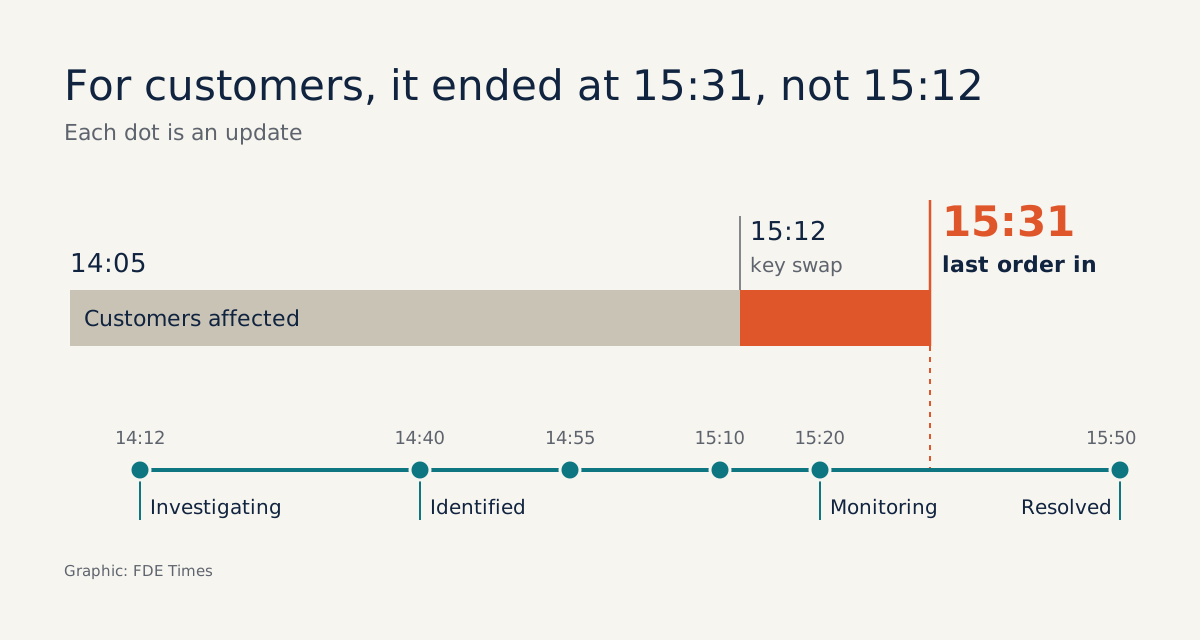
Picture a retail customer. You have deployed a connector for them that pushes orders from the sales portal to the warehouse. At 14:05 new orders stop reaching the warehouse, and at 14:12 you send the first update.
Status: Investigating (14:12)
Impact: since about 14:05, new orders have not been reaching the warehouse system; orders already in the warehouse are unaffected.
In progress: checking the connector; cause not yet known.
Action for your team: nothing needed yet.
Next update: 14:40, sooner if anything major changes.
Owner: [your name]
There is no cause and no lengthy apology, but the customer’s operations lead now knows enough to alert the warehouse team. By 14:40, the agreed time, you have more information.
Status: Identified (14:40)
Impact: the warehouse system has been rejecting authentication since 14:05; 340 orders are queued and none has been lost.
In progress: preparing to rerun the queue once a new key is available.
Action for your team: IT to issue a new API key; in the meantime, the warehouse can enter urgent orders by hand.
Next update: 15:10. No recovery time yet.
Owner: [your name]
Then at 14:55 you discover that manually entered orders will be pushed to the warehouse a second time when the queue reruns. OneUptime advises posting immediately when the impact widens, a workaround becomes unsafe or the recovery assessment changes significantly. Do not wait until 15:10.
Status: Identified (14:55)
Impact: manually entered orders may be duplicated when the sync reruns.
In progress: waiting for the new key and preparing to remove these orders from the queue.
Action for your team: stop manual entry now and send the list of orders already entered.
Next update: 15:10.
Owner: [your name]
At 15:10 the new key has just arrived but has not been fully applied. You send anyway, because that is the time you gave the customer.
Status: Identified (15:10)
Impact: new orders are still queued and have not reached the warehouse.
In progress: new API key received and being applied.
Action for your team: send the rest of the manual order list, if any remain.
Next update: 15:20. No recovery time yet.
Owner: [your name]
Ten minutes later, the key is in and the sync is running again.
Status: Monitoring (15:20)
Impact: the sync is running again, but some queued orders have not yet reached the warehouse.
In progress: new key applied at 15:12; working through the rest of the queue, still monitoring, incident not yet closed.
Action for your team: nothing further for now.
Next update: 15:50.
Owner: [your name]
This is when you may be tempted to write “all fixed”. Hold back. The key has been replaced, but the customer’s warehouse is still missing orders, so for them the incident is not over.
Status: Resolved (15:50)
Impact: from 14:05 to 15:31, or 86 minutes; 412 orders in total reached the warehouse late, with no orders lost and no duplicates.
In progress: the sync is back to normal; the engineering team is completing the root-cause analysis and will send it to you afterwards.
Action for your team: none.
Owner: [your name]
Statuspal requires the closing update to state the period of impact, with start and end times. In this example the end time is 15:31, when the last order reached the warehouse, not 15:12, when you replaced the key. Go by the customer’s clock, not the deployment’s.
When the fix sits with the customer’s IT team, who speaks?
This is where FDE work differs from an ordinary on-call shift. At 14:40 in the example above, you have found the point of failure but cannot fix it yourself, because the API key is issued by the customer’s IT team. The operations lead still messages you, because you are the person they see every day.
If you reply “IT should be done in about half an hour”, you have made a promise on behalf of a team you do not run. If IT also sends its own messages, the operations lead receives two versions of the same incident.
So find the IT contact immediately and settle it in one sentence: “I’ll keep sending the shared updates to operations. When the key is ready, let me know and I’ll report exactly that, okay?” As with a handover, wait for them to confirm.
If the customer wants their own team to issue the messages, step aside and switch to supplying that person with the facts. Who does the writing matters less than there being only one writer.
The action line must also state who owns the next step, without assigning blame: “Your IT team ([contact name]) is issuing the key; completion time to be confirmed by IT.” That tells the operations lead whom to ask, and it does not make you the guarantor of another team’s progress.
Set it up before the fire starts
The first thing to ask at a new customer is this: when there is an incident, who needs to hear about it, on which channel, and who sends the message if the failing part belongs to their team? Agree the answers in the first week of the deployment, along with a primary sender and a backup on your side.
When a fault occurs, send the Investigating update straight away from the six-line skeleton. Set an alarm for the next update time and send when it goes off, even if all you can say is “nothing new, still checking X”. Before each send, ask yourself what has changed for the customer, not what has changed in the code.
This skill should also show up in your career materials. When reading FDE job descriptions, look for phrases such as incident response or customer-facing. In interviews, describe an incident through a concrete timeline of updates, rather than the generic claim of “good communication skills”.
Phrases to delete before you hit send
Most mistakes lie in a few habitual phrases, and the fix is always the same: replace speculation with what has been observed.
| The phrase that slips out | The phrase to send |
|---|---|
| Should be fixed in about 30 minutes | No recovery time yet. Next update at 15:00 |
| Probably the warehouse team changed a config | The warehouse system has been rejecting authentication since 14:05; investigating the cause |
| The system is having some minor issues | New orders are not reaching the warehouse; existing orders are unaffected |
| All fixed now! | Back to normal; impact lasted from 14:05 to 15:31 |
Three mistakes have nothing to do with wording. The first is letting two people answer the customer with two different versions. The second is staying silent because there is “nothing to say yet”, which is exactly when the customer is most anxious. The third is writing “no data lost” before checking; if you are not sure, write “checking”.
Rewrite an old incident this week
Pick an incident your team has handled and reopen its timeline. Write four updates using the skeleton, on the condition that each one uses only what the team actually knew at that moment, then give the first to a colleague who was not involved.
If after 30 seconds they can say what is broken, who owns it and when the next update is due, that update passes. When a real incident arrives, you will not be learning to write while the customer waits.
Was this article useful?
Thanks for the feedback!
5 sources
- Chapter 14 - Managing Incidents (Google SRE book)
- Is your incident communication hurting your MTTR? (Templates to fix it) · 2025-12-31
- During Incident – Statuspal Incident Communication Handbook
- How to Write Useful Incident Status Updates Without a Recovery ETA · 2026-09-29
- Communicate with Stakeholders – PagerDuty