Hands-on: matching duplicate CRM and ERP customers in Python and loading Neo4j without duplicate nodes
Seven rows of data are enough to expose three traps: an explosion in the number of pairs, names that score 100 and may still be wrong, and reloads that create duplicate nodes.

In brief
- Blocking must come before fuzzy matching, and it should use several rules, because a pair needs to satisfy only one rule to be compared.
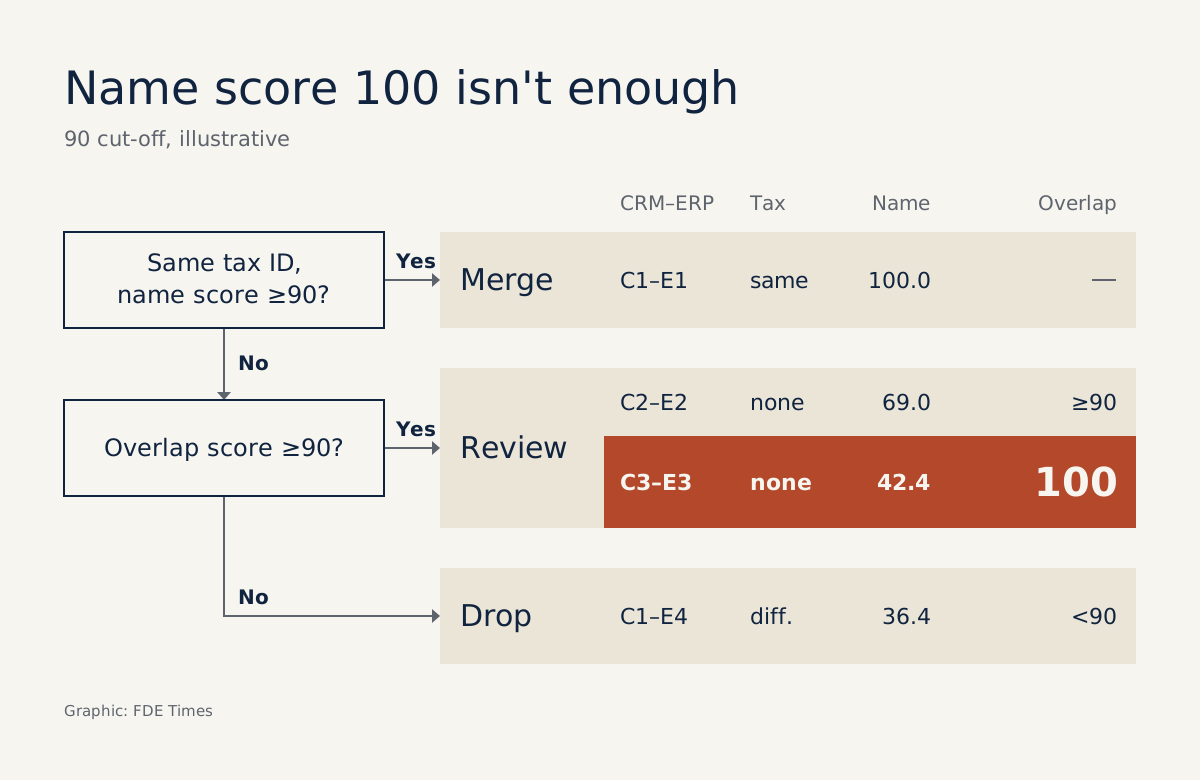
- token_set_ratio returns 100 when one name is a subset of the other, so cases with a high set score and a low token_sort score must go to a human reviewer.
- Keep source records in the graph and MERGE in batches on a key constraint; a merge made after review needs an extra step to delete the old relationships.
One million customer records produce about 500 billion comparison pairs, according to Splink’s documentation. That is why matching duplicate customers is rarely a matter of a few lines of fuzzy matching.
Imagine a CRM with 200,000 customers and an ERP with 150,000. Compare every row with every other and you have 30 billion pairs, while the two systems share no common identifier. Match them wrongly and the knowledge graph behind them will still answer fluently. The answers will simply be wrong.
You will meet this problem as soon as a client project needs to bring one company’s data together from several systems. What follows is the whole process, run on a dataset small enough to work out by hand and check at every step.
What will you build?
The script has six parts: create sample data, filter candidate pairs, score names, assign canonical IDs, load into Neo4j and correct the graph after review. The correct result is 7 source records, 6 customers and 2 cases awaiting human review; approve one merge and 5 customers remain.
You need Python, the RapidFuzz package, the Neo4j Python driver and a Neo4j instance you can write to. This is a cut-down version for learning: hand-written rules, illustrative thresholds, and no handling yet of chained matches such as A matches B and B matches C.
Step 1: Create data with the traps already in it
crm = [
    {"id": "C1", "name": "Acme Co Ltd", "tax": "0101", "zip": "10000"},
    {"id": "C2", "name": "Beta Foods", "tax": None, "zip": "70000"},
    {"id": "C3", "name": "Acme Co", "tax": None, "zip": "20000"},
]
erp = [
    {"id": "E1", "name": "Ltd Acme Co", "tax": "0101", "zip": "10000"},
    {"id": "E2", "name": "Beta Foods Holdings", "tax": "0555", "zip": "70000"},
    {"id": "E3", "name": "Acme Co Logistics Holdings", "tax": "0999", "zip": "20000"},
    {"id": "E4", "name": "Gamma Steel", "tax": "0777", "zip": "10000"},
]
This data is hypothetical. C1 and E1 are the same company with the name in a different order, while C2 and C3 have no tax ID, exactly the kind of row you will meet when real data starts arriving.
Check: 3 × 4 = 12 pairs if everything is compared. Remember this number for the next step.
Step 2: Block before comparing names
Blocking reduces the number of pairs the model has to consider. Splink’s documentation states that when there are several rules, a pair needs to satisfy only one of them to be compared, and the code below follows that logic by hand.
from collections import defaultdict

def build_index(rows, field):
    idx = defaultdict(list)
    for row in rows:
        if row[field]:
            idx[row[field]].append(row)
    return idx

def candidate_pairs(crm, erp, fields=("tax", "zip")):
    seen = {}
    for field in fields:
        idx = build_index(erp, field)
        for a in crm:
            for b in idx.get(a[field], []):
                seen[(a["id"], b["id"])] = (a, b)
    return list(seen.values())

pairs = candidate_pairs(crm, erp)
print(len(pairs))  # 4
Check: the 12 pairs fall to 4: C1–E1, C1–E4, C2–E2 and C3–E3. With the tax ID rule alone you would be left with only C1–E1 and lose the two hardest cases, because C2 and C3 have no ID to match on.
The trade-off is that the postcode rule still misses companies that have moved and also lack a tax ID. To catch those, you have to add another rule and measure again how many pairs it generates.
Step 3: Score names with two measures
According to the RapidFuzz documentation, token_set_ratio returns 100 when one string is a subset of the other, whatever else the longer string contains. The script uses token_sort_ratio as a second measure for comparison, and the check below shows how differently the two functions score the same pair.
So read the two scores together. A high set score with a low sort score usually means that one name contains the other. That may be the same company abbreviated, or a subsidiary, or an entirely different business.
from rapidfuzz import fuzz

def decide(a, b):
    name_a, name_b = a["name"].lower(), b["name"].lower()
    sort_score = fuzz.token_sort_ratio(name_a, name_b)
    set_score = fuzz.token_set_ratio(name_a, name_b)
    same_tax = a["tax"] and a["tax"] == b["tax"]

    if same_tax and sort_score >= 90:
        return "match", sort_score
    if set_score >= 90:
        return "review", sort_score
    return "reject", sort_score

results = [(a, b, *decide(a, b)) for a, b in pairs]
for a, b, verdict, score in results:
    print(a["id"], b["id"], round(score, 1), verdict)
Check: the output should be as follows; the numeric column is the token_sort_ratio score.
C1 E1 100.0 match
C1 E4 36.4 reject
C2 E2 69.0 review
C3 E3 42.4 review
Look closely at the C3–E3 line. “Acme Co” sits entirely inside “Acme Co Logistics Holdings”, so the set score is 100 even though the sort score is only 42.4. Merge on the set score alone and one company swallows another that may be completely different.
The threshold of 90 here is only illustrative. With real data, sample each score band, read the samples by eye, and only then settle the threshold with the person who understands the data on the client’s side.
Step 4: Assign canonical IDs and save the review queue
If you generate a random UUID on every run, MERGE will not find the old node and will create a new customer. This cut-down version derives the ID from the source record: a matched ERP record takes the ID of its CRM record, and an unmatched record keeps its own. The ID therefore stays the same across runs, as long as the matching decisions have not changed.
Cases awaiting review must be written down somewhere, or they vanish when the script ends. Here review_queue.json is the queue and approved.json is the reviewer’s decision log, for example {"E2": "C2"}.
import json
from pathlib import Path

path = Path("approved.json")
approved = json.loads(path.read_text()) if path.exists() else {}

erp_to_crm = {
    b["id"]: a["id"] for a, b, verdict, _ in results if verdict == "match"
}
erp_to_crm.update(approved)

queue = [
    {"crm": a["id"], "erp": b["id"], "score": round(score, 1)}
    for a, b, verdict, score in results
    if verdict == "review" and b["id"] not in approved
]
Path("review_queue.json").write_text(json.dumps(queue, indent=2))

rows = []
for r in crm:
    rows.append({"source_key": f"crm:{r['id']}", "canonical_id": f"cust-{r['id']}",
                 "name": r["name"], "tax": r["tax"]})
for r in erp:
    owner = erp_to_crm.get(r["id"], r["id"])
    rows.append({"source_key": f"erp:{r['id']}", "canonical_id": f"cust-{owner}",
                 "name": r["name"], "tax": r["tax"]})

print(len(rows), len({row["canonical_id"] for row in rows}), len(queue))  # 7 6 2
Check: it prints 7 6 2, and review_queue.json contains exactly C2–E2 and C3–E3. These two pairs stay unmerged until someone confirms them. The cut-down version does not store rejected cases, so they return to the queue on the next run; a real project should store both kinds of decision.
Step 5: Load into Neo4j so that reruns stay safe
MERGE looks for an existing pattern and creates it if there is none, so in principle you can reload. But the Cypher Manual warns that MERGE alone guarantees only that the pattern exists, not that it is unique, and that a key constraint is the preferred option. Create the constraint before loading.
Before running this, check whether your instance is Enterprise or Community Edition, because node key constraints exist only in Enterprise. On Community, the two IS NODE KEY statements below will raise an error and the script will stop there; the fix comes straight after the code.
The Python driver documentation also recommends indexing properties you filter on often, so confirm that these two MERGE keys are indexed.
The same documentation recommends writing in batches with UNWIND rather than sending one query per row. The code below opens a connection, creates the constraints and passes the rows list into the $rows parameter. The address and password are placeholders; hard-coding them is a shortcut for learning, and the driver syntax should be checked against the version you have installed.
from neo4j import GraphDatabase

URI = "neo4j://localhost:7687"
AUTH = ("neo4j", "your-password")

CONSTRAINTS = [
    """CREATE CONSTRAINT customer_key IF NOT EXISTS
       FOR (c:Customer) REQUIRE c.canonical_id IS NODE KEY""",
    """CREATE CONSTRAINT source_key IF NOT EXISTS
       FOR (s:SourceRecord) REQUIRE s.source_key IS NODE KEY""",
]

LOAD = """
UNWIND $rows AS row
MERGE (c:Customer {canonical_id: row.canonical_id})
MERGE (s:SourceRecord {source_key: row.source_key})
SET s.name = row.name, s.tax = row.tax
MERGE (s)-[:RESOLVES_TO]->(c)
"""

driver = GraphDatabase.driver(URI, auth=AUTH)
for query in CONSTRAINTS:
    driver.execute_query(query)
driver.execute_query(LOAD, rows=rows)
If creating the constraint fails on Community: switch to a single-property uniqueness constraint by replacing the CONSTRAINTS list as below, then rerun the script.
CONSTRAINTS = [
    """CREATE CONSTRAINT customer_key IF NOT EXISTS
       FOR (c:Customer) REQUIRE c.canonical_id IS UNIQUE""",
    """CREATE CONSTRAINT source_key IF NOT EXISTS
       FOR (s:SourceRecord) REQUIRE s.source_key IS UNIQUE""",
]
The trade-off is that a uniqueness constraint, unlike a node key, does not force the property to exist. The sample script always creates both keys, but with real data, check canonical_id and source_key on every row before loading.
Keeping SourceRecord rather than copying attributes over Customer is a deliberate design choice. When accounting asks why two rows were merged, you can trace back to the original records, and a wrong merge can be fixed at the relationship layer while the source data stays intact.
Check: add the following to the end of the script. It should print cust-C1 2 and then 6; load again and the number of Customer nodes must still be 6.
CHECK = """
MATCH (s:SourceRecord)-[:RESOLVES_TO]->(c:Customer)
WITH c, count(s) AS n
WHERE n > 1
RETURN c.canonical_id AS id, n
"""
records, _, _ = driver.execute_query(CHECK)
for record in records:
    print(record["id"], record["n"])

records, _, _ = driver.execute_query("MATCH (c:Customer) RETURN count(c) AS total")
print(records[0]["total"])
driver.close()
Step 6: When a reviewer approves a merge, MERGE does not clean up
Suppose the reviewer confirms that Beta Foods and Beta Foods Holdings are the same, and you write {"E2": "C2"} to approved.json. On the next run, E2 carries the ID cust-C2, a deliberate change of canonical ID. MERGE only finds or creates, so it adds the new relationship but leaves the old relationship and the cust-E2 node in place.
So before reloading, delete the old traces of the newly approved records. Put the code below immediately before the line driver.execute_query(LOAD, rows=rows); the moves list is passed into the $moves parameter.
MOVE = """
UNWIND $moves AS m
MATCH (:SourceRecord {source_key: m.source_key})-[old:RESOLVES_TO]->(c:Customer {canonical_id: m.old_id})
DELETE old, c
"""
moves = [{"source_key": f"erp:{e}", "old_id": f"cust-{e}"} for e in approved]
driver.execute_query(MOVE, moves=moves)
This too is a cut-down version: it assumes the old Customer is connected only to that one record. If the node has other relationships, move them before deleting it.
Check: the script prints 7 5 1, the CHECK query from step 5 returns cust-C1 and cust-C2 with 2 records each, and the number of Customer nodes is 5. Run it again and it is still 5, because MATCH no longer finds an old relationship to delete.
When should you drop hand-written rules?
Writing your own rules helps you understand the problem, but they quickly become hard to maintain as fields and sources multiply. At that point, choose a tool according to the part of the work you no longer want to write yourself.
| Tool | Suits you when | Watch out for |
|---|---|---|
| RapidFuzz | You need a measure for comparing names | In this script it only scores strings; you build the record matching yourself |
| recordlinkage | You want a ready-made block index that returns only pairs agreeing on chosen variables | A full index grows quadratically in pairs, so large datasets still need blocking |
| Splink | The data has no shared identifier and needs probabilistic matching | You still have to set the blocking rules and check the results yourself |
Splink is a Python package for probabilistic record linkage, based on the Fellegi-Sunter model and running on DuckDB or Spark. For a CRM and an ERP that share no identifier, it is the first candidate worth trying.
Mistakes to avoid from the start
Do not trust a single score, especially token_set_ratio, because short names easily sit entirely inside long ones. Nor should you rely on one blocking rule, because a correct pair can be dropped before it is ever scored, with no warning at all.
On the graph side, avoid three mistakes: canonical IDs generated randomly on each run, parallel loads with no constraint in place, and one query per row. All three can run smoothly on sample data and only surface when they meet real data.
On site with the client, what do you do first?
Do not open your editor straight away. Sit down with whoever owns the CRM data and whoever owns the ERP data, and ask which fields can be trusted, which are often empty, and who has the authority to decide that two companies are one.
Then run a trial on a sample and bring the review queue to the meeting, rather than accuracy figures. Two rows such as Beta Foods and Acme Co will force everyone to say clearly what counts as a subsidiary, a branch and “one customer”. A schema cannot answer those questions.
When job hunting, look for the keywords entity resolution, record linkage or master data in job descriptions. On your CV, describe the number of records matched, the number of cases needing review and how you made reloads safe; for interviews, the best question to practise is why you would not automatically merge a pair that scores 100.
A knowledge graph is only right when the “these two rows are one” decisions beneath it are right. A good FDE keeps a trail of each of those decisions, so that when something goes wrong, they know exactly which relationship to fix.
Was this article useful?
Thanks for the feedback!