The demo worked until security found a personal API key
Every model call has to run through the client's own cloud account, so learn Bedrock, Foundry and Vertex AI before your first day onsite.
In brief
- The client chose its cloud long ago. The FDE's job is to get the application into the right account, region and permission system.
- A model offered by a service is not necessarily available in the client's region, and cross-Region inference can mean data is processed outside the approved region.
- Put all provider-specific code in one adapter and write the infrastructure as code, so switching clouds means changing one place.
Your first week at the client, the demo runs smoothly on a personal API key. Then the client’s security team sends a single message: every model call must go through the company’s cloud account, in an approved region, using access they grant.
At that point the demo needs an almost complete rewrite. Nothing is wrong with the model. The demo was simply never built inside the client’s environment.
This is the biggest difference between a product developer and an FDE. Developers usually get to pick their own stack. An FDE walks into a cloud the client chose years ago and has to move around it as comfortably as someone who works there.
Know the three services below and you will not lose your first week just asking “where do we call the model from?”
You don’t choose the cloud, but you have to know the way in
On AWS, the entry point is Amazon Bedrock. AWS describes it as a fully managed service that gives companies access to foundation models from many AI providers. Bedrock supports more than 100 models, from Amazon, Anthropic, DeepSeek, Moonshot AI, MiniMax, OpenAI and xAI.
For an FDE, the most practical point is that Bedrock offers several API styles: Messages, Responses, Chat Completions, Converse and Invoke. That means you can keep the Anthropic or OpenAI SDK you already know, or use boto3. For new applications, AWS recommends the bedrock-runtime endpoint.
On Azure, Azure OpenAI now sits inside Microsoft Foundry. The model catalog is split into two groups: models sold directly by Azure, and models from partners or the community. Beyond the GPT family, there are model sets from Cohere, DeepSeek, Meta, Mistral AI and xAI.
Microsoft also states plainly that which models are available depends on the region and the type of cloud, and Azure Government has its own documentation page.
On Google Cloud, the name you will see most often is Vertex AI. Google’s newer documentation calls the platform Gemini Enterprise Agent Platform, a suite of tools covering the whole ML lifecycle, from building and training to managing models. Older blog posts say “Vertex AI” and newer docs use the other name, but it is the same platform.
| Aspect | AWS | Azure | Google Cloud |
|---|---|---|---|
| Service to look for | Amazon Bedrock | Azure OpenAI in Microsoft Foundry | Gemini Enterprise Agent Platform (formerly Vertex AI) |
| Scope of the service | Access to more than 100 foundation models from many providers | Models sold directly by Azure, plus partner and community models | Tools to build, train and manage ML models |
| What to ask the client first | Do you use cross-Region inference? | Is the model available in your region and cloud type? | Which regions have you approved for resources and data? |
Worked example: moving a prototype onto Bedrock for a logistics company
Say the client is a logistics company that runs everything on AWS. It wants an agent that reads complaint emails and summarizes them for customer service staff. Your prototype currently calls the model provider’s API directly.
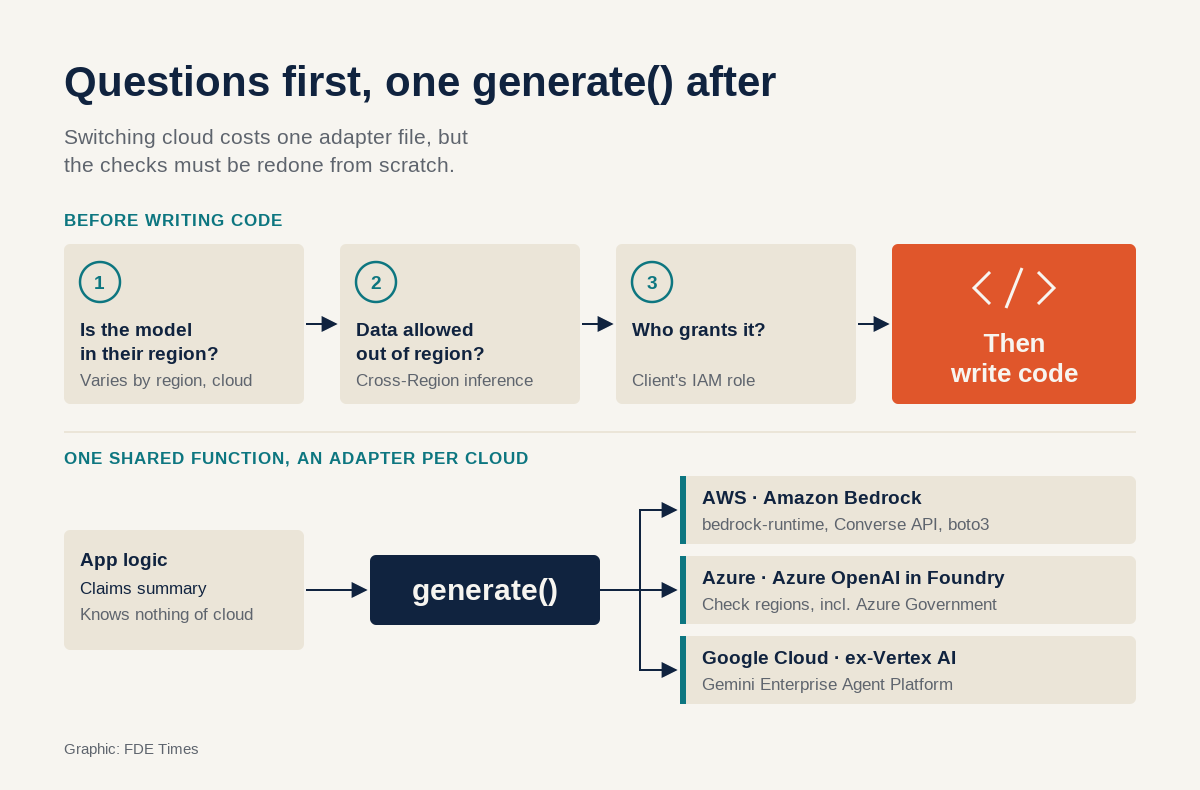
The first step is not code. The habit to build on any cloud is to open the console in the client’s account and check whether the model you need is available in the region they use. Microsoft spells this out for Azure; on AWS or Google Cloud, treat it as the safe assumption.
If the model is not there, the whole plan changes, and the earlier you find out, the cheaper the change.
The second step is cross-Region inference. Bedrock supports two kinds, Global and Geo, which offer higher throughput and a lower price per token. That sounds attractive, but it means a request may be processed outside the source region, and complaint emails contain customers’ names, phone numbers and addresses.
If the client’s policy requires data to stay in one region, you have to ask before turning this feature on.
The third step is access. Don’t stuff access keys into environment variables. Run the application under an IAM role the client grants, allowed to call only the model it needs. Bedrock applies this principle thoroughly: even the built-in Web Search tool only fetches data from the outside web when IAM explicitly allows it.
This approach will persuade the client’s security team more than any slide deck.
Only now do you get to code. Calling the model with boto3 through the Converse API is short:
import boto3

client = boto3.client("bedrock-runtime", region_name=REGION)  # region the client has approved

def generate(prompt: str) -> str:
    resp = client.converse(
        modelId=MODEL_ID,
        messages=[{"role": "user", "content": [{"text": prompt}]}],
    )
    return resp["output"]["message"]["content"][0]["text"]
The detail that matters is the generate() function. The rest of the application calls only this function and knows nothing about Bedrock. If the client later acquires a company that runs on Azure, you only need to write one more adapter for Foundry, and the complaint-summarizing logic stays the same.
That new adapter still has to answer the region question from scratch, because on Azure whether a model is available depends on the region and cloud type, Azure Government included. Switching clouds costs only one extra adapter file, but the checks have to be run again from the start.
Add one more scenario: one of the client’s subsidiaries runs on Google Cloud. The first job is to search the documentation under both names, Vertex AI and Gemini Enterprise Agent Platform, so you miss neither the old guidance nor the new.
Google Cloud has regions across Asia, Australia, Europe, Africa, the Middle East and both Americas, so you ask which regions the subsidiary has approved, place resources there, and then write a third adapter for the same generate() function.
The last step is infrastructure. Don’t click through the console by hand to create roles and resources. AWS has CDK, a framework for declaring infrastructure in code and deploying it through CloudFormation. Google Cloud also lets you manage resources through the console, the CLI, client libraries or Terraform; for that subsidiary, Terraform is the natural choice.
Once the infrastructure lives in the repo, the client’s team can review it, rebuild it and take it over after you leave.
Five questions for the kickoff meeting
The example above gives you a process that works on all three clouds. First question: which cloud does the client use, and which regions are approved? Google Cloud has regions in Asia, Australia, Europe, Africa, the Middle East, North America and South America, but clients usually allow only a few.
Second: is the model you need in the catalog for that region? Third: who grants access, and what is the minimum permission you need to request? Fourth: which data is sensitive, and may it be processed outside the region?
Last: which IaC tool does the client deploy with? Knowing this, you write to their standards instead of bringing your own.
Mistakes that eat the first week
The most common mistake is assuming a model is available in every region. Microsoft states clearly that availability depends on the region and cloud type. A demo that runs in a US region guarantees nothing about the client’s region.
The second is turning on cross-Region inference because it is cheaper and faster, before asking about the policy on where data is stored and processed. The third is leaving personal credentials in code. The code still runs, but it fails the first security review.
The fourth is small but costly: searching for “Vertex AI” in the new documentation without knowing the platform has been renamed, or the reverse. The last is building everything by hand in the console. On handover day, nobody can rebuild the environment you set up.
Turning this skill into a line on your CV
When you read FDE job descriptions, look for phrases such as “deploy into customer cloud”, “Bedrock”, “Azure OpenAI” or “IAM”. When you see them, expect the work to look a lot like the example above.
On your CV, don’t just write “AWS experience”. Be specific: moved an LLM application onto Bedrock in a client’s account, running under a least-privilege IAM role, with infrastructure written in CDK.
That line shows a hiring manager you know how to make an application run reliably in someone else’s environment. Anyone can call a model. In an FDE role, the valuable part is everything that has to happen after that.
Was this article useful?
Thanks for the feedback!