Don't let your sync job get your API key locked
A sync job running flat out can get your API key locked by a client in your first week. If you own an API with no limits, a single faulty client can bring it down. A few dozen lines of code handle both sides.

In brief
- When you call a client's API, throttle yourself first so you never hit the ceiling. If you still get a 429, follow Retry-After.
- Retrying without jitter performed worst in AWS's simulations, so always add a random interval.
- When you own the API, set rate limits at the gateway per API key and return 429 with headers that tell clients what to do.
Picture your first week on a client site. The sync job for 3,000 records you wrote yesterday runs very fast, and precisely because it is fast, the client’s ERP system throws errors all night. This morning the client’s IT team emails to say they have suspended your API key until the job is fixed.
For an FDE, this is an easy situation to fall into. You often sit between two systems: calling APIs the client owns while exposing your own API for the client’s systems to call. In the first direction, you have to be a considerate client. In the second, you have to set your own limits so that a faulty client cannot take your service down.
This article covers both directions. You will write a client that reads the 429 signal and slows itself down, then a simple limiter that sits in front of your own API. The code is sketch-level Python, trimmed for readability and using only the standard library. You need Python 3, a terminal, and a real or mock API to test against.
What does a rate limit actually protect?
MDN defines rate limiting as controlling how many operations can be performed within a period of time, mainly so that a system is not overloaded and slowed down. A server may limit the number of requests it accepts from a client over a period, both to preserve performance and to mitigate attacks such as DoS.
Limits are usually counted per client IP. If requests are authenticated or carry cookies, the limit can be counted per user or per application. On a client site, that means every job sharing an API key also shares a quota, and your sync job may be eating into the allowance of another internal application.
Start with simple arithmetic. Suppose the client’s API allows 10 requests per second and you need to sync 3,000 records, one request per record. The minimum time is 300 seconds, or 5 minutes. Any attempt to finish faster than 5 minutes simply trades speed for errors.
Step 1: read the 429 and Retry-After signals correctly
HTTP status 429 Too Many Requests means the client has sent too many requests within a period of time. The limit may apply to the whole server or to individual resources. The server may include a Retry-After header to tell the client how long to wait before trying again.
The easy mistake is that Retry-After can carry one of two kinds of value. The first is an HTTP date; the second is a non-negative integer giving the number of seconds to wait. Code that handles only one form will break the moment it meets a server using the other.
from email.utils import parsedate_to_datetime
from datetime import datetime, timezone

def retry_after_seconds(value):
    if value is None:
        return None
    value = value.strip()
    if value.isdigit():               # seconds form
        return int(value)
    try:                              # HTTP date form
        when = parsedate_to_datetime(value)
        delta = (when - datetime.now(timezone.utc)).total_seconds()
        return max(0, delta)
    except (TypeError, ValueError):
        return None
Check: retry_after_seconds("120") must return 120. For an HTTP date a few minutes from now, the result must be a positive number of seconds. For a garbage string, the function must return None rather than raise an error.
Step 2: retry with jitter when the server doesn’t say how long to wait
Not every server sends Retry-After. Without it, the usual approach is exponential backoff: each retry waits twice as long as the previous one. A post on the AWS Architecture Blog shows that plain backoff without jitter produced the worst results in their simulations, because many clients that fail at the same moment also retry at the same moment.
import random, time

def backoff_delay(attempt, base=1, cap=60):
    return random.uniform(0, min(cap, base * 2 ** attempt))

def call_with_retry(send, max_attempts=5):
    for attempt in range(max_attempts):
        status, headers = send()      # send() is your own hypothetical function
        if status != 429:
            return status
        wait = retry_after_seconds(headers.get("Retry-After"))
        time.sleep(wait if wait is not None else backoff_delay(attempt))
    raise RuntimeError("Out of retries")
Check: have a mock send() return 429 three times and then 200, and print the wait intervals. They should be random and tend to grow, not an identical 1, 2, 4 on every run.
Step 3: don’t wait for a 429 before slowing down
Retry is a safety net, not a strategy. A good client throttles itself from the start. MDN distinguishes two concepts: throttling still lets operations run, but only at a fixed maximum rate, while debouncing merges several closely spaced calls into one and waits until the calls have stopped entirely.
A sync job needs throttling. Debouncing suits things like a client-side search box.
Tyk compares several familiar algorithms. Fixed window is simple but prone to bursts, sliding log is accurate but memory-hungry, and token bucket handles bursts flexibly. A token bucket works like a bucket: tokens are added at a fixed rate, each request takes one token, and once the bucket is full, new tokens are discarded.
class TokenBucket:
    def __init__(self, rate, capacity):
        self.rate, self.capacity = rate, capacity
        self.tokens = capacity
        self.last = time.monotonic()

    def take(self):
        now = time.monotonic()
        self.tokens = min(self.capacity,
                          self.tokens + (now - self.last) * self.rate)
        self.last = now
        if self.tokens >= 1:
            self.tokens -= 1
            return True
        return False

bucket = TokenBucket(rate=8, capacity=8)   # 20% headroom below the 10/sec ceiling
def throttled_send(send):
    while not bucket.take():
        time.sleep(0.05)
    return call_with_retry(send)
Setting 8 rather than 10 leaves room for other applications sharing the key. It is a cautious choice, not a standard figure. Check: sending 80 requests through throttled_send should take roughly 9 seconds in total, not close to 0.
Step 4: now you own the API. Where does the limit go?
Take a hypothetical fixed-window example: a limit of 100 requests per minute, and a client that sends 100 requests in the last second of one minute and 100 in the first second of the next. Both windows are within the limit, yet the backend receives 200 requests in about 2 seconds. A token bucket with a small capacity would not let that burst through.
That bucket belongs in the API gateway, the software layer IBM describes as the single entry point through which clients reach multiple backend services. Rate limiting is the gateway’s job, not the load balancer’s, because the gateway is where you stop any single client or IP from overloading a service.
Setting limits here, as Tyk recommends, lets you apply policy consistently per API key, IP or user.
At the gateway, separate the two functions you used in Step 3. Rate limiting caps the number of requests and blocks the excess, while throttling slows, delays or queues requests when traffic spikes. With the same token bucket, the client side uses sleep to queue, while the server side rejects immediately.
Step 5: return 429 in a way clients can act on
Tyk notes that returning a 429 status is standard practice, along with headers such as Retry-After, X-RateLimit-Limit and X-RateLimit-Remaining. Your response is exactly the signal the client in Step 1 needs to read. The snippet below simulates this logic, with a separate bucket for each API key.
buckets = {}
LIMIT = 10

def check(api_key):
    b = buckets.setdefault(api_key, TokenBucket(rate=LIMIT, capacity=LIMIT))
    allowed = b.take()
    headers = {"X-RateLimit-Limit": str(LIMIT),
               "X-RateLimit-Remaining": str(int(b.tokens))}
    if not allowed:
        headers["Retry-After"] = "1"
        return 429, headers
    return 200, headers
This is only an in-process illustration. In a real deployment you configure this policy on whatever gateway the client already uses, following that product’s documentation, rather than writing it yourself. Check: calling check("key-a") 15 times in a row should produce around 5 responses of 429, while check("key-b") still returns 200.
Mistakes that get integration jobs’ keys locked
A common mistake is retrying immediately on a 429. The status itself says the client has sent too many requests, so retrying at once only piles more load onto the system that is already overloaded. The second mistake is parsing only the numeric form of Retry-After, so the job crashes at 2am the first time it meets the date form.
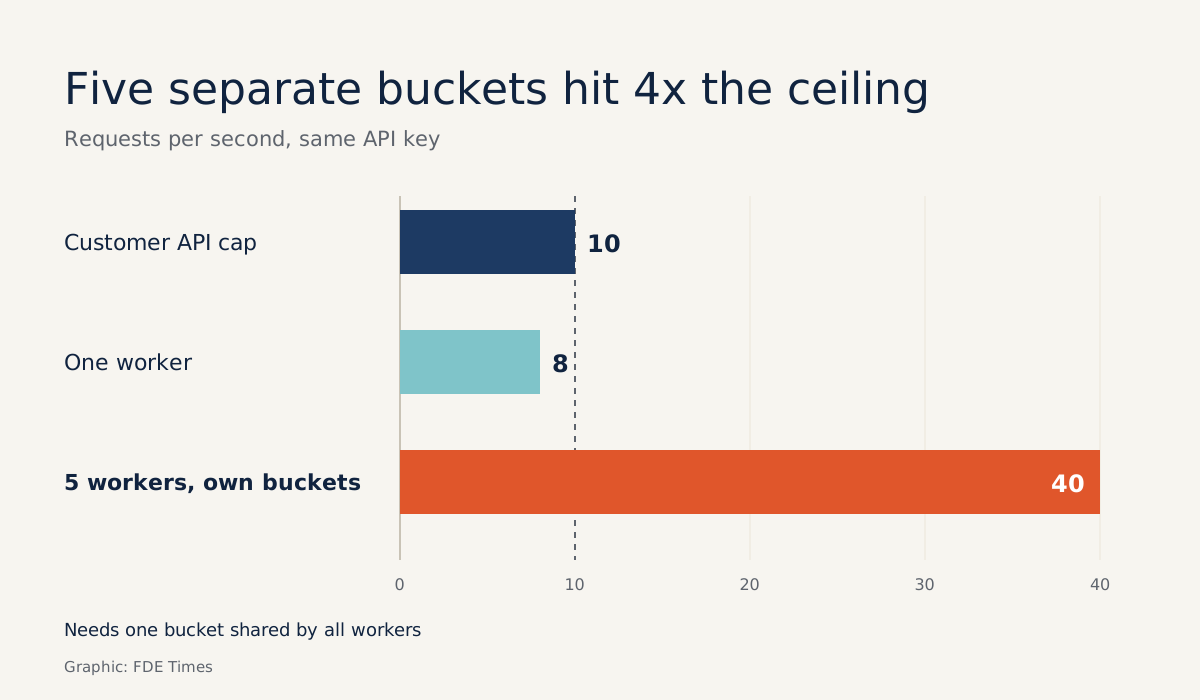
The third is harder to spot: running several workers in parallel, each with its own bucket set to 8 requests per second. Five workers add up to 40 requests per second, four times the ceiling. Workers that share a key must share a bucket.
On a client site, start with three questions
In your first working session with the client’s IT team, ask three questions before writing a line of code: what is the ceiling, is it counted per key, IP or user, and which other applications share this key? The answers determine your rate parameter.
From there, you can work out the minimum time for each job, as in the 5-minute calculation above, and tell the client in advance.
If the job description you are targeting mentions integrating with client systems, bring this exact example to the interview: the quota arithmetic, the shared bucket for all workers, and how you read Retry-After.
Clients rarely remember how fast your job ran. What they remember is that, for the whole project, their system never threw an error because of you.
Was this article useful?
Thanks for the feedback!
9 sources
- Rate limit - Glossary | MDN · 2025-07-11
- Throttle - Glossary | MDN · 2025-07-11
- Debounce - Glossary | MDN · 2025-07-11
- 429 Too Many Requests - HTTP | MDN · 2026-06-22
- Retry-After header - HTTP | MDN · 2025-11-21
- API rate limiting explained: From basics to best practices (Tyk) · 2023-02-03
- What is an API gateway? (IBM) · 2024-08-15
- API gateway vs. Load balancer: Do you need one or both?
- Exponential Backoff And Jitter (AWS Architecture Blog) · 2015-03-04