RBAC, ABAC, ReBAC or PBAC: bringing a client's permission model into an AI application
When an internal chatbot leaks data, the model usually hasn't misbehaved. The retrieval step simply doesn't know who is asking.

In brief
- In RAG, permissions must be enforced at retrieval so the pipeline returns only documents the person asking is allowed to see.
- RBAC is easy to audit but the number of roles tends to balloon; ABAC needs fewer policies because it matches on attributes; PBAC puts the rules in one policy engine, which makes them easy to version and audit.
- When documents live in Drive, Confluence or SharePoint, sync both content and permissions, and keep both in step with the source system.
Picture your second week on a client site. The internal chatbot demo has gone smoothly, until a salesperson asks about this year’s bonus policy and the bot quotes a passage straight from the board’s payroll sheet.
The model did nothing wrong. It answered the question it was asked, using exactly the documents the retrieval step handed it. The failure is that the pipeline had no idea who was asking, or what that person was allowed to see.
Every FDE building RAG or agents for an enterprise runs into this. The client already has a permission model. Sometimes it is explicit, but more often it is implicit in SharePoint or Confluence. Your job is to carry that model into the AI application without dropping a single rule.
Why the gap is in retrieval
OpenFGA’s documentation states the requirement plainly: document-level permissions must be enforced in the pipeline so that RAG returns only content the user is allowed to see. The authorisation decision, in other words, has to happen before any text reaches the model’s context.
Once a passage is in the prompt, any instruction along the lines of “do not reveal confidential information” is no more than a request. So the real engineering questions are which model you use to represent the client’s permissions, and where you filter.
One rule, four ways to describe it
Stay with the company from the example above and try writing the rule “only the board may see the payroll sheet” in each model. Each one asks a different question about the same permission.
The most familiar is RBAC. Auth0 defines it as assigning permissions by role within the organisation, where each role is a set of permissions applied to users. For payroll, you create a “Board” role and you are done. Auditing is simple too.
Trouble starts when rules acquire context. Say the client has 5 departments, 4 seniority levels and 3 regions. If each combination needs its own role, you already have 60 roles before projects even enter the picture.
That is the “role explosion” Ping Identity warns about. AWS points to a further drawback: every time a new resource appears, you have to update policies to grant access to it.
If the client’s documents are already labelled by department and confidentiality level, ABAC is far tidier. A single rule, such as “the asker’s department matches the document’s department, and their seniority is high enough for its confidentiality level”, replaces all 60 roles, because decisions are based on attributes of the person, the resource and the environment.
AWS says this approach needs fewer policies and scales automatically to new resources. The cost is that labels must be clean: one payroll file someone forgot to label is a leak.
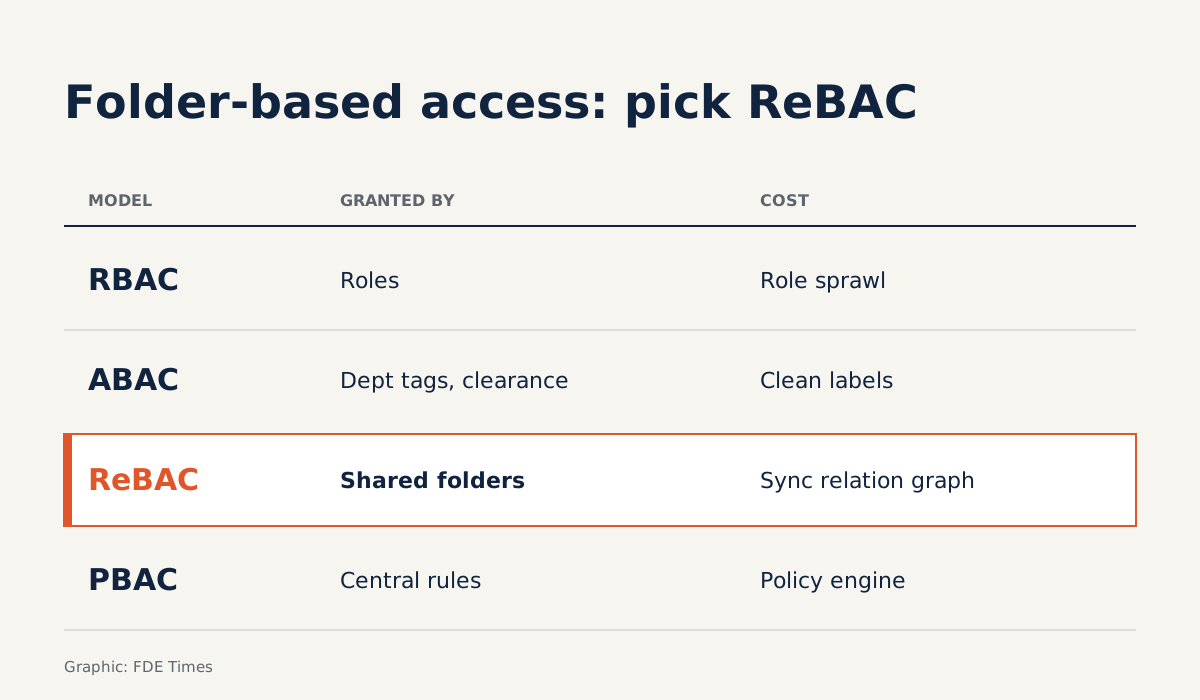
Many clients, though, label nothing. Their permissions live in who a “Payroll” folder has been shared with, which is a relationship. ReBAC models exactly that: permissions flow from relationships between users, groups and documents, and you have to describe the whole relationship graph. Google’s Zanzibar is usually cited as the reference design.
PBAC answers an entirely different question: where the rules live and who owns them. Every decision goes through a policy engine, with rules written in a declarative language that the security team can author, version and audit. Permissions can change quickly without reviewing roles across the whole organisation.
| Model | Question it answers | Fits a client when | The cost |
|---|---|---|---|
| RBAC | What role does this person hold? | The organisation has few roles and wants simple audits | Roles multiply; new resources require policy changes |
| ABAC | Do the attributes of the person, document and context match? | Documents are already tagged with department and confidentiality level | Attributes must be clean and kept up to date |
| ReBAC | What is this person’s relationship to the document? | Permissions follow folders, groups and who shared what | The full relationship graph must be described and synced |
| PBAC | What does the central rule say? | The security team wants to manage rules as code | Requires a policy engine and someone to maintain the rules |
The practical lesson: a client saying “we use roles” does not mean they use RBAC. If their permissions come down to “who has this folder been shared with”, that is a relationship, and you should model it with ReBAC.
Example: documents that inherit permissions from folders
OpenFGA gives an example very close to what you will find on a client site. A document belongs to a folder and inherits that folder’s viewers, so anyone who can view the folder can view every document inside it. In OpenFGA’s modelling language, the rule takes only a few lines:
model
  schema 1.1

type user

type folder
  relations
    define viewer: [user]

type document
  relations
    define parent: [folder]
    define viewer: [user] or viewer from parent
The last line contains all of the inheritance logic. The “Payroll” folder has only board members as viewers, so the payroll file inside it is automatically visible to them alone, with no new role required.
The next step is deciding where to filter. OpenFGA describes two approaches. Post-filtering runs the vector query first and then checks permissions on each result. Pre-filtering fetches the list of documents the user may view first, then passes those IDs as a filter to the vector search. A sketch of pre-filtering:
def retrieve(user_id, question, k=8):
    allowed = fga.list_objects(
        user=f"user:{user_id}",
        relation="viewer",
        type="document",
    )
    return vector_db.search(
        query=question,
        top_k=k,
        filter={"doc_id": {"$in": allowed}},
    )
The case for preferring pre-filtering is simple arithmetic. With post-filtering, if you take the top 8 and all 8 chunks come from confidential documents, the user gets 0 chunks, even though a valid document sits at rank 9.
Pre-filtering carries the opposite risk: the ID list can grow very long for someone who can see a lot, so you need to measure it on the client’s real data.
Starting from scratch on a client site
Start with discovery, not code. Bring a few short questions:
- Which systems hold the documents?
- Who decides on permissions?
- Are permissions attached to roles, to tags or to shared folders?
- When someone leaves, in which system is their access revoked?
The answer to the last question usually points to the source of truth you need to follow.
Then choose a model based on how permissions actually work, not on what the client calls them. Folder- and sharing-based permissions point towards ReBAC. Documents already labelled by department and confidentiality level suit ABAC. A security team that wants to review rules as code suggests PBAC.
When documents live in Drive, Confluence or SharePoint, OpenFGA recommends syncing content into the vector database and permissions into OpenFGA, and keeping both in step with the source system. That is two pipelines, not one. Each needs a schedule, alerts when they drift, and a way to handle deletions.
Finally, test with real users. Take three accounts from three departments, ask the same question, and check that the sets of cited documents differ exactly as expected.
On your CV, don’t write a generic “built RAG”; say that you modelled document-level permissions and synced them from the source systems. When interviewing for a role building enterprise RAG, ask how they handle document-level permissions.
That question tells you how mature the product is, and shows them you know where these projects tend to break.
Common traps
The first trap is syncing permissions once for the demo and then forgetting about it. Content can be a few days stale without anyone noticing, but permissions a few days stale mean someone whose access was just revoked can still query the bot.
The second is letting an agent read documents through a broadly privileged service account and trusting the prompt to hold it back. The third is handling every edge case by creating another role, the quickest route to role explosion.
The last is relying solely on post-filtering with a fixed top-k, so users with limited access get empty answers and conclude the bot is “bad”. At that point you lose the trust of precisely your largest group of users.
Whether an enterprise AI application is trusted does not depend on how well it answers. It depends on whether it stays silent at the right moment, for the right person.
Was this article useful?
Thanks for the feedback!
7 sources
- Role-Based Access Control (Auth0 Docs)
- Ping Identity – RBAC vs. Adaptive access control (authorization methods)
- Define permissions based on attributes with ABAC authorization (AWS IAM User Guide)
- Relationship-based Access Control (ReBAC) – Aserto Docs
- How to Implement Relationship Based Access Control (ReBAC) · 2024-03-08
- Policy-Based Access Control (PBAC) – The Complete Know How for Organizations · 2023-12-07
- RAG Authorization (OpenFGA Docs)