Why an agent can run all night on one ticket and never throw an error
Four layers of limits, plus handoff points to a human designed in advance, keep an agent loop from spinning forever and burning the client's money.
In brief
- An agent loop is essentially a while loop that stops on its own only when the goal is met. That is why it always needs step, budget and time limits.
- Combine several stop conditions so the loop ends as soon as any one of them is met. The Vercel AI SDK stops after 20 steps by default.
- Stopping should never be silent: every stop must return a reason and hand a human enough context, especially before an irreversible action.
Monday morning at the client’s office, and the refund agent deployed last week has spent the whole night on a single ticket: look up the order, read the result, look up the order again, read it again. No error was thrown. There is only a log thousands of lines long and an API bill that has shot up.
The agent gave no wrong answers. It simply did not know when to stop. A forward deployed engineer will find an incident like this hard to explain to a client, because there is no error line to point at, only a system that kept running.
The good news is that preventing it involves nothing mysterious. There are two parts: put limits on the loop, and design the moments at which the agent hands work over to a human.
Why doesn’t an agent know when to stop?
The Hugging Face Agents Course describes the agent loop as a while loop: the cycle of thought, action and observation continues until the objective is fulfilled. The final action is to send an answer back to the user, and the loop closes there.
The trouble lies in the word “until”. If the model never believes it has reached the goal, because data is missing, a tool returns a vague error or the prompt contradicts itself, the natural stop condition is never met. The Vercel AI SDK documentation is blunt: without a step limit, an agent can run indefinitely or rack up large costs.
That is why Anthropic, in its guidance on building agents, recommends adding stop conditions such as a maximum number of iterations to keep control. Where to set the threshold is a genuine trade-off. A tutorial from Metric Coders sums it up: stop too early and the result is incomplete; stop too late and the model rambles, repeats itself or hallucinates.
Four safeguards, each catching a different failure
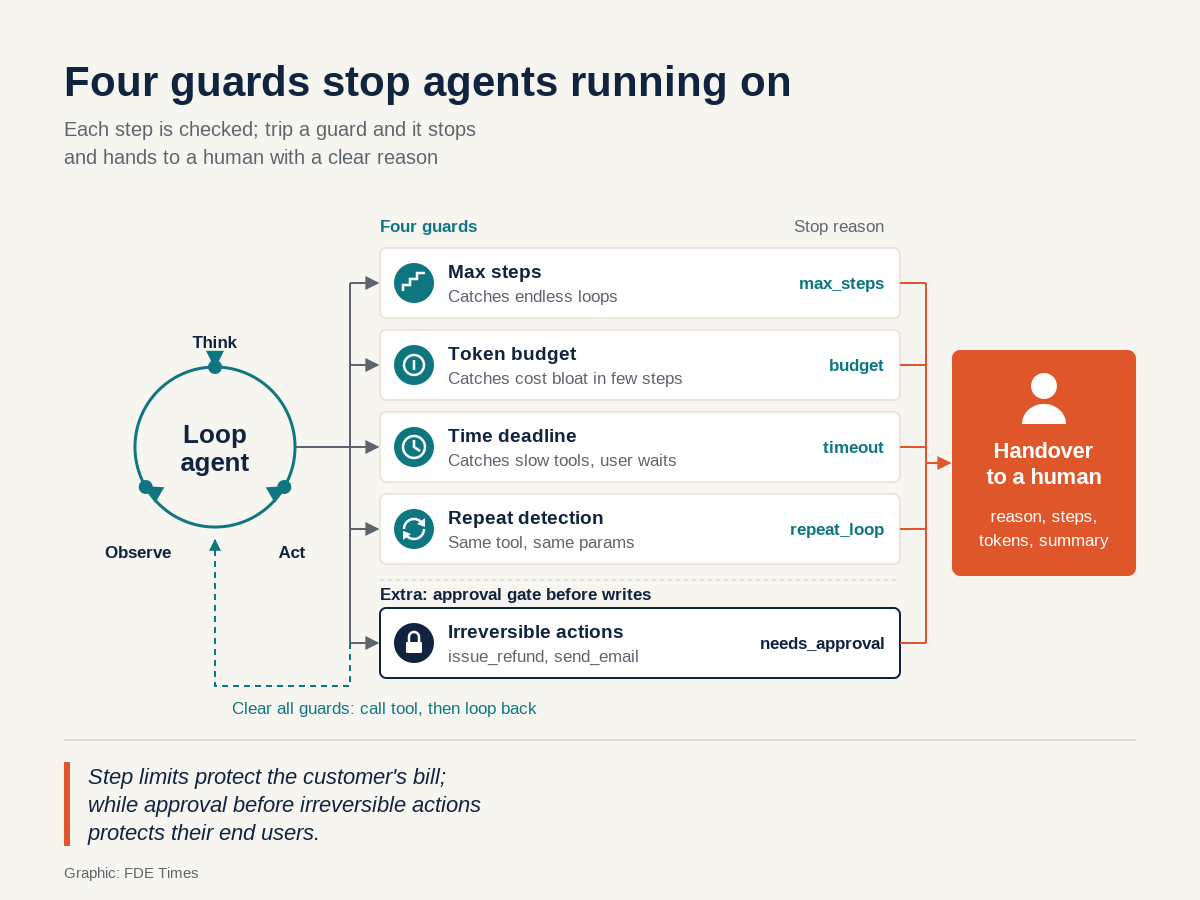
No single limit is enough on its own, because each catches a different kind of failure. The AI SDK lets you combine several stop conditions, and the loop ends when any one of them is met. Whatever framework you use, think about it the same way.
| Safeguard | What it catches | Weakness to know about |
|---|---|---|
| Maximum steps | Endless looping, logic cycles | Set too low, it cuts off long tasks |
| Token budget | Costs ballooning even with few steps | Capping only output tokens can cut a sentence in half |
| Time deadline | Slow tools, a user who is waiting | Says nothing about the quality of the result |
| Repeat detection | The same tool called with the same arguments again and again | You have to define what counts as “the same” |
On steps, the AI SDK stops a ToolLoopAgent after 20 steps by default. That is a sensible starting point, not a magic number. On tokens, the Metric Coders piece notes that capping the number of generated tokens is simple but tends to cut sentences off, and recommends combining approaches.
Stop sequences, which halt generation as soon as the model emits a predefined string, suit structured output. They are fragile, though, if the model fails to emit that exact string.
In the example below, repeat detection and the time deadline are both written by hand inside the loop, alongside the two familiar limits on steps and tokens.
Stopping is not giving up: handing off to a human
Anthropic describes agents pausing for human feedback at checkpoints or when they hit a blocker.
The site agentpatterns.ai makes this concrete with three positions. The first is when confidence is low. The second is when the loop has consumed a configurable share of its budget in tokens, money or tool calls. The third is before any action the loop cannot undo from its own state.
For enterprise clients, the third is the most worrying. A wrong order lookup can simply be run again. A wrong refund, or an email sent to the wrong customer, cannot be taken back.
Example: a refund agent for an e-commerce marketplace
Say you are building an agent that handles refund tickets, with four tools: look up an order, look up the policy, issue a refund and send an email. The thresholds below are hypothetical figures for illustration: at most 20 steps, a budget of 40,000 tokens, a handoff to staff once 80% of the budget is used, and a 90-second deadline.
import time

MAX_STEPS = 20
TOKEN_BUDGET = 40_000
SOFT_FRACTION = 0.8          # at 80% of the budget, stop and ask a human
DEADLINE_S = 90
MAX_REPEAT = 3               # same tool + same arguments more than 3 times = looping
IRREVERSIBLE = {"issue_refund", "send_email"}

def run(task):
    s = {"steps": 0, "tokens": 0, "history": [], "calls": {}}
    start = time.monotonic()
    while True:
        if s["steps"] >= MAX_STEPS:
            return handoff(task, s, "max_steps")
        if s["tokens"] >= TOKEN_BUDGET * SOFT_FRACTION:
            return handoff(task, s, "budget")
        if time.monotonic() - start > DEADLINE_S:
            return handoff(task, s, "timeout")

        step = llm_next_step(task, s["history"])
        s["steps"] += 1
        s["tokens"] += step.usage.total_tokens

        if step.is_final:
            return {"status": "done", "answer": step.answer, "steps": s["steps"]}

        key = (step.tool, str(sorted(step.args.items())))
        s["calls"][key] = s["calls"].get(key, 0) + 1
        if s["calls"][key] > MAX_REPEAT:
            return handoff(task, s, "repeat_loop", pending=step)

        if step.tool in IRREVERSIBLE:
            return handoff(task, s, "needs_approval", pending=step)

        obs = call_tool(step.tool, step.args)
        s["history"].append((step, obs))

def handoff(task, s, reason, pending=None):
    return {
        "status": "needs_human",
        "reason": reason,
        "steps": s["steps"],
        "tokens": s["tokens"],
        "summary": summarize(s["history"]),
        "pending_action": pending,
    }
Go back to the scenario at the top. The agent looks up the order, gets a timeout from the orders API, then looks it up again with the same order ID. On the fourth call the repeat counter fires and returns repeat_loop with a summary of the history, instead of spinning all night.
On another ticket, the agent looks up the order, checks the policy, concludes the customer is eligible and prepares to call issue_refund. The loop stops with the reason needs_approval, along with the action awaiting approval. The customer service agent only has to check it and click approve or reject, without reading everything from the start.
Note that the handoff function does more than report “failure”. It returns the reason, the step count, the token count and a summary, so whoever picks it up can carry on within seconds.
Each stop reason should lead to a specific human task. With repeat_loop, the recipient checks what is wrong with the tool and handles the ticket manually if needed. With budget or timeout, staff read the summary and decide whether to let the agent continue or finish the job themselves. And max_steps belongs to an engineer: find the cycle before thinking about raising the limit.
Doing it on your own project
Start by listing every tool and sorting them into three groups: read-only, writes that can be undone, and writes that cannot. The last group must always pass through an approval point, at least in the early stages of a deployment.
Next, run the agent on a sample of real tasks and record the step and token counts of the successful runs. Set limits a reasonable margin above the usual range, rather than guessing. Then agree with the client on who takes over when the agent stops, through which channel, and what they need to see.
Finally, turn “stop reason” into a metric. If the share of runs stopping on max_steps rises after a prompt change, you know at once that something has broken.
Common mistakes
The first mistake to avoid is raising the limit as soon as you see the agent being cut off. The LangGraph documentation on the GRAPH_RECURSION_LIMIT error points out that if you did not expect your graph to iterate many times and it still hits the limit, you likely have a cycle. You can increase recursionLimit, but check the loop logic for infinite loops first.
The second is relying only on an output token cap, which leaves users with answers that break off mid-sentence. The third is stopping silently: the loop ends and the user receives nothing, which breaks the principle that a loop should close with an answer.
The fourth is harder to spot: handing off to staff without context. The recipient has to open the logs and read everything again. It is easy to see why they would then start treating the agent as a burden rather than a helper.
Turning this skill into an interview advantage
When reading FDE job descriptions, look for mentions of human-in-the-loop or guardrails. Where they appear, that is your opening to bring this skill up. On your CV, avoid the generic “built AI agents”.
State plainly that you designed stop conditions and a human handoff flow, with a measurable number attached, such as the share of tasks that had to be passed to staff.
This week’s exercise: take an agent you have written, deliberately make one tool always return an error, and run it. If the agent stops on its own after a few attempts and returns a handoff that can be understood in ten seconds, you have a concrete story to tell at your next interview.
Was this article useful?
Thanks for the feedback!
6 sources
- Building effective agents (Anthropic) · 2024-12-19
- Understanding AI Agents through the Thought-Action-Observation Cycle (Hugging Face Agents Course)
- Defining Stopping Criteria in Large Language Models: A Practical Guide (Metric Coders) · 2025-03-29
- Loop Control (AI SDK)
- GRAPH_RECURSION_LIMIT (LangGraph docs)
- Human-in-the-Loop Checkpoints as Loop Control (agentpatterns.ai)