Sandboxing an agent: file and network fences must go together
The more freely an agent runs commands on a client's machine, the more it needs a fence it cannot talk its way past.
In brief
- A sandbox only works if it fences both files and network. Leave out either one and a tricked agent still has a way to do harm.
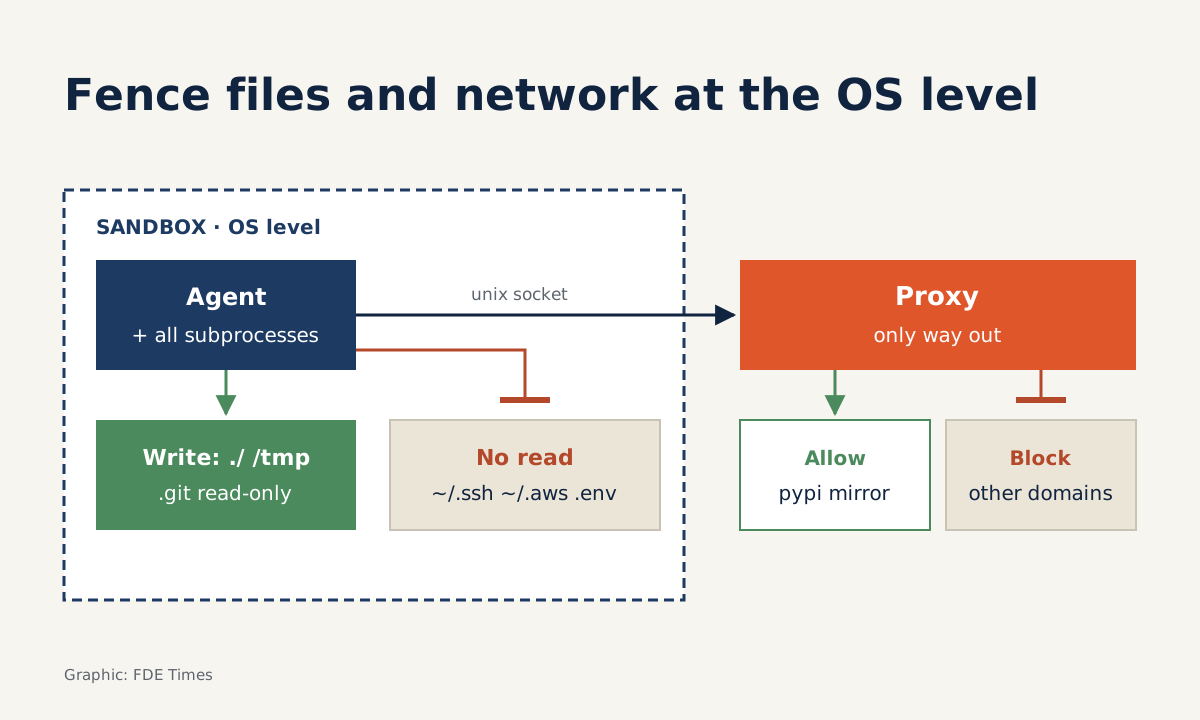
- The fence belongs at the operating-system level (bubblewrap, Seatbelt, sandbox-runtime), and network traffic must pass through a proxy that sits outside the sandbox.
- Make the fence solid before loosening approvals: commands inside the fence run on their own; only commands that cross it need a human.
In your first week at a client, you let an agent run tests in their repo. Half an hour later you have clicked “allow” dozens of times for commands such as pytest, ls and pip install. At some point you stop reading the commands and just click.
That is the riskiest moment. A permission prompt only protects you while the person clicking is still paying attention. The answer is neither to click faster nor to switch the prompts off, but to build a sandbox: inside the fence the agent is free; outside it, the operating system stops it.
For an FDE this is real deployment work. The client’s security team will ask what your agent can touch. “It asks first” is hard for them to trust. “It can’t” is persuasive.
Why fence both files and network?
Simon Willison describes a “lethal trifecta”: three capabilities that, once an agent has all of them, make a single prompt injection enough to steal data. One of the three is the ability to communicate externally. In his view, a sandbox must cut at least one leg.
Anthropic’s engineering team, writing about the Claude Code sandbox, concluded that an effective sandbox needs to isolate both the filesystem and the network. Remove either half and the reason is obvious.
Fence only the network, and a tricked agent can still edit a shell config file to plant a command that runs outside the sandbox next time. Fence only the files, and it can still read the source code in the workspace and send it straight to the internet.
There is another thing people often conflate. Codex’s documentation separates the sandbox (what the agent can technically do) from the approval policy (when it must ask).
The two have to be tuned separately. Setting approvals to “allow everything” does not give you a sandbox. And a tight sandbox with an approval policy that still asks about everything puts you back to clicking non-stop.
At which layer should the fence sit?
The fence belongs at the operating-system layer, not in the tool layer or the prompt. The Claude Code sandbox is built on bubblewrap on Linux and Seatbelt on macOS. As a result, every child process the agent launches, from pytest to an install script, is fenced in too.
Anthropic has also open-sourced sandbox-runtime (srt), a tool that applies file and network limits to any process without a container. It is handy when you work on a laptop, or on a client’s developer machine where Docker is not allowed.
The network side has a detail worth learning. On Linux, srt removes the fenced process’s network namespace entirely, so all traffic is forced through a proxy running on the host.
Claude Code likewise only reaches the internet through a unix domain socket connected to a proxy outside the sandbox. The agent cannot modify the proxy, and because it is the only way out, a domain allowlist enforced at the proxy actually means something.
Example: a policy for a logistics company’s repo
Picture a client that is a logistics company, asking you to have an agent fix a bug in its delivery-fee service. The agent needs to read code, run pytest and install packages from an internal mirror. The machine also holds ~/.ssh, ~/.aws and a .env file containing the staging database key.
Write the policy from what the agent needs to do, not from what it might want. The sketch below only illustrates the idea; it is not the configuration syntax of any particular tool:
write:   ./  /tmp        # everything else denied
         ./.git read-only
read:    allowed by default
         except ~/.ssh  ~/.aws  ./.env
network: denied by default
         allow only pypi.mirror.khach-hang.example
The read and write rules are deliberately opposite, as in srt. Reads are allowed by default, with specific locations blocked. Writes are denied everywhere by default, and each writable location, such as . or /tmp, must be opened explicitly.
The reason: the agent needs broad read access to understand the system, whereas every writable location is one more place where something could be planted to run later.
The .git line comes from Codex: a .git directory inside a writable area is still locked read-only. That way the agent can change code but cannot rewrite commit history.
The network rule follows srt’s allowlist approach: no declared domains means no network. Codex also keeps the network off in workspace-write mode unless you enable it in the configuration.
An untested policy is no policy
Before handing the agent to a client, play the prompt injection yourself and run these commands inside the sandbox:
cat ~/.ssh/id_rsa         # read must be blocked
echo x >> ~/.bashrc       # write must be blocked
curl https://example.com  # proxy must refuse
git commit -am "thu"      # .git is read-only, must fail
Then run one test in the opposite direction: pip install from the internal mirror must succeed. A fence that also blocks legitimate work is one people will switch off. Any attack command that gets through means the policy has a hole, and you fix the corresponding part straight away.
Steps to build the fence
Start by listing what the agent needs to do in a day at the client: the commands, the directories, the domains.
From that list, write the write rule as an allowlist, the read rule as a denylist of secret locations, and the network rule as a domain allowlist. Then pick an enforcement mechanism at the operating-system layer: srt on a laptop, or bubblewrap and Seatbelt if you build it yourself.
Only once the fence is in place should you tune the approval policy. Commands that stay inside the fence run on their own; only commands that need to cross it go to a human. Finally, run the attack commands above and keep the results to give to the client’s security team.
Measure the outcome by how often you have to click “allow”. Anthropic says that in internal use, sandboxing cut permission prompts by 84% while staying safe. Your number will differ, but if it does not fall, your approval policy is not yet making use of the fence.
Common mistakes
The most common mistake is opening the network wide because “pip needs the internet”. The agent only needs a mirror, so open that domain and nothing else.
Codex cloud also runs the agent phase offline by default unless you enable internet access for that environment. Keep that default and open access only for a specific reason.
The second mistake is replacing the fence with a guardrail filter. Willison is sceptical of products that boast of catching most attacks, because in his view 95% is a clear failing grade. An attacker only needs to get through once, while an operating-system fence does not depend on guessing intent correctly.
The third mistake is fencing only at the tool layer, for example blocking a read_file tool from reading ~/.ssh while letting the agent call cat through the shell. Every child process must sit inside the same fence.
Putting this skill on your CV
When reading job descriptions for FDE roles that involve agents, look for terms such as “sandboxing”, “least privilege” and “agent security”.
On a CV, a concrete line such as “designed a sandbox for a coding agent in client environments: writes limited to the workspace, network via an allowlisting proxy, with an attack test suite” carries far more weight than “experience in security”. In interviews, explain which leg of the lethal trifecta you cut, and bring the results of your attack commands.
Clients do not need your agent to behave. They need it to be unable to break anything, even when it has been tricked.
Was this article useful?
Thanks for the feedback!