The free security course FDEs should take before handing over code
The most useful parts of LFD121 are a few small habits around secrets, logs, SBOMs and a public channel for reporting vulnerabilities.

In brief
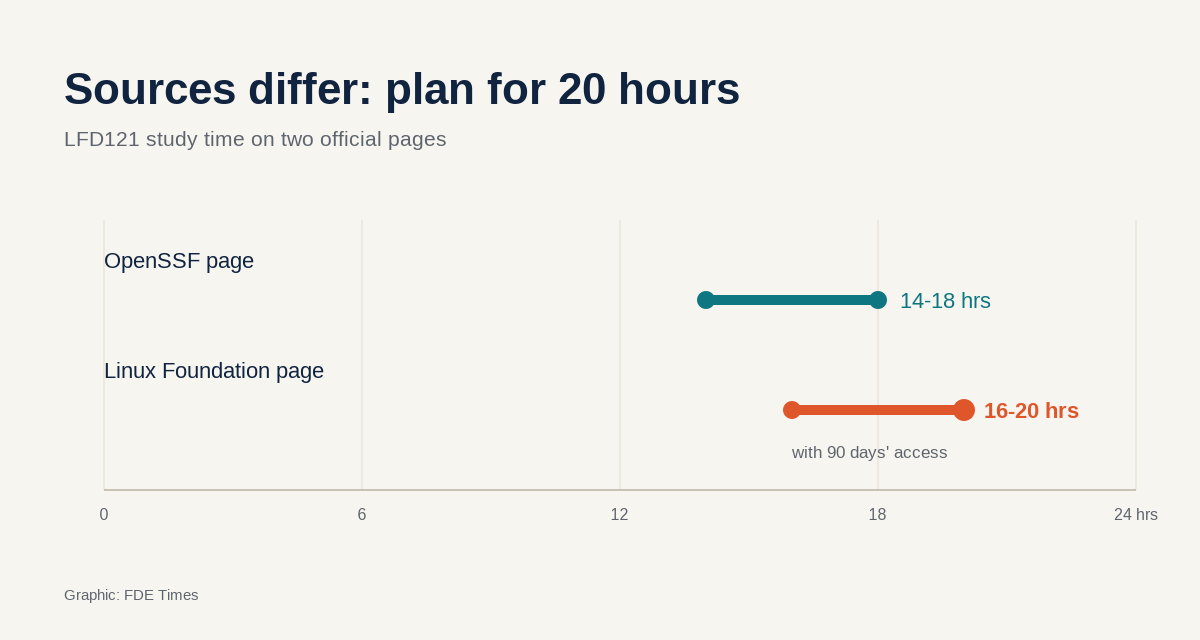
- LFD121 is free, self-paced and online, taking about 14-18 hours according to OpenSSF or 16-20 hours according to the Linux Foundation, with 90 days of access.
- FDEs should start with the sections on secrets, logging, SBOMs and vulnerability disclosure, then apply them straight away to the repo they are about to hand over.
- The certificate is valid for two years. On a CV, list it with the handover checklist you actually used.
The OpenSSF course Developing Secure Software contains one short, blunt instruction: do not put secrets that are in real use into source code. It sounds obvious. For a forward deployed engineer, though, it can mark the line between a smooth handover and an urgent call from the client after you have left the project.
The course, coded LFD121, is free, self-paced, online and ends with a final exam. It is most useful at the moment FDEs are most prone to slip: the last week, when code passes from your hands to the client’s engineering team.
Who runs the course, and what it asks of you
On March 30, 2022, OpenSSF and Linux Foundation Training & Certification announced the free course. The curriculum is public in the GitHub repository ossf/secure-sw-dev-fundamentals, so you can read the material before signing up.
The stated length varies by source. The 2022 announcement put it at about 14-18 hours, including quizzes, while the Linux Foundation enrollment page lists 16-20 hours of material and gives 90 days of access.
Plan around the higher figure: two one-hour sessions a week is more than enough for 20 hours within 90 days, even while you are on site with a client.
The curriculum estimates the time for each part. Part II, on implementing code, is the longest: about 4-6 hours of content alone and 5-7 hours in total. Part I takes 2-4 hours (4-5 in total) and Part III 3-5 hours (5-6 in total).
Since 2024, OpenSSF has added interactive labs that run in the browser with nothing to install. The labs are optional but recommended, and if you are studying to apply the material on a live project, you should do them.
You leave the project; the security flaws stay
Engineers building internal products have time to come back and fix security bugs. The client’s team inherits whatever you leave behind.
Take a hypothetical case: you hand over a data integration repo in which the API keys have been properly moved into environment variables, but the CI script prints every environment variable to the log to make debugging easier. The key is no longer in the code, yet it sits in a log that anyone with access to CI can read.
The logging section of LFD121 is direct: as a general rule, do not put passwords or highly sensitive data into logs. The example shows what an FDE needs from this course is a habit of checking, far more than cryptographic theory.
So if only a few weeks remain before delivery, skip the cover-to-cover approach and open the sections on protecting secrets, logging, SBOMs and vulnerability disclosure first.
Three ideas worth keeping
First, secrets must come out of both code and logs, and exposed keys must be retired. Deleting the line of code that holds a key does not finish the job. The OWASP Secrets Management Cheat Sheet calls for exposed keys to be revoked immediately and for secrets found in code or logs to be removed from the exposed systems, which includes old CI logs.
Second, an SBOM is something you deliver to the people using your software, and it has to accompany every release. The course recommends sending SBOMs to anyone who may use your software.
According to FOSSA’s summary of CISA’s 2026 SBOM minimum elements, the requirement remains a new SBOM for each build or release, so one produced once and left alone will soon be wrong.
The third is the most often overlooked: publish how to report a vulnerability. The course notes that open source projects usually do this in a SECURITY.md file linked from README.md. Without it, someone who finds a flaw in the client’s system will not know whom to tell.
A five-step checklist before handover day
Take the repo you are about to hand over and go through exactly five steps. Step one: search the committed code and configuration files for strings that look like keys, tokens or passwords. Step two: open the logs from the most recent CI run and search for those same values.
Step three: for every key that appeared in either place, record the issuing of a new key, the revocation of the old one and the cleanup of old logs, then agree with the client who does each. Step four: generate an SBOM for the release you are about to deliver, keep it alongside the source code, and add a line to the release process stating that every build or release gets a new SBOM.
Step five is the vulnerability reporting channel. GitHub advises that SECURITY.md should state which versions are supported and how to report a vulnerability. If the project includes a web service, RFC 9116 requires a security.txt file under the /.well-known/ path, with a Contact field and exactly one Expires field. A minimal layout might look like this:
repo/
├── README.md              # links to SECURITY.md
├── SECURITY.md
├── sbom/
│   └── sbom-v1.0.0.json   # one SBOM per release
└── public/.well-known/
    └── security.txt       # only for web-based services

# SECURITY.md
## Supported versions
v1.x: supported
## Reporting a vulnerability
Email [email protected] (owner: customer platform team)

# security.txt
Contact: mailto:[email protected]
Expires: 2027-11-30T00:00:00Z
The address and date above are only examples. What matters is that the file names the responsible team on the client’s side; your own email address does not belong there.
The two scanning steps can be done right away. Revoking keys and changing the release process need to be scheduled with the client, so start early. Finish all five steps before studying the matching chapters of LFD121, and you will read them with concrete questions in mind.
How to put the certificate on your CV
According to OpenSSF, both the course and the completion certificate are free. The certificate requires passing the final exam and is valid for two years. State the issue date so that whoever reads your CV can tell whether it is still current.
A certificate line on its own is thin, so pair it with real work. A sample line: “Developing Secure Software (LFD121), OpenSSF, issued [month/year]. Applied to a handover checklist for a client data integration repo: scanned for secrets in code and CI logs, revoked exposed keys, produced an SBOM per release, added SECURITY.md.”
When an FDE job posting mentions working in client environments or security requirements, that is the line to expand on in the interview.
Clients will not read your certificate. What they see is a repo free of secrets, an SBOM that matches the version in production and a clear address for reporting flaws.
Was this article useful?
Thanks for the feedback!
9 sources
- Developing Secure Software (LFD121)
- Free Developing Secure Software Training Course From OpenSSF Now Available · 2022-03-30
- Free Course: Developing Secure Software (LFD121)
- Developing Secure Software (docs/lfd121.md, ossf/secure-sw-dev-fundamentals)
- OpenSSF Expands Secure Development Course with Interactive Labs · 2024-10-29
- Adding a security policy to your repository (GitHub Docs)
- RFC 9116: A File Format to Aid in Security Vulnerability Disclosure · 2022-04
- Secrets Management Cheat Sheet (OWASP)
- CISA Releases the 2026 SBOM Minimum Elements | FOSSA Blog · 2026-07-30