mitmproxy: when the API docs say one thing and the traffic says another
On a client site, arguing about the spec rarely gets anyone anywhere. Putting a proxy in the middle and reading each request and response byte by byte usually ends the dispute faster.

In brief
- mitmproxy sits between the two sides: to the client it acts as the server, to the server it acts as the client. That lets you see real traffic instead of trusting the documentation
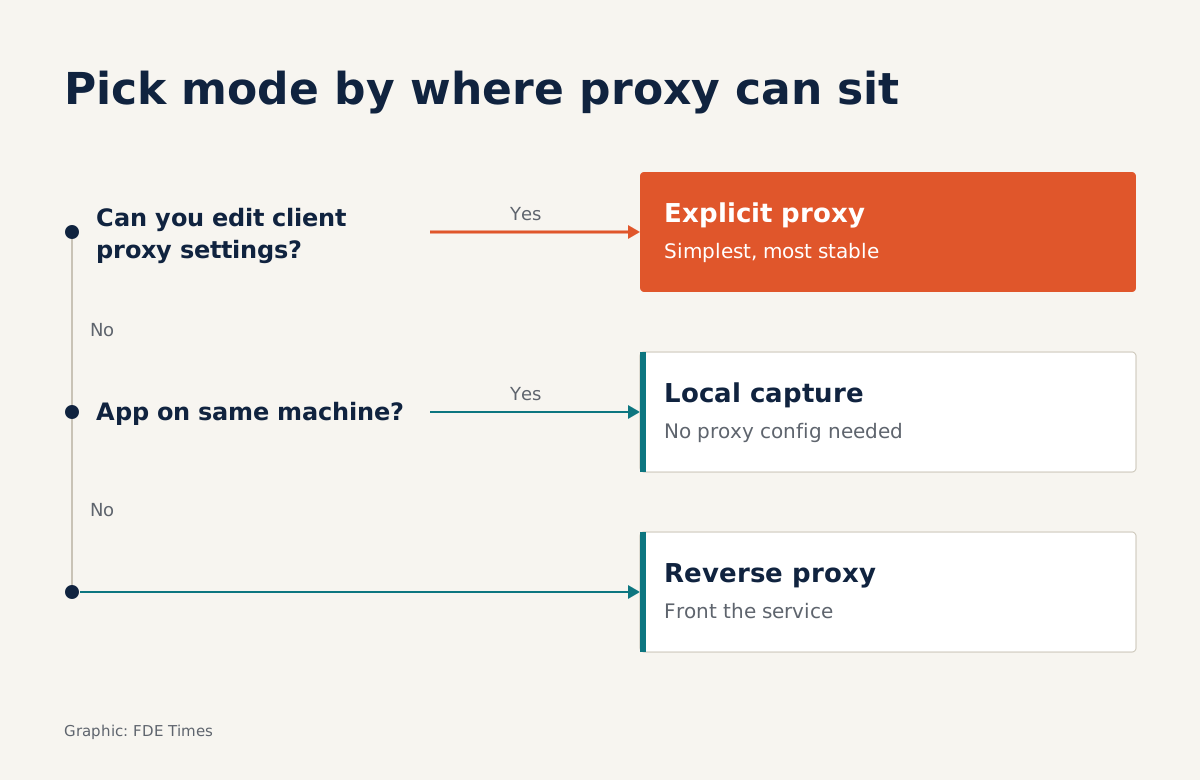
- Start with explicit proxy mode; local capture and reverse proxy are for when you cannot configure the client
- An addon run through mitmdump turns manual inspection into an automated check, and the script reloads itself whenever you edit the file
The client’s API documentation says authentication errors return 401. Your application keeps receiving a response that looks like a success, then breaks at a parsing step three layers further down. The meeting goes nowhere: the client insists the system behaves as described, and your side insists the code follows the documentation.
Only one side can be right, and the evidence is on the wire. Instead of arguing about the spec, you can put a tool in the middle so everyone looks at the real request and response together. mitmproxy was built for exactly this.
If you do integration work on client sites, this scene will repeat itself. Documentation can fall behind the system; traffic always reflects the system that is actually running.
What is mitmproxy, exactly?
The official site describes mitmproxy as a free and open-source interactive HTTPS proxy, created by Aldo Cortesi, Maximilian Hils and Thomas Kriechbaumer and released under the MIT licence. The licence is worth remembering: many clients keep a list of software approved for work machines, and the licence is the first thing their IT department will ask about.
The developers call it a “swiss-army knife” for debugging, testing, privacy measurements and penetration testing. The GitHub repository states plainly that it is aimed at both penetration testers and software developers.
The toolkit has three programs. mitmproxy is the interactive command-line interface, mitmweb puts the main features into a browser-based graphical interface, and mitmdump is for scripting and addons.
On a client site, mitmweb usually suits the first session, because you can share your screen and click through each request with the client’s engineers. When you need to repeat a check hundreds of times, switch to mitmdump.
How does it read HTTPS?
The mitmproxy documentation explains the basic idea: to the client it acts as the server; to the server it acts as the client. To do this with TLS, mitmproxy ships a full certificate authority and generates fake certificates on the fly. The client device must trust that CA for the connection to succeed.
This technical detail carries a professional rule. Installing an unfamiliar CA on a machine, especially one in the client’s infrastructure, is a security change, not a debugging trick. Get permission in writing, do it only in a test environment, and remove the CA as soon as you are finished.
There is another consequence: any client that does not trust the mitmproxy CA will refuse to connect. If the application reports a certificate error the moment you turn on the proxy, check the CA trust step first before blaming the client’s system.
Which mode to use on a client site?
The deciding question is whether you can change the client’s proxy settings. The official documentation recommends explicit proxy, meaning you configure the client to go through mitmproxy, because it is the simplest and most robust option. When the client is your own code, you can almost always do this.
| Situation on the client site | Mode to use |
|---|---|
| The client is a script or service you can configure | Explicit proxy (regular mode) |
| The application runs on the same machine but has no proxy setting | Local capture: transparent capture, no proxy configuration needed |
| You cannot touch the client, but you can place something in front of the service | Reverse proxy: mitmproxy acts like an ordinary server |
Reverse proxy is especially useful when the client’s system calls back into your service, for example through a webhook. You put mitmproxy in front of your endpoint and read what the other side actually sends.
An example: catching a “401” that returns 200
Go back to the opening situation and treat it as a hypothetical scenario. You run mitmproxy in explicit mode, route your client through it, then send a request with a deliberately wrong token. In mitmweb you see status 200 and a body containing an error field. No 401 anywhere.
Those ten minutes replace the whole meeting. You capture the request/response pair, send it to the client’s engineer, and the conversation moves from “who is wrong” to “how do we handle this case”. Your code should also check the error body rather than relying on the status alone.
The next step is to turn that finding into an automated check. According to the documentation, an addon is a Python object, with one method per event such as request or response. The sketch below prints only those successful responses whose body contains the word “error”:
class FlagHiddenErrors:
    def response(self, flow):
        body = flow.response.get_text() or ""
        if flow.response.status_code == 200 and "error" in body:
            print("Hidden error behind 200:", flow.request.pretty_url)

addons = [FlagHiddenErrors()]
Run it with mitmdump -s flag_errors.py. Scripts loaded through -s reload automatically when you edit the file, so you can adjust the condition while traffic is flowing without restarting.
Limits to know in advance
mitmproxy only sees what passes through it. If the client is not configured correctly, or does not trust the CA, you will get an empty screen or a TLS error and can easily draw the wrong conclusion. Always confirm that a simple request has gone through the proxy before reading the real ones.
It is also a penetration tester’s tool. Placing it in the middle of a client’s system without permission can become a security incident, even if you only meant to debug. And captured traffic may contain tokens and real customer data, so never paste it verbatim into a ticket or a chat.
What to learn first, and how to tell the story in an interview
A sensible order is explicit proxy with mitmweb, then installing and cleanly removing the CA, then a small addon run with mitmdump. Save local capture and reverse proxy for when you hit a situation that needs them.
When asked about an integration that did not behave as documented, tell it in three beats: symptom, evidence, fix.
Use the scenario above as a template: the application broke at the parsing step; you put mitmproxy in the middle and saw authentication errors returning 200 with an error body; you sent the request/response pair to the client, changed the code to read the error body, and wrote an addon to catch every similar case.
That story shows the interviewer what you do when two sides are stuck, not merely that you know the name of a tool. On your CV, condense it into a single results line following the same three beats.
Knowing a tool’s name convinces nobody. What counts is that when two sides argue about the spec, you are the one who can bring evidence into the meeting.
Was this article useful?
Thanks for the feedback!