Docker for FDEs: when the image reaches the customer's server on a USB stick
Most engineers learn Docker to run code on a laptop. FDEs have to learn it again as a way to deliver software to sites that have no internet, no root access and a different kind of chip.

In brief
- For an FDE, a Docker image is the package handed to the customer, not a dev environment. The smaller and more reproducible it is, and the fewer privileges it needs, the easier it is to get approved.
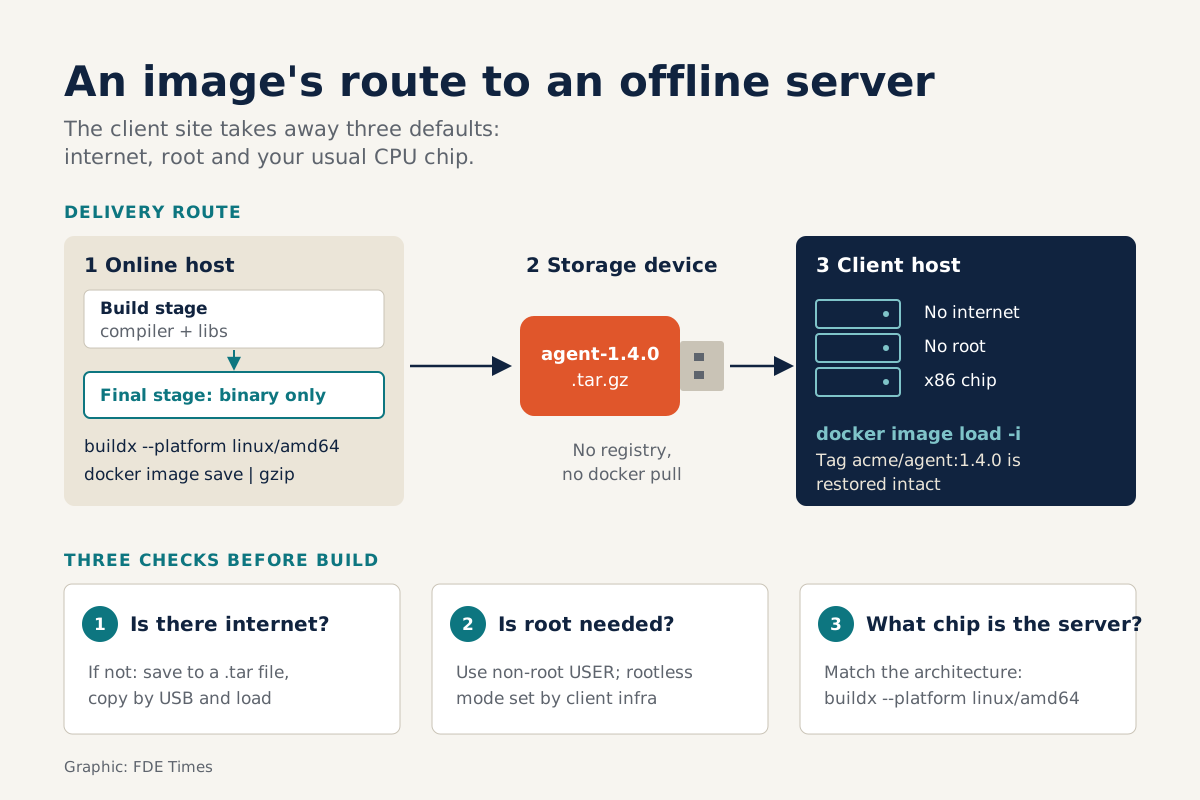
- Customer infrastructure may lack three things you take for granted: internet (use save/load), root (use USER and rootless mode) and the same CPU architecture (use --platform).
- Practise the full build → save → load loop across two different machines before you walk into your first site.
NVIDIA’s DGX OS 8 guide describes the step of getting a container image onto an air-gapped server in plain terms: copy the image to a portable storage device, such as a USB stick, and carry it to the target system. No registry, no docker pull. A DGX server receives its software much as machines did from installation discs twenty years ago.
If you work as an FDE, you are likely to meet exactly this situation, and not only at NVIDIA: Overleaf has written a full guide for customers deploying offline. Developers write code that runs on laptops and in CI; FDEs have to make it run on infrastructure the customer controls, which may have no internet, forbid root and use a different chip from yours.
So in an FDE’s hands Docker stops being a developer convenience. It is a delivery tool, and the way you write the Dockerfile decides whether the customer’s infrastructure team lets your software run at all.
The image is a package, not a dev environment
Docker describes Docker Engine as an open-source containerization technology for building and packaging applications. That is accurate, but not enough for an FDE. What you actually hand the customer is an image, and everything inside it is something their security team will inspect.
This is why multi-stage builds matter far more than they do when you only run things locally. You use several FROM instructions in one Dockerfile, each starting a new stage; the first stage has the full compiler and libraries needed to build, and the final stage copies over only the artifact. Docker’s documentation sums up the result in one line: a lean production image with only the binary inside.
Less inside means fewer questions to answer, less data to copy onto a USB stick and fewer potential vulnerabilities. In the same spirit, a .dockerignore file keeps irrelevant files out of the build, without forcing you to restructure the repository.
Three questions to ask the customer before you build
First: does the server have internet access? If not, delivery rests on two commands. docker image save writes an image to a tar file, including all parent layers and tags; docker image load loads it back from the tar, even when compressed with gzip, bzip2, xz or zstd, and restores the tags as well.
Overleaf’s on-prem guide describes exactly this process: move the .tar files to the offline server, then docker load each one.
Second: does the service need root? Docker recommends using USER to switch to a non-root user when a service can run without privileges. Going further, rootless mode lets both the Docker daemon and containers run as an ordinary user, which suits customers who forbid running the daemon as root.
Third: what chip does the server use? NVIDIA’s guide requires pulling the image on a machine that is connected and shares the CPU architecture of the air-gapped system. Build on an ARM laptop and carry the result to an x86 server, and the image will not run. Multi-platform builds with buildx’s --platform flag let you specify targets such as linux/amd64 or linux/arm64.
A minimal workflow
Imagine delivering a small service to a customer with an offline x86 server. The Dockerfile might look like this, with the part after @sha256: being where you fill in the real digest of the base image:
FROM golang:1.22@sha256:... AS build
WORKDIR /src
COPY . .
RUN go build -o /out/server ./cmd/server

FROM alpine@sha256:...
COPY --from=build /out/server /server
USER 10001
ENTRYPOINT ["/server"]
Two FROM lines, two stages, only the binary goes into the final image, and it runs as a non-root user. Base images are pinned by digest because tags can change; Docker presents this as a way to protect the supply chain, while for an FDE it simply guarantees that the image you test today is identical to the one the customer loads next month.
On a connected machine, build for the right architecture and package it:
docker buildx build --platform linux/amd64 -t acme/agent:1.4.0 .
docker image save acme/agent:1.4.0 | gzip > agent-1.4.0.tar.gz
On the customer’s server, once the file has travelled on portable storage:
docker image load -i agent-1.4.0.tar.gzThe acme/agent:1.4.0 tag is restored intact, and from there you run the container as usual.
Docker will not check the infrastructure for you
Docker does exactly what you ask; whether that request matches the customer’s server is your responsibility. NVIDIA has good reason to require that the image be pulled on a machine with the same CPU architecture as the air-gapped system: architecture is something to confirm with the customer before you type the build command, not something to discover while standing next to the server.
Unpinned tags are the same: the build still works, but the next build may produce a different image.
Rootless mode, too, belongs to the daemon side, meaning it is configured on the customer’s machine, not inside your image. You can recommend it, but their infrastructure team is the one that turns it on.
And a non-root USER only applies when the service genuinely runs without privileges. If your code writes to a path that needs root, fix the code first, not the Dockerfile.
What to learn first
If you are moving into FDE work, do not start with orchestration. Master a multi-stage Dockerfile, understand how a digest differs from a tag, and complete the full build, save and load loop between two different machines, one of them with networking switched off. That loop takes an evening but teaches more than a week of reading documentation.
A tip for the job search: if a job description mentions on-prem, air-gapped or deploying into the customer’s own infrastructure, have an offline delivery story ready to tell in the interview.
On your CV, instead of writing “knows Docker”, state that you packaged and delivered a service that ran offline in a non-root environment, along with the image size before and after optimisation.
The USB stick in NVIDIA’s guide is not a sign of backwardness. It is a reminder that on the customer’s side, software only counts as done when it runs somewhere you do not control.
Was this article useful?
Thanks for the feedback!