Writing handover documents that let clients run the system without calling the FDE back
Whether the system you built survives after you leave often depends on a few pages written in a hurry during your last week.
In brief
- PostHog's standard for 'done': a stranger on the client's team can pick up the document with nobody explaining it, understand the scope, follow it and never need to ping the FDE team.
- Handover documents fail because the person leaving writes them during their busiest week, recording what is easy to remember rather than what the recipient needs.
- Keep the cover page to a few pages, separate how-tos, reference and the reasoning behind decisions, attach a source to every claim and name the person responsible for keeping it up to date.
Picture this: Friday is your last day on the project. The pipeline syncing orders from the client’s ERP into the data warehouse has run smoothly for two weeks, the demo is done and the client is happy. Three weeks later, the client messages you: last night’s job failed, could you take a look?
That message shows the handover failed, even though there is nothing wrong with the code. PostHog’s FDE handbook sets a very clear standard for when a deliverable is “done”: a stranger on the client’s team can pick it up and read it with nobody explaining, understand the scope, follow the recommendations and never need to ping the FDE team.
PostHog describes the documentation and training phase as the transfer of ownership, so that the client runs the system themselves once the team has left.
For an FDE, this is the skill that separates someone who “finished the project” from someone who “left behind a system that lives on”. It is also something worth describing concretely in interviews, in terms of outcomes rather than adjectives.
Why are handover documents so often useless?
Tandem, a company that writes about FDE processes, points to a very ordinary cause: the person about to leave writes the documentation during exactly their busiest weeks, on top of finishing the build. The predictable result is a document that contains what the writer finds easy to remember, not what their successor needs.
Tandem also observes that documents like this are an unverifiable snapshot. A line such as “the client agreed to ignore cancelled orders”, with no link to an email or meeting notes, leaves the reader no option but to ask the client again. As Tandem puts it, a note without a source is just a claim.
The third problem is time. Google’s SRE book warns that in a fast-changing environment, operational documentation goes stale quickly. New people are the ones who most need up-to-date documentation, yet they often feel they lack the authority or understanding to fix it.
One handover pack, five kinds of document
The fix is to stop treating a handover as “one long README” and to split it by what the reader is trying to do.
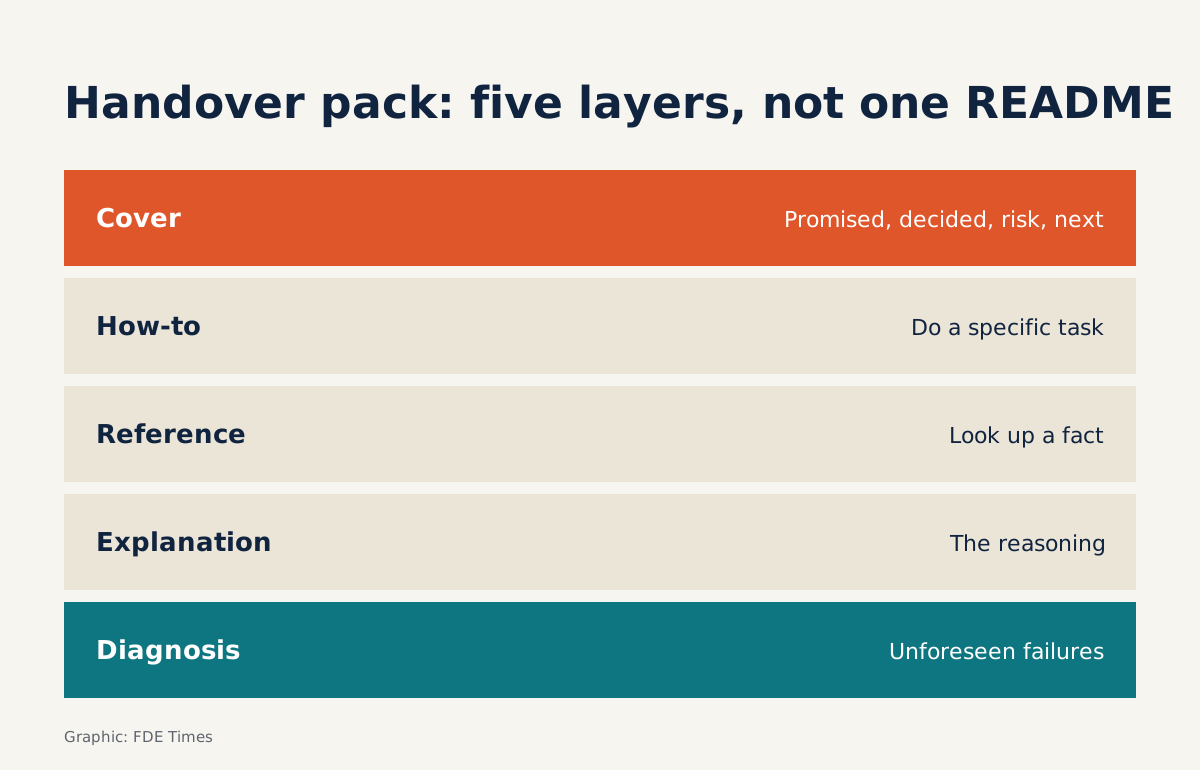
The Diátaxis framework by Daniele Procida (Canonical) offers a practical way to divide it. A how-to guide is a step-by-step recipe for completing a specific task. Reference is where you look up facts about the system. Explanation covers why the system was designed the way it was.
For a handover pack, it helps to add two more layers around these three. At the top sits a short cover page which, following Tandem’s suggestion, answers only four questions: what was promised, what was decided, what risks remain, and what comes next.
At the bottom sits a diagnostics section, because Google’s SRE book warns against training people only with procedures, checklists and playbooks: operators need to know how to reason through failures the book does not cover.
| Type | What the reader needs | Example in the order pipeline |
|---|---|---|
| Cover page | The full picture in five minutes | Scope, decisions, risks, next steps with named owners |
| How-to | To do a specific task right now | Rerun the job for a missed day |
| Reference | To look up a fact | Run schedule, target tables, where credentials are stored |
| Explanation | To understand why the system is the way it is | Why incremental sync rather than full |
| Diagnostics | To find the cause of an unfamiliar incident on their own | Row counts differ between the ERP and the warehouse |
Example: a cover page for the order pipeline
Back to the hypothetical pipeline above. Its cover page might look like this, with every line linking to its source:
# Handover: ERP → data warehouse order sync pipeline

## Promised
- Sync new and modified orders every night. [link: kickoff minutes]
- Does NOT include inventory data (deferred to a later phase). [link: confirmation email]

## Decided
- Incremental sync on the updated_at column. Reason: see explanation/incremental.md
- Cancelled orders are kept and flagged with is_cancelled. [link: meeting notes with the accounting team]

## Risks
- The ERP may change its schema during upgrades; the job will fail at the validate step.

## Next (in order)
1. Lan (Data) moves job-failure alerts to her team's on-call channel.
2. Minh (IT) rotates the ERP credentials before they expire.
3. Lan runs how-to/backfill.md as a trial on the staging environment.
The “Next” section is where weak documents usually say “needs further monitoring”. PostHog requires next steps to be concrete, ordered and assigned to a named person. A task without an owner is a task nobody does.
The “Decided” section points to the explanation rather than repeating it. PostHog’s guidance is that a handover should record what was built and why. The reasoning matters because a year from now someone on the client side will want to “simplify” things by switching to a full sync, and only the explanation will tell them why that option was rejected.
Nor does the cover page copy out the run schedule or configuration. Tandem warns that if the document runs beyond a few pages, it is duplicating things a system should be storing. The schedule lives in the scheduler’s configuration file, and the reference only needs to point there.
Diagnostics: teach how to think, not just what to click
The “rerun the job” how-to helps the client deal with failures you anticipated. The diagnostics section is for the ones you did not.
For this pipeline, a good diagnostics page starts from a symptom (“the warehouse has fewer orders than the ERP”), then lists hypotheses in order of how easy they are to check: did the job run, are there orders whose updated_at falls outside the window, is there a time-zone mismatch.
Each hypothesis comes with a way to verify it, such as a query counting orders by day on both sides. The reader learns how to rule causes out, and can apply the same approach to a different symptom next time.
Doing it yourself: five steps
Step 1: write from the first week, not the last. This is how to avoid the trap Tandem describes. Whenever a decision is made, add a line to “Decided” with a link to its source at that moment.
Step 2: write the how-tos and reference. As handover approaches, write how-tos for the three to five tasks the client will need to do most often, then write reference that points to where the configuration actually lives.
Step 3: write the explanation and the diagnostics page. Explanation is for decisions that later arrivals will be tempted to reverse; the diagnostics page is for the most common symptoms.
Step 4: run PostHog’s test. Give the documentation to someone on the client side who has not been involved in the project and ask them to work through a how-to while you say nothing. Every question they ask is a gap to fill.
Step 5: name a keeper for the documents. State clearly who on the client side is responsible for updating them, and put the documents somewhere that person can edit easily, so new operators are not reluctant to make changes, as the SRE book warns.
Common mistakes
The most common mistake is writing for yourself: using internal abbreviations and skipping “obvious” steps that are only obvious to the person who built the system. The second is putting everything in one file, so someone fixing an incident at midnight has to wade through three pages of design history.
The third is keeping the documentation in your own company’s wiki, where the client cannot edit it. Google’s SRE book has already warned that operational documentation ages quickly; if people on the client side cannot change it, it will steadily drift away from the real system with nobody fixing it.
Where this skill shows up on your profile
When reading an FDE job description, look for whether the role mentions handing systems over to the client’s team. On your CV, instead of writing “wrote documentation”, describe the outcome: which client team ran the system on its own after you left, and what they could do without calling you.
This week’s exercise works in reverse: find a handover document or README that you once received, list every question you had to ask someone else, then sort each question into one of the five layers above. Whichever layer collects the most questions is the one you are most at risk of neglecting when it is your turn to hand over.
Was this article useful?
Thanks for the feedback!