Workflow or agent: which design pattern to choose when the client says "we want an agent"
Clients usually ask for an agent. The question to bring into the meeting is a different one: can you list in advance the steps the system has to take?

In brief
- A workflow follows predefined code paths; an agent lets the LLM steer itself. Choose based on how predictable the problem is.
- Start with the simplest solution. A single LLM call with retrieval and examples is often enough.
- Agents trade latency and cost for quality. Multi-agent uses about 15× the tokens of chat, so it only pays off for high-value work that can be parallelised.
The first meeting with a client often opens with a confident request: “We want an agent to handle customer email.” They have seen the demos, read the news, and in their minds an “agent” is the most modern thing available.
An FDE’s job is not to nod along. It is to find the design pattern that solves the problem at a latency, cost and reliability the client can accept. Get this step wrong and three months later you will be debugging a system nobody can explain, wondering why it answers differently today than it did yesterday.
The skill this article covers is not a big one, but you will need it almost every week: reading a client’s problem and deciding whether it calls for a workflow, an agent, or something simpler than either.
Who decides the next step?
Anthropic has a compact definition. A workflow is a system in which LLMs and tools are orchestrated through predefined code paths. An agent is a system in which the LLM dynamically directs its own process and tool use, meaning the model holds control over how the task gets done.
LangGraph’s documentation draws the same line. Workflows have predetermined paths and run in a designed order. Agents are for situations where neither the problem nor the solution can be predicted in advance.
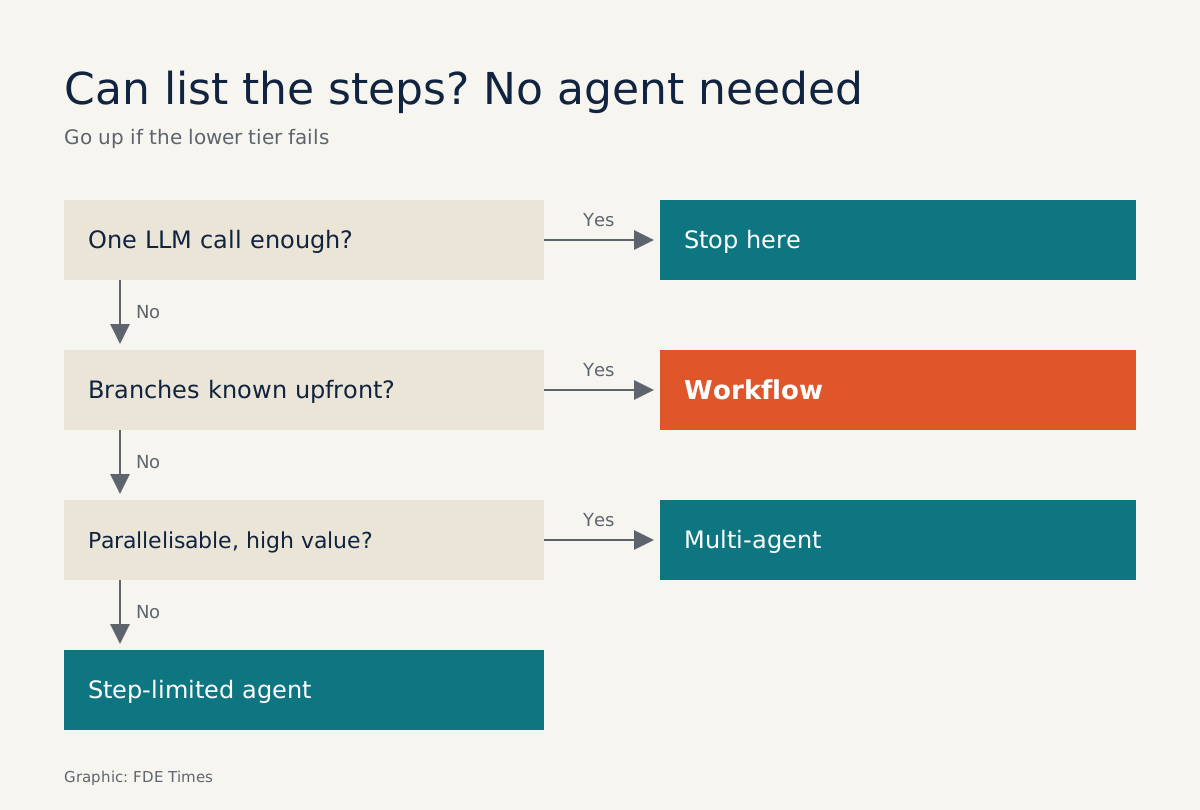
So the classifying question is simple: who decides the next step, your code or the model? If you can sit down and draw the branch diagram before anything runs, it is a workflow. If you cannot list the steps because they depend on what the model discovers along the way, that is where an agent belongs.
The complexity ladder
Anthropic’s core advice is to find the simplest possible solution and add complexity only when it is truly needed. They state plainly that for many applications, optimising a single LLM call with retrieval and in-context examples is usually enough.
The reason is the trade-off. Agentic systems typically accept higher latency and greater cost in exchange for better quality. Workflows, by contrast, offer predictability and consistency for well-defined tasks. For enterprise clients, “consistency” is often what they need most; they just do not call it that.
The top rung is multi-agent, where several agents run in parallel. Anthropic reports that its multi-agent system uses about 15× the tokens of ordinary chat. In their view, this kind of system suits high-value tasks that parallelise heavily, whereas most coding work is harder to parallelise than research.
A worked example, end to end
Imagine a logistics company that wants to answer customer email automatically. You ask for 50 real emails and sort them by hand. Suppose the result is that most emails ask about order status, some are policy questions covered by the FAQ, and a small share are complex complaints.
For the first two groups you can write the steps out on paper straight away: identify the intent, extract the order ID, query the database, draft a reply. Nothing here is surprising, so this is a workflow:
# Workflow: the code decides the path
def handle_email(email):
    intent = classify(email)  # 1 LLM call, returns only a fixed label
    if intent == "order_lookup":
        order = db.get_order(extract_order_id(email))
        return draft_reply(email, context=order)
    if intent == "policy":
        return draft_reply(email, context=search_faq(email))
    if intent == "complaint":
        return investigate_complaint(email)  # the only branch with an agent
    return escalate_to_human(email)
(The comments read: the code decides the path; one LLM call that returns only a fixed label; the only branch with an agent. The intent labels are order lookup, policy and complaint.)
The agent version the client pictures is usually a while True loop with a full set of tools, including issue_refund. In that design, whether to refund is decided by the model inside the loop, and no line of code can block it beforehand.
In the workflow version, each email passes through a fixed number of LLM calls, so you can estimate cost, measure latency, and know immediately which branch went wrong when something fails.
The agent is not eliminated; it is confined. If the complaints group genuinely requires investigating several sources in an unpredictable order, you place an agent at that branch alone, with a restricted toolset and a step limit:
# Agent only in the complaint branch: the model decides the path, but within guardrails
COMPLAINT_TOOLS = [get_order, search_faq]  # read-only, no issue_refund
MAX_STEPS = 6

def investigate_complaint(email):
    messages = [COMPLAINT_PROMPT, email]
    for _ in range(MAX_STEPS):
        step = llm(messages, tools=COMPLAINT_TOOLS)
        if step.is_final:
            return draft_for_human_review(email, findings=step.text)
        messages.append(run_tool(step))
    return escalate_to_human(email)  # out of steps: hand off to a human
(The comments read: agent only in the complaints branch, where the model decides the path but within guardrails; read-only tools, no issue_refund; out of steps, hand over to a human.)
That is a hybrid design you can defend in front of the client: the predictable part runs in code, and only the unpredictable part is handed to the model. Even there, the model only reads and proposes; the refund decision stays with a person.
Do it yourself in five steps
Step one: collect real samples, not the client’s description. Thirty to fifty real cases will show you how predictable the problem is, something the first meeting never reveals.
Step two: try the lowest rung first. Write a good prompt, add retrieval and a few examples, and run it on the sample set. If the results are good enough, stop there.
Step three: draw a branch diagram for the cases the first rung could not handle. Any branch you can draw, build as a workflow.
Step four: use an agent only for what remains, the part where you genuinely cannot list the steps. Set a loop limit and include only the tools that are needed, as in the investigate_complaint function above.
Step five: consider multi-agent only when the task splits into independent parts that run in parallel, and the value of the result is large enough to carry the extra tokens.
Common mistakes
The most common mistake is choosing an agent because the demo looked good. Demos run on a few easy cases; production has to run on thousands of cases where the client needs the same result every time.
The second mistake is splitting work across several agents without sharing context. Cognition, the company behind Devin, advises sharing context and sharing full agent traces, not just individual messages.
They also point out that every action carries an implicit decision, and when parallel agents make conflicting decisions, the outcome is bad.
The third mistake is not measuring. If you do not know how many calls each request costs and how long it waits, you cannot explain to the client why it is worth climbing another rung, or why it is not.
Turning this skill into an edge in job applications
If the job description you are targeting mentions agents, be ready to explain why you chose that architecture, not just that you built an agent. How you reason about trade-offs is what is worth talking about.
So on your CV, do not just write “built AI agents”. Describe the decision: which rungs you tried, what you measured, and why you stopped at a workflow or climbed to an agent.
A line such as “moved the lookup path from an agent loop to a fixed workflow for consistent results” shows you understand the trade-off. It is also the kind of judgement you will have to make every week sitting next to a client.
Exercise: let the agent show you which parts should be a workflow
Take an agent loop you already have, or write one like investigate_complaint for the email problem above. Run it 20 times on 20 different inputs and record the sequence of tools the model called each time.
Then line the sequences up side by side. Sequences that repeat almost identically are candidates to rewrite as a workflow branch; sequences that differ every time are the part worth keeping for the agent. Also record the average number of steps per run to know what MAX_STEPS should be.
The next time a client says “we want an agent”, ask for their last fifty emails first. Quite possibly those emails will give you the answer.
Was this article useful?
Thanks for the feedback!
4 sources
- Building effective agents · 2024-12-19
- How we built our multi-agent research system · 2025-06-13
- Don't Build Multi-Agents · 2025-06-12
- Workflows and agents (LangGraph docs)