When clients are slow with data and access: how FDEs keep projects moving
Every day of waiting can be converted into days of demo slippage, and that number turns a complaint into a decision the sponsor has to make.

In brief
- A slow client is a risk to manage, not something to get annoyed about.
- Count back from the deadline to see which dependencies are already late, then ask for the actual cause before escalating.
- Good escalation offers paths forward, each with a clear date and scope.
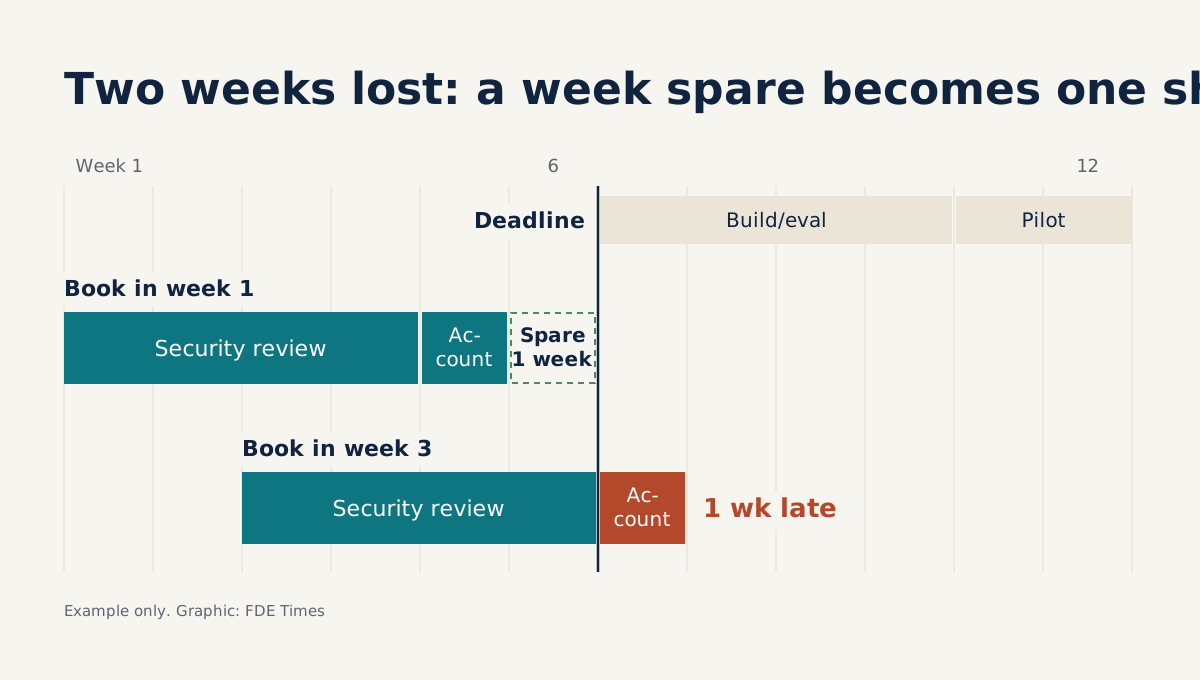
It is week two of the project. You have a laptop, a badge and a borrowed meeting room. The one thing you do not have is an account on the client’s systems. The request has gone in three times, the ticket still says “waiting on security”, and nobody has moved the date of the demo for the executive team.
This scene tends to produce one of two reflexes: send another polite reminder, or sit and wait in frustration. Both let project time drain away without anyone having to decide anything. Getting out of that position is a skill you have to practise, like debugging.
Umbrex’s consulting handbook advises treating repeated client delays as a project dependency risk, not a personal frustration, and moving from passive waiting to active dependency management. To do that, you need three things: a tracking table, a subtraction and a message with options.
Delay belongs in the plan
Rewind to the kickoff, before any of the opening scene has happened. The timeline is on screen, the sponsor and people from security and IT are in the room, and nobody is late on anything yet. This is the easiest moment to talk about delay, because there is no one to blame.
Point at one specific box on the timeline: the security review of the integration approach, a typical obstacle that, as Rocketlane warns, can cost a project weeks because of a single department. Then ask: “Who on your side will own this, and how long does it usually take?”
The answer is a name and a number of days, and both go straight into the timeline. That is also Baton’s advice: build the familiar client-side obstacles into the plan from the start. A warning with no one to receive it requires nobody to do anything.
The client will take what you say at kickoff more seriously if the contract says the same thing, so before that meeting, read the SOW before you read the schema. Alloy.ai’s SOW is a clear example: all timelines depend on timely access to data, and delays can lead to a change order extending the project.
When the client does not respond, the same document also gives the implementation side the right to pause the integration and reassign its people. You need to know whether your contract has a similar mechanism before you can discuss escalation.
A hypothetical project, day by day
Suppose the project is an agent that classifies insurance claims for an insurer. Kickoff is N1, and the demo is fixed for working day 20, which we will call N20. Once you have read access to the real system, you estimate 10 days to build and 3 days for the business team to approve the results.
The calculation takes one line: 20 minus 13 is 7. Access must arrive by N7 at the latest, and if the account takes 2 days to provision after the review is complete, security must approve by N5 at the latest. This is what a polite reminder never tells you: the real deadline of each dependency.
Umbrex advises tracking each dependency along with its owner, deadline, affected deliverable and escalation point. Applied to this hypothetical project, with equally hypothetical names, the register looks like this:
| Dependency | Client-side owner | Deadline | Affected deliverable | Escalate to |
|---|---|---|---|---|
| Security review of the integration approach | Lan, security lead | N5 | All work on real data | Sponsor |
| Read-only account | Minh, IT admin | N7 | First build | Head of IT |
| 12-month export of claims for evaluation | Ha, data engineer | N12 | Eval set for the demo | Data lead |
The most important column is Owner: each cell names one person, not “client side” or a generic job title. If you cannot put a person’s name in that cell, you have found the project’s first risk.
N6, and the review still isn’t done
It is now N6, and the N5 deadline has passed. Before writing to the sponsor, you ask Lan: “Where is the review stuck, and is there anything still missing from our side?” Umbrex treats this question as the step before escalation, because curiosity makes people less defensive and reveals what is really blocking the project.
Lan replies that the submission is complete, but the review board meets on N10. So the cause is the meeting calendar, not a vague request, and neither another reminder nor a rewritten request would help. The account can arrive on N12 at the earliest, 5 days past its deadline; 12 plus 13 puts the full demo on N25.
Umbrex stresses that effective escalation helps the client choose a direction, rather than merely reporting that you are frustrated. So the message to the sponsor should read like this:
The N20 demo is at risk: the account arrives on N12, 5 days late, because the security board meets on N10.
Checked with Lan: the submission is complete; the only blocker is the meeting date.
A. Keep N20 and narrow the scope: demo on an anonymised export, if security agrees and the export arrives by N7 at the latest.
B. Keep the full scope and move the demo to N25.
C. You ask security for a dedicated session on N7: account on N9, full-scope demo on N22.
Please choose by the end of N6.
The decision deadline is N6 because options A and C both depend on N7. Under option A, the 13 days of work only just reach N20 if the export arrives during N7; option C needs the review session on that very day. Leave it until the next day, and only option B remains.
The message blames no one and contains no adjectives. OpenProject’s escalation guidance describes this as a template for decision-making: put it in writing, send it early, and state the cause and the options.
The sponsor may not know that security is holding up the project, but they can make a phone call that you cannot.
Whichever option is chosen, record the decision in the register and in a confirmation email. If the SOW has a clause like Alloy.ai’s and the schedule really does extend, the person handling the contract on your side needs to know early enough to deal with it, rather than finding out when it is already late.
Six steps to apply to your project
Step one is the kickoff: state plainly where things usually slow down and ask for one person to be responsible for each dependency.
Step two is building the register. A spreadsheet reviewed regularly is enough to start.
Step three is counting back from the deliverable to get a real deadline instead of one based on gut feeling.
Step four is asking why something is late before you escalate. A vague request needs rewriting, with the exact tables, the exact permissions and the reason; an overloaded owner needs the sponsor to change priorities. These two causes call for different remedies, so a generic reminder solves neither.
Step five is for when the real deadline can no longer hold: escalate with a multi-option message like the one above, each option with a date and a scope.
Step six is to keep doing whatever does not need access while you wait: write tests, build the pipeline on synthetic data, and ask who already holds a copy of the data that is cleared for use.
The mistakes that keep projects stuck
Don’t wait until a deadline is long gone to escalate, because by then you have no cheap options left to offer the sponsor. Nor should you escalate the wrong way, by forwarding an email thread to someone’s boss with no consequences or options attached. Do that and you lose an ally, while the sponsor still doesn’t know what to do.
A more dangerous mistake is finding your own workaround, such as borrowing a friendly employee’s account or asking for files through a personal channel. You save a few days but gamble all your trust with the security team that is reviewing you. The final mistake is quietly working overtime to make up the time, which means the client never sees the real cost of the delay.
How to present this skill when job hunting
Don’t just write “strong communication skills” on your CV, because that phrase shows the reader nothing of what you did. Describe which dependency you spotted, how many days of risk you calculated, what options you offered and what happened, using your own real numbers.
At the interview stage, ask whether FDEs get to read the SOW and who opens a change order. The answer tells you whether the company empowers its engineers in the field or simply sends them out to wait alone.
An exercise for this week
Pick something you are waiting for from a client or from another team in your company. Count back from the deliverable to find the real deadline, ask the owner where the work is stuck, then write a three-option message using the template above, each option with a date and a scope. If you cannot yet write a second option, you do not yet understand your project well enough.
The next time a ticket still says “waiting on security”, your job is no longer to wait. It is to work out how many days are left, and who needs to know that number.
Was this article useful?
Thanks for the feedback!