When a demo breaks in front of the customer: say it once and move on
Once a red error line is on the projector, it cannot be taken back. The next minute is still yours.

In brief
- Acknowledge the error once, without profuse apology, and move on before the silence turns into doubt.
- Do not push code or change the environment to save face; use the fallback you prepared.
- If the demo cannot be saved, close cleanly and propose a next step, then send a short video of the part you could not show.
You click “Run”. The progress bar freezes, then a red error line appears on the projector, in front of everyone on the customer’s side.
Reprise’s blog describes the reflex at that moment precisely: panic and profuse apology. But Reprise also notes that when a presenter gives off panic, customers grow uncomfortable and stop focusing on what is being said. A technical error costs you one demo flow. Panic can cost you the whole meeting.
If you work as an FDE, treat a failed demo as a rehearsal for the incidents you may face once a system is running for real. The job is the same in both places: tell the truth, decide quickly and keep your promises.
The first minute has only three jobs
The first job is to say it out loud. MangoApps advises acknowledging the problem once and moving on, before the silence turns into doubt. The important word is “once”: a third apology adds no information and only keeps everyone thinking about the error.
The second job is not to fix it on stage. A post on the Atomic Object blog states flatly that a demo is no time to push code or make risky changes to the environment just to save face. A patch written in a hurry while the room waits can turn one bug into two.
The third job is to classify the failure and choose a path, because each level calls for a different response. Once you know which level you are at, you do not have to invent a solution at the moment your mind is under the most strain.
| Failure level | Signs | Response | What to have ready |
|---|---|---|---|
| Local | One step fails, the rest still works | Note it and take another route | A tested alternative flow |
| Main flow lost | The central step will not run | Switch to video or screenshots, and say clearly it is a recording | Video, screenshots, text output |
| Total | The environment is unusable | Use the click-through version; close cleanly if needed | Click-through version, a proposed next step |
A 45-minute meeting, an error at minute 18
Imagine you are demoing an invoice reconciliation agent for a logistics company. The flow has three steps: upload a batch of invoices, have the agent match them against orders, then export an exceptions report. At minute 18, the matching step returns a 500 error. This is the main flow, so you are at the second level.
You say it once, without blaming the wifi or the customer’s infrastructure when you do not yet know the cause:
“The matching step just threw an error, and I don’t know the cause yet. My colleague will look into it separately while I carry on, so you can still see the end result.”
Atomic Object calls this colleague a wing person: someone ready to investigate or prepare data while the presenter keeps going. Their point is clear: do not count on someone happening to step in, arrange it beforehand. In the meeting room, this person opens the logs while you open the recorded video.
“This is a video I recorded before the meeting, of this same flow with sample data. Please watch the exceptions report, which is where I’ll pause.”
Say clearly that it is a recording. If customers think they are watching the live system and find out later, what you lose is no longer a demo flow but their trust.
Then the head of accounting asks: “What happens if this error occurs in production?” Reprise advises that when you are stuck, you calmly say you will get back to them. The honest answer here is a deadline, not a guarantee:
“I can’t give you a firm answer because I don’t know the cause yet. This afternoon I’ll email you the cause and how we’re handling it.”
A small error can reveal a real requirement
A few minutes later, the wing person sends a private message: the demo file is missing the supplier code column, a requirement the presenter forgot. Atomic Object recounts a similar situation, in which what looked like a bug turned out to be a user forgetting a requirement; the issue was logged, the team gained useful information and the demo carried on.
Do not stop at the correction. Own your share of the mistake, then turn it into a customer discovery question:
“I’ve found the cause: the file I just used is missing the supplier code, which I overlooked when preparing it. But may I ask: do your real invoices ever arrive without this field?”
In this scenario, suppose accounting replies that invoices from small suppliers often lack it. You have just found a data-handling requirement that might never have surfaced if the demo had run smoothly.
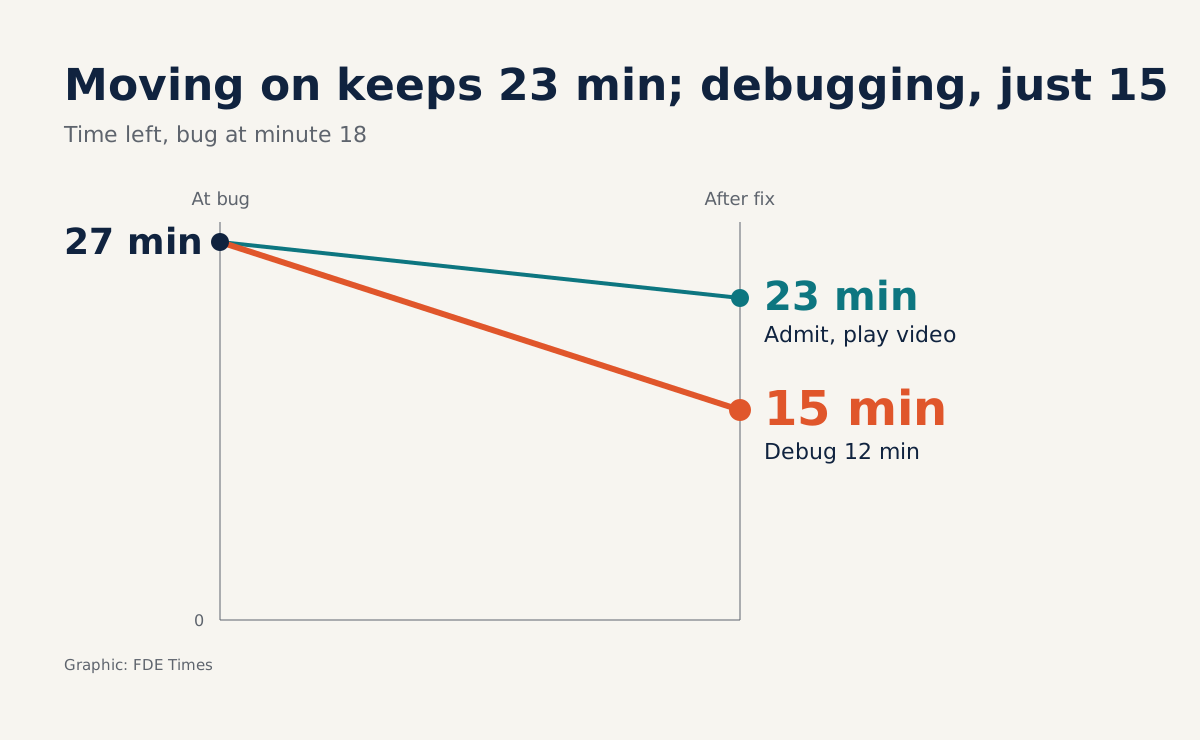
Now do the arithmetic on time. An error at minute 18 leaves 27 minutes. One minute to acknowledge and change course and three minutes of video still leave 23 minutes to discuss the customer’s problem. Spend 12 minutes debugging in front of the projector and you have only 15 left, after the customer has sat waiting through those 12.
After the meeting, keep the deadline you promised. Reprise suggests recording a short video focused on the exact feature or question you could not show, and you send it along with the cause and how it is being handled. A five-minute video of precisely what the customer did not get to see is more useful than a long apology email.
The fallback has to exist the day before
Nobody thinks up a good backup plan while panicking, so calm in the meeting room is largely prepared in advance. The ORACLE-BASE blog recommends having text output, screenshots or, better still, videos of your demos ready. Reprise adds a click-through version for the rare case of total failure.
Before each demo, you can work in this order. Rerun the whole flow on the exact environment you will use, and record the video during that run. Write a short list of input requirements, such as mandatory data columns or accounts that need to be logged in, so that errors like a forgotten field get caught before the meeting.
Next, pick a tested alternative flow and prepare a clean data set. Assign a wing person, and agree on a private messaging channel and a signal phrase for passing on news. Finally, set yourself a limit, say 60 seconds: if there is no news by then, switch to the fallback and do not wait any longer.
If every fallback fails, do not force it. MangoApps advises closing cleanly and proposing the best next step rather than pushing through a broken flow. The line can be very simple: “I’d like to demo the part that didn’t run in a separate short session. Today, I’d like to spend the remaining time hearing more about your problem.”
Five ways to make a small error big
The first slip is apologising repeatedly, because each apology pulls attention back to the failure. Close to it is guessing at the cause: blaming the network, then discovering shortly afterwards that the error was your own, and that correction costs more credibility than the original bug.
The third slip is bluffing when asked something hard. A confident but wrong answer can follow you all the way to contract signing, whereas “I’ll send you the answer this afternoon” costs only one email.
The fourth is promising and forgetting: all the effort spent staying calm is wasted if the promised deadline passes in silence.
The last slip is subtler: letting the presenter debug alone. When one person talks and reads logs at the same time, both tasks suffer, and the customer can see it on the screen.
Turn a failure into evidence of ability
This skill is hard to convey with a line of technologies on a CV, so show it through actions. Instead of “good communication skills”, write that you built a demo process with fallbacks and support roles, then name one specific requirement you uncovered from an incident.
When interviewing for FDE roles, have a true story of a failed demo ready: what you said in the first minute, which path you chose, what you sent after the meeting. If you have never demoed to a customer, an internal presentation is a good place to start.
Exercise: rehearse a deliberate failure
This week, pick a demo you already have and ask a colleague to sit in. Tell that person to break something at a moment you do not know in advance, such as shutting down a service or renaming a column in the input file, then to play the customer and ask a hard question right after the error.
Time how long it takes from the error appearing until you say your first sentence, and until you switch to the fallback. Then count how many times you apologised. The number may startle you the first time, but it tells you exactly what to practise before the real demo, where the error will come without warning.
Was this article useful?
Thanks for the feedback!
5 sources
- Demo Fails: How to Turn Challenges Into Triumphs · 2025-04-22
- The Art of Failing Forward: Demo Lessons Learned · 2025-10-08
- Keep Calm and Carry On… With Your Demo · 2026-08-13
- Public Speaking Tip 4 : Have a disaster recovery plan! · 2014-01-02
- Recover a Demo After a Live Glitch Template — Stay Credible | MangoApps · 2026-11-01